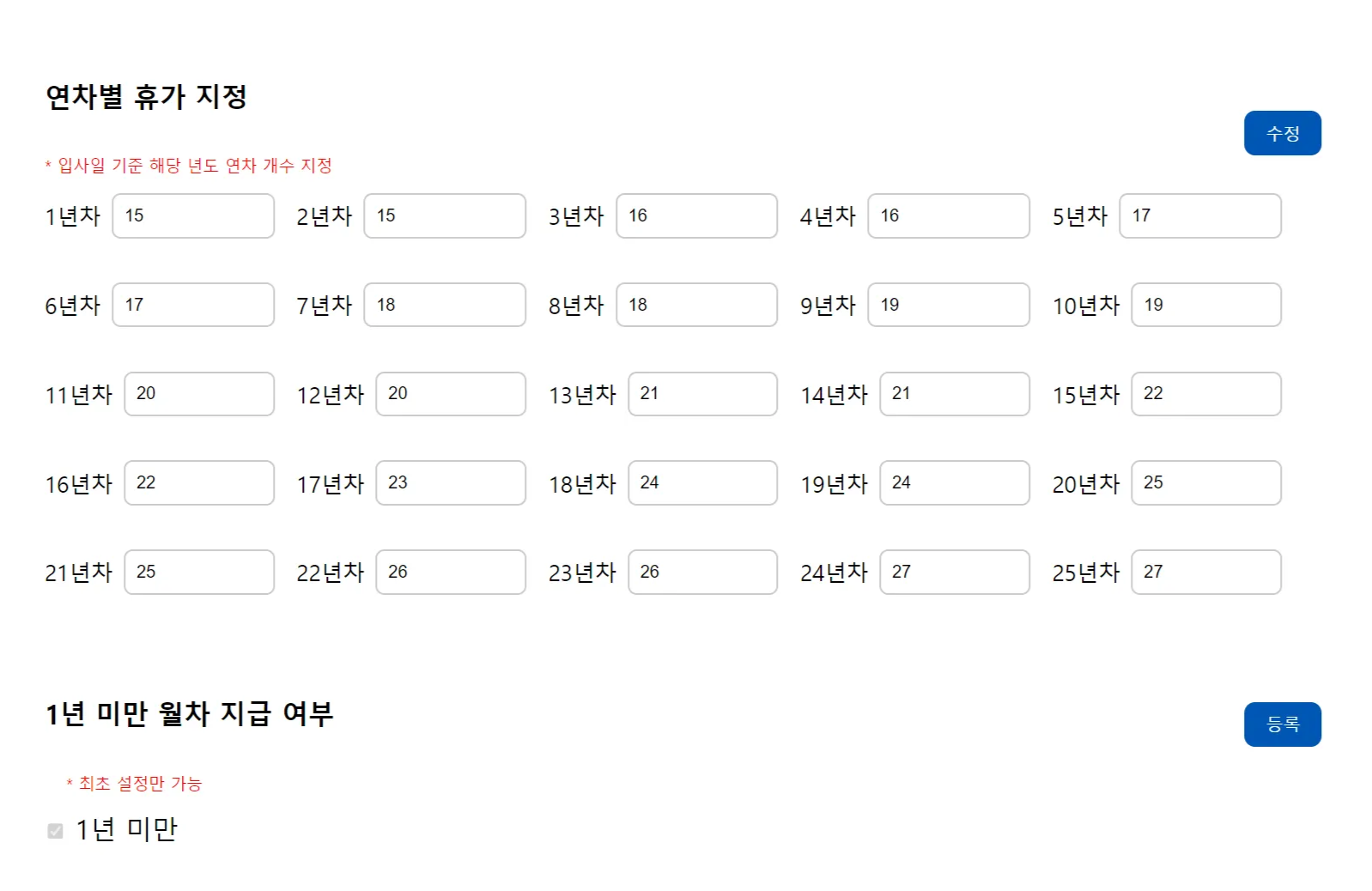
휴가 지정 구성
- 법적으로 25년 이상의 개수는 같은 수를 지급하기에 25년차 이상부터는 같은 개수를 지급
- 년차별로 회사마다 증가하는 개수가 다를 수 있으므로, 설정가능하게 구성
- 등록된 후, 추후 수정가능하게 구성
- 만약 값이 등록되지 않게 되면, 0으로 일괄 지정
휴가 지정
//Vacation
@Id
@GeneratedValue(strategy = GenerationType.IDENTITY)
@Column(name="vacation_no")
private Long vacationNo;

@Column(name="vacation_year")
private int vacationYear; // 년차 기준

@Column(name="vacation_annual_leave")
private int vacationAnnualLeave;// 년차에 따른 지급 개수

@Column(name="vacation_create_date")
@CreationTimestamp
private LocalDateTime vacationCreateDate;

@Column(name="member_no")
private Long memberNo;

//vacation.js
// 연차 개수 제출 시 처리
document.addEventListener('DOMContentLoaded', () => {
    const form = document.getElementById("vacationForm");
    const csrfToken = document.querySelector('input[name="_csrf"]').value;

    form.addEventListener('submit', function(event) {
        event.preventDefault();

        Swal.fire({
            text: '입력되지 않은 연차의 개수는 0으로 지정됩니다. 계속하시겠습니까?',
            icon: 'warning',
            showCancelButton: true,
            confirmButtonText: '확인',
            cancelButtonText: '취소',
            customClass: {
                 confirmButton: 'custom-confirm-button',
                 cancelButton: 'custom-cancel-button'
            }
        }).then((result) => {
            if (result.isConfirmed) {
                // 사용자가 확인했을 때 처리 진행
                const memberNo = document.getElementById('memberNo').value;
                const yearInputs = document.querySelectorAll('[id^="year"]');
                const countVacation = document.getElementById('countVacation').value;
                const vacationPkElements = document.querySelectorAll('[id^="vacationPk"]');

                let count = 1;
                const vacationData = {};
                const vacationPkData = [];

                if (countVacation > 0) {
                    vacationPkElements.forEach(input => {
                        if (input.value) {
                            vacationPkData.push(input.value);
                        }
                    });
                    yearInputs.forEach(input => {
                        const year = input.id.replace('year', '');
                        const vacationDays = input.value;

                        // 0으로 지정
                        vacationData[count] = vacationDays.trim() === "" ? 0 : parseInt(vacationDays);
                        count++;
                    });

                    const requestData = {
                        memberNo: memberNo,
                        vacationData: vacationData,
                        lessThanOneYear: lessThanOneYear,
                        countVacation: countVacation,
                        count: count,
                        vacationPkData: vacationPkData
                    };

                    fetch('/vacation/addVacationAction', {
                        method: 'POST',
                        headers: {
                            'Content-Type': 'application/json',
                            'X-CSRF-TOKEN': csrfToken
                        },
                        body: JSON.stringify(requestData)
                    })
                    .then(response => {
                        if (!response.ok) {
                            throw new Error('Network response was not ok');
                        }
                        return response.json();
                    })
                    .then(data => {
                        if (data.res_code === '200') {
                            Swal.fire({
                                icon: 'success',
                                text: data.res_msg,
                                confirmButtonText: "닫기",
                                customClass: {
                                       confirmButton: 'custom-confirm-button'

                                 }
                            }).then((result) => {
                                if (result.isConfirmed) {
                                    location.reload();
                                }
                            });
                        } else {
                            Swal.fire({
                                icon: 'error',
                                text: data.res_msg,
                                confirmButtonText: "닫기",
                                customClass: {
                                     confirmButton: 'custom-confirm-button'

                                }
                            });
                        }
                    })
                    .catch(error => {
                        Swal.fire({
                            icon: 'error',
                            text: '서버와의 통신 중 오류가 발생했습니다.',
                            confirmButtonText: "닫기",
                            customClass: {
                                confirmButton: 'custom-confirm-button'
                            }
                        });
                    });
                } else {
                    yearInputs.forEach(input => {
                        const year = input.id.replace('year', '');
                        const vacationDays = input.value;

                        vacationData[year] = vacationDays.trim() === "" ? 0 : parseInt(vacationDays);
                    });

                    const requestData = {
                        memberNo: memberNo,
                        vacationData: vacationData,
                        lessThanOneYear: lessThanOneYear,
                        countVacation: countVacation
                    };

                    fetch('/vacation/addVacationAction', {
                        method: 'POST',
                        headers: {
                            'Content-Type': 'application/json',
                            'X-CSRF-TOKEN': csrfToken
                        },
                        body: JSON.stringify(requestData)
                    })
                    .then(response => {
                        if (!response.ok) {
                            throw new Error('Network response was not ok');
                        }
                        return response.json();
                    })
                    .then(data => {
                        if (data.res_code === '200') {
                            Swal.fire({
                                icon: 'success',
                                text: data.res_msg,
                                confirmButtonText: "확인",
                                customClass: {
                                     confirmButton: 'custom-confirm-button'

                                }
                            }).then((result) => {
                                if (result.isConfirmed) {
                                    location.reload();
                                }
                            });
                        } else {
                            Swal.fire({
                                icon: 'error',
                                text: data.res_msg,
                                confirmButtonText: "확인",
                                customClass: {
                                      confirmButton: 'custom-confirm-button'

                                }
                            });
                        }
                    })
                    .catch(error => {
                        Swal.fire({
                            icon: 'error',
                            text: '서버와의 통신 중 오류가 발생했습니다.',
                            confirmButtonText: "닫기",
                            customClass: {
                                 confirmButton: 'custom-confirm-button'

                            }
                        });
                    });
                }
            }
        });
    });
});

// vacationController
@PostMapping("/addVacationAction")
@ResponseBody
public Map<String, String> addVacation(@RequestBody Map<String, Object> params) {
  Map<String, String> resultMap = new HashMap<>();
  resultMap.put("res_code", "404");
  resultMap.put("res_msg", "휴가 생성 중 오류가 발생했습니다.");

  try {
    Long memberNo = Long.parseLong((String) params.get("memberNo"));
    // 연차 입력 데이터 처리
    Map<String, Object> vacationData = (Map<String, Object>) params.get("vacationData");
    VacationDto dto = new VacationDto();
    dto.setMember_no(memberNo);
    dto.setVacationData(vacationData);

    int count = Integer.parseInt(String.valueOf(params.get("countVacation")));

    if(count > 0) {
       List<String> vacationPk = (List<String>) params.get("vacationPkData");
       for(int i = 0; i< vacationPk.size(); i++){

          	String pk = vacationPk.get(i);
          	dto.setVacation_no(Long.parseLong(pk));

        	List<Vacation> vacations = dto.toEntities();
			dto.setVacation_no(vacations.get(i).getVacationNo());
 			dto.setVacation_annual_leave(vacations.get(i).getVacationAnnualLeave());
			dto.setVacation_year(vacations.get(i).getVacationYear());

			if (vacationService.addVacation(dto) > 0) {
              resultMap.put("res_code", "200");
              resultMap.put("res_msg", "휴가 개수가 지정되었습니다.");
            }
		}

 	}
    List<Vacation> vacations = dto.toEntities();

      for (Vacation vacation : vacations) {
    	dto.setVacation_year(vacation.getVacationYear());
        dto.setVacation_annual_leave(vacation.getVacationAnnualLeave());

        if (vacationService.addVacation(dto) > 0) {
           resultMap.put("res_code", "200");
           resultMap.put("res_msg", "휴가 개수가 지정되었습니다.");
        }

   	  }

} catch (Exception e) {
    e.printStackTrace();
    resultMap.put("res_code", "404");
    resultMap.put("res_msg", "처리 중 오류가 발생했습니다.");
}
	return resultMap;
}
- js는 Swal을 사용하므로 코드가 길지만, 중요한 부분을 확인하면 초기 입력과 수정이 동시에 한 form에서 가능해야 하기 때문에 html에서 입력된 값의 개수에 따라 조건을 분류
- 만약 새로 입력하는 경우에는, 다 처음 값을 넘겨야 하기 때문에 yearInput만 확인
- 기존에 있는 값을 변경하게 되면, pk값이 필요하고 이를 가지고 jpa 수정(save)이 바로 가능하다
- 그래서 pk값들을 따라 배열에 저장하여 넘긴다
1년 미만 월차 지급 구성
- member 데이터에서 현재 날짜에서 입사일 기준으로 차이가 1년이 되지 않는 직원들은 1년 미만 상태값을 변경
- 그 점을 이용하여 다른 1년 이상 재직자는 상태값 0으로 유지
- 스케쥴링을 통해 매일 1년 미만 재직자의 상태에 따라 개수 지급
- 입사일 기준으로 첫 한 달이 지나게 되면, 값을 +1하고 업데이트 날짜에 지급한 날짜 저장
- 이후 지급은 업데이트 날짜를 기준으로 +1 하고, 또 날짜 업데이트
1년 미만 월차 지급
//vacationOneUnder
//지급 여부 초기 설정
//선택 시, 상태값 1로 저장
@Id
@GeneratedValue(strategy = GenerationType.IDENTITY)
@Column(name="vacation_under_no")
private Long vacationUnderNo;

@Column(name="vacation_under_status")
private int vacationUnderStatus;

//vacation.html
<form id="oneUnderForm" class="oneUnderForm">
    <input type="hidden" th:name="${_csrf.parameterName}" th:value="${_csrf.token}"/>
    <div>
    	<div class="vacation_ele1">
        	<p style="font-weight: 550;">1년 미만 월차 지급 여부</p>
        	<div class="checkButton" style="text-align: center; margin-top: 20px;">
        		<!-- countCheckOneYear가 0보다 크면 버튼을 비활성화 -->
        		<button type="submit" th:disabled="${countCheckOneYear > 0}">등록</button>
    		</div>
    	</div>
        <!-- 분리되는 부분 -->
    	<div>
    		<p style="color: red; font-size: 15px; padding-left: 20px; padding-right: 15px;">* 최초 설정만 가능</p>
    	</div>
    </div>
    <div>
    	<div>
        	<!-- 체크박스 비활성화 처리 -->
        	<input type="checkbox" id="lessThanOneYear" name="lessThanOneYear" value="true"
                                   th:disabled="${countCheckOneYear > 0}"
                                   th:checked="${countCheckOneYear > 0}">
            <label for="lessThanOneYear">1년 미만</label>
         </div>
    </div>
</form>

//vacationSchedulerService
@Transactional
public void updateVacationStatus() {
	LocalDate now = LocalDate.now();

    memberRepository.findAll().forEach(member -> {
    	String hire= member.getMemberHireDate();
        LocalDate hireDate = LocalDate.parse(hire, DATE_FORMATTER);
        long monthsBetween = ChronoUnit.MONTHS.between(hireDate, now);

        if (monthsBetween < 12) {
        	member.setMemberOneUnder(1); // 상태를 1로 변경
            memberRepository.save(member);
        } else {
            member.setMemberOneUnder(0); // 1년 이상인 경우 상태를 0으로 변경
            memberRepository.save(member);
        }
    });

}
- 스케쥴링을 통해 현재 시간 - 입사일 기준 < 12 이면, 1년 미만 재직자로 상태값 변경하기
- 나중에 1년미만 재직자가 1년 이상 재직자로 변경될 경우, 상태값 변경도 가능하도록 구성
트러블 슈팅
- JPA에서 삽입할 때, save를 사용했는데 수정도 같이 사용이 가능하다는 점을 이용해서 입력폼은 동일하니 수정하면 자동 수정되는 것으로 알았음
- 하지만 값이 수정되지 않고 오류 발생
- 이를 확인하고자, save 사용방법을 찾아 확인 후에 pk값을 가지고 있어야 수정이 정상적으로 가능하다는 것을 깨달음
- 그래서 처음 입력과 기존 입력된 상황을 나누기 위해 count를 하여 vacation 년차 값을 조건으로 다르게 처리되게 구성
- 1년 미만 재직자 설정할 때, 멤버 값을 따로 빼서 테이블을 구성하려 했으나 나중에 사용자마다 메인에 휴가 개수를 띄울 때에 여러 테이블을 조인해야하는 상황 발생
- 멤버 테이블에 컬럼 추가로 마무리 함

백엔드 개발⭐