Redux로 모달 관리하기
모달 컴포넌트를 필요한 컴포넌트에 위치시켜 그때그때 렌더링하여 사용하면 코드가 늘어져 더럽고 관리하기 힘들어 진다는 것을 느꼈다.
이를 해결하기 위해 redux(정확하게는 redux-toolkit)로 모달의 상태를 전역에서 관리해주고 필요할 때 모달을 '호출'해주기로 했다.
모달 reducer 생성
store/modalSlice.js
import { createSlice } from '@reduxjs/toolkit';

const initialState = {
  type: null,
};

const modalSlice = createSlice({
  name: 'modal',
  initialState,
  reducers: {
    openModal: (state, action) => {
      const { type } = action.payload;
      state.type = type;
    },
    closeModal: () => {
      return initialState;
    },
  },
});

export default modalSlice.reducer;
export const { openModal, closeModal } = modalSlice.actions;
우선 모달 reducer를 생성해 주어야 한다.
state의 key는 type으로 주었다. value로 호출하려는 모달의 타입이 문자열로 payload로 전달될 것이다.
ex) profile, logout 등...
store/index.js
import { configureStore } from '@reduxjs/toolkit';
import userSlice from './modules/auth/user';
import signupSlice from './modules/auth/signup';
import modalSlice from './modules/modal';
import profileEditSlice from './modules/auth/profileEdit';

const store = configureStore({
  reducer: {
    user: userSlice,
    signup: signupSlice,
    modal: modalSlice,
    profileEdit: profileEditSlice,
  },
});

export default store;
당연히 필요한 작업 rootReducer에 모달 reducer를 추가해준다.
모달 reducer 호출 함수 useModal 생성
hooks/useModal.js
import { useDispatch } from 'react-redux';
import { openModal, closeModal } from '../redux/modules/modal';

const useModal = () => {
  const dispatch = useDispatch();

  const handleOpenModal = ({ type }) => {
    dispatch(openModal({ type }));
  };

  const handleCloseModal = () => {
    dispatch(closeModal());
  };

  return { openModal: handleOpenModal, closeModal: handleCloseModal };
};

export default useModal;
모달 reducer를 호출 즉 디스패치할 훅 함수 useModal을 생성한다.
훅 함수의 리턴값은 openModal과 closeModal이다. 각각 모달을 열고 닫는 역할을 할 것이다.
openModal의 인자로 입력되는 type 객체는 디스패치로 모달 reducer로 보내지고 전역에서 modal의 type을 변경해줄 것이다.
전역에서 모달 type 변경
import useModal from '../../../hook/useModal';
//...
const { openModal, closeModal } = useModal();
//...
<button onClick={() => openModal({ type: 'profile' })} />
//...
이제 원하는 곳에서 버튼을 위치시키고 클릭하면 전역 state의 modal의 type은 profile로 변경될 것이다.
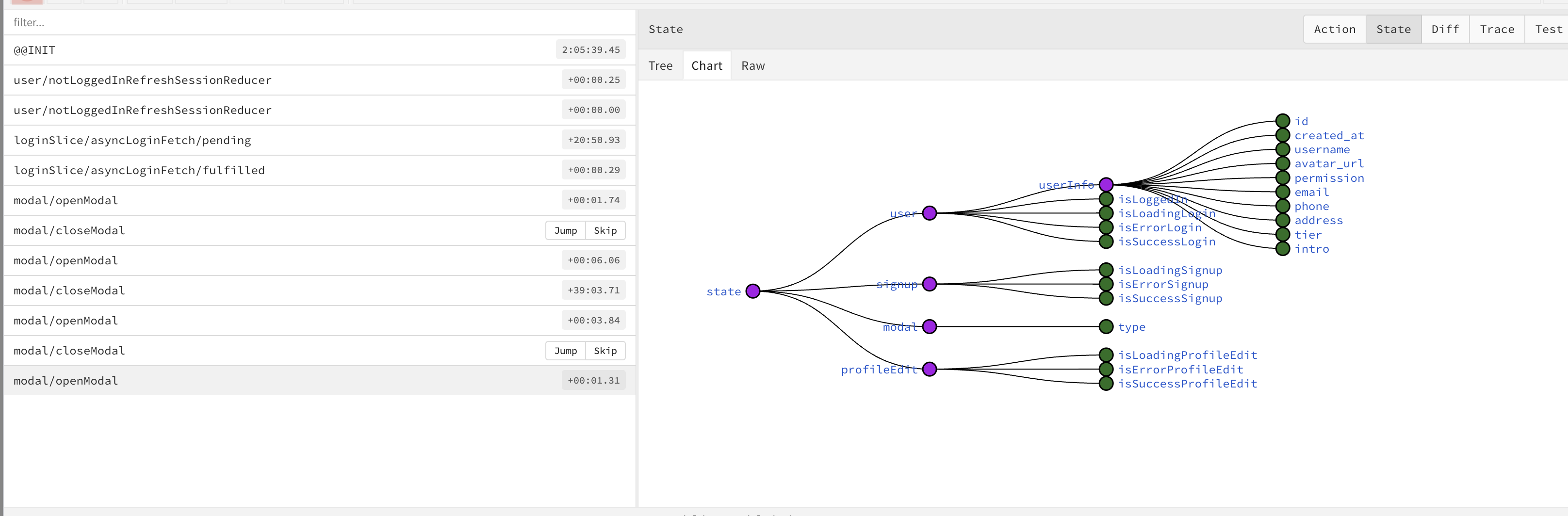
하지만 아직 실제 모달을 만들지 않았기 때문에 모달은 팝업되지 않고 상태 전역만 변경될 뿐이다. 이제 모달 컴포넌트를 만들고 이 모달을 프로젝트에 심어 줄 차례이다.
사용할 모달의 컨테이너 생성
components/ModalContainer
import React from 'react';
import ReactDOM from 'react-dom';
import { useSelector } from 'react-redux';

import ProfileModal from './ProfileModal/ProfileModal';
import ManagerModal from './ManagerModal/ManagerModal';
import ResultModal from './ResultModal/ResultModal';

const ModalContainer = () => {
  const { type } = useSelector((state) => state.modal);

  if (!type) {
    return null;
  } else if (type === 'profile') {
    return ReactDOM.createPortal(
      <ProfileModal />,
      document.getElementById('modal')
    );
  } else if (type === 'manager') {
    return ReactDOM.createPortal(
      <ManagerModal />,
      document.getElementById('modal')
    );
  } else if (type === 'result') {
    return ReactDOM.createPortal(
      <ResultModal />,
      document.getElementById('modal')
    );
  }
};

export default ModalContainer;
전역의 type 상태에 따라 다른 종류의 모달을 띄우는 모달 컨테이너를 생성하였다.
이제 원하는 모달을 생성하고 그 모달을 띄워줄 type을 리듀서에 추가하는 식으로 모달을 추가할 수 있다.
모달 컨테이너 프로젝트에 위치시키기
App.js
    <>
      <Switch>
        <Route path="/loading" exact>
          <Loading />
        </Route>
        <PublicRoute component={Login} path="/" exact />
        <PublicRoute component={Signup} path="/signup" exact />
        <PrivateRoute component={Dashboard} path="/dashboard" exact />
        <PrivateRoute component={Users} path="/users" exact />
        <PrivateRoute component={Calendar} path="/calendar" exact />
        <PrivateRoute component={Profile} path="/profile" exact />
        <PrivateRoute component={Logout} path="/logout" exact />
        <PrivateRoute
          component={Permission}
          path="/permission"
          isLoggedIn
          exact
        />
      </Switch>
      <ModalContainer />
    </>
나의 경우 App컴포넌트의 마지막에 모달 컨테이너를 위치시켰다.
이제 모달은 프로젝트의 노드 안에 위치되어 있으므로 모달이 제대로 띄워질 것이다.
