Spring boot
Spring boot의 특징
- 웹 애플리케이션 서버(내장)
- 스프링 스타터 개발이 조금 더 편하다.
- xml 설정 없이 자바 수준으로 개발하기 용이하다.
- 애플리케이션 모니터링 관련 용이
기본 뼈대
main -> resources -> templates -> HTML
static -> 나머지
java -> 자바
test -> java -> junit = 테스트
pom.xml -> 의존성
어노테이션
메타데이터라고도 들린다.
클래스나 메소드, 변수 등을 선언할 때 '@'를 붙여서 사용한다.
어노테이션은 컴파일러에게 정보를 알려주거나, 실행할 때 별도의 처리가 필요할 때 매우 대양한 용도로 사용할 수 있다.
JPA(Java Persistence Api)
자바 ORM 기술에 대한 ORM 기술에 대한 API 표준
ORM(Object Relational Mapping)
객체 관계(관계 데이터베이스) 연결(맵핑)
자바 객체 <-> ORM <-> 관계 데이터베이스
ORM을 통해 객체지향과 관계 데이터베이스를 연결해주는 역할
우리가 쓰는 것 -> Hibernate
장점과 단점
장점
- 특정 데이터베이스에 종속 X
- 객체 지향 마스터
- 생산성이 좋아진다.
단점
- 복잡한 쿼리 처리 -JPQL
- 성능 저하
- 공부는 비등비등 - 데이터베이스 공부
엔티티
테이블 클래스 @Entity 클래스
ex) item.java -> @Entity
class item
엔티티 매니저 팩토리
- 엔티티 매니저 인스턴스를 관리하는 주체로 한 개만 만들어진다.
- 엔티티 매니저 생성
엔티티 매니저
영속성 컨텍스트에 접근해 엔티티에 대하여 데이터베이스 작업을 제공한다.
- Find() -> 검색
- persist() -> 저장
- remove() 삭제 ->
- flush() 반영
영속성 컨텍스트
엔티티를 영구 저장하는 환경
- 비영속(new) -> 영속성 컨텍스트와 관련이 없는 상태
- 영속(managed) -> 트랜잭션 커밋 시점에 데이터베이스 반영
- 준영속 상태(detached) -> 저장되었다가 분리
- 삭제상태 (removed) -> 데이터베이스에서 삭제된 상태
트랜잭션
- 실행 흐름 단위
- 데이터베이스 실행 흐름 단위
트랜잭션 해야하는 이유
- 동일성 보장
- 지연 SQL 저장소가 존재
- 커밋하는 시점에 저장된 SQL문들이 flush 되면서 반영
영속성 컨텍스트 사용시 이점
애플리케이션과 데이터베이스 사이에 영속성 컨텍스트 중간 계층 버퍼링, 캐싱등을 할 수 있는 장점이 있다.
1차 캐시
Map<key,balue>로 저장
영속성 컨텍스트의 1차 캐시를 조회 존재하면 바로 반환
없으면 데이터베이스 조회 후 1차 캐시 등록 후 반환
캐시 한 줄 정리!
영속성 컨텍스트에는 1차 캐시가 있다.
조회할 때 먼저 영속성 컨텍스트(1차 캐시)를 확인한다.
캐시에 엔티티가 있으면 DB까지 가지 않고 바로 가져온다.
캐시에 없으면 DB에서 조회한 후 영속성 컨텍스트에 저장하고 반환한다.
데이터베이스
-
즉시 쓰기 - 데이터 저장을 바로 적용
-
쓰기 지연 - 데이터 저장을 바로 적용 X 어느 시점이 되면 반영
-
변경 감지 -> 변경 내용이 있다면 (Update) 쓰기 지연 SQL 저장소에 담아두고 커밋 시점이 되면 자동으로 반영
Update문이 필요가 없다.
Spring boot를 이용한 쇼핑몰 만들기
의존성 추가
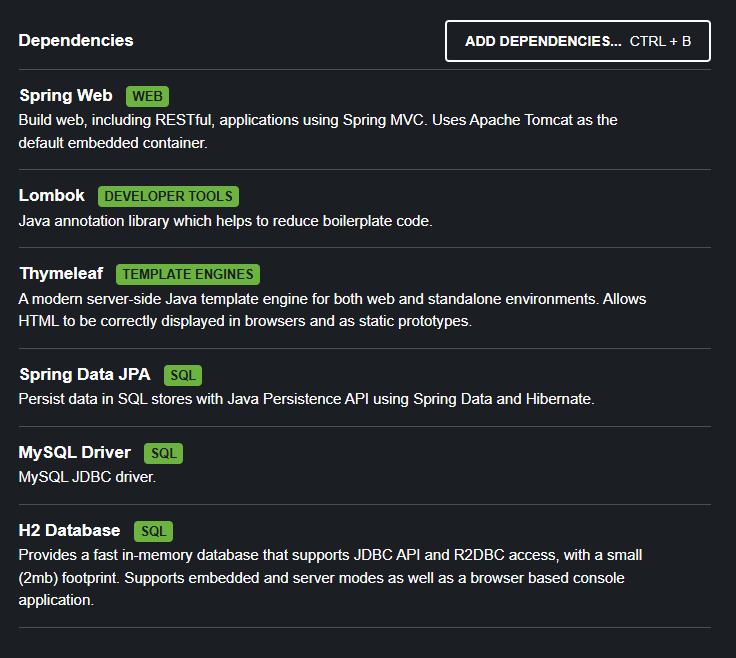
application.properties
spring.application.name=shop

server.port=80
// mysql 쓸 거야
spring.datasource.driver-class-name=com.mysql.cj.jdb.Driver
// 호스트 이거 쓸 거야
spring.datasource.url=jbdc:mysql://localhost:3306/shop?serverTimezone=UTC
// 아이디
spring.datasource.username=root
// 비번
spring.datasource.password=1234

spring.jpa.properties.hibernate.show_sql=true
spring.jpa.properties.hibernate.format_sql=true
logging.level.org.hibernate.type.descriptor.sql=trace
spring.jpa.hibernate.ddl-auto=create
spring.jpa.database-platform=org.hibernate.dialect.MySQLDialect
DDL AUTO 옵션
- None: 사용하지 않음
- Create 기존 테이블 삭제 후 테이블 생성
- Create_drop 기존 테이블 삭제 후 테이블 생성, 종료 시점에 테이블 삭제
- Update 변경된 스키마 적용
엔티티 매핑 관련 어노테이션
@Entity: 클래스를 엔티티로 선언@Table: 매핑할 테이블 지정@Id: 기본 키(Primary Key) 지정@GeneratedValue: 기본 키 자동 생성 전략 지정@Column: 필드와 컬럼 매핑@Lob: BLOB, CLOB 타입 매핑@CreationTimestamp: INSERT 시 현재 시간 자동 저장@UpdateTimestamp: UPDATE 시 현재 시간 자동 저장@Enumerated: enum 타입 매핑@Transient: DB에 저장·조회하지 않는 필드 지정@Temporal: 날짜(Date) 타입 매핑@CreatedDate: 엔티티 생성 시간 자동 저장 (Spring Data JPA Auditing)@LastModifiedDate: 엔티티 수정 시간 자동 저장 (Spring Data JPA Auditing)
참고
@CreationTimestamp,@UpdateTimestamp→ Hibernate 제공@CreatedDate,@LastModifiedDate→ Spring Data JPA Auditing 제공
Repository 설계
Spring Data JPA 엔티티 매니저를 직접 이용해 코드를 작성하지 않아도 된다.
Repository 인터페이스를 설계한 후 사용
단어 설명
런타임: 프로그램 실행 시간
Proxy: 중간 서버
@query
SQL과 유사하게 복잡한 쿼리도 사용 가능
JPQL(Java Persistence Query Language)
엔티티 객체를 대상으로 쿼리를 수행
item.java
package com.shop.entity;

import com.shop.constant.ItemSellStatus;
import jakarta.persistence.*;
import lombok.Getter;
import lombok.Setter;
import lombok.ToString;

import java.time.LocalDateTime;

@Entity
@Table(name = "item")
@Getter
@Setter
@ToString
public class Item {
    @Id
    @Column(name = "item_id")
    @GeneratedValue(strategy = GenerationType.AUTO)
    private Long id; // 상품 코드

    @Column(nullable = false, length = 50)
    private String itemNm; // 상품명

    @Column(name = "price", nullable = false)
    private int price; // 가격

    @Column(nullable = false)
    private int stockNumber; // 수량

    @Lob
    @Column(nullable = false)
    private String itemDetail; // 상품 상세 설명

    @Enumerated
    private ItemSellStatus itemSellStatus; // 상품 판매 상태

    private LocalDateTime regTime; // 등록 시간

    private LocalDateTime updateTime; // 수정 시간
}
ShopApplication.java
package com.shop;

import org.springframework.boot.SpringApplication;
import org.springframework.boot.autoconfigure.SpringBootApplication;

@SpringBootApplication
public class ShopApplication {

	public static void main(String[] args) {
		SpringApplication.run(ShopApplication.class, args);
	}

}
ItemRepository.java
package com.shop.repository;

import com.shop.entity.Item;
import org.springframework.data.jpa.repository.JpaRepository;
import org.springframework.data.jpa.repository.Query;
import org.springframework.data.repository.query.Param;

import java.util.List;

public interface ItemRepository extends JpaRepository<Item, Long> {
    // select*from item where itemNm = itemNm;
    List<Item> findByItemNm(String itemNm);
    List<Item> findByItemNmOrItemDetail(String itemNm, String itemDetail);
    List<Item> findByPriceLessThan(Integer price);
    List<Item> findByPriceLessThanOrderByPriceDesc(Integer price);

    @Query("select i from Item i where i.itemDetail like %:itemDetail% order by i.price desc")
    List<Item> findByItemDetail(@Param("itemDetail")String itemDetail);

    @Query(value = "select * from item i where i.item_detail like %:itemDetail% order by i.price desc",
    nativeQuery = true)
    List<Item> findByItemDetailNative(@Param("itemDetail") String itemDetail);
}
ItemRepositoryTest.java
package com.shop.repository;

import com.querydsl.jpa.impl.JPAQuery;
import com.querydsl.jpa.impl.JPAQueryFactory;
import com.shop.constant.ItemSellStatus;
import com.shop.entity.Item;
import com.shop.entity.QItem;
import jakarta.persistence.EntityManager;
import jakarta.persistence.PersistenceContext;
import org.junit.jupiter.api.DisplayName;
import org.junit.jupiter.api.Test;
import org.springframework.beans.factory.annotation.Autowired;
import org.springframework.boot.test.context.SpringBootTest;
import org.springframework.test.context.TestPropertySource;

import java.time.LocalDateTime;
import java.util.List;

@SpringBootTest // 스프링 부트 테스트
// 테스트 설정을 application-test.properties 로 세팅한다
@TestPropertySource(locations = "classpath:application-test.properties")
class ItemRepositoryTest {
    // 객체를 연결한다 자동으로
    // 스프링 객체 지향 디자인 패턴 -> 1.싱글톤 2.빌더패턴
    // 싱글톤
    // 스프링 컨테이너가 있다 -> 객체를 관리하는데 컨테이너에서 꺼내준다 무슨 객체를? itemRepository 객체를 무조건 1개
    @Autowired
    ItemRepository itemRepository;

    @PersistenceContext // 영속성 컨텍스트 -> EntityManager 객체를 받는다.
    EntityManager em;

    @Test
    @DisplayName("상품 저장 테스트")
    public void createItemTest(){
        Item item = new Item();
        item.setItemNm("테스트 상품");
        item.setPrice(10000);
        item.setItemDetail("테스트 상품 상세 설명");
        item.setItemSellStatus(ItemSellStatus.SELL);
        item.setStockNumber(100);
        item.setRegTime(LocalDateTime.now());
        item.setUpdateTime(LocalDateTime.now());
        Item savedItem = itemRepository.save(item);
        System.out.println(savedItem.toString());
    }

    public void createItemList(){
        for (int i = 1; i <= 10; i++ ){
            Item item = new Item();
            item.setItemNm("테스트 상품" + i);
            item.setPrice(10000+i);
            item.setItemDetail("테스트 상품 상세 설명" + i);
            item.setItemSellStatus(ItemSellStatus.SELL);
            item.setStockNumber(100);
            item.setRegTime(LocalDateTime.now());
            item.setUpdateTime(LocalDateTime.now());
            Item savedItem = itemRepository.save(item);
            System.out.println(savedItem.toString());
        }
    }

    @Test
    @DisplayName("상품명 조회 테스트")
    public void findByItemNmTest(){
        this.createItemList();
        List<Item> itemList = itemRepository.findByItemNm("테스트 상품1");
        for (Item item : itemList){
            System.out.println(item.toString());
        }
    }

    @Test
    @DisplayName("상품명, 상품상세설명 or 테스트")
    public void findByItemNmOrDetailTest() {
        this.createItemList();
        List<Item> itemList = itemRepository
                .findByItemNmOrItemDetail("테스트 상품1", "테스트 상품 상세 설명5");
        for (Item item : itemList) {
            System.out.println(item.toString());
        }
    }

    @Test
    @DisplayName("가격 LessThan 테스트")
    public void findByPriceLessThanTest() {
        this.createItemList();
        List<Item> itemList = itemRepository
                .findByPriceLessThan(10005);
        for (Item item : itemList) {
            System.out.println(item.toString());
        }
    }

    @Test
    @DisplayName("가격 내림차순 조회 테스트")
    public void findByPriceLessThanOrderByPriceDescTest() {
        this.createItemList();
        List<Item> itemList = itemRepository
                .findByPriceLessThanOrderByPriceDesc(10005);
        for (Item item : itemList) {
            System.out.println(item.toString());
        }
    }

    @Test
    @DisplayName("@Query를 이용한 상품 조회 테스트")
    public void findByItemDetailTest() {
        this.createItemList();
        List<Item> itemList = itemRepository
                .findByItemDetail("테스트 상품 상세 설명");
        for (Item item : itemList) {
            System.out.println(item.toString());
        }
    }

    @Test
    @DisplayName("nativeQuery 속성을 이용한 상품 조회 테스트")
    public void findByItemDetailNativeTest() {
        this.createItemList();
        List<Item> itemList = itemRepository
                .findByItemDetailNative("테스트 상품 상세 설명");
        for (Item item : itemList) {
            System.out.println(item.toString());
        }
    }

    @Test
    @DisplayName("Querydsl 조회테스트1")
    public void queryDslTest() {
        this.createItemList(); // 10개 데이터 DB에 저장
        // JPAQueryFactory 객체를 생성하는 -> 생성자 매개변수 Entity Manager
        JPAQueryFactory queryFactory = new JPAQueryFactory(em);
        // target/ generated-sources/java...QItem
        QItem qItem = QItem.item;
        //                      EntityManager를 이용한 JPAQueryFactory를 이용해서
        //                      쿼리문을 만든다. 빌더패턴으로
        //
        JPAQuery<Item> query = queryFactory.selectFrom(qItem)
                .where(qItem.itemSellStatus.eq(ItemSellStatus.SELL))
                .where(qItem.itemDetail.like("%" + "테스트 상품 상세 설명" + "%"))
                .orderBy(qItem.price.desc());

        List<Item> itemList = query.fetch();
        for (Item item : itemList) {
            System.out.println(item.toString());
        }
    }
}
pom.xml (shop)
<?xml version="1.0" encoding="UTF-8"?>
<project xmlns="http://maven.apache.org/POM/4.0.0" xmlns:xsi="http://www.w3.org/2001/XMLSchema-instance"
         xsi:schemaLocation="http://maven.apache.org/POM/4.0.0 https://maven.apache.org/xsd/maven-4.0.0.xsd">
    <modelVersion>4.0.0</modelVersion>
    <parent>
        <groupId>org.springframework.boot</groupId>
        <artifactId>spring-boot-starter-parent</artifactId>
        <version>4.1.0</version>
        <relativePath/> <!-- lookup parent from repository -->
    </parent>
    <groupId>com.shop</groupId>
    <artifactId>shop</artifactId>
    <version>0.0.1-SNAPSHOT</version>
    <name/>
    <description/>
    <url/>
    <licenses>
        <license/>
    </licenses>
    <developers>
        <developer/>
    </developers>
    <scm>
        <connection/>
        <developerConnection/>
        <tag/>
        <url/>
    </scm>
    <properties>
        <java.version>25</java.version>
    </properties>
    <dependencies>
        <dependency>
            <groupId>org.springframework.boot</groupId>
            <artifactId>spring-boot-h2console</artifactId>
        </dependency>
        <dependency>
            <groupId>org.springframework.boot</groupId>
            <artifactId>spring-boot-starter-data-jpa</artifactId>
        </dependency>
        <dependency>
            <groupId>org.springframework.boot</groupId>
            <artifactId>spring-boot-starter-thymeleaf</artifactId>
        </dependency>
        <dependency>
            <groupId>org.springframework.boot</groupId>
            <artifactId>spring-boot-starter-webmvc</artifactId>
        </dependency>

        <dependency>
            <groupId>com.h2database</groupId>
            <artifactId>h2</artifactId>
            <scope>runtime</scope>
        </dependency>
        <dependency>
            <groupId>com.mysql</groupId>
            <artifactId>mysql-connector-j</artifactId>
            <scope>runtime</scope>
        </dependency>
        <dependency>
            <groupId>org.projectlombok</groupId>
            <artifactId>lombok</artifactId>
            <optional>true</optional>
        </dependency>
        <dependency>
            <groupId>org.springframework.boot</groupId>
            <artifactId>spring-boot-starter-data-jpa-test</artifactId>
            <scope>test</scope>
        </dependency>
        <dependency>
            <groupId>org.springframework.boot</groupId>
            <artifactId>spring-boot-starter-thymeleaf-test</artifactId>
            <scope>test</scope>
        </dependency>
        <dependency>
            <groupId>org.springframework.boot</groupId>
            <artifactId>spring-boot-starter-webmvc-test</artifactId>
            <scope>test</scope>
        </dependency>
        <dependency>
            <groupId>com.querydsl</groupId>
            <artifactId>querydsl-jpa</artifactId>
            <version>5.0.0</version>
            <classifier>jakarta</classifier>
        </dependency>
        <dependency>
            <groupId>com.querydsl</groupId>
            <artifactId>querydsl-apt</artifactId>
            <version>5.0.0</version>
            <classifier>jakarta</classifier>
        </dependency>
        <dependency>
            <groupId>com.querydsl</groupId>
            <artifactId>querydsl-core</artifactId>
            <version>5.0.0</version>
        </dependency>
    </dependencies>

    <build>
        <plugins>
            <plugin>
                <groupId>org.springframework.boot</groupId>
                <artifactId>spring-boot-maven-plugin</artifactId>
                <configuration>
                    <excludes>
                        <exclude>
                            <groupId>org.projectlombok</groupId>
                            <artifactId>lombok</artifactId>
                        </exclude>
                    </excludes>
                </configuration>
            </plugin>
            <plugin>
                <groupId>org.apache.maven.plugins</groupId>
                <artifactId>maven-compiler-plugin</artifactId>
                <executions>
                    <execution>
                        <id>default-compile</id>
                        <phase>compile</phase>
                        <goals>
                            <goal>compile</goal>
                        </goals>
                        <configuration>
                            <annotationProcessorPaths>
                                <path>
                                    <groupId>org.projectlombok</groupId>
                                    <artifactId>lombok</artifactId>
                                </path>
                            </annotationProcessorPaths>
                        </configuration>
                    </execution>
                    <execution>
                        <id>default-testCompile</id>
                        <phase>test-compile</phase>
                        <goals>
                            <goal>testCompile</goal>
                        </goals>
                        <configuration>
                            <annotationProcessorPaths>
                                <path>
                                    <groupId>org.projectlombok</groupId>
                                    <artifactId>lombok</artifactId>
                                </path>
                            </annotationProcessorPaths>
                        </configuration>
                    </execution>
                </executions>
            </plugin>
            <plugin>
                <groupId>com.mysema.maven</groupId>
                <artifactId>apt-maven-plugin</artifactId>
                <version>1.1.3</version>
                <executions>
                    <execution>
                        <goals>
                            <goal>process</goal>
                        </goals>
                        <configuration>
                            <outputDirectory>target/generated-sources/java</outputDirectory>
                            <processor>com.querydsl.apt.jpa.JPAAnnotationProcessor</processor>
                        </configuration>
                    </execution>
                </executions>
            </plugin>
        </plugins>
    </build>

</project>
application-test.properties
spring.datasource.driver-class-name=org.h2.Driver
spring.datasource.url=jdbc:h2:mem:test
spring.datasource.username=sa
spring.datasource.password=

spring.jpa.database-platform=org.hibernate.dialect.H2Dialect
ItemSellStatus.java
package com.shop.constant;

// enum 열거형 타입 -> 사용자는 문자 : 컴퓨터는 숫자로 관리
// 코딩할 때는 문자로 쓰면 된다.
public enum ItemSellStatus {
    SELL, SOLD_OUT
}
마무리
오늘은 Spring boot를 처음 시작했다.
앞으로 쇼핑몰 만들기를 진행할 예정이다.
여러가지 개념들과 틀에 대한 설명을 배웠다.
DB 연결 테스트를 진행한 후, List와 Query를 사용해 데이터를 조회하는 연습을 했다.
사실 진짜 복잡하고 어렵고 이해하기가 힘들었는데 너무 재밌었다.
내가 직접 작성한 것들이 터미널 안에서 돌아가고 한 번에 성공했을 때 좋았다.
얼른 나도 혼자 웹사이트 하나 뚝딱 만들고 싶다!
