createPortal
createPortal을 사용하면 일부 자식을 DOM의 다른 위치에서 렌더링할 수 있음.
<div>
  <SomeComponent />
  {createPortal(children, domNode, key?)}
</div>
Reference
createPortal(children, domNode, key?)
Portal을 만들려면 createPortal을 호출하여 JSX와 이를 렌더링할 DOM 노드를 전달하면 됨:
import { createPortal } from 'react-dom';

// ...

<div>
  <p>This child is placed in the parent div.</p>
  {createPortal(
    <p>This child is placed in the document body.</p>,
    document.body
  )}
</div>
Portal은 DOM 노드의 물리적 배치만 변경함. portal을 이용해 렌더링하는 JSX는 물리적 배치 외의 다른 모든 면에서 이를 렌더링하는 React 컴포넌트의 자식 노드 처럼 동작함. 예를 들어, 자식은 부모 트리에서 제공하는 context에 액세스할 수 있으며, 이벤트는 React 트리에 따라 자식에서 부모로 bubble up됨.
Parameters
-
children: JSX 조각(예:<div />또는<SomeComponent />), Fragment(<>...</>), 문자열 또는 숫자, 또는 이들의 배열 등 React로 렌더링할 수 있는 모든 것. -
domNode:document.getElementById()가 반환하는 것과 같은 DOM 노드. 노드가 이미 존재해야 함. 업데이트 중에 다른 DOM 노드를 전달하면 potal 콘텐츠가 다시 생성됨. -
key(optional): Portal의 key로 사용할 고유 문자열 또는 숫자.
Returns
createPortal은 JSX에 포함되거나 React 컴포넌트에서 반환할 수 있는 React 노드를 반환함. React가 렌더링 출력에서 이 노드를 발견하면, 제공된 children을 제공된 domNode 안에 배치함.
Caveats
Portal의 이벤트는 DOM 트리가 아닌 React 트리에 따라 전파됨. 예를 들어, <div onClick>으로 감싸진 portal 내부를 클릭할 경우, 해당 onClick 핸들러가 실행됨. 이로 인해 문제가 발생하면 portal 내부에서 이벤트 전파를 중지하거나 portal 자체를 React 트리에서 위로 이동할 것.
Usage
Rendering to a different part of the DOM
Portal을 사용하면 컴포넌트의 일부 자식을 DOM의 다른 위치에서 렌더링할 수 있음. 이를 통해 컴포넌트의 일부가 어떤 컨테이너에 있든 "escape"될 수 있음. 예를 들어, 컴포넌트는 모달 대화상자나 툴팁을 페이지의 나머지 부분의 위와 바깥쪽에 표시할 수 있음.
Portal을 만들려면 JSX와 DOM 노드가 있어야 할 곳을 전달한 createPortal을 렌더링할 것:
import { createPortal } from 'react-dom';

function MyComponent() {
  return (
    <div style={{ border: '2px solid black' }}>
      <p>This child is placed in the parent div.</p>
      {createPortal(
        <p>This child is placed in the document body.</p>,
        document.body
      )}
    </div>
  );
}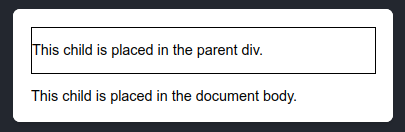
React는 사용자가 전달한 JSX의 DOM 노드를 사용자가 제공한 DOM 노드 안에 배치함.
포털이 없다면 두 번째 <p>는 부모 <div> 안에 배치되지만, 포털은 이를 document.body로 '텔레포트'함.
두 번째 단락이 테두리가 있는 부모 <div> 외부에 나타나는 것에 주목할 것. 개발자 도구로 DOM 구조를 검사하면 두 번째 <p>가 <body>에 바로 배치된 것을 확인할 수 있음:
// 개발자 도구로 검사한 DOM 구조

<body>
  <div id="root">
    ...
      <div style="border: 2px solid black">
        <p>This child is placed inside the parent div.</p>
      </div>
    ...
  </div>
  <p>This child is placed in the document body.</p>
</body>
Portal은 DOM 노드의 물리적 배치만 변경함. portal을 이용해 렌더링하는 JSX는 물리적 배치 외의 다른 모든 면에서 이를 렌더링하는 React 컴포넌트의 자식 노드 처럼 동작함. 예를 들어, 자식은 부모 트리에서 제공하는 context에 액세스할 수 있으며, 이벤트는 React 트리에 따라 자식에서 부모로 bubble up됨.
Rendering a modal dialog with a portal
모달 대화 상자를 불러오는 컴포넌트가 overflow: hidden 또는 대화 상자를 방해하는 다른 스타일이 있는 컨테이너 안에 있는 경우에도 portal을 사용하여 페이지의 나머지 부분 위에 떠 있는 모달 대화 상자를 만들 수 있음.
다음 예제에서는 두 컨테이너에 모달 대화 상자를 방해하는 스타일이 있지만, DOM에서 모달이 부모 JSX 요소에 포함되지 않기 때문에 portal에 렌더링된 것은 영향을 받지 않음.
// App.js

import NoPortalExample from './NoPortalExample';
import PortalExample from './PortalExample';

export default function App() {
  return (
    <>
      <div className="clipping-container">
        <NoPortalExample  />
      </div>
      <div className="clipping-container">
        <PortalExample />
      </div>
    </>
  );
}
// PortalExample.js
import { useState } from 'react';
import { createPortal } from 'react-dom';
import ModalContent from './ModalContent.js';
export default function PortalExample() {
const [showModal, setShowModal] = useState(false);
return (
<>
<button onClick={() => setShowModal(true)}>
Show modal using a portal
</button>
{showModal && createPortal(
<ModalContent onClose={() => setShowModal(false)} />,
document.body
)}
</>
);
}Pitfall
Portal을 사용할 때 앱의 접근성을 확인하는 것이 중요함. 예를 들어, 사용자가 portal 안팎으로 자연스럽게 초점을 이동할 수 있도록 키보드 포커스를 관리해야 할 수 있음.
Portal을 만들 때는 WAI-ARIA 모달 제작 관행을 따를 것. 커뮤니티 패키지를 사용하는 경우에는 해당 패키지의 접근성을 확인하고 위 지침을 따르는지 확인할 것.
Rendering React components into non-React server markup
Portal은 React 루트가 React로 빌드되지 않은 정적 또는 서버 렌더링 페이지의 일부일 때 유용할 수 있음. 예를 들어 페이지가 Rails와 같은 서버 프레임워크로 빌드된 경우, 사이드바 같은 정적 영역 내에 인터랙티브 영역을 만들 수 있음. 여러 개의 개별 React 루트를 사용하는 것과 비교하여 portal을 사용하면 앱의 일부가 DOM의 다른 부분에 렌더링되더라도 앱을 공유 상태를 가진 단일 React 트리로 취급할 수 있음.
// index.html

<!DOCTYPE html>
<html>
  <head><title>My app</title></head>
  <body>
    <h1>Welcome to my hybrid app</h1>
    <div class="parent">
      <div class="sidebar">
        This is server non-React markup
        <div id="sidebar-content"></div>
      </div>
      <div id="root"></div>
    </div>
  </body>
</html>
// App.js
import { createPortal } from 'react-dom';
const sidebarContentEl = document.getElementById('sidebar-content');
export default function App() {
return (
<>
<MainContent />
{createPortal(
<SidebarContent />,
sidebarContentEl
)}
</>
);
}
function MainContent() {
return <p>This part is rendered by React</p>;
}
function SidebarContent() {
return <p>This part is also rendered by React!</p>;
}Rendering React components into non-React DOM nodes
Portal을 사용하여 React 외부에서 관리되는 DOM 노드의 콘텐츠를 관리할 수도 있음. 예를 들어, React가 아닌 맵 위젯과 통합할 때 팝업 안에 React 콘텐츠를 렌더링하고 싶다면, 렌더링할 DOM 노드를 저장하는 state 변수를 선언하면 됨:
const [popupContainer, setPopupContainer] = useState(null);써드파티 위젯을 만들 때, 위젯이 반환하는 DOM 노드를 저장하여 렌더링할 수 있도록 함:
useEffect(() => {
  if (mapRef.current === null) {
    const map = createMapWidget(containerRef.current);
    mapRef.current = map;
    const popupDiv = addPopupToMapWidget(map);
    setPopupContainer(popupDiv);
  }
}, []);
React 콘텐츠를 사용할 수 있게 되면 createPortal을 사용하여 popupContainer로 렌더링할 수 있음:
return (
  <div style={{ width: 250, height: 250 }} ref={containerRef}>
    {popupContainer !== null && createPortal(
      <p>Hello from React!</p>,
      popupContainer
    )}
  </div>
);