Flutter 앱 개발 기초 1회차 - 로그인 페이지 만들기
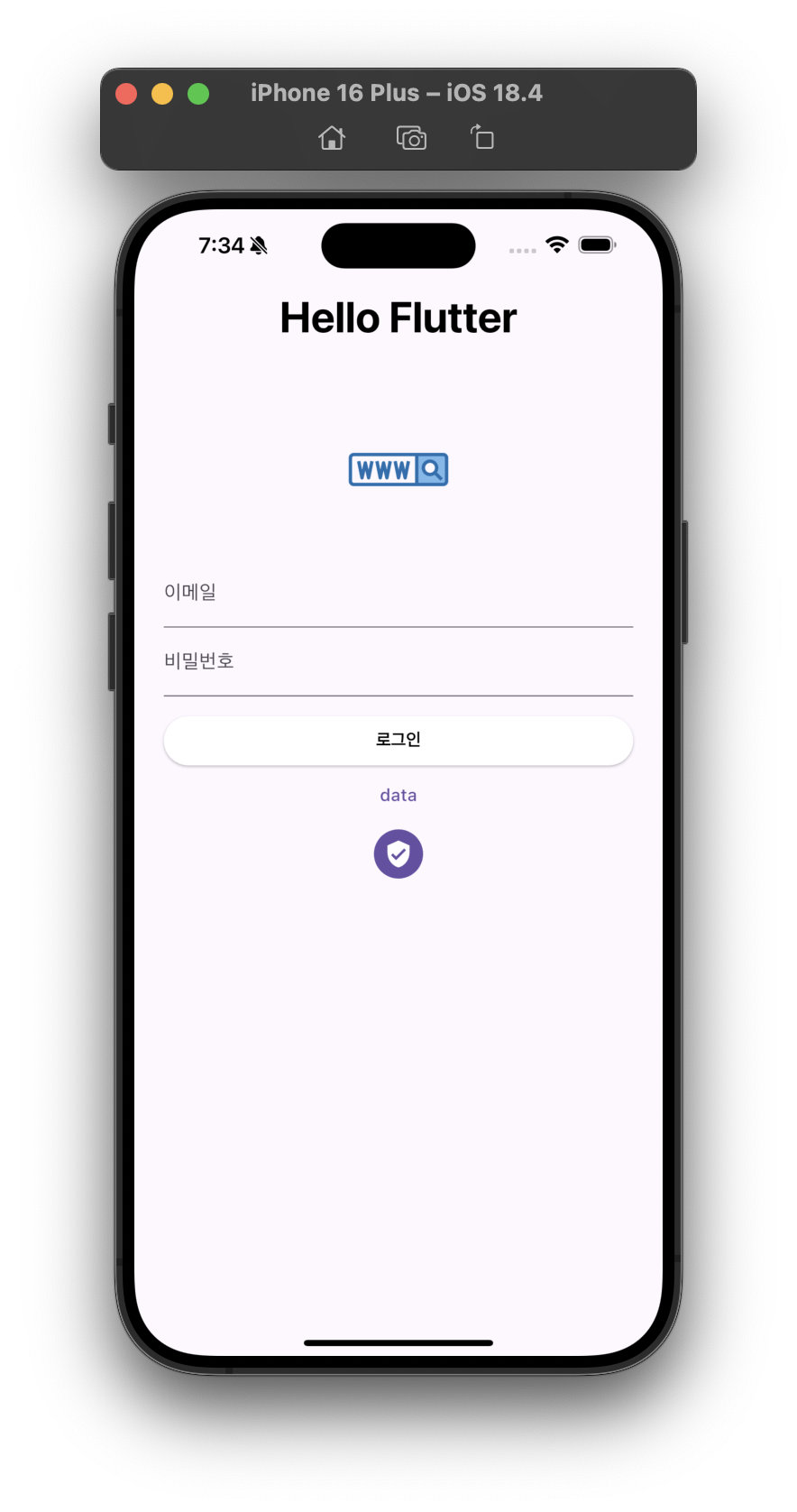
import 'package:flutter/material.dart';

void main() {
  runApp(MyApp());
}

class MyApp extends StatelessWidget {
  const MyApp({Key? key}) : super(key: key);

  @override
  Widget build(BuildContext context) {
    return MaterialApp(
      debugShowCheckedModeBanner: false,
      home: Scaffold(
        appBar: AppBar(
          title: Text(
            'Hello Flutter',
            style: TextStyle(
              fontSize: 35,
              fontWeight: FontWeight.bold,
              color: Colors.black,
            ),
          ),
          centerTitle: true, // Android에서도 타이틀 가운데 정렬
        ),
        body: SingleChildScrollView(
          child: Padding(
            padding: const EdgeInsets.all(24.0),
            // EdgeInsets.only: 특정 방위만, EdgeInsets.symmetric: 위/아래, 좌/우
            child: Column(
              children: [
                Padding(
                  padding: const EdgeInsets.all(32.0),
                  child: Image.network(
                    'https://cdn-icons-png.flaticon.com/512/1271/1271847.png',
                    width: 81,
                  ),
                ),
                TextField(
                  decoration: InputDecoration(
                    labelText: '이메일',
                  ),
                ),
                TextField(
                  obscureText: true,
                  decoration: InputDecoration(
                    labelText: '비밀번호',
                  ),
                ),
                Container(
                  width: double.infinity,
                  height: 40,
                  margin: EdgeInsets.only(top: 16.0),
                  child: ElevatedButton(
                    onPressed: () {},
                    child: Text(
                      '로그인',
                      style: TextStyle(
                        color: Colors.black,
                        fontWeight: FontWeight.bold,
                      ),
                    ),
                    style: ElevatedButton.styleFrom(
                      backgroundColor: Colors.white,
                    ),
                  ),
                ),
                TextButton(
                  onPressed: () {},
                  child: Text('data'),
                ),
                IconButton.filled(
                  onPressed: () {},
                  icon: Icon(Icons.verified_user),
                ),
              ],
            ),
          ),
        ),
      ),
    );
  }
}
의미있는 개발