
장바구니에있는 배열객체의 price를 다 더해야 되는 거잖아
그러면 배열의 객체를 다 순회 해야 갰네
그리고 객체의 price만 가지고 오고
<div class="w-[1920px] flex justify-center">
  <div class="w-[1080px] h-[1920px]">
    <header class="flex h-[140px] justify-center items-center bg-slate-200">
      <a routerLink="/initialscreen">
        <img
          id="home_button"
          class="w-[62px] h-[62px] ml-[38px] mr-[256px]"
          src="https://w7.pngwing.com/pngs/839/365/png-transparent-computer-icons-hamburger-button-home-home-angle-triangle-black-and-white-thumbnail.png"
          alt="home"
      /></a>

      <img
        id="koisk_logo"
        class="w-[400px] h-[140px] mr-[380px]"
        src="00 "
      />
    </header>
    <nav>
      <ul class="flex justify-center space-x-28">
        @for (item of categories; track item.category_id) {
          <li
            (click)="upLoad_categories1()"
            class="font-bold text-4xl text-center block p-6 w-[300px] h-[105px] bg-white rounded-lg border border-gray-200 shadow-md hover:bg-blue-100"
          >
            <a>{{ categories[0].name }}</a>
          </li>
          <li
            class="font-bold text-4xl text-center block p-6 w-[300px] h-[105px] bg-white rounded-lg border border-gray-200 shadow-md hover:bg-blue-100"
          >
            <a>{{ categories[1].name }}</a>
          </li>
        }
        <!-- <li
          class="font-bold text-4xl text-center block p-6 w-[300px] h-[105px] bg-white rounded-lg border border-gray-200 shadow-md hover:bg-blue-100"
        >
          <a>{{ categories[2].name }}</a>
        </li> -->
      </ul>
    </nav>
    <main class="h-[1048px]">
      <!-- //만약 입력창으로 추가 한다고 하면 //- 폼으로 배열 만들수 있는? 추가
        할수 있는
        <input type="text" placeholder="" /> -->
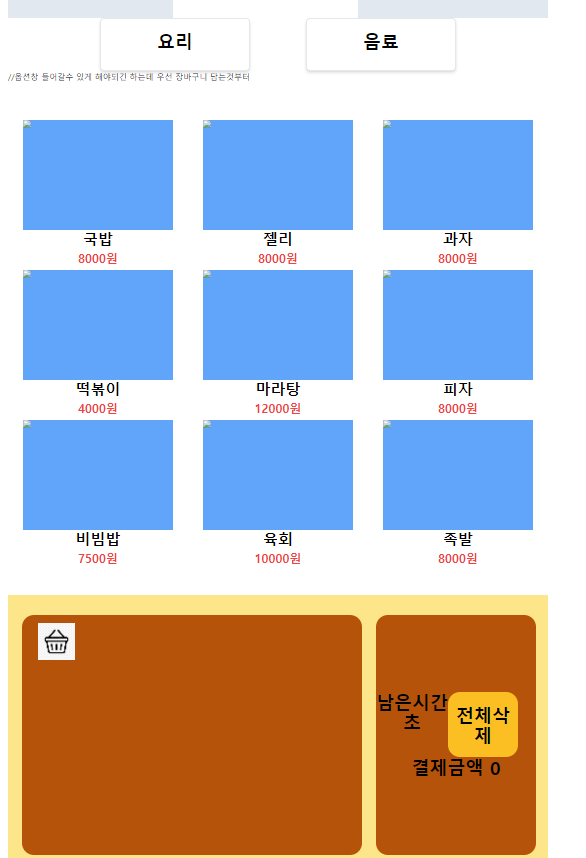
      //옵션창 들어갈수 있게 해야되긴 하는데 우선 장바구니 담는것부터
      <ul class="grid grid-cols-3 row-span-3 place-items-center my-[74px]">
        @for (item of food; track item.id) {
          <li
            class="w-[300px] h-[300px] flex-col text-center font-bold"
            (click)="putOnMenu(item)"
          >
            <img src="#" hrf="#" class="h-[220px] bg-blue-400" />
            <p class="h-[40px] text-3xl">{{ item.name }}</p>

            <p class="h-[40px] text-red-500 text-2xl">{{ item.price }}원</p>
          </li>
        }
      </ul>
    </main>

    <footer class="h-[560px] bg-amber-200 flex items-center">
      <div
        id="shop_basket"
        class="w-[680px] h-[480px] bg-amber-700 rounded-3xl flex flex-col py-4 px-8 mx-7 my-7"
      >
        <div class="space-y-4">
          <img
            class="w-[74px] h-[74px]"
            src="https://png.pngtree.com/png-clipart/20191120/original/pngtree-shopping-cart-icon-png-image_5060874.jpg"
          />

          @for (selectItem of shop_basket; track $index) {
            <li class="text-2xl font-bold list-none space-y-4">
              {{ selectItem.name }} | {{ selectItem.price }} |
              <button (click)="plus(selectItem)">+</button>
              {{ selectItem.quantity }}
              <button (click)="minus(selectItem)">-</button>
            </li>
          }
        </div>
      </div>

      <div
        id="shop_payment"
        class="font-bold text-4xl w-[320px] h-[480px] bg-amber-700 rounded-3xl flex flex-col justify-center text-center"
      >
        <div class="flex">
          <p>
            남은시간 <br />
            초
          </p>
          <button
            (click)="totalRemove()"
            class="w-[140px] h-[130px] bg-amber-400 rounded-3xl"
          >
            전체삭제
          </button>
        </div>
        <p class="">결제금액 {{ payTotal() }}</p>
      </div>
    </footer>
  </div>
</div>
import { Component } from '@angular/core';
import { InitialscreenComponent } from '../0initialscreen/initialscreen.component';
import { RouterLink } from '@angular/router';
import { FormsModule } from '@angular/forms';
// import { Foods } from './2main_models/foods.model'

type Mainmenu = {
  //주메뉴 데이터
  name: string,
  category_id: number
}
type Cart = {
  id: number,
  name: string,
  description: string,
  price: number,
  discount_rate: boolean,
  is_available: boolean,
  image: string,
  quantity: number
}

type Foods = {
  id: number,
  name: string,
  description: string,
  price: number,
  discount_rate: boolean,
  is_available: boolean
  image: string
  quantity: number
}

@Component({
  selector: 'app-mainmenu',
  standalone: true,
  imports: [RouterLink, FormsModule],
  templateUrl: './mainmenu.component.html',

})
export class MainmenuComponent {

  categories: Mainmenu[] = [

    {
      name: '요리',
      category_id: 1
    },
    {
      name: '음료',
      category_id: 2
    }
  ];
  shop_basket: Cart[] = [];

  food: Foods[] = [{
    id: 0,
    name: '국밥',
    description: '국과밥',
    price: 8000,
    discount_rate: false,
    is_available: false,
    image: '이미지',
    quantity: 1
  },
  {
    id: 1,
    name: '젤리',
    description: '국과밥',
    price: 8000,
    discount_rate: false,
    is_available: false,
    image: '이미지',
    quantity: 1

  }, {
    id: 2,
    name: '과자',
    description: '국과밥',
    price: 8000,
    discount_rate: false,
    is_available: false,
    image: '이미지',
    quantity: 1
  },
  {
    id: 3,
    name: '떡볶이',
    description: '국과밥',
    price: 4000,
    discount_rate: false,
    is_available: false,
    image: '이미지',
    quantity: 1
  },
  {
    id: 4,
    name: '마라탕',
    description: '국과밥',
    price: 12000,
    discount_rate: false,
    is_available: false,
    image: '이미지',
    quantity: 1
  }, {
    id: 5,
    name: '피자',
    description: '국과밥',
    price: 8000,
    discount_rate: false,
    is_available: false,
    image: '이미지',
    quantity: 1
  },
  {
    id: 6,
    name: '비빔밥',
    description: '국과밥',
    price: 7500,
    discount_rate: false,
    is_available: false,
    image: '이미지',
    quantity: 1
  },
  {
    id: 7,
    name: '육회',
    description: '국과밥',
    price: 10000,
    discount_rate: false,
    is_available: false,
    image: '이미지',
    quantity: 1
  },
  {
    id: 8,
    name: '족발',
    description: '국과밥',
    price: 8000,
    discount_rate: false,
    is_available: false,
    image: '이미지',
    quantity: 1
  }

  ]

  upLoad_categories1() {

    console.log('확인')
    //데이터중 찾아서 정해진 카테고리에 따라 음료 정보를 랜더한다.
  }

  putOnMenu(food: Foods) {
    // 고객이 선택했을때 선택한 음식과 동일한 음식이 있는지 찾고
    //있다면 해당음식의 갯수를 업데이트
    //없다면 새로운 장바구니 배열에 추가
    const selectedItem = this.shop_basket.find((item) => item.id === food.id)

    // 이미 리스트에 있는 아이템이면 숫자만 증가시키고 아니면 장바구니 배열에 넣는다
    if (selectedItem) {

      selectedItem.quantity += 1;

      // console.log(`${selectedItem.quantity} `)
      // //백틱 사용함 중요!!
      // console.log(this.shop_basket.length)
    }
    else {
      this.shop_basket.push({
        ...food,
        quantity: 1
      });

      // console.log(this.shop_basket?.values)

    }

  }

  plus(food: Foods) {
    const selectedItem = this.shop_basket.find((item) => item.id === food.id)
    if (selectedItem) { // 같은거 선택하면 숫자 증가 배열추가 근데 리스트엔 추가 안되는
      selectedItem.quantity += 1;
      console.log();

    }
  }
  minus(food: Foods) {
    const selectedItem = this.shop_basket.find((item) => item.id === food.id)
    if (selectedItem) { // 같은거 선택하면 숫자 증가
      selectedItem.quantity -= 1;
      // 작아지는데 1까지만 작아질수 있도록
      selectedItem.quantity = selectedItem.quantity > 1 ? selectedItem.quantity - 1 : 1;
    }
  }

  // total: number = this.payTotal();

  // 총 합산 값
  payTotal(): number {
    const total = this.shop_basket.reduce((acc, item) => acc + (item.price * item.quantity), 0);

    console.log('payTotal:', total); return total;
  }

  totalRemove() {
    // 버튼 누르면 전부다 삭제 하기
    this.shop_basket.length = 0;
  }

  // else {
  //   console.log('죄송합니다. 재고소진으로 이용하기 어렵습니다. ')
  // }

  // console.log('${shop_basket.name}가 장바구니에 추가 되었습니다. ')
  //

  // plus(shop_basket: Cart) {
  //   const selectedItem = this.food.find((item) => item.id === shop_basket.id)
  //   if (selectedItem) { // 같은거 선택하면 숫자 증가
  //     selectedItem.quantity + 1;
  //   }
  // }

  // Cart[]= new Foods[]
  // 메뉴 선택할때 장바구니에 알맞은 메뉴가 생성되고
  //이름과 가격이 나옴 선택한 메뉴를 새로운 장바구니 배열을 새로 추가 생성할수는
  // 없나?

}

--------------------
import { Injectable } from '@angular/core';

@Injectable({
  providedIn: 'root'
})
export class ProductService {
  private products: Product[] = [
    { id: 1, name: 'Product A', price: 100, imageUrl: 'path/to/image1.jpg', category: 'category1' },
    { id: 2, name: 'Product B', price: 150, imageUrl: 'path/to/image2.jpg', category: 'category2' },
    // more products...
  ];

  getProductsByCategory(category: string): Product[] {
    return this.products.filter(product => product.category === category);
  }
}
chan