배열 메서드 고급
forEach
자바의 forEach와 비슷하지만, 자바스크립트에서는 배열 메서드로 제공되며 반환값이 없다.
// forEach: 각 요소에 대해 실행
const resultArray2 = [];
array.forEach((n) => resultArray2.push(n * n));
console.log(resultArray2);
map
각 요소를 변환해서 새로운 배열을 반환한다.
const resultArray3 = array.map((n) => n * n);
console.log(resultArray3);
filter
조건이 true인 요소만 모아서 새로운 배열을 반환한다.
const resultArray4 = array.filter((n) => n % 2 === 0);
console.log(resultArray4);
reduce
배열을 순회하면서 하나의 결과값으로 축약한다.
let sum = array.reduce((a, b) => {
  console.log(a + "+" + b);
  return a + b;
}, 0);

console.log(sum);
find / findIndex / splice / slice
find: 배열에서 첫 번째로 조건을 만족하는 요소를 반환한다.findIndex: 배열에서 첫 번째로 조건을 만족하는 요소의 인덱스를 반환한다.splice: 배열 원본을 직접 수정하며 요소를 추가하거나 제거한다.slice: 배열 일부를 복사해 새로운 배열을 반환한다(원본 유지).
const users = [
  { id: 1, name: "김철수" },
  { id: 2, name: "이영희" },
  { id: 3, name: "박민수" },
];

// find
console.log("==============find=================");
const user = users.find((u) => u.id === 2);
console.log(user);

// findIndex
console.log("==============findIndex=================");
const index = users.findIndex((u) => u.id === 2);
console.log(index);

// splice
console.log("==============splice=================");
const numbers = [10, 20, 30, 40];
const index2 = numbers.indexOf(20);
numbers.splice(index2, 1);
console.log(numbers);

// slice - 원본 배열 유지
console.log("==============slice=================");
const arr = [10, 20, 30, 40];
const sliced = arr.slice(0, 2); // 0부터 2 전까지
console.log(sliced);
console.log(arr);
클래스와 프로토타입
자바스크립트에서 객체 생성자를 함수로 정의하고 인스턴스를 생성할 수 있다.
// 객체 생성자 함수
function Animal(type, name, sound) {
  this.type = type;
  this.name = name;
  this.sound = sound;
  this.say = function () {
    console.log(this.sound);
  };
}

// 인스턴스 생성
const dog = new Animal("개", "멍멍이", "멍멍");
const cat = new Animal("고양이", "야옹이", "야옹");

dog.say();
cat.say();.prototype을 사용하면 프로토타입 메서드/공유 값을 추가할 수 있다.
function Animal(type, name, sound) {
  this.type = type;
  this.name = name;
  this.sound = sound;
}

// 프로토타입에 메서드 추가
Animal.prototype.say = function () {
  console.log(this.sound);
};

// 프로토타입에 공유 값 추가
Animal.prototype.sharedValue = 1;

const dog = new Animal("개", "멍멍이", "멍멍");
const cat = new Animal("고양이", "야옹이", "야옹");

dog.say();
cat.say();
console.log(dog.sharedValue);
console.log(cat.sharedValue);
프로토타입에 공유 값을 추가하고 생성자 값들을 다르게 지정해도 공유 값은 같은 것을 확인할 수 있다.
아직 개념이 완벽히 정리되지 않아서 나중에 추가로 작성하겠다.
ES6 클래스
ES6 클래스 문법은 새로 도입된 문법이지만 내부적으로는 여전히 프로토타입 기반으로 동작한다.
class Animal {
  constructor(type, name, sound) {
    this.type = type;
    this.name = name;
    this.sound = sound;
  }

  // 메서드는 자동으로 프로토타입에 등록
  say() {
    console.log(this.sound);
  }
}

const dog = new Animal("개", "멍멍이", "멍멍");
const cat = new Animal("고양이", "야옹이", "야옹");

dog.say();
cat.say();
자바스크립트에서도 클래스 상속, 예외 처리(try-catch-finally) 등을 자바처럼 사용할 수 있다.
동기 / 비동기
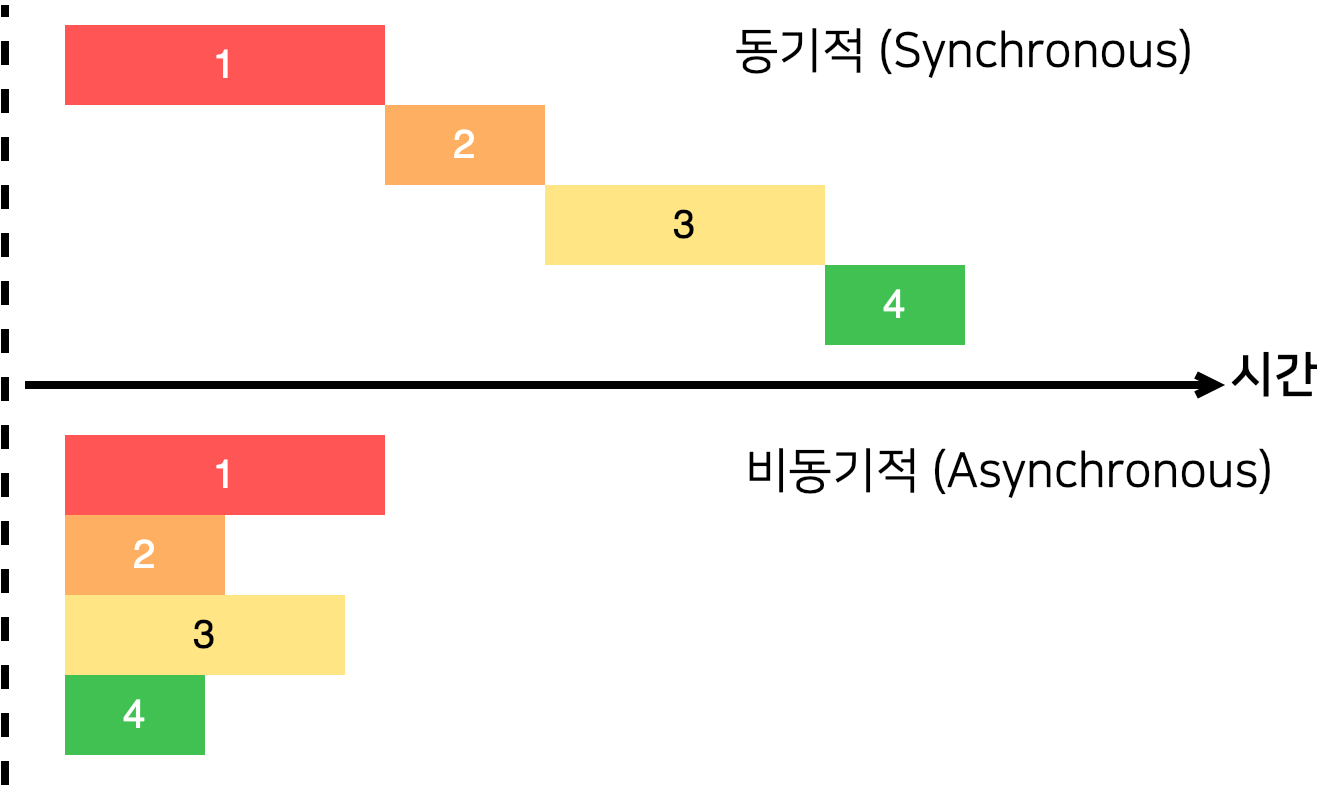
- 동기 처리: 작업이 끝날 때까지 기다린다.
- 비동기 처리: 작업을 시작하고 다른 작업을 진행한다.
콜백과 setTimeout
콜백은 다른 함수의 인자로 전달되어 나중에 호출되는 함수이다.
setTimeout은 지정된 시간이 지난 후 함수를 한 번 실행하는 Web API이다.
console.log("시작");

setTimeout(() => {
  console.log("2초 후 실행");
}, 2000);

console.log("끝");

// 출력 순서:
// 시작
// 끝
// 2초 후 실행
function increaseAndPrint(n, callback) {
setTimeout(() => {
const increased = n + 1;
console.log(increased);
if (callback) {
callback(increased);
}
}, 1000);
}
// callback 중첩
increaseAndPrint(0, (n) => {
increaseAndPrint(n, (n) => {
increaseAndPrint(n, (n) => {
increaseAndPrint(n, (n) => {
increaseAndPrint(n, (n) => {
console.log("끝!");
});
});
});
});
});Promise
Promise는 미래에 완료될 작업의 결과를 나타내는 객체이다.
function delay(ms) {
  return new Promise((resolve, reject) => {
    setTimeout(() => {
      resolve(`${ms}ms 대기 완료`);
    }, ms);
  });
}

delay(1000)
  .then((result) => {
    console.log(result);
    return delay(2000);
  })
  .then((result) => {
    console.log(result);
  })
  .catch((error) => {
    console.error("에러:", error);
  });
async / await
async: 함수를 비동기 함수로 선언하며 항상 Promise를 반환한다.await: Promise의 결과를 기다린다(async함수 내에서만 사용 가능).
async function fetchData() {
  try {
    console.log("데이터 요청 시작");

    await delay(1000);
    console.log("첫 번째 작업 완료");

    await delay(2000);
    console.log("두 번째 작업 완료");

    return "모든 작업 완료!";
  } catch (error) {
    console.error("에러 발생:", error);
  }
}

fetchData().then((result) => {
  console.log(result);
});
느낀점
오늘은 자바스크립트를 조금 더 심도 있게 배워봤다. 동기/비동기 개념부터는 조금 헷갈리거나 이해가 안 되는 부분이 있어서 좀 더 공부를 해야 할 것 같다.
생각보다 자바와 비슷한 점이 많아서 신기하기도 했고, 사용 방식이 조금 다른 부분들도 있어 어색하기도 했다.
내일은 DOM과 EVENT에 대해서 공부하는데 집중해서 잘 들어야겠다.

백엔드 공부중입니다.