
행운복권 프로젝트를 진행하면서 연금복권 720+ 웹 사이트에서 모든 회차 당첨 번호를 저장해야 하는 상황이 생겼다. 웹에서 크롤링하여 우리의 행운복권 프로젝트 DB에 저장하고자 한다.
자바를 사용하여 개발 중이며 정적 페이지를 크롤링 하면 되기 때문에 웹 크롤링 라이브러리 jsoup를 사용하였다.
Jsoup 공식 문서
https://jsoup.org/
문서를 보니 사용법이 간단해서 프로젝트에 쉽게 적용할 수 있을 것으로 판단했다.
Document doc = Jsoup.connect("https://en.wikipedia.org/").get();
log(doc.title());
Elements newsHeadlines = doc.select("#mp-itn b a");
for (Element headline : newsHeadlines) {
  log("%s\n\t%s",
    headline.attr("title"), headline.absUrl("href"));
}
-
Jsoup.connect()는 지정된 URL("https://en.wikipedia.org/")에 연결하여 get() 메소드를 통해 해당 웹 페이지의 HTML 문서를 가져와 저장한다.
-
.select()는 CSS 선택자를 매개변수로 받아, 해당하는 모든 요소를 선택한다. 이렇게 선택된 요소들은 Elements 객체에 저장된다.
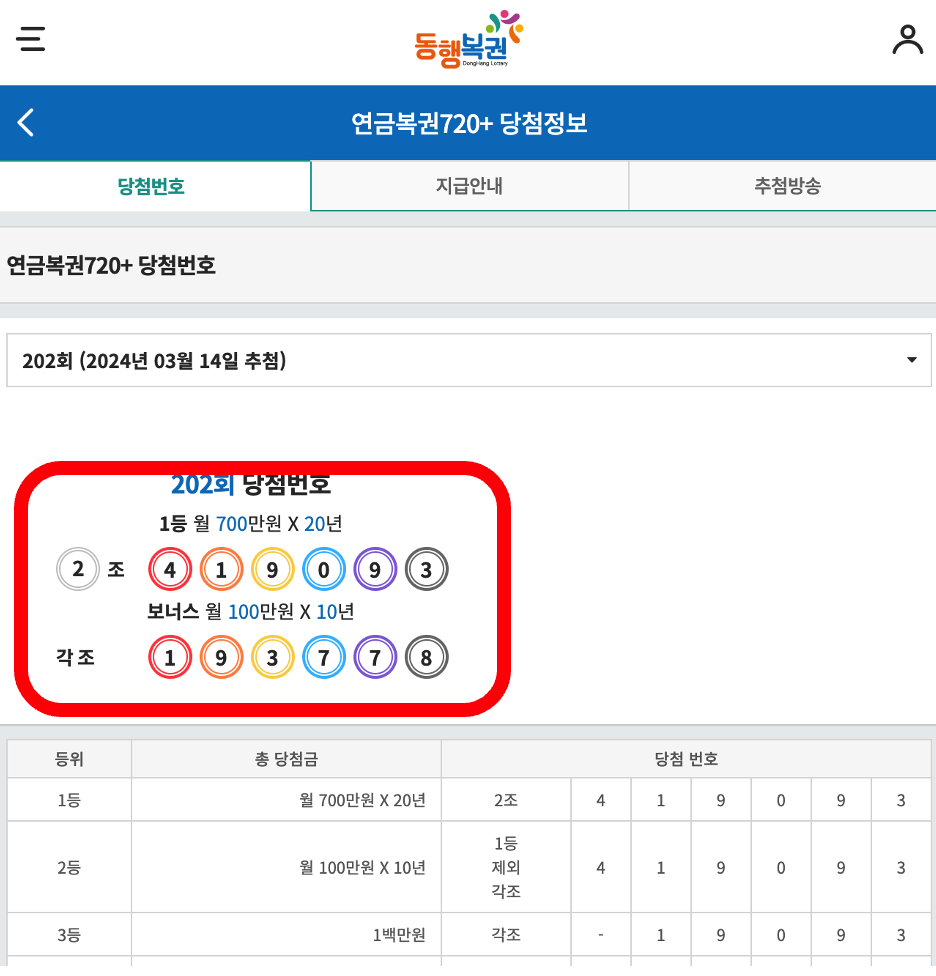
빨간 박스 부분을 크롤링 하고자 한다.
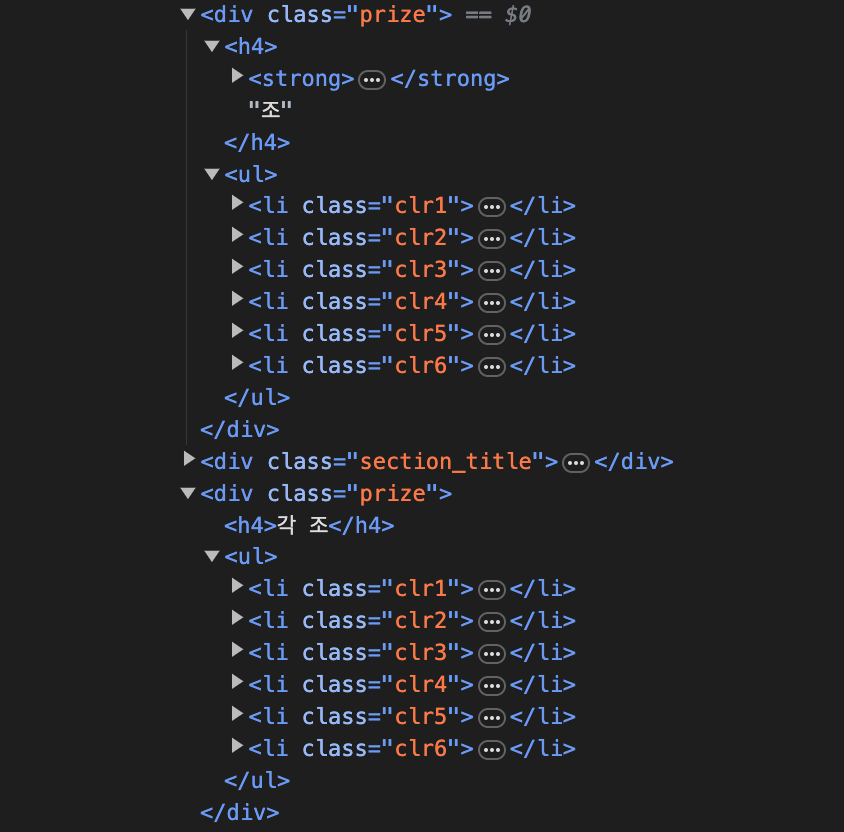
개발자 도구를 통해서 html을 확인하여 필요한 부분을 확인했다.
구현을 시작해 보자
@RequiredArgsConstructor
@Service
@Slf4j
public class WinningPensionLotteryService implements WinningPensionLotteryUtils{

    private final WinningPensionLotteryJdbcRepository winningPensionLotteryJdbcRepository;
    private final WinningPensionLotteryRepository winningPensionLotteryRepository;
    private final static String PENSION_LOTTERY_URL = "https://m.dhlottery.co.kr/gameResult.do?method=win720&Round=";
    private final static String  DRAW_TIME_CSS_QUERY = "div.wrap_select option[selected]";
    private final static String  PRIZE_CSS_QUERY = "div.prize";
    private final static String  GROUP_CSS_QUERY = "h4 strong";
    private final static String  WiN_NUM_CSS_QUERY = "li";


    public WinningPensionLotteryCrawlingDto crawlingWinningPensionLottery(String round) {
        try {
            Document document = getDocumentForRound(round);
            LotteryDrawDayDto lottoDayAndRound = extractLottoDayAndRound(document);
            List<Integer> winningNumber = extractPensionWinningNumbers(document);

            return new WinningPensionLotteryCrawlingDto(
                    lottoDayAndRound.getRound(),
                    lottoDayAndRound.getLotteryDrawTime(),
                    winningNumber);

        } catch (HttpStatusException e) {
            throw PageAccessException.EXCEPTION;

        } catch (IOException e) {
            throw CrawlingException.EXCEPTION;

        } catch (NullPointerException | NumberFormatException e) {
            throw DataNotFoundException.EXCEPTION;
        }
    }
}
연금복권 웹사이트에서 당첨 번호를 크롤링 하여 반환한다. 예외는 처리는 (Checked Exception) IOException 예외를 (Unchecked Exception) RuntimeException로 바꿔서 처리했다.
private Document getDocumentForRound(String round) throws IOException {
        return Jsoup.connect(PENSION_LOTTERY_URL + round).get();
    }
지정된 회차에 해당하는 Document 객체를 반환한다.
private LotteryDrawDayDto extractLottoDayAndRound(Document document) {
        Element selectedOption = document.select(DRAW_TIME_CSS_QUERY).first();
        log.info("날짜와 회차 가져오기 ={}",selectedOption);
        String selectedText = selectedOption.text();
        return getLottoDayAndRound(selectedText);
    }
당첨 번호 추첨 날짜와 회차 정보를 추출한다.
private LotteryDrawDayDto getLottoDayAndRound(String dayAndRound){

        Pattern pattern = Pattern.compile("\\d+");
        Matcher matcher = pattern.matcher(dayAndRound);
        List<Integer> parsedData = new ArrayList<>();

        while (matcher.find()) {
            parsedData.add(Integer.parseInt(matcher.group()));
        }

        LocalDate drawDay = LocalDate.of(parsedData.get(1), parsedData.get(2), parsedData.get(3));
        Integer drawRound = parsedData.get(0);
        return new LotteryDrawDayDto(drawRound,drawDay);
    }
당첨 번호 추첨 날짜와 회차 정보를 파싱한다.
private List<Integer> extractPensionWinningNumbers(Document document) {
        List<Integer> winningNumber = new ArrayList<>();
        Elements prizes = document.select(PRIZE_CSS_QUERY);
        log.info("조 와 당첨 번호 및 보너스 점수 가져오기={}",prizes);
        for (Element prize : prizes) {
            extractNumbersFromPrize(prize, winningNumber);
        }
        return winningNumber;
    }
연금복권 각 조, 당첨 번호, 보너스 점수를 추출한다
private void extractNumbersFromPrize(Element prize, List<Integer> winningNumber) {
        Elements lotteryGroup = prize.select(GROUP_CSS_QUERY);

        if (!lotteryGroup.isEmpty()) {
            String group = lotteryGroup.first().text();
            winningNumber.add(Integer.parseInt(group));
        }

        Elements winNumbers = prize.select(WiN_NUM_CSS_QUERY);
        for (Element number : winNumbers) {
            Integer num = Integer.parseInt(number.text());
            winningNumber.add(num);
        }
    }
Prize 요소로부터 조, 당첨 번호, 보너스 번호를 추출하여 리스트에 추가한다.
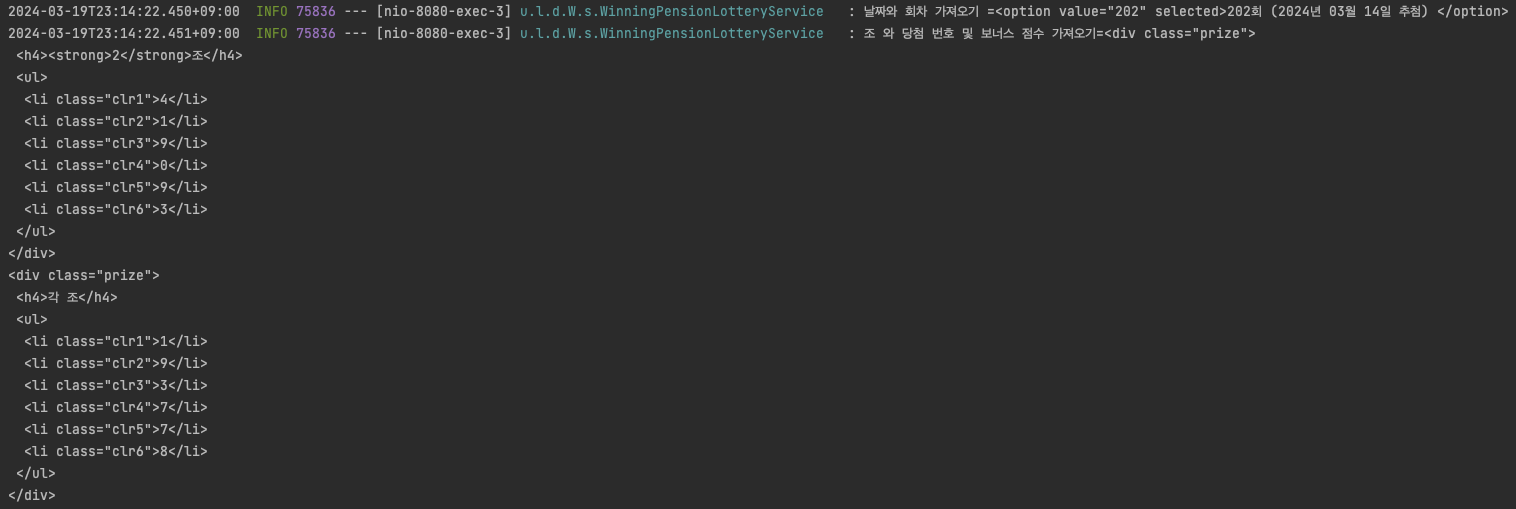
로그를 찍어보니 원하는 정보들이 잘 들어 오는 것을 확인했다.
가져온 데이터들을 Insert 쿼리로 데이터를 한 개씩 저장한다면 만약에 데이터가 수십만 개이면 쿼리 또한 수십만 개 나가게 된다. 이것은 속도뿐만 아니라 성능에 좋지 않은 방법이다.
한 번의 쿼리로 크롤링을 통해서 받은 데이터들을 저장해 보고자 한다.
JPA 에서 Bulk Insert
JPA에서 제공하는 saveAll() 메서드를 사용하여 Batch Insert를 사용하기 위해 테스트를 진행했다.
필자는 쿼리 한 번으로 잘 해결될 줄 알았다...
테스트를 진행해보자
@Test
    @DisplayName("연급 복권 저장 JPA save All")
    public void createPensionLotterySaveAll(){

        long startTime = System.currentTimeMillis();

        List<WinningPensionLottery> list = new ArrayList<>();

        for (int i =1; i< 50000; i++){   // 50000개의 데이터로 테스트
            WinningPensionLottery winningPensionLottery = WinningPensionLottery.builder()
                    .lotteryDrawTime(LocalDate.of(2204,3,12))
                    .round(1)
                    .lotteryGroup(2)
                    .winningFirstNum(3)
                    .winningSecondNum(4)
                    .winningThirdNum(5)
                    .winningFourthNum(6)
                    .winningFifthNum(7)
                    .winningSixthNum(8)
                    .bonusFirstNum(1)
                    .bonusSecondNum(2)
                    .bonusThirdNum(3)
                    .bonusFourthNum(4)
                    .bonusFifthNum(5)
                    .bonusSixthNum(6)
                    .build();

            list.add(winningPensionLottery);
        }

        winningPensionLotteryRepository.saveAll(list);
        System.out.println("============= time test ============");
        System.out.println("save all() 걸린 시간 = "+(System.currentTimeMillis() - startTime)+"ms");

    }
50000개의 데이터로 테스트를 진행해 보았다.
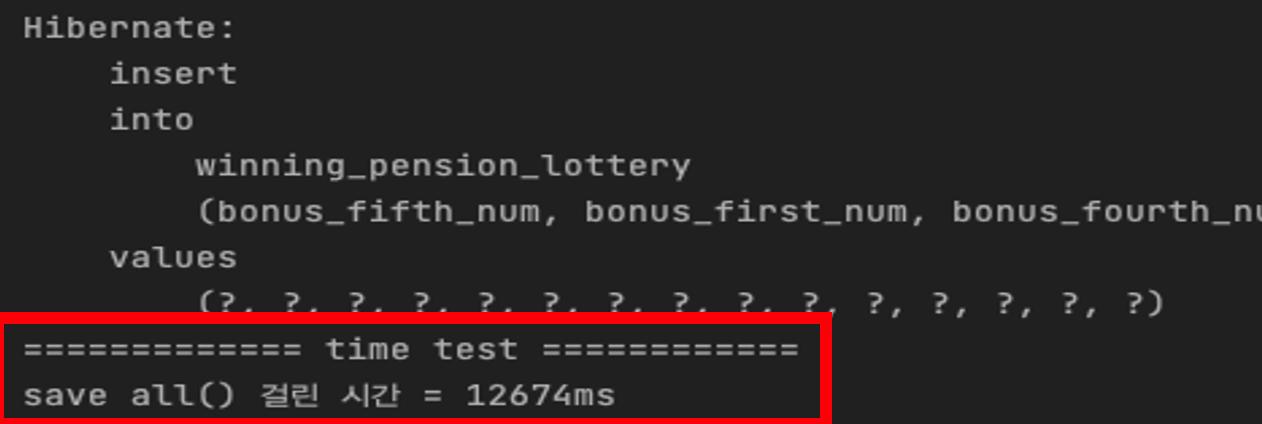
결과
대략 12.647초가 걸렸고
쿼리는 50000개의 insert 쿼리가 발생했다... 왜 이렇게 됐는가?
Entity 객체의 @Id 에 @GeneratedType 의 전략을 IDENTITY 로 설정했기 때문에 이런 문제가 발생했다.
stackoverflow 참고 자료
https://stackoverflow.com/questions/1793169/which-is-faster-multiple-single-inserts-or-one-multiple-row-insert
- MariaDB는 일반적으로 IDENTITY GeneretedType 전략은 auto_increment를 사용한다.
- DB에 Insert가 되어야 Id 값을 알 수 있는 JPA는 Flush를 마지막 순간까지 지연한다. (transactional write-behind)
이러한 부분은 특징은 Id 값을 알아야하는 Batch의 특성과 충돌을 일으켜 Batch Insert를 비활성화한다.
JdbcTemplate Bulk Insert
@GeneratedType 전략을 바꾸어 해결할 수 있지만 IDENTITY 전략을 유지하고 싶기에 JdbcTemplate에서 Batch를 지원하는 batchUpdate() 메서드를 사용하고자 한다
@Repository
@RequiredArgsConstructor
public class WinningPensionLotteryJdbcRepository {

    private final JdbcTemplate jdbcTemplate;

    public void batchInsertWinningPensionLottery(List<WinningPensionLottery> pensionLotteryList){

        String sql = "INSERT INTO winning_pension_lottery"
                +  "(round,lottery_draw_time,lottery_group," +
                "winning_first_num,winning_second_num,winning_third_num,winning_fourth_num,winning_fifth_num,winning_sixth_num," +
                "bonus_first_num,bonus_second_num,bonus_third_num,bonus_fourth_num,bonus_fifth_num,bonus_sixth_num) VALUE(?,?,?,?,?,?,?,?,?,?,?,?,?,?,?)";


        jdbcTemplate.batchUpdate(sql, new BatchPreparedStatementSetter() {

            @Override
            public void setValues(PreparedStatement ps, int i) throws SQLException {
                WinningPensionLottery pensionLottery = pensionLotteryList.get(i);
                Timestamp timestamp = Timestamp.valueOf(pensionLottery.getLotteryDrawTime().atStartOfDay());
                ps.setInt(1,pensionLottery.getRound());
                ps.setTimestamp(2,timestamp);
                ps.setInt(3,pensionLottery.getLotteryGroup());
                ps.setInt(4,pensionLottery.getWinningFirstNum());
                ps.setInt(5,pensionLottery.getWinningSecondNum());
                ps.setInt(6,pensionLottery.getWinningThirdNum());
                ps.setInt(7,pensionLottery.getWinningFourthNum());
                ps.setInt(8,pensionLottery.getWinningFifthNum());
                ps.setInt(9,pensionLottery.getWinningSixthNum());
                ps.setInt(10,pensionLottery.getBonusFirstNum());
                ps.setInt(11,pensionLottery.getBonusSecondNum());
                ps.setInt(12,pensionLottery.getBonusThirdNum());
                ps.setInt(13,pensionLottery.getBonusFourthNum());
                ps.setInt(14,pensionLottery.getBonusFifthNum());
                ps.setInt(15,pensionLottery.getBonusSixthNum());

            }

            @Override
            public int getBatchSize() {
                return pensionLotteryList.size();
            }
        });
    }

}-
setValues 메서드를 오버라이드 해서 리스트의 각 데이터를 추출하여 PreparedStatement에 설정했다.
-
getBatchSize 메서드를 오버라이드 해서 batch 처리할 항목의 총 수를 반환한다 여기서는 리스트의 size가 되겠다.
-
jdbcTemplate batchUpdate 함수를 사용하여 berk insert를 수행한다.
이것도 테스트를 진행해보자
	@Test
    @DisplayName("연급 복권 저장 jdbc batch update")
    public void createPensionLotteryBerkInsert(){

        long startTime = System.currentTimeMillis();

        List<WinningPensionLottery> list = new ArrayList<>();

        for (int i =1; i< 50000; i++){
            WinningPensionLottery winningPensionLottery = WinningPensionLottery.builder()
                    .lotteryDrawTime(LocalDate.of(2204,3,12))
                    .round(1)
                    .lotteryGroup(2)
                    .winningFirstNum(3)
                    .winningSecondNum(4)
                    .winningThirdNum(5)
                    .winningFourthNum(6)
                    .winningFifthNum(7)
                    .winningSixthNum(8)
                    .bonusFirstNum(1)
                    .bonusSecondNum(2)
                    .bonusThirdNum(3)
                    .bonusFourthNum(4)
                    .bonusFifthNum(5)
                    .bonusSixthNum(6)
                    .build();

            list.add(winningPensionLottery);
        }

        winningPensionLotteryJdbcRepository.batchInsertWinningPensionLottery(list);
        System.out.println("============= time test ============");
        System.out.println("batch update 걸린 시간 = "+(System.currentTimeMillis() - startTime)+"ms");

    }
500000개의 데이터를 DB에 넣는 테스트를 진행하였다.
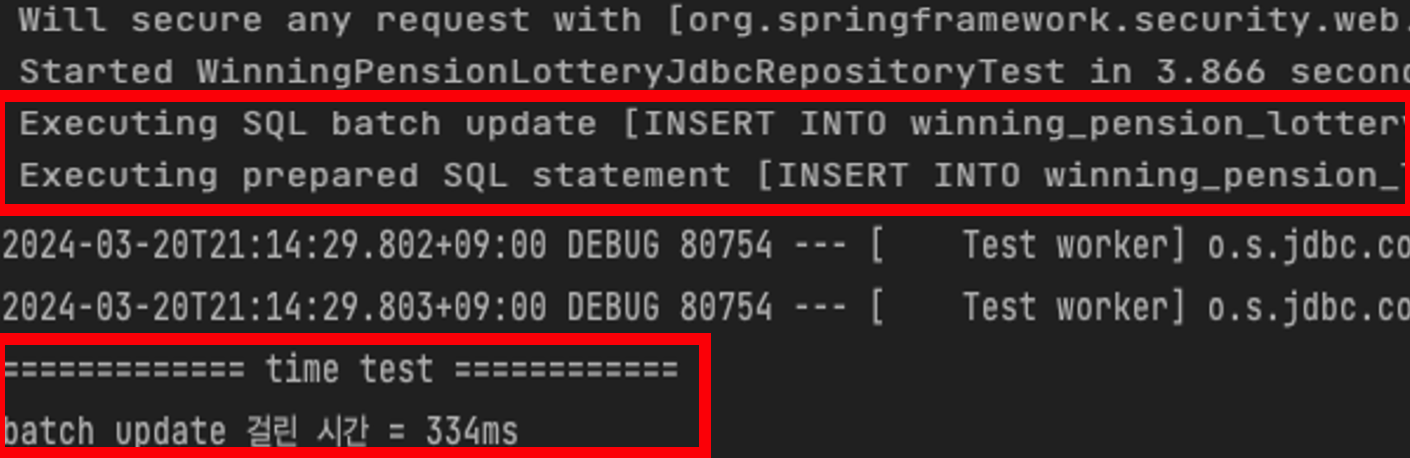
대략 0.334초가 걸렸고
한 번의 쿼리로 벌크 연산이 잘 된 것을 확인할 수 있다.
JPA의 saveAll() -> 12.647초
JdbcTemplate batchUpdate() -> 0.334초
시간 차이로 봤을 때 38배의 빠른 것을 확인할 수 있었고 JdbcTemplate Bulk Insert를 사용하여 연금복권 웹사이트에서 크롤링 한 데이터를 프로젝트 DB에 저장할 수 있었다.
프로젝트 링크를 통해서 참고하시면 좋을 것 같습니다! 감사합니다.
도움이 되셨으면 좋겠습니다.👋🏼
행운 복권 깃허브 링크
https://github.com/Uttug-Seuja/luck-lottery-server