난 CSS와 친구하기 힘들 것 같다
-박감자-
개인과제
진행상황
왜인지는 모르겠으나, Day1과 Day2를 어쩌다보니 동시에 진행했던 것이 어제. 그리고 오늘은 엉겁결에 Day3를 끝냈다. 선택과제만 조금 해보면 될 것 같다
근데 기능구현은 둘째치고 CSS는 진짜.... 디자인은 내 영역이 아닌 건 알았지만, 내가 이렇게나 창의성이 없었나 싶은 영역이다. (이게 더 오래 걸린 것 같다)
Day1 & Day2
이걸 왜 동시에 했느냐, 컴포넌트로 나누는 과정을 Day2 마지막에 하는 가이드라인이 있었지만, 가이드라인 또 안 읽고 처음부터 컴포넌트 구성하느라 머리 터진 감자... (어쩐지 정신이 좀 없더라)
그래도 오늘 최종 정리한 부모-자식 관계는 아래와 같다
App
│
├── MedalData
    ├── MedalForm
	|		├── InputGroup
    |       		├── CountryInput
    |       		├── MedalInput
    |
    |       ├── ButtonGroup──Button
    |
    ├── Table
			├── Table──Button
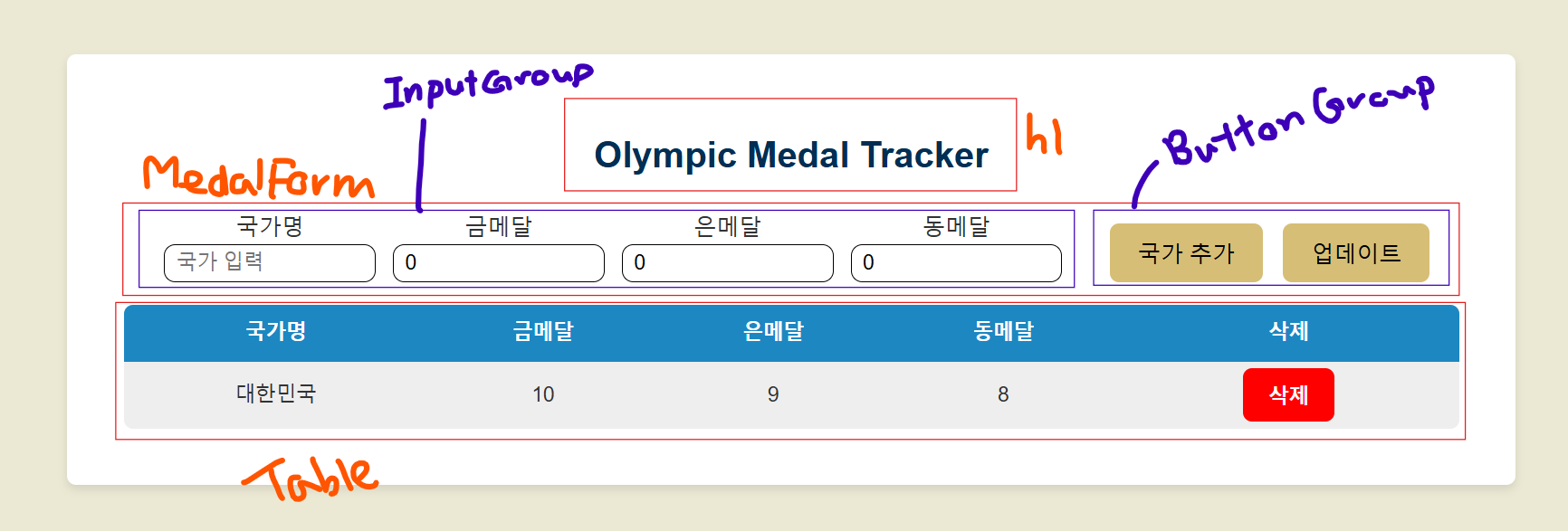
- Button 요소는 Table과 ButtonGroup 컴포넌트에서 사용한다.
- App의 JS 부분은 최대한 줄이고 싶어서 MedalData를 따로 만들어주었고, 국가별 기록은 Medal Data에서
useState()를 사용하여 관리한다. - 국가명, 금메달, 은메달, 동메달 인풋 받는 부분은 MedalFrom (form tag)에서 받은 후 MedalData의 추가, 업데이트 함수의 매개변수로 준다
form
form tag 안에 submit 타입의 버튼만 지정하면 onSubmit에 핸들러 함수를 통해 기록 저장/업데이트가 가능하다
아래는 내 코드로 (inputGroup div를 지정하기 전)
  const handleSubmit = (e) => {
    e.preventDefault();
    console.log("Country:", country);
    console.log("Gold:", gold);
    console.log("Silver:", silver);
    console.log("Bronze:", bronze);
  };

  return (
    <form className="group-input" onSubmit={handleSubmit}>
      <CountryInput country={country} countryInputHandler={countryInputHandler} />
      <MedalInput label="금메달" medal={gold} medalInputHandler={goldInputHandler} />
      <MedalInput label="은메달" medal={silver} medalInputHandler={silverInputHandler} />
      <MedalInput label="동메달" medal={bronze} medalInputHandler={bronzeInputHandler} />
      <ButtonGroup />
    </form>
  );
버튼 그룹 안에 type="submit" 지정을 해주면 버튼이 클릭되거나 엔터키가 눌린 순간 제출이 된다. 제출시 디폴트로 페이지가 리로드 되게끔 되어있는데 따라서 .preventDefault()로 이를 방지해야한다
input의 required, min, max, maxLength
	// 국가명
    <div className="country-input">
      <label>국가명</label>
      <input
        type="text"
        placeholder="국가 입력"
        value={country}
        onChange={countryInputHandler}
        required
      />
    </div>

	// 메달 수
    <div className="number-input">
      <label>{label}</label>
      <input
        type="number"
        placeholder="0"
        value={medal}
        onChange={medalInputHandler}
        min="0"
        max="99"
      />
    </div>
위의 attribute를 input에서 설정할 수 있다.
required를 지정해주면, 해당 필드가 값을 받기 전에는 제출이 되지 않도록 지정할 수 있다.- number 타입의 인풋의 경우 최솟값(
min)과 최댓값(max)을 정할 수 있다.- 다만 두개 동시에 지정하면 input 필드 너비가 재조정되는데, 찾아보니 사용하는 브라우저에 따라 재조정되는 경우가 있다고 한다.
- 이를 해결하려면 input을 wrapper로 감싸서 고정된 사이즈를 wrapper에서 지정해주는 것이 흔한 해결방법이라고 한다.
- 해당 현상은 버그가 아닌 브라우저마다 숫자의 range를 보고 재조정하는 로직이 다른 것
maxLength는 text 타입의 인풋 길이를 제한할 수 있다.
Day3
삭제와 업데이트가 메인이었던 과제로 둘 다 filter 사용해서 완성시켰다.
  // 업데이트 함수
  const updateCountryHandler = (newData) => {
    console.log("countries =>", countries);
    if (countries.some((item) => item.country === newData.country)) {

      // index 찾기
      const target_index = countries.findIndex(
        (item) => item.country === newData.country
      );

      // 정보 업데이트 (기존 데이터 지우고 새로운 데이터 추가)
      const updated_countries = countries.filter((_, index) => {
        return index !== target_index;
      });
      sortedSetCountries([...updated_countries, newData]);

      return 1;
    } else {
      alert(`등록된 국가가 아닙니다.\n새로운 국가 등록을 원하시면 추가를 눌러주세요.`);
      return -1;
    }
  };

  // 삭제 함수
  const deleteCountryHandler = (targetData) => {
    const deletedCountries = countries.filter((data) => {
      return data.country !== targetData.country;
    });

    sortedSetCountries(deletedCountries);
  }
업데이트 시킬때 필터를 사용하였지만 정작 아이템의 값은 중요하지 않아서 필터의 콜백 함수의 매개변수를 (_, index)로 지정할 수 있다는 사실을 배웠다. index만 쓰고 싶어서 변수를 1개 적으면 인덱스 값이 나오지 않는다는 걸 알아서 열심히 찾았던 것 같다. Python과 마찬가지로 _를 사용할 수 있어서 반가웠다.
선택구현
메달 수 정렬과 localStorage 사용은 아직 완성시키지는 못했는데, 제출 전까지는 일단 해볼 수는 있을 것 같다
마치며...
벌써 내일이 금요일이라니...