오늘은 문자열에 대해 알아보자
1. 문자열 길이 확인
- len()
공백도 카운트 해준다
s = 'hello'
print(len(s))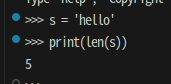
2. 인덱스
- 문자열 특정위치[인덱스] 확인
첫글자는 0부터 / 끝글자는 -1부터 시작
s = 'hello'
print(s[0])
print(s[::-1]) # 문자열 역순 나열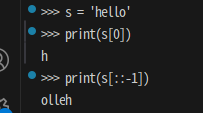
3. 명령어
- index()/find()
문자열 왼쪽부터 해당 문자열 시작 인덱스 검색
index는 문자열이 없으면 오류, find는 -1 출력
- rindex()/rfind()
문자열 오른쪽부터 해당 문자열 마지막 인덱스 검색
index는 문자열이 없으면 오류, find는 -1 출력
a= 'hello'
b = a.index('l')
c = a.rindex('l')

print(b)
print(c)
>> 왼쪽부터 찾는것와 오른쪽부터 찾는 인덱스 위치가 다르다!
s = 'hello, my name is alice'
s_find = s.find('b')
print(s_find) 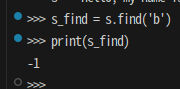
s = 'hello, my name is alice'
s_fin = s.rfind('a')
print(s_fin)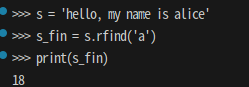
📌 검색 구간 지정 가능
s = 'hello, my name is alice'
s_fin = s.rfind('a',0, 7) #인덱스 0에서 6까지 검색
print(s_fin) 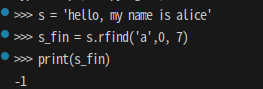
- 문자열 일부 추출하기
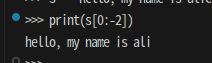
s[시작 인덱스:마지막 인덱스]
마지막 인덱스는 -1 한 위치까지 추출
s = 'hello, my name is alice'
print(s[0:-2]) #0부터 -3 인덱스까지 추출
- strip() 문자 제거
#lstrip() 왼쪽부터 "문자조합"의 모든 문자 제거

s = "가hello나"
s_strip = s.lstrip("가h나")
print(s_strip)


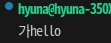
#rstip() 오른쪽부터 "문자조합"의 모든 문자 제거
s = "가hello나"
s_strip = s.rstrip("가h나")
print(s_strip)
* replace(원래 문자열, 새로운 문자열)
s = "뜨거운 아메리카노"
s_re = s.replace("뜨거운", "차가운")
print(s_re)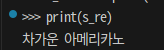
* upper()/lower()
대문자 변환 case_text = text.upper()
소문자 변환 case_text = text.lower()
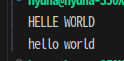
s1 = 'helle world'
s1_up = s1.upper()

s2 = 'HELLO WORLD'
s2_low = s2.lower()

print(s1_up)
print(s2_low)
- case_text.capitalize(): 맨앞 문자만 대문자 변환
- count
주어진 문자열이 몇 번 나오는지 카운트
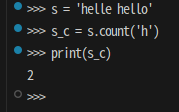
s = 'helle hello'

s_c = s.count('h')
print(s_c)
- 글자/숫자 확인하기
| 함수 | 설명 | 예제 |
|---|---|---|
isdigit() | 문자열이 모두 숫자인지 여부를 확인 | "123".isdigit() → True |
isalpha() | 문자열이 모두 알파벳 문자인지 여부를 확인 | "abc".isalpha() → True |
isalnum() | 문자열이 모두 알파벳 문자 또는 숫자로만 구성되어 있는지 여부를 확인 | "abc123".isalnum() → True |
isspace() | 문자열이 모두 공백 문자 (space, tab, newline 등)로만 구성되어 있는지 여부를 확인 | " ".isspace() → True |
isnumeric() | 문자열이 수치형인지 여부를 확인 | "123".isnumeric() → True |
isdecimal() | 문자열이 십진수인지 여부를 확인 | "123".isdecimal() → True |
python3부터는 한글도 알파벳으로 인식
ex) "ㅠㅠ".isalpha() True 출력
💡 "우리나라에 "나"가 포함되어 있는지 확인해보자
s = '우리나라'
s_find = s.find('나')

if s_find  != -1 :
    print('"나"가 포함되어 있습니다', s_find)
else:
    print('"나"가 포함되어 있지 않습니다')
💡 세 개 이상 단어로 구성된 문자열을 입력받고 두번째 단어를 화면에 출력해보자
>> 단어는 공백 문자로만 분리된다고 가정
s = input("세 개 이상 단어로 구성된 문자열을 입력하세요: ")

new_s = s.strip()  #양쪽 끝 공백 제거

index_s = new_s.find(' ') #첫번째-두번째 단어 사이 공백 찾기
new_s = new_s[index_s+1:].strip() #단어 사이 공백 제거
print("단어 사이 공백 제거: ", new_s)

index_s = new_s.find(' ')
print("두번째 단어: ", new_s[:index_s])
💡 "Hello World" 문자열 두번째 단어부터 검색해서 "o" 인덱스를 출력해보자
s= "Hello World"
s_strip = s.strip()
indexing_s = s_strip.find(' ')
new_s = s_strip[indexing_s +1: ]

indexing_s = new_s.find("o")
print('두번째 "o" 인덱스: ', indexing_s)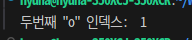
💡 ".jpg"로 끝나는 파일 이름을 입력받고 ".jpg"를 ".png"로 변환해본다
>> replace() 함수를 사용하는 경우와 사용하지 않는 경우 2가지를 작성한다
#1 replace사용
s = input('".jpg"로 끝나는 파일 이름을 입력하세요:')

new_s = s.replace('.jpg', '.png')
print(new_s)


#2 replace 사용하지 않음
s = input('".jpg"로 끝나는 파일 이름을 입력하세요:')

new_s = s[:-3] + 'png' # 0부터 -4인덱스 + png
print(new_s)

💡 "Beutiful.image.png" 파일 이름에서 확장자를 제외한 부분을 출력해보자
>> 파일 이름에 "." 가 두 개 이상 있을 수 있음
s = "Beautiful.image.png"
find_s = s.rfind('.')
new_s = s[:find_s]
print(new_s)
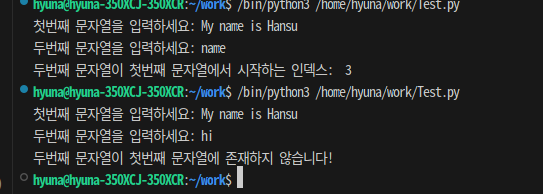
💡 두 개의 문자열을 입력받아 아래 요구사항을 만족하는 코드를 작성해보자
>> 두 번째 문자열이 첫번째 문자열에 들어있는지 확인
>> 들어있을 때 두번째 문자열이 첫번째 문자열에서 시작하는 인덱스 출력
s1 = input("첫번째 문자열을 입력하세요: ")
s2 = input("두번째 문자열을 입력하세요: ")

if s1.find(s2) != -1:
    indexing_s2 = s1.find(s2)
    print("두번째 문자열이 첫번째 문자열에서 시작하는 인덱스: ",indexing_s2)
else:
    print("두번째 문자열이 첫번째 문자열에 존재하지 않습니다!")