☁️ Rendering Piepline
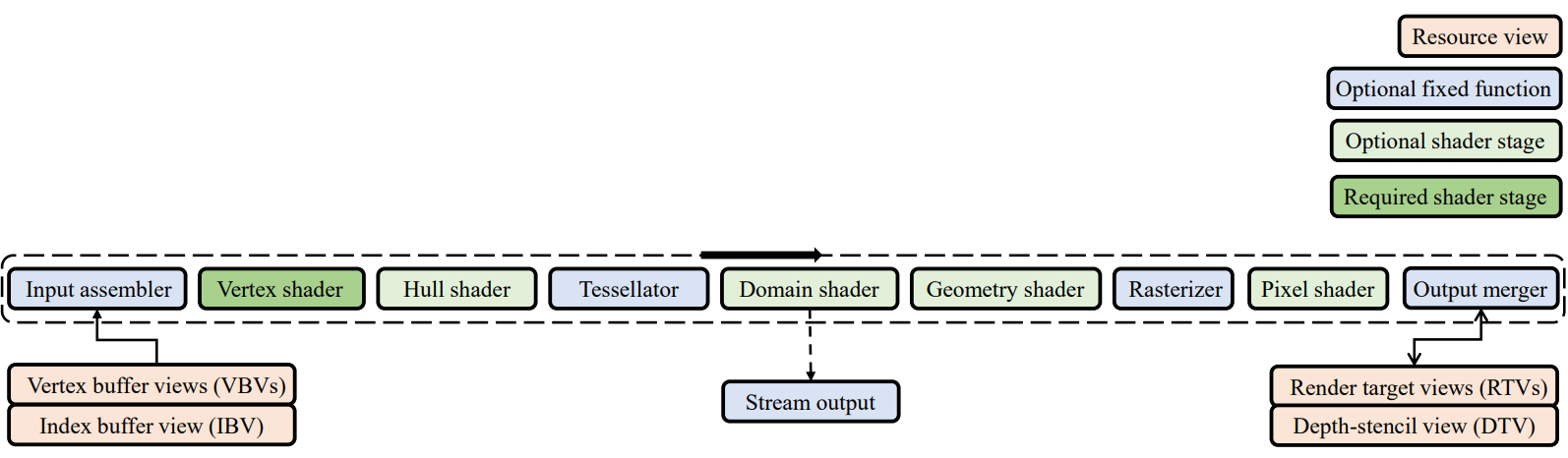
☁️ Pixel Shader
= determines the color of each pixel
- Texturing
- Lighting
☁️ Texture Coordinates
🔎 Image Texturing
- texturing method들 중 가장 간단한 방법
- pasting an image on an object's surface
- texture : 2D array of texels
- texel의 위치는 그 texel의 중점으로 나타낸다.
ex) 가장 오른쪽 위 텍셀의 위치는 (0.5,0.5), 그 오른쪽은 (1.5,0.5)
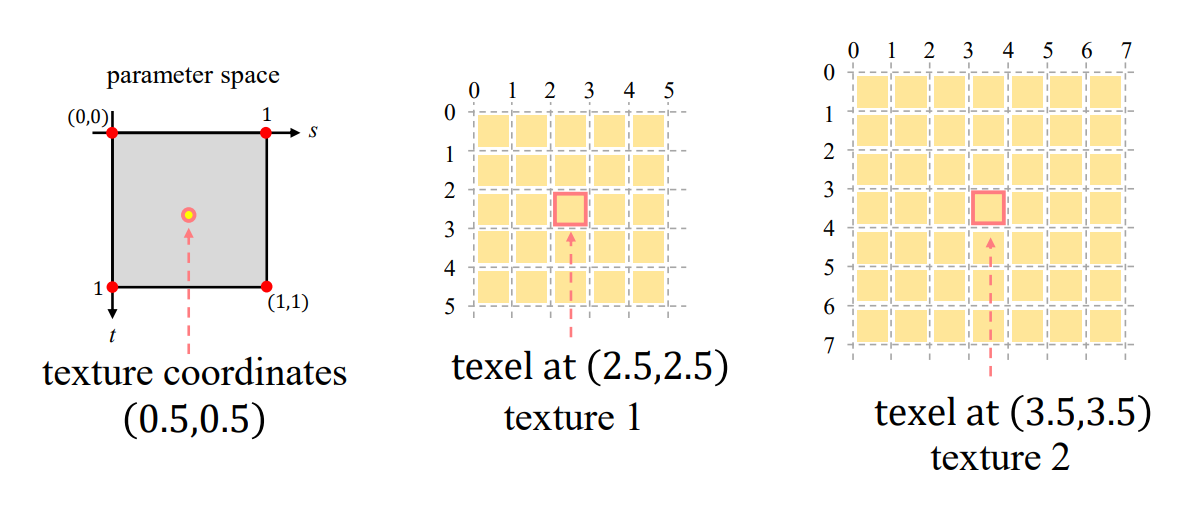
rasterizer가 interpolate 해서 출력한 texture 좌표에 texture 해상도를 곱해서 실제 texture에서 rgb값을 꺼내오는 것
- 모델링 단계에서 polygon mesh의 각 정점마다 texture coordination가 설정되어야 한다. (s,t)
- rasterizer가 pixel에 따라 interpolation 해준다
ex) 아래 예시에서 (s,t) = (1/8 , 1/8) - texture 좌표를 이용해서 실제 texture(c)을 방문하게 된다.
- 아까 구한 (s,t)에 실제 texture의 해상도 (width tex, height tex)를 곱해준다 -> (s', t') = (c)의 좌표 = (0.5,0.5)
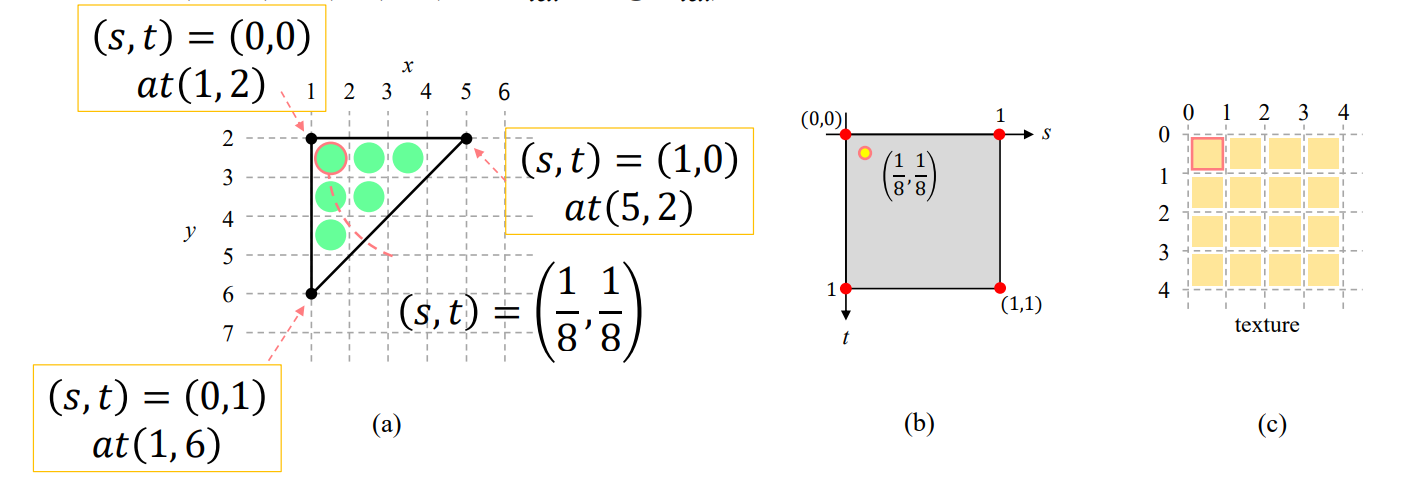
- texture coordintate의 s와 t는 0과 1 사이로 nomalize 되어있다. 이는 다양한 텍스쳐에 적용될 수 있다.
🔎 Parameterization
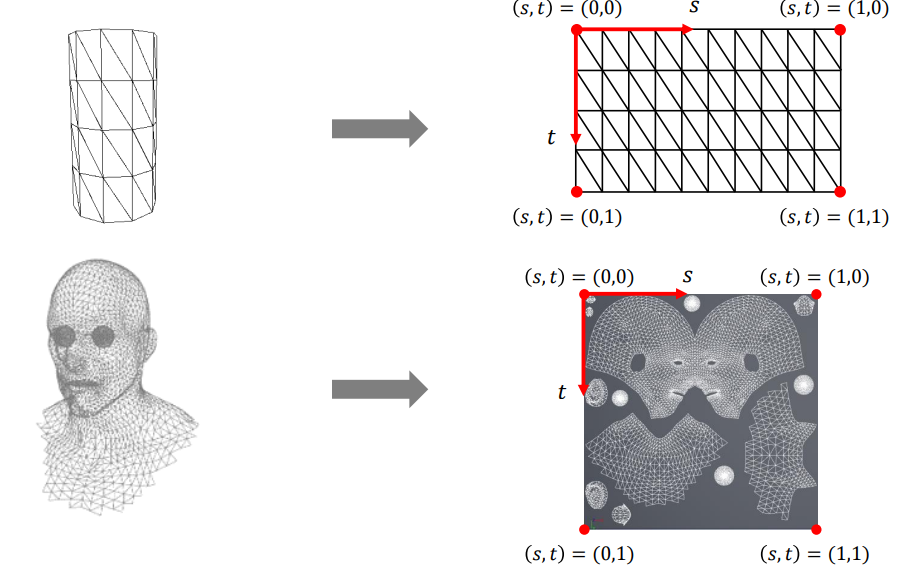
- 복잡한 2D/3D 표면을, 단순한 2D 좌표계 (s, t)로 표현하는 것
= surface(polygon mesh) parameterization
= unfolding a 3D surface onto a 2D planer domain
🔎 Chart and Atlas
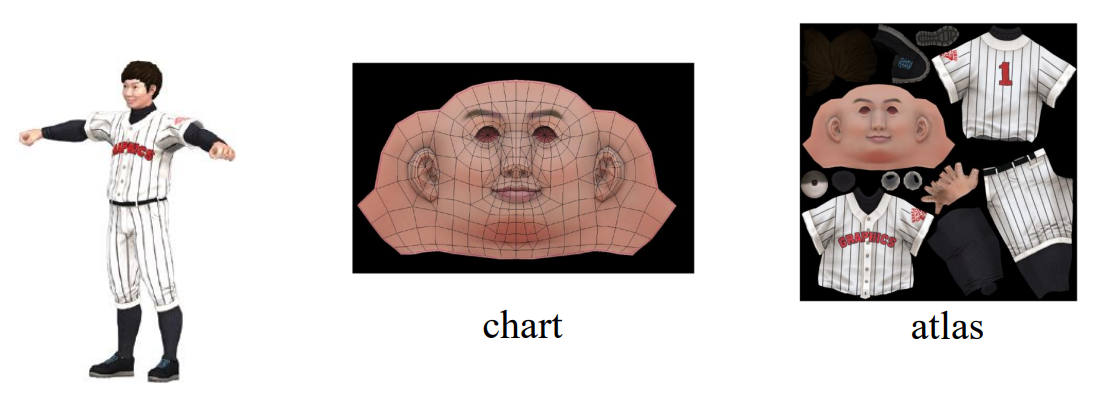
- 복잡한 polygon mesh는 patch(ex.머리, 몸 , 팔)들로 나뉨
- 각 patch들은 unfolded & parameterizaed됨
- chart : 각 patch들의 image
- atlas : 여러 chart들이 texture에 합쳐진 것
🔎 Texture Wrapping
= range를 벗어난 (s,t)들을 처리해준다.
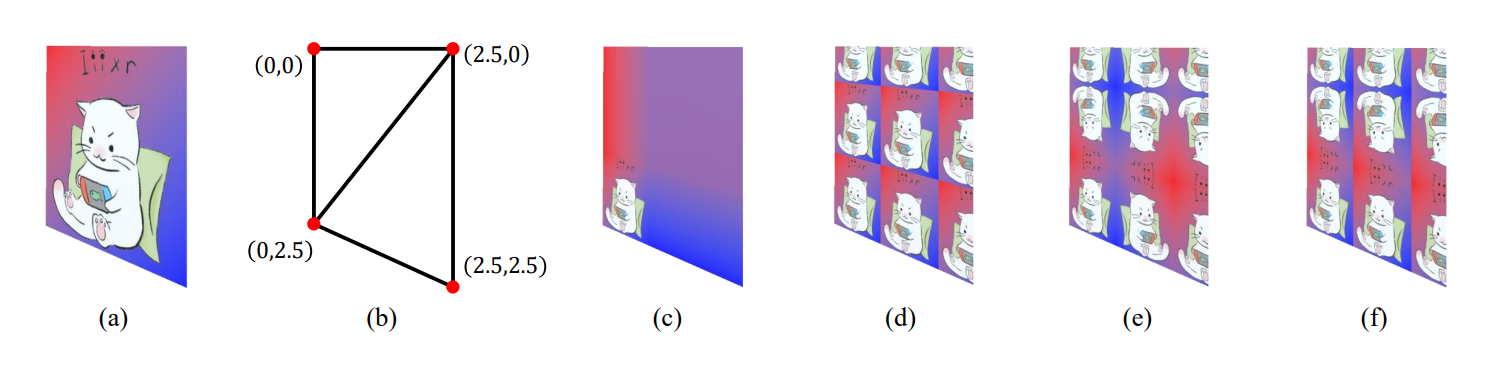
- Clamp-to-Edge (c) : out of range인 경우 edge color로 렌더링
- Repeat (d) : tiling at every integer junction
- Mirrored-Repeat (e),(f) : mirrored or reflected at every integer junction
🔎 Texture Filtering
= 텍셀(texel) → 화면 픽셀(pixel)로 맵핑할 때, 텍스처 해상도와 화면 해상도가 다를 경우 생기는 왜곡/노이즈 문제를 보정하는 기술
-
Filtering이 필요한 경우
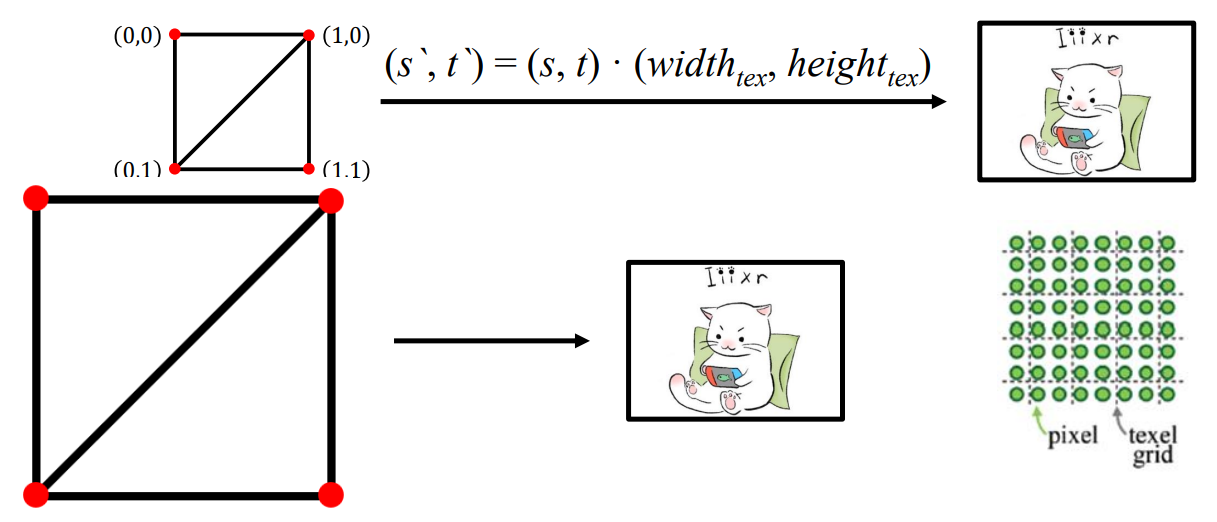
- Magnification ( 확대 )
screen-space quad가 image texture 보다 클 때, texture가 확대된다.
= pixel > texel
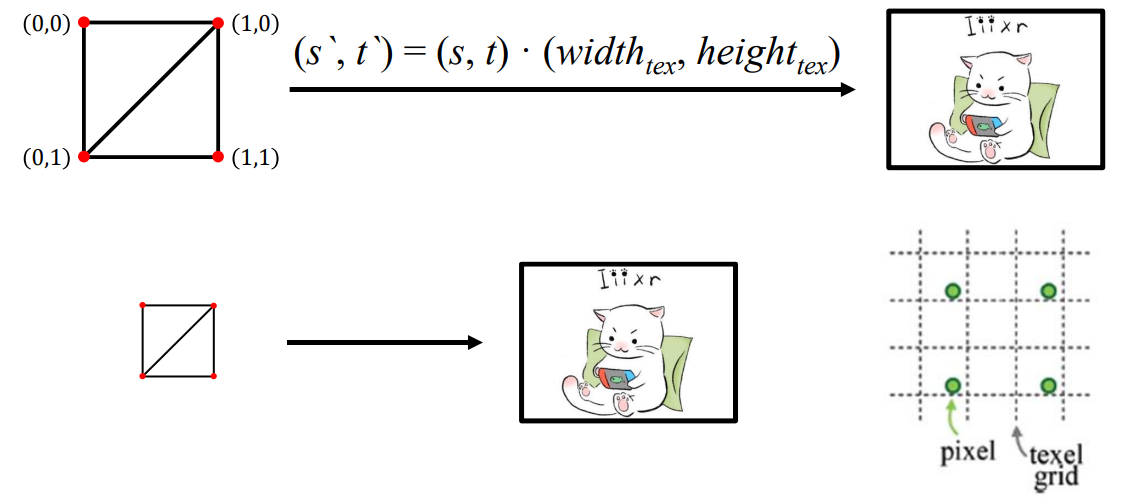
- Minification ( 축소 )
= pixel < texel
- Magnification ( 확대 )
-
주요 Texture Filtering 방식
- Nearest point sampling
- Bilinear interpolation
- Mipmap 활용 방식
🔎 Filtering for Magnification
Magnification = pixel > texel
-
Option 1: Nearest point sampling
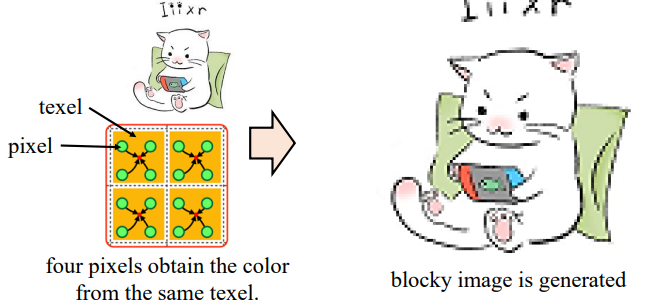
= 현재 픽셀에 가장 가까운 텍셀 하나의 값을 그대로 가져옴- 가장 간단한 기법
- 문제점 : 같은 texture값을 여러번 가져오게 된다 -> block image
-
Option 2: Bilinear interpolation
= 주변 4개의 텍셀 값을 이용해 보간(Interpolation)하여 중간색을 계산- 수평/수직 방향으로 보간을 2번 하게 됨
= ca, cd 구하고(수평 방향), 그다음 수직 방향으로 보간 -> 최종 c - 경계가 부드럽고, 자연스러운 색 표현이 가능하지만, 연산량이 많은 단점,,
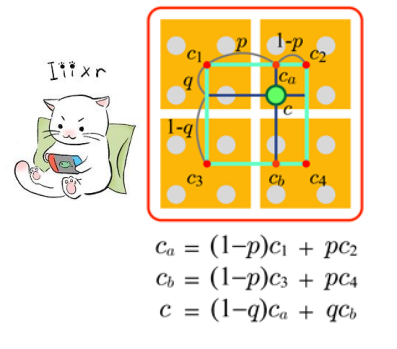
- 수평/수직 방향으로 보간을 2번 하게 됨
🔎 Filtering for Minification
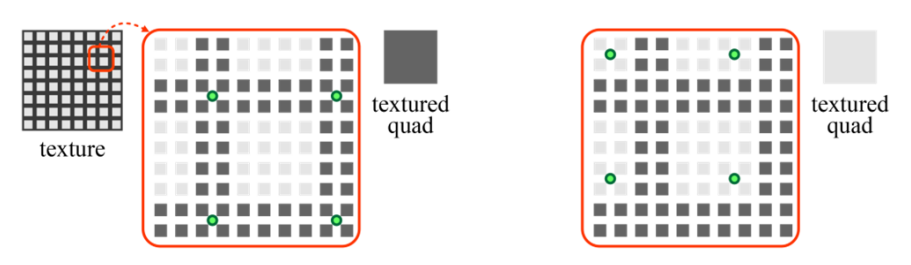
= pixel < texel / Magnification보다 문제가 심각함
= texel의 숫자를 줄이자!
- Aliasing in minification
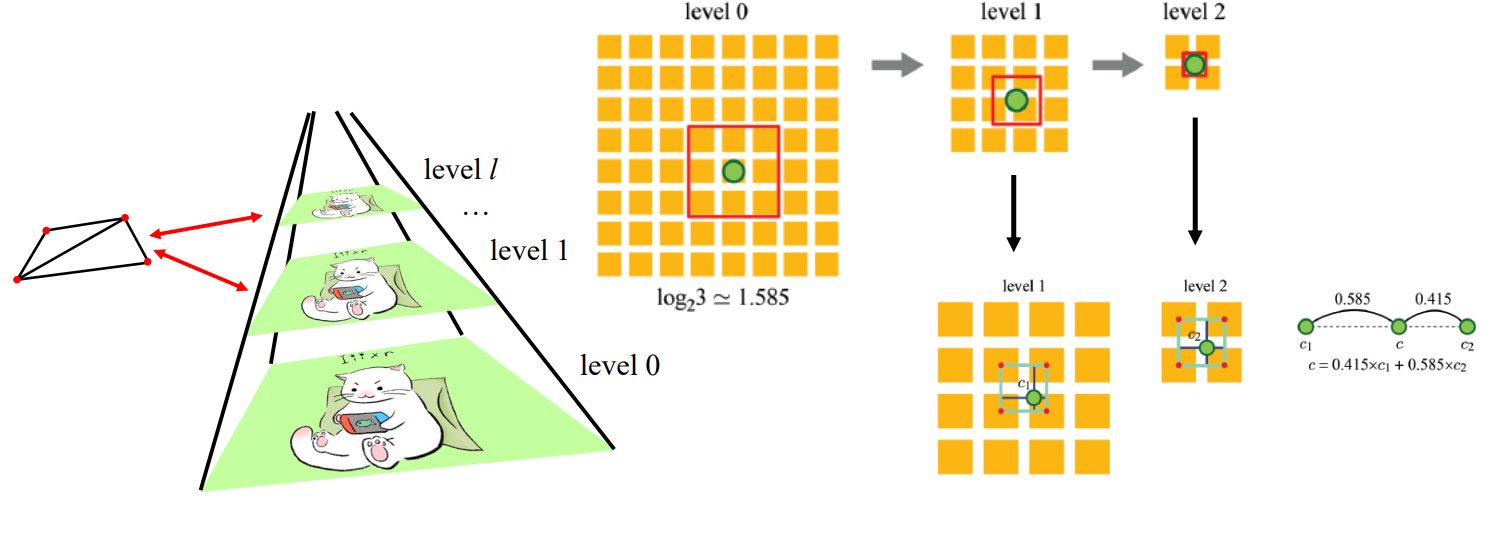
🔎 Mipmapping
= aliasing 문제를 해결하기 위해 사용
Mipimap
- 텍셀의 수를 줄여서 픽셀 수에 최대한 가까워지도록 하자!
- 텍스처 크기를 줄이기 위해 down-sampling한다.
- 원래 텍스처의 해상도가 인 경우, (l+1)개의 레벨로 구성된 피라미드(mipmap)를 구축한다. 이때, 원래 텍스처는 레벨 0 이다.
- 필터링할 레벨을 디테일 레벨(level of detail)이라고 하며, λ로 표기.
- level 0에서 pixel footprint covers m x m texel
-> ( )
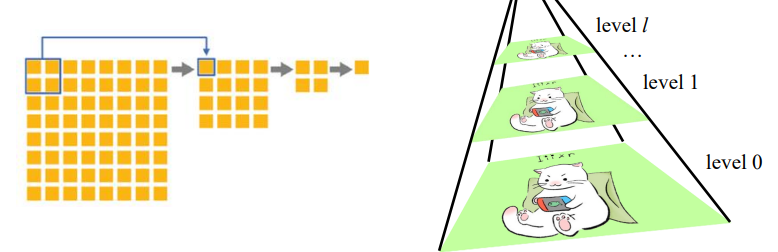
Example - Level 1.585
- level 1과 level2의 결과를 선형보간 ( bilinear interpolation )