RN - babel-plugin-module-resolver 셋팅
프로젝트를 갈아 엎을 준비를 하고있는데 우선적으로 적용하고 싶은 걸 찾았는데
바로 babel-plugin-module-resolver이다.
프로젝트를 진행하다보면 아래와같이 점점 미궁속으로 들어가는 import 파일 경로를 마주하게 된다..
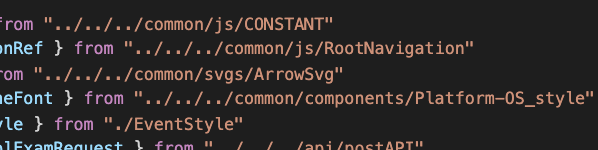
프로젝트를 엎기 전에 해야한다고 생각한 이유는 프로젝트 구조를 변경하는데 있어서 해당 경로를 일일이... 변경해주는 지독한 노가다를 막고싶었기 때문이다.
-
먼저,
npm install -D babel-plugin-module-resolver을 설치한다. -
프로젝트 root에 있는 babel.config.js가 있을 것이다. 난 따로 설정 해준적이 없어서 초기 상태 그대로이다. 내용을 아래와 같이 수정해준다.
module.exports = {
  presets: ["module:metro-react-native-babel-preset"],
  plugins: [
  // 여기부터
    [
      "module-resolver",
      {
        root: ["./src"],
        extensions: [".ios.js", ".android.js", ".jsx", ".js", ".json"],
        alias: {
          "@": "./src",
          "@components": "./src/components",
          "@utils": "./src/utils",
        },
      },
    ],
  ],
  // 여기까지
}
(만약 타입스크립트를 사용하고 있다면 extensions에 .ts등 추가적인 셋팅 필요)
- 다음은 metro.config.js이다. 내 기억으론 여기도 초기상태인 것 같다.
resolver에 js만 있으므로 jsx, ts, tsx까지 추가해 주었다.
(현재 프로젝트에 ts는 도입되지 않아서 처음에는 jsx까지만 추가해 줬는데 node_modules에 있는 라이브러리들이 ts로 작성되어있어 ts, tsx까지 추가해줘야 동작하였다.)
module.exports = {
  resolver: {
    sourceExts: [
	"js",
	"jsx",
	"ts",
	"tsx"
    ],
  },
  transformer: {
    getTransformOptions: async () => ({
      transform: {
        experimentalImportSupport: false,
        inlineRequires: true,
      },
    }),
  },
}- 마지막으로 가장 중요한 부분이다.
npm start -- --reset-cache하여 프로젝트를 클리어한 후에 다시 시작해 주면 된다. 끝.

경험을 기록하려 합니다