1. java.io.File
- File 클래스는 파일 또는 폴더에 대한 정보를 제공하는 클래스
- File 클래스의 객체는 정보를 조회하고자 하는 파일이나 폴더의 경로에 대한 문자열을 생성자 파라미터로 전달하는 형태로 만들 수 있음
이 때 파라미터로 전달되는 경로가 실제로 존재하지 않더라도 File 객체의 생성이 가능 - C:\photo\food.jpg 파일에 대한 객체 생성 예시
File file = new File("C:\photo\food.jpg");
File file = new File("C:\photo", "food.jpg");
2. 경로 설정하기
-
운영 체제 간의 호한성 유지를 위한 "/"의 사용
-> 경로 문자열을 설정할 때 윈도우 기반에서는 역슬래시()를 사용하지만 이 경우 이스케이프 문자를 사용하 여 '\'의 형식으로 사용해야 하고, 가급적 다른 운영체제와의 호환성을 위해 슬래시(/)를 사용하는 것이 좋음 -
절대 경로
: 작업 디렉토리와 관계없이 절대적인 위치를 의미하는 경로
-> 리눅스 : /etc/httpd/conf/httpd.conf
-> 윈도우 : C:/Windows/System32/divers/etc/hosts -
상대 경로
: 작업 디렉토리를 기준으로 상대적인 위치를 의미하는 경로
-> 리눅스 : ./(내 폴더에서 이동, 없어도 됨)conf/httpd,conf
-> 윈도우 : ../(내 상위 폴더로 이동)/divers/etc/hosts
package file;

import java.io.File;

public class Main01 {

	public static void main(String[] args) {
		File file = new File("src/file/Main01.java");

		// 전달된 경로가 파일인지를 검사 -> 존재하지 않은 파일로 검사할 경우 무조건 false
		boolean is_file = file.isFile();
		System.out.println("is_file : " + is_file);

		// 전달된 경로가 디렉토리인지 검사 -> 존재하지 않는 디렉토리로 검사할 경우 무조건 false
		boolean is_dir = file.isDirectory();
		System.out.println("is_dir : " + is_dir);

		// 전달된 경로가 숨긴 형태인지 검사 -> 존재하지 않는 파일로 검사할 경우 무조건 false
		 boolean is_hidden = file.isHidden();
		 System.out.println("is_hidden : " + is_hidden);

		 // 절대 경로 값을 추출
		 String abs = file.getAbsolutePath();
		 System.out.println("절대 경로 : " + abs);

		 // 생성자에 전달도니 파일이나 디렉토리가 물리적으로 존재하는지를 검사
		 boolean is_exist = file.exists();
		 System.out.println("존재 여부 : " + is_exist);
		 System.out.println("----------------------------------------------------------------");

		 // 디렉토리 정보 객체 생성
		 File file2 = new File("a/b/c/target");
		 System.out.println("is File : "+file2.isFile());
		 System.out.println("is Directory : "+file2.isDirectory());
		 System.out.println("is hidden : "+ file2.isHidden());
		 System.out.println("절대 경로 : "+file2.getAbsolutePath());
		 System.out.println("존재 여부 : "+file2.exists());

		 // 경로에 따른 디렉토리 생성
		 file2.mkdirs();
		 System.out.println("----------------------------------------------------------------");

		 // 마지막 "/" 이후 단어를 리턴
		 System.out.println(file.getName());
		 System.out.println(file2.getName());

		 // 처음부처 마지막 "/" 직전까지 리턴
		 System.out.println(file.getParent());
		 System.out.println(file2.getParent());
	}

}
3. 문자 인코딩(character encoding)
: 문자나 기호들의 집합을 컴퓨터에서 저장하거나 통신에 사용할 목적으로 부호화하는 방법
- UTF-8 : 8비트 이진수로 표현하는 방법
4. 스트림이란?
: 입출력에서 stream이란 디바이스의 입출력 방식이character 단위이던 block 단위이던 관계없이 1바이트씩 연속적으로 전달되는 형태로, 추상화된 상태를 의미
- 입출력 장치는 개별적인 특성이 있으므로 읽고 쓰는 단위가 각각 다르지만, 스트림은 이러한 일련의 과정을 추상화하여 모든 디바이스를 charcater 단위로만 사용하도록 함
- 즉, 입출력 디바이스의 특성을 무시하고 하나의 단일한 입출력 인터페이스로 다룰 수 있도록 하는 것이 stream
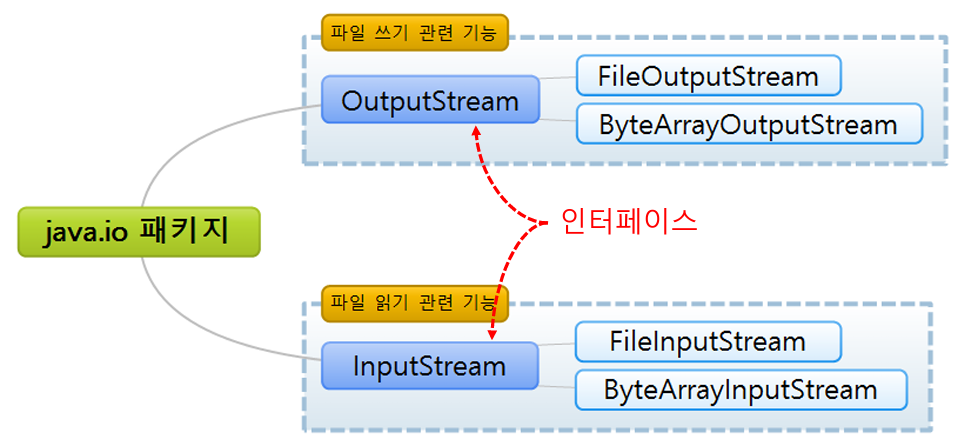
5. 자바 스트림 관련 클래스
- 스트림 관련 클래스들은 각각 InputStream(입력/읽기), OutputStream(출력/저장)과 관련된 인터페이스를 상속받기 때문에 모두 동일한 메서드를 보유
- 프로그래머는 상황에 다라 적절한 클래스를 사용하기만 하면 동일한 방법으로 스트림을 사용할 수 있음
package file;

import java.io.FileNotFoundException;
import java.io.FileOutputStream;
import java.io.IOException;
import java.io.OutputStream;
import java.io.UnsupportedEncodingException;

public class Main02 {

	public static void main(String[] args) {
		// 저장할 파일의 경로
		final String PATH = "./text.txt";

		// 파일에 저장할 내용
		String write_string = "가나다라마바사abcdefg";

		// 특정 인코딩 방식 적용
		// getBytes() 메서드는 존재하지 않는 인코딩 형식에 대한 지정을 방지하기 위해서
		// 예외처리를 강제적으로 요구

		// 변수의 유효성 범위가 서로 달라서 buffer를 인식하지 못하는 문제 발생
		byte[] buffer = null;
		try {
			buffer = write_string.getBytes("utf-8");
		} catch (UnsupportedEncodingException e) {
			e.printStackTrace();
		}
		// finally 블록에서 인식하기 위해서 선언부를 위로 이동
		OutputStream out = null;
		// 파일 저장 절차 시작
		try {
			out = new FileOutputStream(PATH);
			// 파일 쓰기
			out.write(buffer);
			System.out.println("[INFO] 파일 저장 성공 >> "+PATH);
		} catch (FileNotFoundException e) {
			System.out.println("[ERROR] 지정된 경로를 찾을 수 없음 >> "+PATH);
			e.printStackTrace();
		} catch (IOException e) {
			System.out.println("[ERROR] 파일 저장 실패 >> "+PATH);
			e.printStackTrace();
		} catch (Exception e) {
			System.out.println("[ERROR] 알 수 없는 에러 >> "+PATH);
			e.printStackTrace();
		} finally {
			try {
				out.close();
			} catch (IOException e) {
				e.printStackTrace();
			}
		}
	}

}
6. 파일 저장
- OutputStream : 각각의 단게마다 예외 처리를 강제적으로 요구
- try~catch 블록이 형성되는 과정에서 변수의 유효성 범위에 대한 처리에 유의
7. 파일 읽기 과정
- InputStream
package file;

import java.io.FileInputStream;
import java.io.FileNotFoundException;
import java.io.IOException;
import java.io.InputStream;
import java.io.UnsupportedEncodingException;

public class main03 {

	public static void main(String[] args) {
		// 읽을 파일의 경로
		final String PATH = "./text.txt";

		// 읽은 내용이 담겨질 스트림
		byte[] data = null;

		// 읽은 내용이 담겨질 스트림
		String read_string = null;

		// 파일 읽기
		InputStream in = null;
		try {
			in = new FileInputStream(PATH);

			// 읽은 내용을 담기 위한 배열은 파일의 용량만큼 사이즈를 할당 int.available() ->열고 있는 파일의 크기
			data = new byte[in.available()];

			// 파일 읽기 - 파라미터로 전달된 배열 안에, 패일 내용을 담아줌
			in.read(data);
			System.out.println("[INFO] 파일 읽기 성공 >> " + PATH);
		} catch (FileNotFoundException e) {
			System.out.println("[ERROR] 지정된 경로를 찾을 수 없음 >> " + PATH);
			e.printStackTrace();
		} catch (IOException e) {
			System.out.println("[ERROR] 파일 읽기 실패 >> " + PATH);
				e.printStackTrace();
		} catch (Exception e) {
			System.out.println("[ERROR] 알 수 없는 에러 >> " + PATH);
			e.printStackTrace();
		}
		finally {
				try {
					in.close();
				} catch (IOException e) {
					e.printStackTrace();
				}
		}
		// data 배열에 내용이 있다면, 문자열로 변환하여 출력
		if(data != null) {
			try {
				read_string = new String(data, "utf-8");
				System.out.println(read_string);
			} catch (UnsupportedEncodingException e) {
				System.out.println("[ERROR] 인코딩 지정 에러");
				e.printStackTrace();
			}
		}
	}

}