1. 객체 생성 과정
- 빈 객체의 생성 : 아무런 기능이 없는 상태의 빈 객체 (=prototype)
- 변수의 추가, 함수의 추가, 배열의 추가
2. 빈 객체의 생성
- 빈 객체를 만드는 것은 블록괄호{}를 지정하는 것으로 표현
let people = {};
3. 변수의 추가
- 객체 안에 추가되어 있는 변수를 멤버 변수 혹인 프로퍼티라고 함
- 변수를 추가하기 위해서는 객체 이름.변수명 = 값 의 형식을 사용함
- 선언을 위한 별도의 let, const 키워드는 사용되지 않음
people.name = "hsj";
people.gender = "F";
<!DOCTYPE html>
<html lang="en">
<head>
<meta charset="UTF-8">
<meta name="viewport" content="width=device-width, initial-scale=1.0">
<title>Document</title>
</head>
<body>
<script>
let people = {};
people.name = "hsj";
people.gender = "F";
document.write("<h1>" + people.name + "님은 " + people.gender + "입니다.</h1>");
for (key in people) {
document.write("key : " + key + ", value : " + people[key] + "<br>");
}
</script>
</body>
</html>
<!DOCTYPE html>
<html lang="en">
<head>
    <meta charset="UTF-8">
    <meta name="viewport" content="width=device-width, initial-scale=1.0">
    <title>Document</title>
</head>
<body>
    <script>
        let person = {
            key : "value",
            key1 : "value2",
            key2 : true,
            key3 : undefined,
            key4 : [1, 2],
            key5 : function(){}
        };
    </script>
</body>
</html>
<!DOCTYPE html>
<html lang="en">
<head>
    <meta charset="UTF-8">
    <meta name="viewport" content="width=device-width, initial-scale=1.0">
    <title>Document</title>
</head>
<body>
    <script>
        let grades = {
            list : {aa : 10, bb : 20, cc : 30},
            show : function(){
                document.write('Hello World');
            }
        }
        document.write(grades['list']);
        document.write("<br>");
        document.write(grades['list']['bb'])
        document.write("<br>");
        document.write(grades.list);
        document.write("<br>");
        document.write(grades.list.cc);
        document.write("<br>");
        document.write(grades['show']);
        document.write("<br>");
        document.write(grades['show']());
        document.write("<br>");
        document.write(grades.show());
    </script>
</body>
</html>
<!DOCTYPE html>
<html lang="en">
<head>
    <meta charset="UTF-8">
    <meta name="viewport" content="width=device-width, initial-scale=1.0">
    <title>Document</title>
</head>
<body>
    <script>
        let person = {
            name : "hsj",
            age : 23
        };
        person.location = "한국";
        person["gender"] = "여성";

        person.name = "han seo jin";

        person = {
            age : 23
        };
    </script>
</body>
</html>
<!DOCTYPE html>
<html lang="en">
<head>
<meta charset="UTF-8">
<meta name="viewport" content="width=device-width, initial-scale=1.0">
<title>Document</title>
</head>
<body>
<script>
const person = {
name : "hsj",
age : 23
};
person.location = "한국";
person["gender"] = "여성";
person.name = "han seo jin";
person = {
age : 23
};
</script>
</body>
</html>
4. 메서드 안에서 객테 자원 활용
- 객체 안에 포함된 메서드에서 다른 메서드를 호출하거나, 프로퍼티를 활용하고자 하는 경우에는 this 키워드를 사용
this.변수이름 = 값;
let 변수이름 = this.함수이름(값);
<!DOCTYPE html>
<html lang="en">
<head>
<meta charset="UTF-8">
<meta name="viewport" content="width=device-width, initial-scale=1.0">
<title>Document</title>
</head>
<body>
<script>
let people = {};
people.name = "kjh";
people.gender = "여";
people.sayName = function(){
document.write("<h1>" + this.name + "</h1>");
}
people.sayGender = function(){
document.write("<h1>" + this.gender + "</h1>");
}
people.saySomethig = function(msg){
document.write("<h1>" + msg + "</h1>");
}
people.getName = function(){
return this.name;
}
people.getGender = function(){
return this.gender;
}
people.sayInfo = function(){
document.write("<h1>" + this.getName()
+ "님은 " + this.getGender() + "입니다.</h1>");
}
people.sayName();
people.sayGender();
people.saySomethig("Hello Javascript");
people.sayInfo();
</script>
</body>
</html>
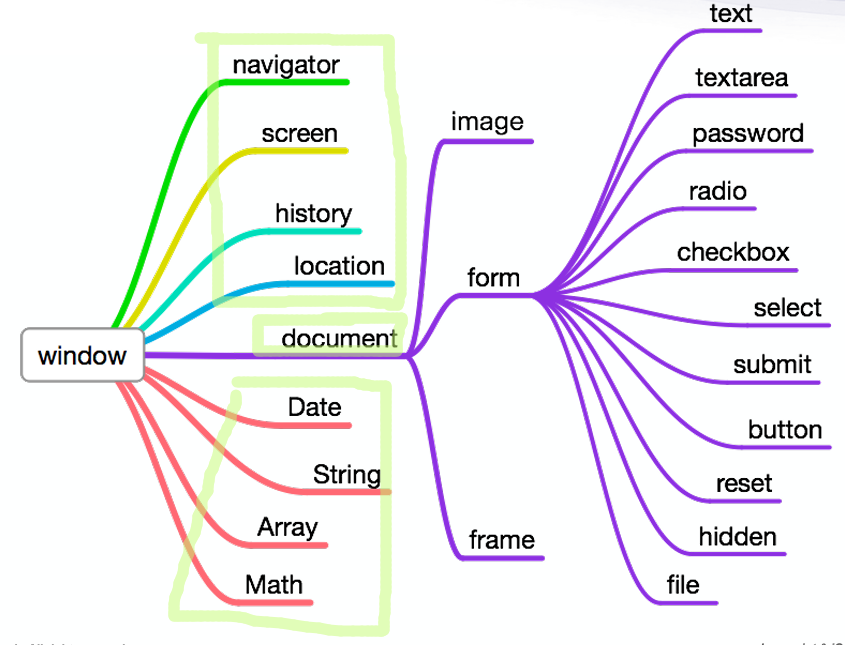
5. 내장객체
- String
<!DOCTYPE html>
<html lang="en">
<head>
<meta charset="UTF-8">
<meta name="viewport" content="width=device-width, initial-scale=1.0">
<title>Document</title>
</head>
<body>
<script>
let url = "https://www.NAVER.com/index.html";
document.write("<p>문자열 : " + url + "</P>");
let len = url.length;
document.write("<p>문자열의 길이 : " + len + "</P>");
let str = url.charAt(4);
document.write("<p>글자 위치 : " + str + "</P>");
let position = url.indexOf(":");
document.write("<p>':'이 처음 나타나는 위치 : " + position + "</P>");
let position2 = url.lastIndexOf("/");
document.write("<p>'/'가 마지막에 나타나는 위치 : " + position2 + "</P>");
let substring = url.substring(0, 5);
document.write("<p>문자열 자르기 : " + substring + "</P>");
let substring2 = url.substring(7);
document.write("<p>문자열 자르기 : " + substring2 + "</P>");
let up = url.toUpperCase();
document.write("<p>대문자 변환 : " + up + "</P>");
let low = url.toLocaleLowerCase();
document.write("<p>대문자 변환 : " + low + "</P>");
</script>
</body>
</html>
<!DOCTYPE html>
<html lang="en">
<head>
<meta charset="UTF-8">
<meta name="viewport" content="width=device-width, initial-scale=1.0">
<title>Document</title>
</head>
<body>
<script>
let str = "오늘,날씨,매우,습함";
let data = str.split(",");
for (let i=0; i<data.length; i++) {
document.write("<h1>" + data[i] + "</h1>");
}
</script>
</body>
</html>
<!DOCTYPE html>
<html lang="en">
<head>
<meta charset="UTF-8">
<meta name="viewport" content="width=device-width, initial-scale=1.0">
<title>Document</title>
</head>
<body>
<script>
let arr = [1, "문자", true, null, undefined, [], {}, function(){}];
console.log(arr);
</script>
</body>
</html>
<!DOCTYPE html>
<html lang="en">
<head>
<meta charset="UTF-8">
<meta name="viewport" content="width=device-width, initial-scale=1.0">
<title>Document</title>
</head>
<body>
<script>
let arr = [1, 2, 3, 4, 5];
arr.push(6);
arr.push({name : "hsj"});
</script>
</body>
</html>
<!DOCTYPE html>
<html lang="en">
<head>
<meta charset="UTF-8">
<meta name="viewport" content="width=device-width, initial-scale=1.0">
<title>Document</title>
</head>
<body>
<script>
let person = {
name : "kjh",
age : 20,
tall : 167
};
let personKey = Object.keys(person);
for(let i=0; i<personKey.length; i++){
const curKey = personKey[i];
const curValue = person[curKey];
console.log(`${curKey} : ${curValue}`);
}
let personVal = Object.values(person);
for( let i=0; i<personVal.length; i++ ){
console.log(personVal[i]);
}
</script>
</body>
</html>
<!DOCTYPE html>
<html lang="en">
<head>
<meta charset="UTF-8">
<meta name="viewport" content="width=device-width, initial-scale=1.0">
<title>Document</title>
</head>
<body>
<script>
let arr = [1, 2, 3, 4];
arr.forEach(function(elm){
console.log(elm);
});
arr.forEach ((elm) => {console.log(elm);});
</script>
</body>
</html>
<!DOCTYPE html>
<html lang="en">
<head>
<meta charset="UTF-8">
<meta name="viewport" content="width=device-width, initial-scale=1.0">
<title>Document</title>
</head>
<body>
<script>
const arr = [1, 2, 3, 4];
console.log(arr);
const newArr = [];
arr.forEach(function(elm){
newArr.push(elm * 2);
});
console.log(newArr);
</script>
</body>
</html>
<!DOCTYPE html>
<html lang="en">
<head>
<meta charset="UTF-8">
<meta name="viewport" content="width=device-width, initial-scale=1.0">
<title>Document</title>
</head>
<body>
<script>
const arr = [1, 2, 3, 4];
const newArr = arr.map((elm)=>{
return elm*2;
});
console.log(newArr);
</script>
</body>
</html>
<!DOCTYPE html>
<html lang="en">
<head>
<meta charset="UTF-8">
<meta name="viewport" content="width=device-width, initial-scale=1.0">
<title>Document</title>
</head>
<body>
<script>
const arr = [1, 2, 3, 4];
let number = 3;
arr.forEach((elm)=>{
if (elm === number) {
console.log(true);
}
});
console.log(arr.includes(number));
</script>
</body>
</html>
<!DOCTYPE html>
<html lang="en">
<head>
<meta charset="UTF-8">
<meta name="viewport" content="width=device-width, initial-scale=1.0">
<title>Document</title>
</head>
<body>
<script>
const arr = [1, 2, 3, 4];
let number = "3";
console.log(arr.indexOf(number));
let number2 = 3;
console.log(arr.indexOf(number2));
</script>
</body>
</html>
<!DOCTYPE html>
<html lang="en">
<head>
<meta charset="UTF-8">
<meta name="viewport" content="width=device-width, initial-scale=1.0">
<title>Document</title>
</head>
<body>
<script>
const arr = [
{color : "red"},
{color : "black"},
{color : "blue"},
{color : "green"},
{color : "blue"}
];
console.log(arr.findIndex((elm)=> elm.color === "green"));
const element = arr.find((elm) => {
return elm.color == "blue";
});
console.log(element);
console.log(arr.filter((elm) => elm.color == "blue"));
</script>
</body>
</html>
<!DOCTYPE html>
<html lang="en">
<head>
<meta charset="UTF-8">
<meta name="viewport" content="width=device-width, initial-scale=1.0">
<title>Document</title>
</head>
<body>
<script>
const arr = [
{num : 1, color : "red"},
{num : 2, color : "black"},
{num : 3, color : "blue"},
{num : 4, color : "green"},
{num : 5, color : "blue"}
];
console.log(arr.slice(0,2));
const arr2 = [
{num : 6, color : "red"},
{num : 7, color : "black"}
];
console.log(arr.concat(arr2));
</script>
</body>
</html>
<!DOCTYPE html>
<html lang="en">
<head>
<meta charset="UTF-8">
<meta name="viewport" content="width=device-width, initial-scale=1.0">
<title>Document</title>
</head>
<body>
<script>
let chars = ["나", "다", "가"];
chars.sort();
console.log(chars);
let numbers = [0, 1, 3, 2, 10, 30, 20];
numbers.sort();
console.log(numbers);
</script>
</body>
</html>
<!DOCTYPE html>
<html lang="en">
<head>
<meta charset="UTF-8">
<meta name="viewport" content="width=device-width, initial-scale=1.0">
<title>Document</title>
</head>
<body>
<script>
const arr = ["한서진", "님", "안녕하세요", "또 오셨네요"];
console.log(arr[0], arr[1], arr[2], arr[3]);
console.log(arr.join());
console.log(arr.join(" "));
</script>
</body>
</html>
<!DOCTYPE html>
<html lang="en">
<head>
<meta charset="UTF-8">
<meta name="viewport" content="width=device-width, initial-scale=1.0">
<title>Document</title>
</head>
<body>
<script>
let s = ['이유덕', '이재영', '권종표', '이재영', '박민호',
'강상희','이재영', '김지완', '최승혁', '이성연', '박영서',
'박민호', '전경헌', '송정환', '김재성', '이유덕', '전경헌'];
function naming1(){
let kim = 0;
let lee = 0;
for(let i=0; i<s.length; i++){
if( s[i][0] === "이" ){
lee++;
}
if( s[i][0] === "김" ){
kim++;
}
}
return "kim : " + kim + ", lee : " + lee;
}
document.write(naming1() + "<br/>");
function naming2(param){
let count = 0;
for(let i=0; i<s.length; i++){
if(s[i] === param){
count++;
}
}
return param + " : " + count;
}
document.write(naming2("이재영") + "<br/>");
function naming3(){
let uniq = [];
for(let i=0; i<s.length; i++){
let uni_count = 0;
for(let j=0; j<s.length; j++){
if( s[i] == s[j] ){
uni_count++;
}
}
if( uni_count < 2 ){
uniq.push(s[i]);
}
}
return uniq;
}
document.write(naming3() + "<br/>");
</script>
</body>
</html>
<!DOCTYPE html>
<html lang="en">
<head>
<meta charset="UTF-8">
<meta name="viewport" content="width=device-width, initial-scale=1.0">
<title>Document</title>
</head>
<body>
<script>
let max = Math.max(100, 123);
document.write("<h1>최대값 : " + max + "</h1>");
let min = Math.min(100, 123);
document.write("<h1>최소값 : " + min + "</h1>");
document.write("<h1>원주율 : " + Math.PI + "</h1>");
let num1 = 3.789;
document.write("<h1>반올림 : " + Math.round(num1) + "</h1>");
document.write("<h1>소수점 올림 : " + Math.ceil(num1) + "</h1>");
document.write("<h1>소수점 내림 : " + Math.floor(num1) + "</h1>");
let num2 = -123;
document.write("<h1>절대값 : " + Math.abs(num2) + "</h1>");
document.write("<h1>난수 발생 : " + Math.random() + "</h1>");
</script>
</body>
</html>
<!DOCTYPE html>
<html lang="en">
<head>
<meta charset="UTF-8">
<meta name="viewport" content="width=device-width, initial-scale=1.0">
<title>Document</title>
</head>
<body>
<script>
function random(n1, n2) {
return parseInt(Math.random() * (n2 - n1 + 1)) +n1;
}
let num = random(0, 9);
document.write("<h1>0~9 사이의 랜덤 숫자 : " + num + "</h1>")
</script>
</body>
</html>
<!DOCTYPE html>
<html lang="en">
<head>
<meta charset="UTF-8">
<meta name="viewport" content="width=device-width, initial-scale=1.0">
<title>Document</title>
</head>
<body>
<script>
function random(n1, n2) {
return parseInt(Math.random() * (n2 - n1 + 1)) +n1;
}
let auth ="";
for(let i=0; i<5; i++) {
auth += random(0, 9);
}
document.write("<h1>인증번호 : " + auth + "</h1>");
let arr = ["가위", "바위", "보"];
function getGame() {
let i = Math.floor(Math.random() * 3);
document.write("<h1>" + arr[i] + "</h1>");
}
getGame();
</script>
</body>
</html>
<!DOCTYPE html>
<html lang="en">
<head>
<meta charset="UTF-8">
<meta name="viewport" content="width=device-width, initial-scale=1.0">
<title>Document</title>
</head>
<body>
<script>
let mydate = new Date();
let yy = mydate.getFullYear();
let mm = mydate.getMonth()+1;
let dd = mydate.getDate();
let result = yy + "-" + mm + "-" + dd;
document.write("<h1>" + result + "</h1>");
let days = ["일", "월", "화", "수", "목", "금", "토"];
let i = mydate.getDay();
let day = days[i];
let hh = mydate.getHours();
let mi = mydate.getMinutes();
let ss = mydate.getSeconds();
let result2 = yy + "-" + mm + "-" + dd + " " + day + "요일" + hh + ":" + mi + ":" + ss;
document.write("<h1>" + result2 + "</h1>");
</script>
</body>
</html>
<!DOCTYPE html>
<html lang="en">
<head>
<meta charset="UTF-8">
<meta name="viewport" content="width=device-width, initial-scale=1.0">
<title>Document</title>
</head>
<body>
<script>
let mydate = new Date();
let days = ["일", "월", "화", "수", "목", "금", "토"];
mydate.setYear(2024);
mydate.setMonth(11);
mydate.setDate(26);
mydate.setHours(12);
mydate.setMinutes(50);
mydate.setSeconds(55);
let yy = mydate.getFullYear();
let mm = mydate.getMonth()+1;
let dd = mydate.getDate();
let i = mydate.getDay();
let day = days[i];
let hh = mydate.getHours();
let mi = mydate.getMinutes();
let ss = mydate.getSeconds();
let result1 = yy + "-" + mm + "-" + dd + " " + day + "요일" + hh + ":" + mi + ":" + ss;
document.write("<h1>" + result1 + "</h1>");
</script>
</body>
</html>