
Spring Security
스프링 시큐리티는
인증 ( Authentication )권한 ( Authorization )부여 및 보호 기능을 제공하는 프레임워크
𝙌. 인증, 인가
인증 Authentication
- 사용자의 신원을 증명하는 것
- 로그인
인가 Authorization
- 특정 리소스에 접근할 수 있는 권한을 부여하는 것

보통 인증절차를 거친 후 인가 절차를 진행
인증 방식
| credential방식 | username, password를 이용하는 방식 |
|---|---|
| 이중 인증 (twofactor 인증) | 사용자가 입력한 개인 정보를 인증 후 다른 인증 체계 (예: 물리적 카드)를 이용하여 두가지의 조합으로 인증하는 방식 |
| 하드웨어 인증 | 자동차 키와 같은 방식 |
이 중, Spring Security 는
credential기반의 인증을 취합니다.
- principal (접근 주체) : 아이디 (username)
- credential (비밀번호): 비밀번호 (password)
Spring Security 특징
필터를 기반으로 동작한다.- Spring MVC 와 분리되어 관리하고 동작할 수 있다.
Filter는 Dispatcher Servlet으로 가기 전에 적용되므로 가장 먼저 URL 요청을 받음Interceptor는 Dispatcher와 Controller 사이에 위치
Bean으로 설정할 수 있다.- Spring Security 3.2부터는 XML 설정을 하지 않아도 된다.
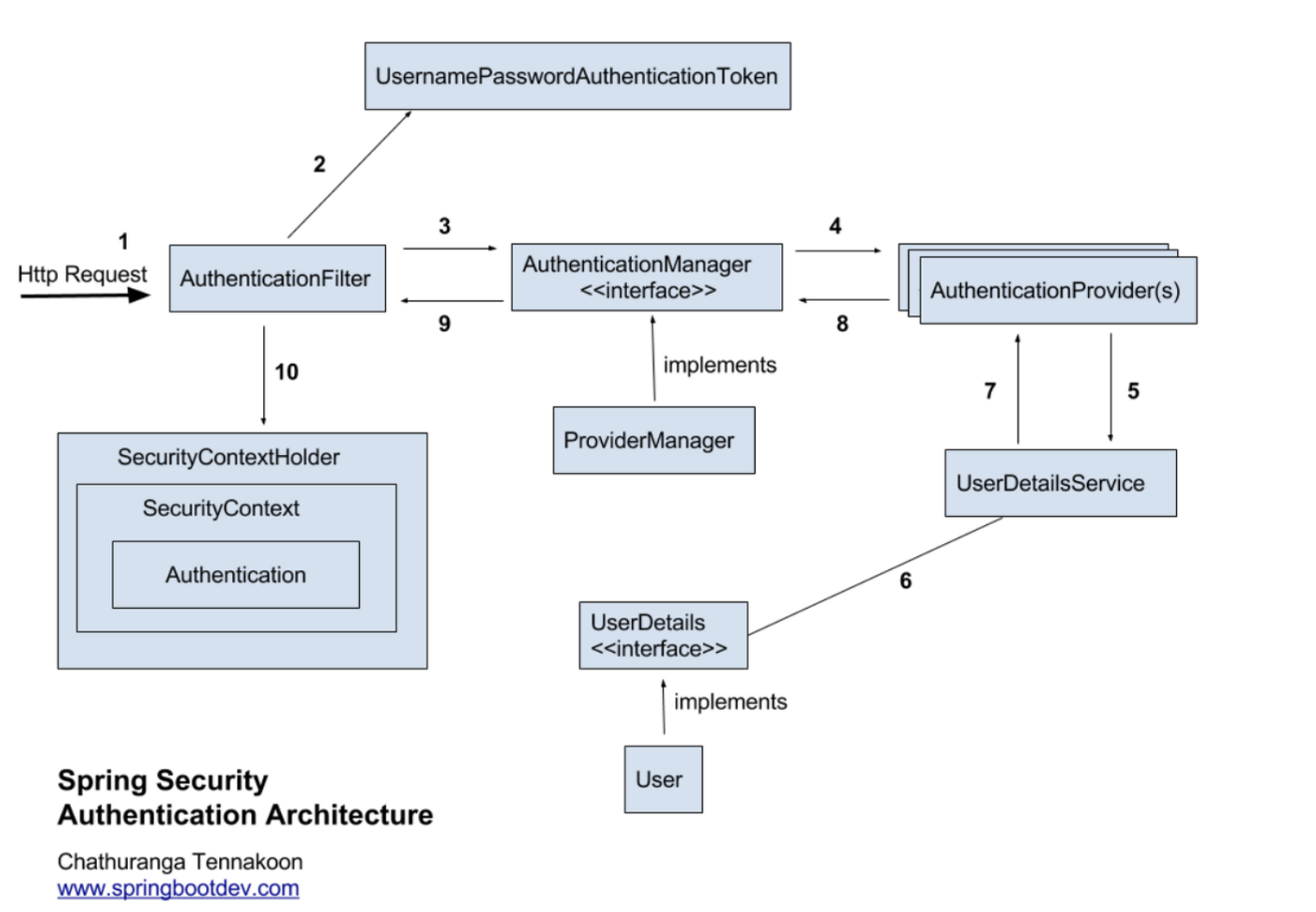
- Spring Security 3.2부터는 XML 설정을 하지 않아도 된다.
1. Http Request 수신
   :사용자가 로그인 정보와 함께 인증 요청을 한다.

2. 유저 자격을 기반으로 인증 토큰 생성
   :AuthenticationFilter 가 요청을 가로채고 가로챈 정보를 통해
   UsernamePasswordAuthenticationTocken의 인증용 객체를 생성

3. Filter를 통해 AuthenticationToKen을 AuthenticationManager 로 위임
   :AuthenticationManager의 구현체인 ProviderManager에게 생성한
   UsernamePasswordToken 객체를 전달

4. AuthenticationProvider의 목록으로 인증 시도
   :AuthenticationManager는 등록된 AuthenticationProvider을 조회하며 인증 요구

5. UserDetailsService의 요구
   :실제 데이터베이스에서 사용자 인증정보를 가져오는
   UserDetailsService에 사용자 정보를 넘겨줌

6. UserDetails를 이용해 User객체에 대한 정보 탐색
   :넘겨받은 사용자 정보를 통해 데이터베이스에서 찾아낸 사용자 정보인
   UserDetials 객체를 만듦

7. User 객체의 정보들을 UserDetails가 UserdetailsService(LoginService)로 전달
   :AuthenticationProvider들은 UserDetails를 넘겨받고 사용자 정보를 비교

8. 인증 객체 or AuthenticationException
   :인증이 완료 되면 권한 등의 사용자 정보를 담은 Authentication 객체를 반환

9. 인증 끝
   :다시 최초의 AuthenticationFilter에 Authentication 객체 반환

10. SecurityContext에 인증 객체를 설정
   :Authentication 객체를 SecurityContext에 저장
SecurityContextHolder는 세션 영역에 있는 SecurityContext에 Authentication객체를 저장- 사용자 정보를 저장한다는 것은 스프링 시큐리티가 전통적인
세션-쿠키기반의 인증방식을 사용한다는 것을 의미
Spring Security의 주요 모듈
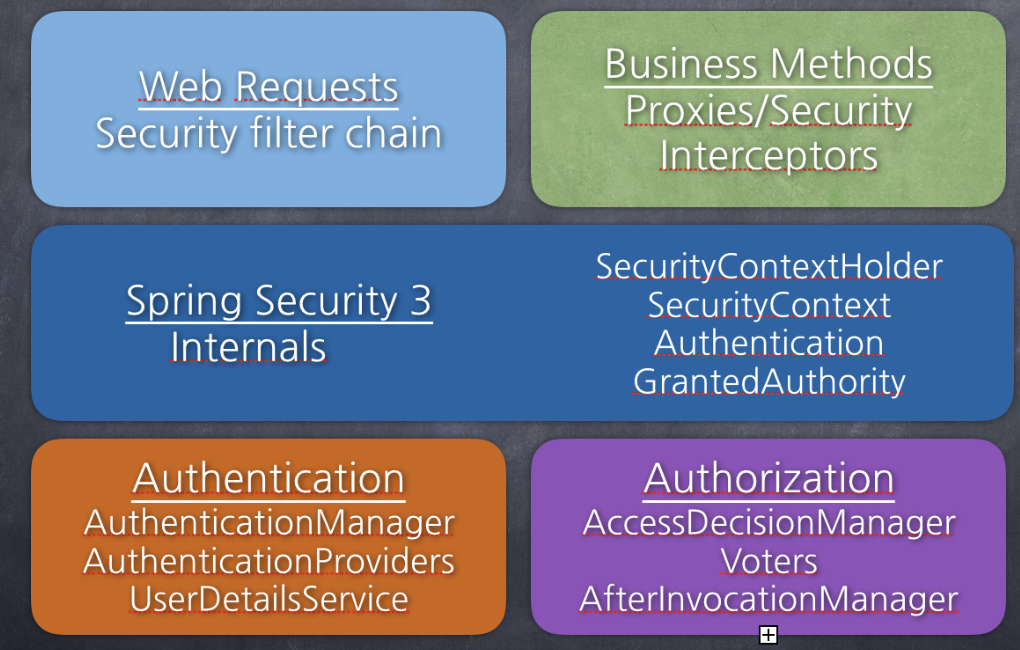
| 스프링시큐리이의 주요 컴포넌트 | |
|---|---|
| SecurityContextHolder | 보안 주체의 세부정보를 포함하여 응용프로그램의 현재 보안 컨텍스트(Bean들)에 대한 세부 정보가 저장된다. |
| SecurityContext | Authentication을 보관하는 역할, SecurityContext를 통해 Authentication 객체를 가져올 수 있다. |
| Authentication | 현재 접근하는 주체의 정보와 권한을 담는 인터페이스. SecurityContext에 저장된다. |
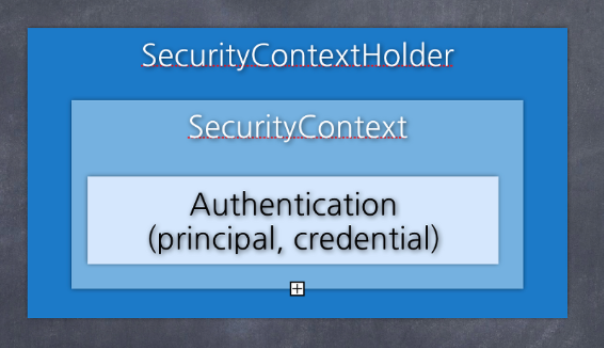
유저의 아이디와 패스원드 사용자 정보를 넣고 실제 가입된 사용자인지 체크한 후 인증에 성공하면 사용자의 principal 과 credential정보를 Authentication안에 담는다. 스프링 시큐리티에서 방금 담은 Authentication 을 SecurityContext에 보관한다. 이 SecurityContext를 SecurityContextHolder에 담아 보관하게 되는 것이다.
SecurityContextHolder를 통해 SecurityContext에 접근하고
SecurityContext를 통해 Authentication에 접근할 수 있다.
class interface AUthentication extends Principal, Serializable {
	// 현재 사용자의 권한 목록을 가져옴
	Collection<? extends GrantedAuthority> getAuthorities();

    // credential(주로 비밀번호)를 가져옴
    Object getCredentials();

    Object getDetails();

    // Principal 객체를 가져옴
    Object getPrincipal();

    // 인증 여부를 가져옴
    boolean isAuthenticated();

    // 인증 여부를 설정함
    void setAuthenticated(boolean isAuthenticated) throws IllegalArgumentException;
}| UsernamePasswordAuthenticationToken |
|---|
| AbstractAuthenticationToken의 하위 클래스. 유저의 아이디가 Principal의 역할을 하고 유저의 Password가 Credintial의 역할을 함. UsernamePasswordAuthenticationToken의 첫번째 생성자는 인증 전의 객체를 생성하고 두번쨰 생성자는 인증이 완료된 객체를 생성 |
public class UsernamePasswordAuthenticationToken extends AbstractAuthenticationToken {
	// 주로 사용자의 아이디
    private final Object principal;

    // 주로 사용자의 비밀번호
    private Object credentials;

    // 인증 완료 전의 객체 생성
    public UsernamePasswordAuthenticationToken(Object principal, Object credential) {
    	super(null);
        this.principal = principal;
        this.credentails = credentails;
        this.setAuthenticated(false);	//super.setAuthenticated(false);
    }

    // 인증 완료 후의 객체 생성
    public UsernamePasswordAuthenticationToken(Object principal, Object credential, Collection<? extends GrantedAuthority> authorities) {
    	super(authorities);
        this.principal = principal;
        this.credentials = credentials;
        super.setAuthenticated(true);
    }

    ... 생략 ...
}

public abstract class AbstractAuthenticationToken implements Authentication, CredentailsContainer {}| AuthenticationProvider |
|---|
| 실제 인증에 대한 부분을 처리하는데, 인증 전의 Authentication 객체를 받아서 인증이 완료된 객체를 반환하는 역할 AuthenticationProvider인터페이스를 구현해서 Custom한 AuthenticationProvider를 작성해서 AuthenticationManager에 등록하면 됨 |
public interface AuthenticationProvider {
	// 인증 전의 Authentication 객체를 받아서 인증된 Authentication 객체를 반환
    Authentication authenticate(Authentication var1) throws AuthenticationException;

    boolean supports(Class<?> var1);
}| AuthenticationManager |
|---|
| 인증에 대한 부분은 AuthenticationManager를 통해 처리하는데 실질적으로는 AuthenticationManager에 등록된 AuthenticationProvider에 의해 처리됨 인증에 성공하면 2번쨰 생성자를 이용해 인증이 성공한 ( isAuthenticated = true ) 객체를 생성하여 SecurityContext에 저장 인증상태를 유지하기 위해 세션에 보관하며, 인증이 실패한 경우에는 AuthenticationException을 발생시킴 |
public interface AUthenticationManager {
	Authentication authenticate(Autentication authentication) throws AuthenticationException;
}AuthenticationManager를 implements한 ProviderManager는 실제 인증 과정에 대한 로직을 가지고 있는 AuthenticationProvider 를 List로 가지고 있으며 ProviderManager는 for문을 통해 모든 provider를 조회하면서 authenticate 처리를 한다.
ProviderManager에 직접 구현한 CustomAuthenticationProvider를 등록하는 방법은 SecurityConfig에서 할 수 있다.
참조 https://mangkyu.tistory.com/76
| UserDetails |
|---|
| 인증에 성공하여 생성된 UserDetails 객체는 Authentication객체를 구현한 UsernamePasswordAuthenticationToken을 생성하기 위해 사용된다. UserDetails 인터페이스를 살펴보면 아래와 같이 정보를 반환하는 메서드를 가지고 있다. |
public interface UserDetails extends Serializable {
	Collection<? extends GrantedAuthority> getAuthorities();

    String getPassword();

    String getUsername();

    boolean isAccountNonExpired();

    boolean isAccountNonLocked();

    boolean isCredentialsNonExpired();

    boolean isEnabled();
}| UserDetailsService |
|---|
| UserDetialsService 인터페이스는 UserDetails객체를 반환하는 단 하나의 메서드를 가지고 있는데 일반적으로 이를 구현한 클래스의 내부에 UserRepository를 주입받아 DB와 연결하여 처리한다. |
public interface UserDetailsService {
	UserDetails loadUserByUsername(String var1) throws USernameNotFoundException;
}| Password Encoding |
|---|
| AuthenticationManagerBuilder.userDetailsService().passwordEncoder() 를 통해 패스워드 암호화에 사용될 PasswordEncoder 구현체를 지정할 수 있다. |
@Override
protected void configure(AuthenticationManagerBuilder auth) throws Exception {
	auth.userDetailsService(userDetailService).passwordEncoder(passwordEncoder());
}

@Bean
public PasswordEncoder passwordEncoder() {
	return new BCryptPasswordEncoder();
}| GrantedAuthority |
|---|
| GrantAuthority는 현재 사용자(principal)가 가지고 있는 권한을 의미한다. ROLEADMIN나 ROLE_USER와 같이 ROLE*의 형태로 사용하며, 보통 "roles" 이라고 한다. GrantedAuthority 객체는 UserDetailsService에 의해 불러올 수 있고, 특정 자원에 대한 권한이 있는지를 검사하여 접근 허용 여부를 결정한다. |