Lv.0 인텔리제이 동작 (04-01)
처음에 실행을 눌렀는데 역시 또 yml을 만들고 DB를 만들고 시작 하였다.
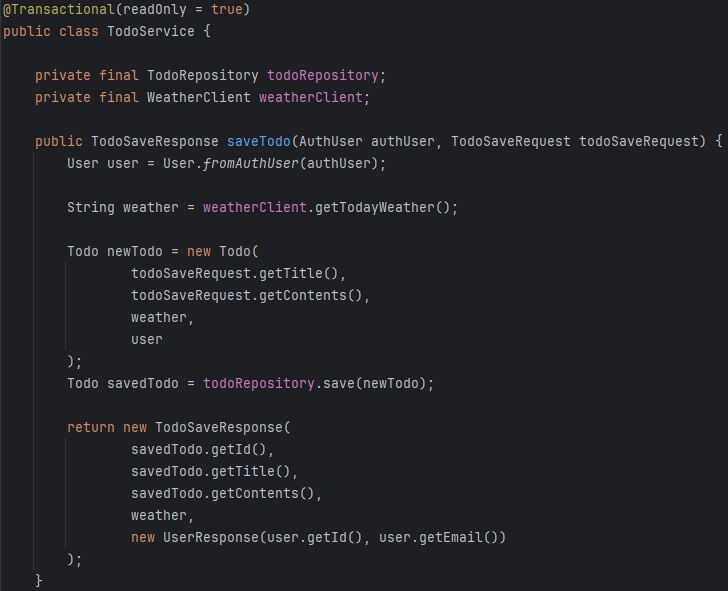
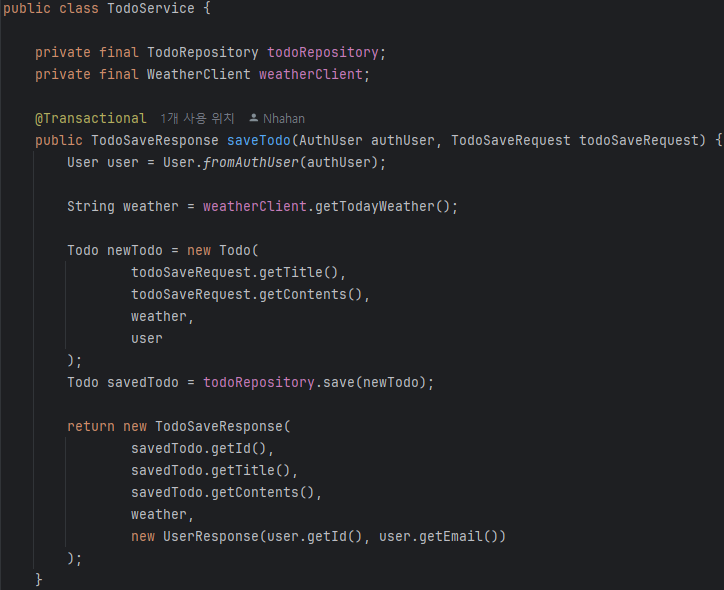
Lv.1-1 코드 개선 퀴즈 - @Transactional의 이해
readonly를 지우고 service코드에 다시 추가를 해서 진행을 하였다.
BF
AF
Lv.1-2 코드 추가 퀴즈 - JWT의 이해
AuthUserArgumentResolver 클래스
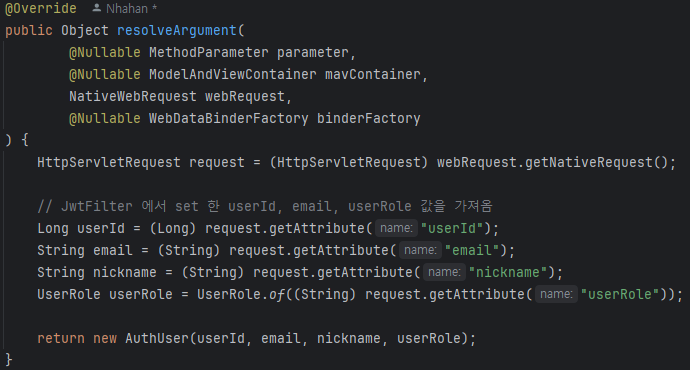
JwtFilter 클래스

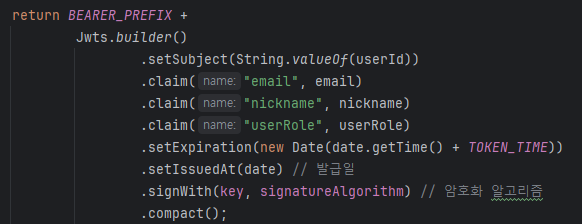
JwtUtil 클래스
TodoController 클래스
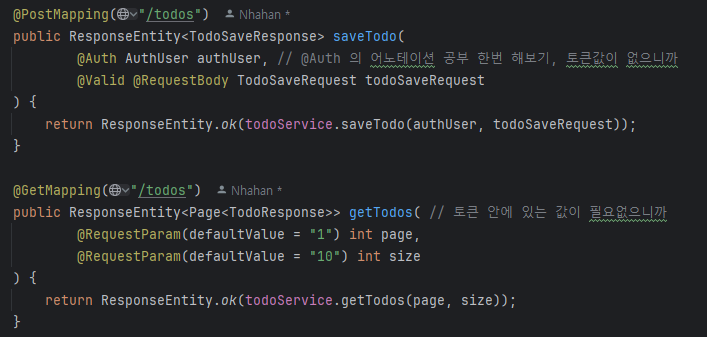
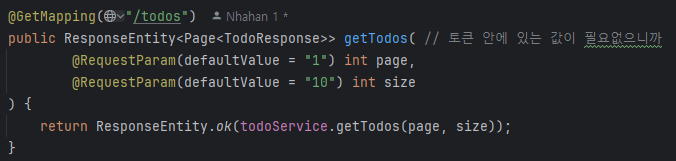
PostMan에서 계속 null값이 나왔는데 JwtUtil을 고쳤더니 나왔다. 왜냐하면 Post에서는 @Auth 어노테이션이 있는 반면 Get에서는 @Auth를 따로 안쓴다. 그리고 todo와 user 연관관계가 맺어져있고 조회를 할 때는 토큰 값만 있어야 하는 반면 Post에서는 토큰에 있는 값을 추출 해야만 @Auth를 통해 nickname이 나오게 된다.
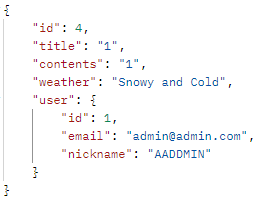
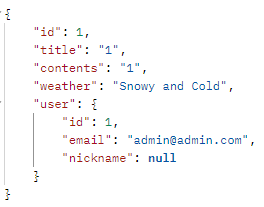
Lv.1-3 코드 개선 퀴즈 - JPA의 이해
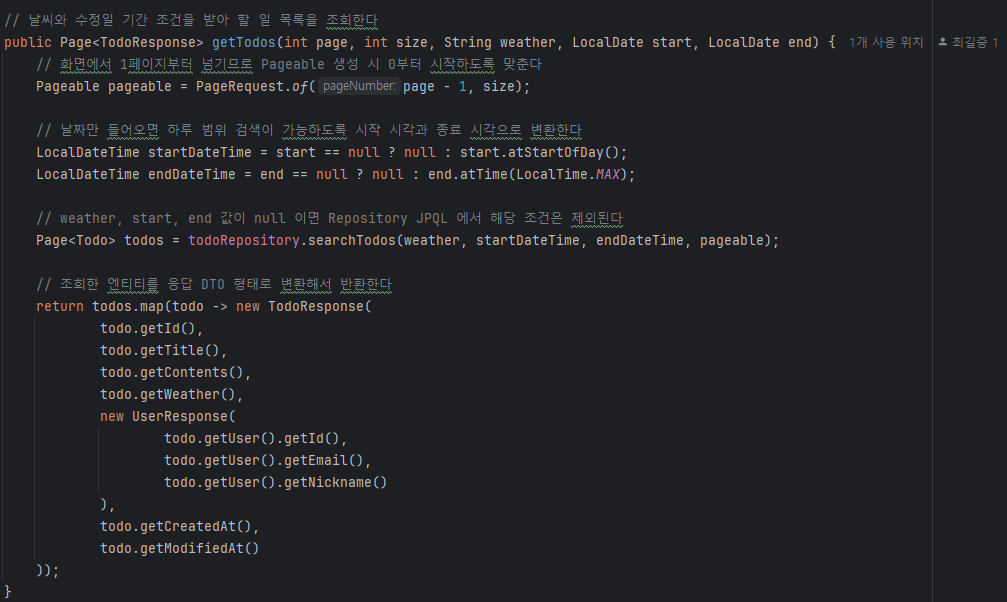
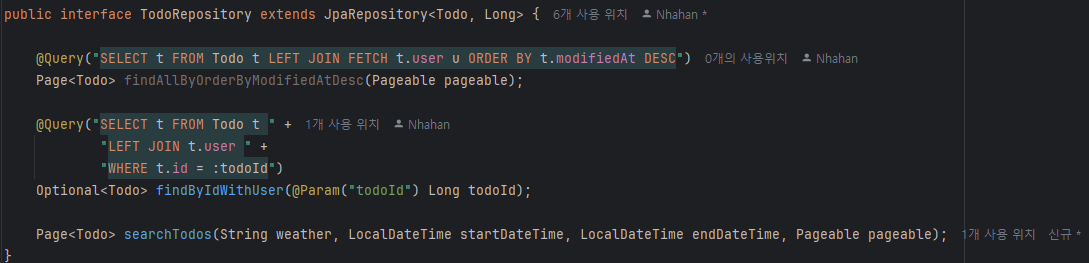
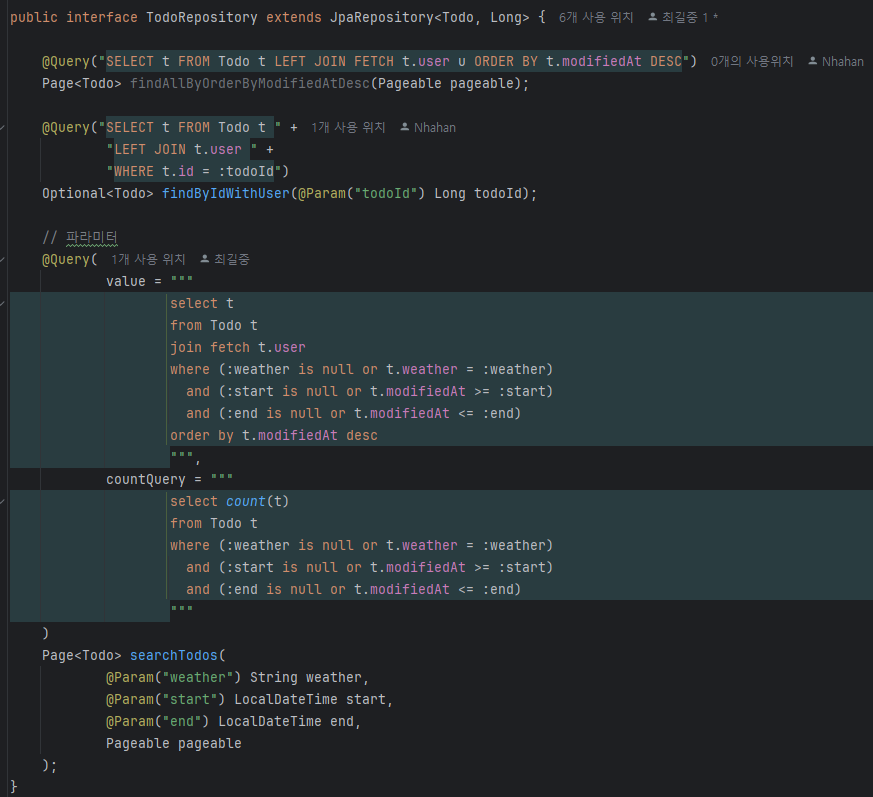
Lv.1-4 테스트 코드 퀴즈 - 컨트롤러 테스트의 이해
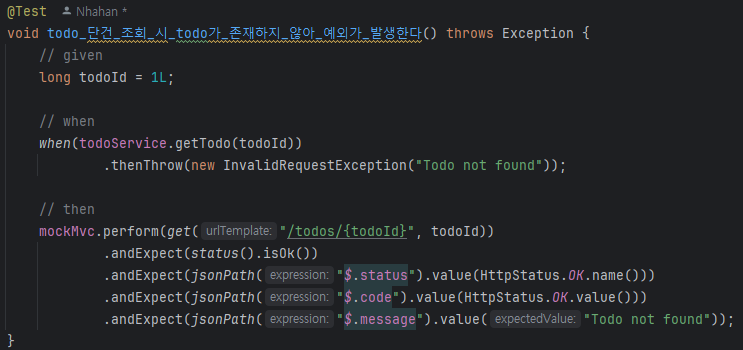
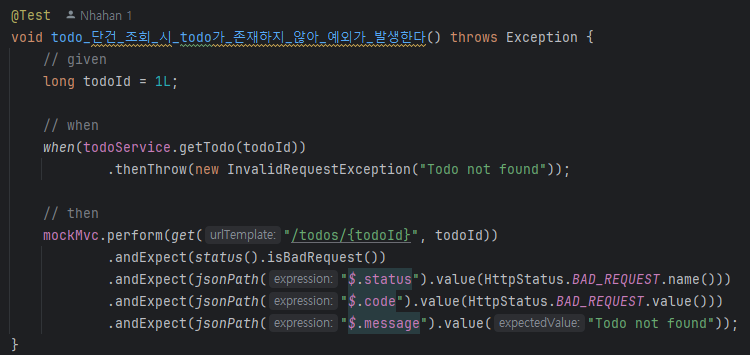
Nickname 추가는 생략
Lv.1-5 코드 개선 퀴즈 - AOP의 이해


Lv.2-6 JPA Cascade


Lv.2-7 N+1

Lv.2-8 QueryDSL (04-02)
config에 생성
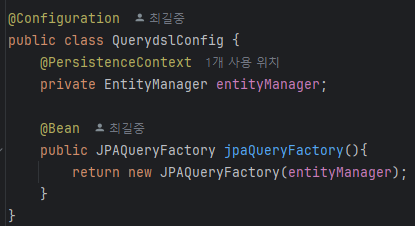
먼저 작성

TodoRepositoryCustom 구현, 메서드 생성은 나중에
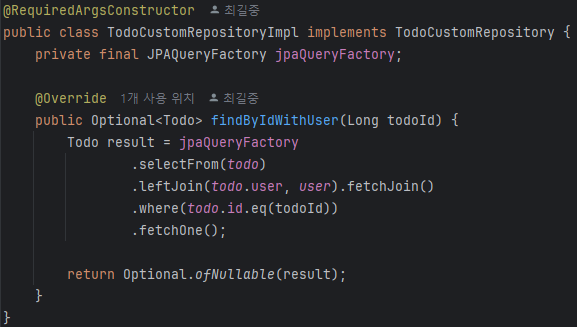
TodoRepositoryCustom 상속

Lv.2-9 Spring Security
클래스 주석 처리
- AuthUserArgumentResolver
- FilterConfig
- JwtFilter
- PasswordEncoder
- WebConfig
JwtAuthenticationFilter 클래스
@Slf4j
@Component
@RequiredArgsConstructor
public class JwtAuthenticationFilter extends OncePerRequestFilter {

    private final JwtUtil jwtUtil;

    @Override
    protected void doFilterInternal(
            HttpServletRequest request,
            HttpServletResponse response,
            FilterChain filterChain
    ) throws ServletException, IOException {

        String requestUri = request.getRequestURI();

        // 로그인/회원가입 요청은 인증 없이 통과시킨다
        if (requestUri.startsWith("/auth")) {
            filterChain.doFilter(request, response);
            return;
        }

        String bearerToken = request.getHeader(HttpHeaders.AUTHORIZATION);

        // 토큰이 없으면 여기서 바로 막지 않고 Security 설정으로 넘긴다
        if (!StringUtils.hasText(bearerToken)) {
            filterChain.doFilter(request, response);
            return;
        }

        try {
            // Bearer 접두사를 제거한 순수 JWT를 꺼낸다
            String token = jwtUtil.substringToken(bearerToken);

            // JWT 안의 사용자 정보를 꺼낸다
            Claims claims = jwtUtil.extractClaims(token);

            Long userId = Long.parseLong(claims.getSubject());
            String email = claims.get("email", String.class);
            String nickname = claims.get("nickname", String.class);
            UserRole userRole = UserRole.valueOf(claims.get("userRole", String.class));

            // 기존에 사용하던 AuthUser를 principal로 재사용한다
            AuthUser authUser = new AuthUser(userId, email, nickname, userRole);

            // Spring Security 권한 형식은 ROLE_ 접두사를 사용한다
            UsernamePasswordAuthenticationToken authentication =
                    new UsernamePasswordAuthenticationToken(
                            authUser,
                            null,
                            List.of(new SimpleGrantedAuthority("ROLE_" + userRole.name()))
                    );

            // request attribute가 아니라 SecurityContext에 인증 정보를 저장한다
            SecurityContextHolder.getContext().setAuthentication(authentication);

        } catch (SecurityException | MalformedJwtException e) {
            log.error("유효하지 않은 JWT 서명입니다.", e);
            response.sendError(HttpServletResponse.SC_UNAUTHORIZED, "유효하지 않은 JWT 서명입니다.");
            return;
        } catch (ExpiredJwtException e) {
            log.error("만료된 JWT 토큰입니다.", e);
            response.sendError(HttpServletResponse.SC_UNAUTHORIZED, "만료된 JWT 토큰입니다.");
            return;
        } catch (UnsupportedJwtException e) {
            log.error("지원되지 않는 JWT 토큰입니다.", e);
            response.sendError(HttpServletResponse.SC_BAD_REQUEST, "지원되지 않는 JWT 토큰입니다.");
            return;
        } catch (Exception e) {
            log.error("JWT 처리 중 오류가 발생했습니다.", e);
            response.sendError(HttpServletResponse.SC_INTERNAL_SERVER_ERROR, "인증 처리 중 오류가 발생했습니다.");
            return;
        }

        filterChain.doFilter(request, response);
    }
}
JwtAuthenticationFilter
@Configuration
@RequiredArgsConstructor
public class SecurityConfig {

    private final JwtAuthenticationFilter jwtAuthenticationFilter;

    @Bean
    public PasswordEncoder passwordEncoder() {
        return new BCryptPasswordEncoder();
    }

    @Bean
    public SecurityFilterChain securityFilterChain(HttpSecurity http) throws Exception {
        return http
                // JWT 기반 인증이므로 csrf는 비활성화한다
                .csrf(AbstractHttpConfigurer::disable)

                // 세션을 쓰지 않는 stateless 방식으로 설정한다
                .sessionManagement(session ->
                        session.sessionCreationPolicy(SessionCreationPolicy.STATELESS)
                )

                // 폼 로그인과 httpBasic은 사용하지 않는다
                .formLogin(AbstractHttpConfigurer::disable)
                .httpBasic(AbstractHttpConfigurer::disable)

                // URL별 접근 권한을 Spring Security 방식으로 설정한다
                .authorizeHttpRequests(auth -> auth
                        .requestMatchers("/auth/**").permitAll()
                        .requestMatchers("/admin/**").hasRole("ADMIN")
                        .anyRequest().authenticated()
                )

                // 우리가 만든 JWT 필터를 Security 필터 체인에 등록한다
                .addFilterBefore(jwtAuthenticationFilter, UsernamePasswordAuthenticationFilter.class)

                .build();
    }
}
3-10. QueryDSL을 사용하여 검색 기능 만들기 (04-03)
TOdoController
    @GetMapping("/todos/search")
    public ResponseEntity<Page<TodoSearchResponse>> searchTodos(
            @RequestParam(required = false) String title,
            @RequestParam(required = false) @DateTimeFormat(iso = DateTimeFormat.ISO.DATE) LocalDate start,
            @RequestParam(required = false) @DateTimeFormat(iso = DateTimeFormat.ISO.DATE) LocalDate end,
            @RequestParam(required = false) String managerNickname,
            @RequestParam(defaultValue = "1") int page,
            @RequestParam(defaultValue = "10") int size
    ) {
        return ResponseEntity.ok(todoService.searchAllTodos(title, start, end, managerNickname, page, size));
    }
TodoSearchResponse
@Getter
@AllArgsConstructor
public class TodoSearchResponse {
    private final Long id;
    private final String title;
    private final Long managerCount;
    private final Long commentCount;
}
TodoService
    public Page<TodoSearchResponse> searchAllTodos(String title, LocalDate start, LocalDate end, String managerNickname, int page, int size) {
        Pageable pageable = PageRequest.of(page -1, size);

        return todoRepository.searchAllTodos(title, managerNickname, start, end, pageable);
    }
TodoCustomRepository
public interface TodoCustomRepository {
    Optional<Todo> findByIdWithUser(Long todoId);

    Page<TodoSearchResponse> searchAllTodos(String title, String managerNickname, LocalDate start, LocalDate end, Pageable pageable);
}
TodoCustomRepositoryImpl 제일 중요
@Override
    public Page<TodoSearchResponse> searchAllTodos(String title, String managerNickname, LocalDate start, LocalDate end, Pageable pageable) {

        QManager managerSub = new QManager("managerSub"); // 서브쿼리에 따로 쓰기 위한 Q타입 객체, 메인 쿼리에서 이미 manger를 사용하기 때문
        QUser userSub = new QUser("userSub"); // 마찬가지 그러면 메인 쿼리란 무엇인가?

        List<TodoSearchResponse> responses = jpaQueryFactory // 쿼리 DSL로 조회한 결과를 response에 넣겠다.
                .select(
                        Projections.constructor( // 조회 결과를 DTO 생성자로 객체로 만듬, 필요한 값만 가져와서 TodoSearchResponse를 가져오겠다.
                                TodoSearchResponse.class,
                                todo.id,
                                todo.title,
                                manager.id.countDistinct(),
                                comment.id.countDistinct()
                        ) // TodoSearchResponse 만든 부분
                )
                .from(todo)
                .leftJoin(todo.managers,manager) // manager라는 이름으로 left join하겠다
                .leftJoin(manager.user,user)
                .leftJoin(todo.comments,comment)
                .where(
                        titleContains(title),
                        createdAtGoe(start),
                        createdAtLoe(end),
                        managerNicknameExists(managerNickname, managerSub, userSub)
                )
                // countDistinct를 쓰더라도 group by로 Todo 기준 묶어준다
                .groupBy(todo.id, todo.title, todo.createdAt)
                // 생성일 최신순 정렬
                .orderBy(todo.createdAt.desc())
                .offset(pageable.getOffset())
                .limit(pageable.getPageSize())
                .fetch();

        Long total = jpaQueryFactory
                .select(todo.id.countDistinct())
                .from(todo)
                .where(
                        titleContains(title),
                        createdAtGoe(start),
                        createdAtLoe(end),
                        managerNicknameExists(managerNickname, managerSub, userSub)
                )
                .fetchOne();

        return new PageImpl<>(responses, pageable, total == null ? 0 : total);
    }

    // 제목은 부분 검색이 가능하도록 contains를 사용한다
    private BooleanExpression titleContains(String title) {
        return StringUtils.hasText(title) ? todo.title.contains(title) : null;
    }

    // 시작일이 있으면 해당 날짜 00:00:00 이후만 검색한다
    private BooleanExpression createdAtGoe(LocalDate start) {
        return start != null ? todo.createdAt.goe(start.atStartOfDay()) : null;
    }

    // 종료일이 있으면 해당 날짜의 마지막 시간까지 검색한다
    private BooleanExpression createdAtLoe(LocalDate end) {
        return end != null ? todo.createdAt.loe(end.atTime(LocalTime.MAX)) : null;
    }

    // 담당자 닉네임은 부분 검색으로 처리하고, 검색 조건 때문에 담당자 수 집계가 줄지 않도록 exists를 사용한다
    private BooleanExpression managerNicknameExists(String managerNickname, QManager managerSub, QUser userSub) {
        if (!StringUtils.hasText(managerNickname)) {
            return null;
        }

        return JPAExpressions
                .selectOne()
                .from(managerSub)
                .join(managerSub.user, userSub)
                .where(
                        managerSub.todo.eq(todo),
                        userSub.nickname.contains(managerNickname)
                )
                .exists();
    }
3-11. Transaction 심화
Log Entity
@Getter
@Entity
@NoArgsConstructor
@Table(name = "log")
public class Log {
    @Id
    @GeneratedValue(strategy = GenerationType.IDENTITY)
    private Long id;

    private Long requestUserId;

    private Long todoId;

    private Long managerUserId;

    private String message;

    private LocalDateTime createdAt;

    public Log(Long requestUserId, Long todoId, Long managerUserId, String message) {
        this.requestUserId = requestUserId;
        this.todoId = todoId;
        this.managerUserId = managerUserId;
        this.message = message;
        this.createdAt = LocalDateTime.now();
    }
}
LogRepository
public interface LogRepository extends JpaRepository<Log, Long> {
}
LogService
@Service
@RequiredArgsConstructor
public class LogService {

    private final LogRepository logRepository;

    @Transactional(propagation = Propagation.REQUIRES_NEW) // 이게 뭐지?
    public void saveManagerRegisterLog(Long requestUserId, Long todoId, Long managerUserId, String message){
        Log log = new Log(
                requestUserId,
                todoId,
                managerUserId,
                message
        );
        logRepository.save(log);
    }
}
코드 추가 ManagerService
        Long requestUserId = authUser.getId();
        Long managerUserId = managerSaveRequest.getManagerUserId();

        // 매니저 등록 성공 여부와 관계없이 요청 자체는 항상 기록한다
        logService.saveManagerRegisterLog(
                requestUserId,
                todoId,
                managerUserId,
                "매니저 등록 요청"
        );
Lv.1-12,13 ReadMe 참고

취준생