목차
Lv.7 예외 처리 고민
Lv.5~6 댓글 필드명의 뒤죽박죽 현상
Lv.2 시작을 못하겠음
문제 1번: 3 Layer Architecture(Controller, Service, Repository)를 적절히 적용했는지 확인해 보고, 왜 이러한 구조가 필요한지 작성해 주세요.
문제 2번: @RequestParam, @PathVariable, @RequestBody가 각각 어떤 어노테이션인지, 어떤 특징을 갖고 있는지 작성해 주세요.
문제: ScheduleService 예외처리(도전 Lv.7)
원래코드 BF
// 400 번대로 안나오고 500으로만 나와서 그냥 @Colum으로 작성
   private void validateTitle(String title) {
        if (title == null || title.isBlank()) {
           throw new IllegalArgumentException("일정 제목은 필수입니다.");
       }
       if (title.length() > 30) {
            throw new IllegalArgumentException("일정 제목은 30자 이내로 입력해주세요.");
       }
    }
원래 주석 처리를 해 두고 @Column 처리를 했었다. 400 번대로 안나오고 500으로만 나와서 굳이 작성할 필요가 없어서..
AF
    private void validateTitle(String title) {
        if (title == null || title.isBlank()) {
            throw new ResponseStatusException(HttpStatus.BAD_REQUEST, "일정 제목은 필수입니다.");
        }
        if (title.length() > 30) {
            throw new ResponseStatusException(HttpStatus.BAD_REQUEST, "일정 제목은 30자 이내로 입력해주세요.");
        }
    }

    private void validateContent(String content) {
        if (content == null || content.isBlank()) {
            throw new ResponseStatusException(HttpStatus.BAD_REQUEST, "일정 내용은 필수입니다.");
        }
        if (content.length() > 200) {
            throw new ResponseStatusException(HttpStatus.BAD_REQUEST, "일정 내용은 200자 이내로 입력해주세요.");
        }
    }

    private void validatePassword(String password) {
        if (password == null || password.isBlank()) {
            throw new ResponseStatusException(HttpStatus.BAD_REQUEST, "비밀번호는 필수입니다.");
        }
    }

    private void validateNickname(String nickName) {
        if (nickName == null || nickName.isBlank()) {
            throw new ResponseStatusException(HttpStatus.BAD_REQUEST, "작성자명은 필수입니다.");
        }
    }
그러다가 ResponseStatusException 이라고 터미널에서는 안나오지만 포스트맨에서 Response 해주는 코드를 발견 해서 적용 시켰더니
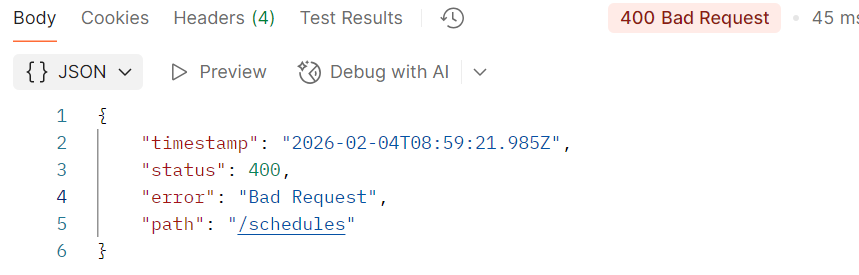
400번대 오류가 잘 나오는 모습이다.
- (후기)
지원님이 validation 적용 시켜서 해보라고 하셨는데 문제 에서는 Bean Validation 금지 여서 읽어 보기만 했는데 갑자기 적어 놨던 코드가 생각 나서 구글링 한 결과 이렇게 도달 할 수 있었다.
문제: 댓글 (필드 명들의 혼란)
BF
content, createAt 댓글 중에 이런게 뒤죽박죽 나온다...
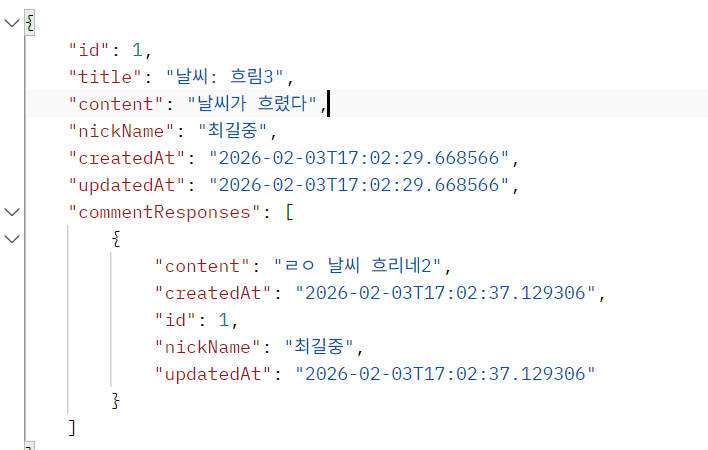
GetCommentResponse
public class GetCommentResponse {
    private final Long id;
    private final String content;
    private final String nickName;
    private final LocalDateTime createdAt;
    private final LocalDateTime updatedAt;

    public GetCommentResponse(Comment comment) {
        this.id = comment.getId();
        this.content = comment.getContent();
        this.nickName = comment.getNickName();
        this.createdAt = comment.getCreatedAt();
        this.updatedAt = comment.getModifiedAt();
    }


}- 여기서 GetCommentResponse생성자를 이렇게 쓰면 안됐고
public class GetCommentResponse {
    private final Long id;
    private final String content;
    private final String nickName;
    private final LocalDateTime createdAt;
    private final LocalDateTime updatedAt;

    public GetCommentResponse(Long id, String content, String nickName, LocalDateTime createdAt, LocalDateTime updatedAt) {
        this.id = id;
        this.content = content;
        this.nickName = nickName;
        this.createdAt = createdAt;
        this.updatedAt = updatedAt;
}- 그냥 정상적으로 바꿔준다. (매개변수 부분)
ScheduleService
@Transactional(readOnly = true)
    public GetScheduleCommentResponse findScheduleComment(Long scheduleId) {
        Schedule schedule = scheduleRepository.findById(scheduleId).orElseThrow(
                () -> new IllegalArgumentException("없는 스케줄입니다.")
        );

        List<Comment> comments = commentRepository.findAllByScheduleIdOrderByIdAsc(scheduleId);

        List<GetCommentResponse> commentResponses = new ArrayList<>();
        for (Comment comment : comments) {
            commentResponses.add(new GetCommentResponse(comment));
        }

        return new GetScheduleCommentResponse(
                schedule.getId(),
                schedule.getTitle(),
                schedule.getContent(),
                schedule.getNickName(),
                schedule.getCreatedAt(),
                schedule.getModifiedAt(),
                commentResponses
        );
    }
여기에서 이제
for (Comment comment : comments) {
            commentResponses.add(new GetCommentResponse(comment));
}- 이 부분을
for (Comment comment : comments) {
            commentResponses.add(new GetCommentResponse(
                    comment.getId(),
                    comment.getContent(),
                    comment.getNickName(),
                    comment.getCreatedAt(),
                    comment.getModifiedAt()));
        }
이렇게 바꿔 주니까
AF
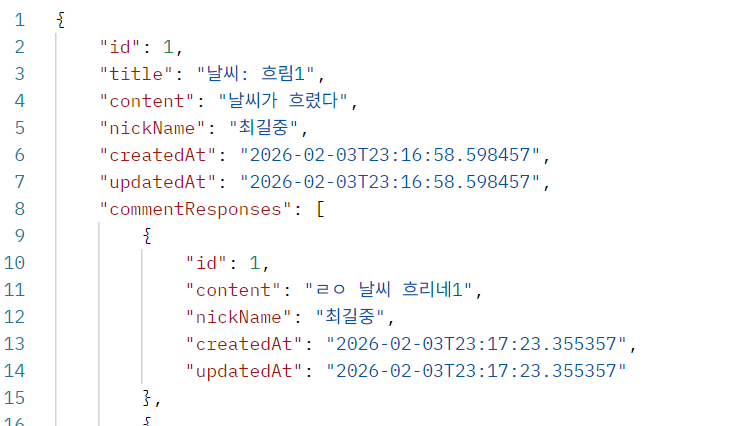
짜라란 잘 나오는 모습이다
+기찬님이 오늘 알려주신 내용
@JsonPropertyOrder({ "id", "title", "content", "createdAt" })
어노테이션을 활용해서 푸는 것도 가능 하다!!
문제: 트러블 슈팅 (Lv.2)
@PathVariable에 익숙해서 2가지를 만들어서 진행 하려고 했는데 API는 1개만 만들어야 한다는 조건이 있어 고민 하다 튜터님께 질문 했다.
    // 전체 조회
    // 작성자명은 조회 조건으로 포함될 수도 있고, 포함되지 않을 수도 있습니다.
    // ex) @GetMapping("/schedules/{nickName}")
    // /schedules?nickName=김철수
    // http://localhost:8080/schedules?nickName=최길중
    @GetMapping("/schedules")
    public ResponseEntity<List<GetScheduleResponse>> getSchedule(// String nickName) 원래 이거
            @RequestParam(required = false) String nickName
    ){
//        return ResponseEntity.status(HttpStatus.OK).body(scheduleService.findAll());
        return ResponseEntity.ok(scheduleService.findAll(nickName));
    }
@RequestParam을 이용해서 푸는 내용이였다.
그렇다면 service를 수정 해야 겠지?
원래 나는 그냥 GetMapping으로 전체 수정을 만들었다.
ScheduleService
이전에 없었던 내용 추가
        List<Schedule> schedules;
        if (nickName == null ) {
            schedules = scheduleRepository.findAll();
        } else {
            schedules = scheduleRepository.findAllByNickName(nickName); // repository에 추가 findAllByNickName
        }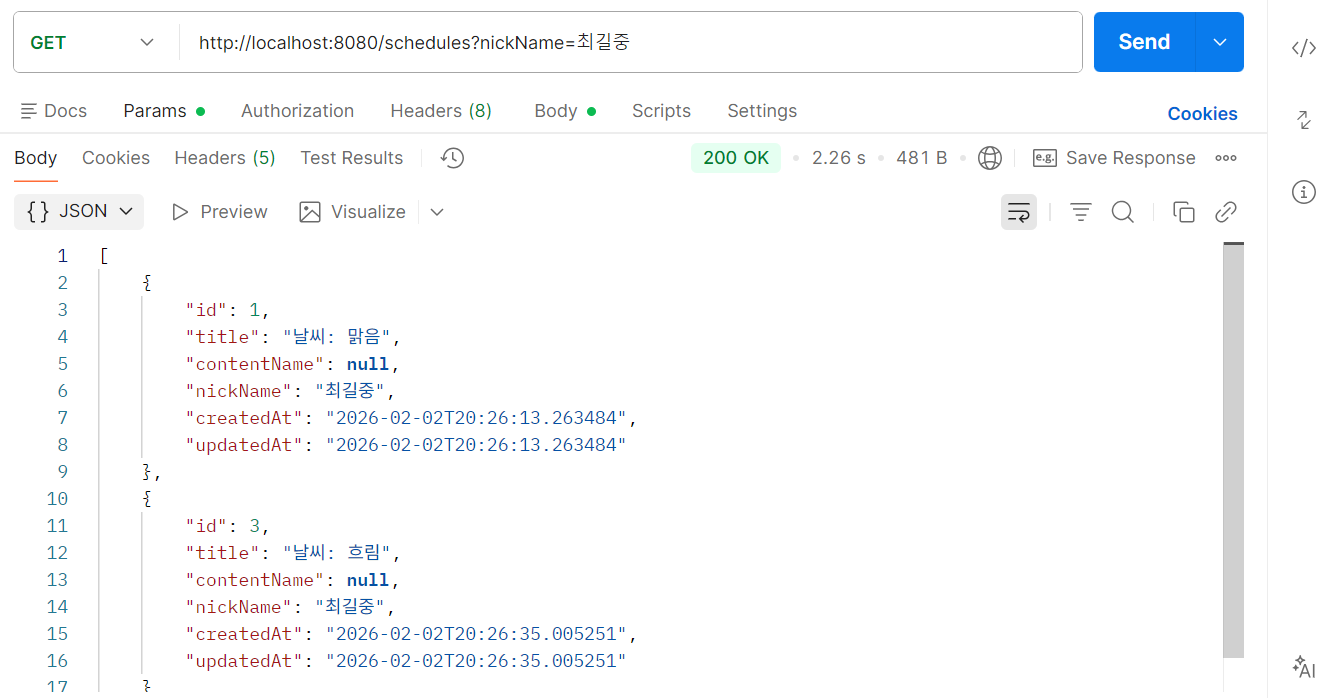
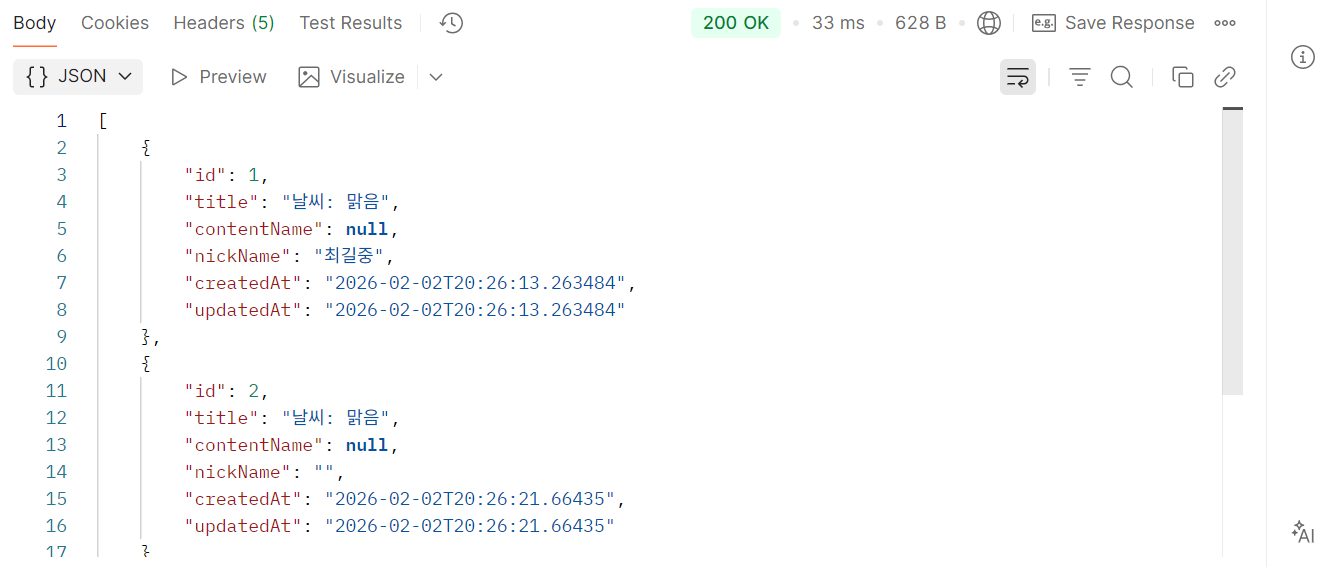
잘나오는 모습!!
문제 1번
3 Layer Architecture(Controller, Service, Repository)를 적절히 적용했는지 확인해 보고, 왜 이러한 구조가 필요한지 작성해 주세요.
답:
1) Controller
- 클라이언트 요청을 받는 입구입니다.
- URL로 들어오는 요청을 받고, 어떤 기능을 실행할지 Service에 전달합니다.
- 처리 결과를 Response로 반환합니다.
2) Service
- 실제 비즈니스 로직을 처리하는 곳입니다.
- 예: 비밀번호 검증, 댓글 10개 제한, 정렬 조건, 입력값 검증 같은 규칙을 여기에서 처리합니다.
- Controller가 복잡해지지 않도록 핵심 로직을 모아둡니다.
3) Repository
- DB와 직접 통신하는 역할입니다.
- 엔티티 저장/조회/수정/삭제 같은 CRUD를 담당합니다.
문제 2번
@RequestParam, @PathVariable, @RequestBody가 각각 어떤 어노테이션인지, 어떤 특징을 갖고 있는지 작성해 주세요.
답:
https://velog.io/@choil8228/발제-트러블-슈팅Lv.2PathVariable-RequestParam-RequestBody
1) @PathVariable
- 의미: URL 경로(path) 안에 들어가는 값 (리소스의 고유 식별자)
- 언제: 특정 1개를 딱 집어서 조회/수정/삭제할 때 (보통 id)
- 예: /schedules/1 , /schedules/10
2) @RequestParam
- 의미: URL 쿼리스트링(query string) 값 (조회 조건/옵션)
- 언제: 필터링/검색/정렬/페이지 같은 “옵션” 줄 때 (없어도 되는 값이 많아서 required=false 자주 씀)
- 예: /schedules?authorName=최길중
- 예: /schedules?authorName=최길중&sort=updatedAtDesc&page=0
3) @RequestBody
- 의미: HTTP 요청의 Body(JSON) 에 담긴 데이터
- 언제: 생성/수정할 “내용”을 보낼 때 (POST/PUT/PATCH) — 보통 DTO로 받는 게 정석
- 예: POST /schedules + Body(JSON)