- If the server needs to receive fields like
name,email,phone number, etc, there must be some form of validation logic implemented to ensure those fields follow certain requirements. This can result in a longer and complicated validation logic if the number of fields received from the client increases. This is where Spring Boot Validation can come in useful.
- The
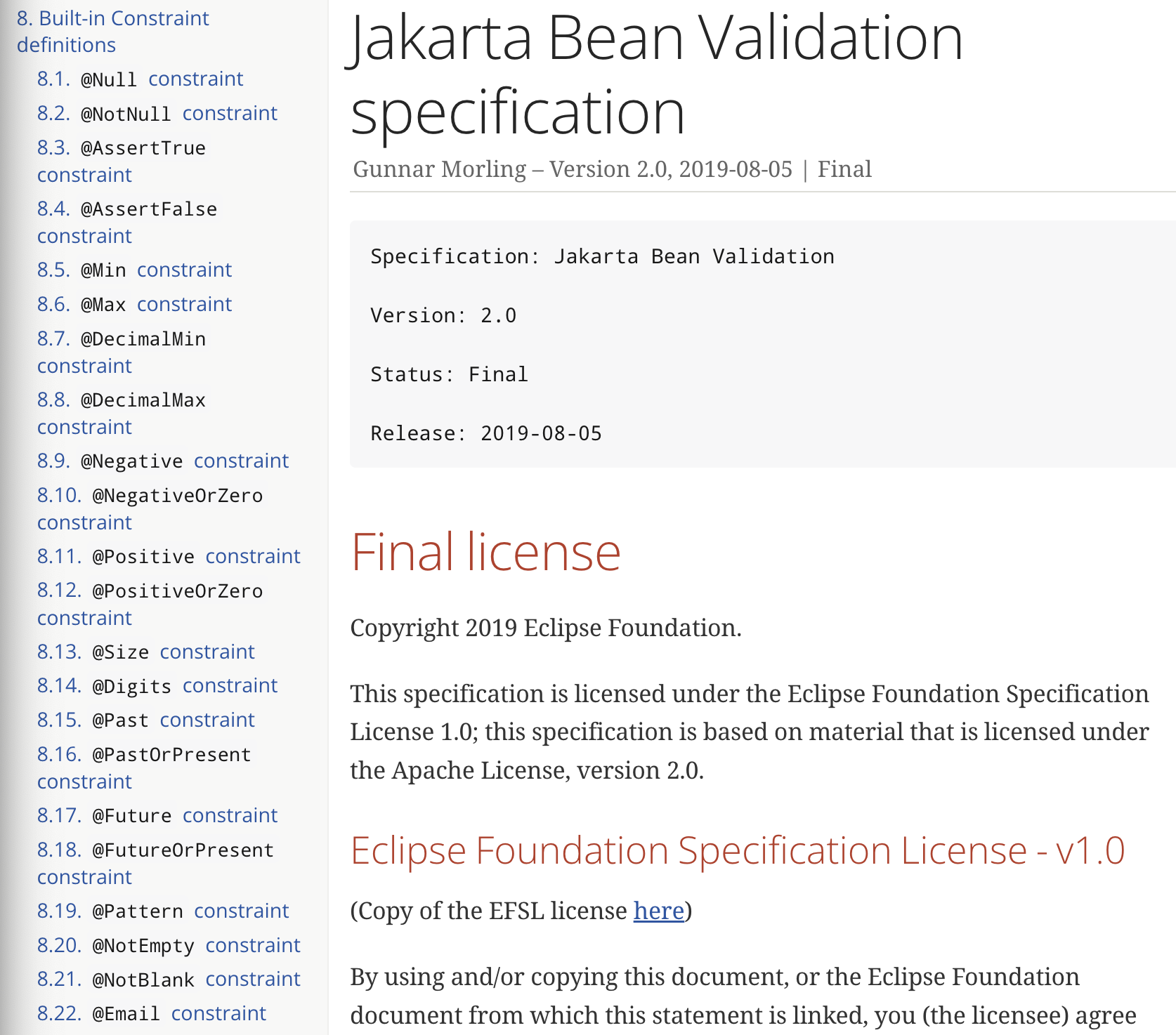
Built-in Constraint definitions are the annotations available for validations.
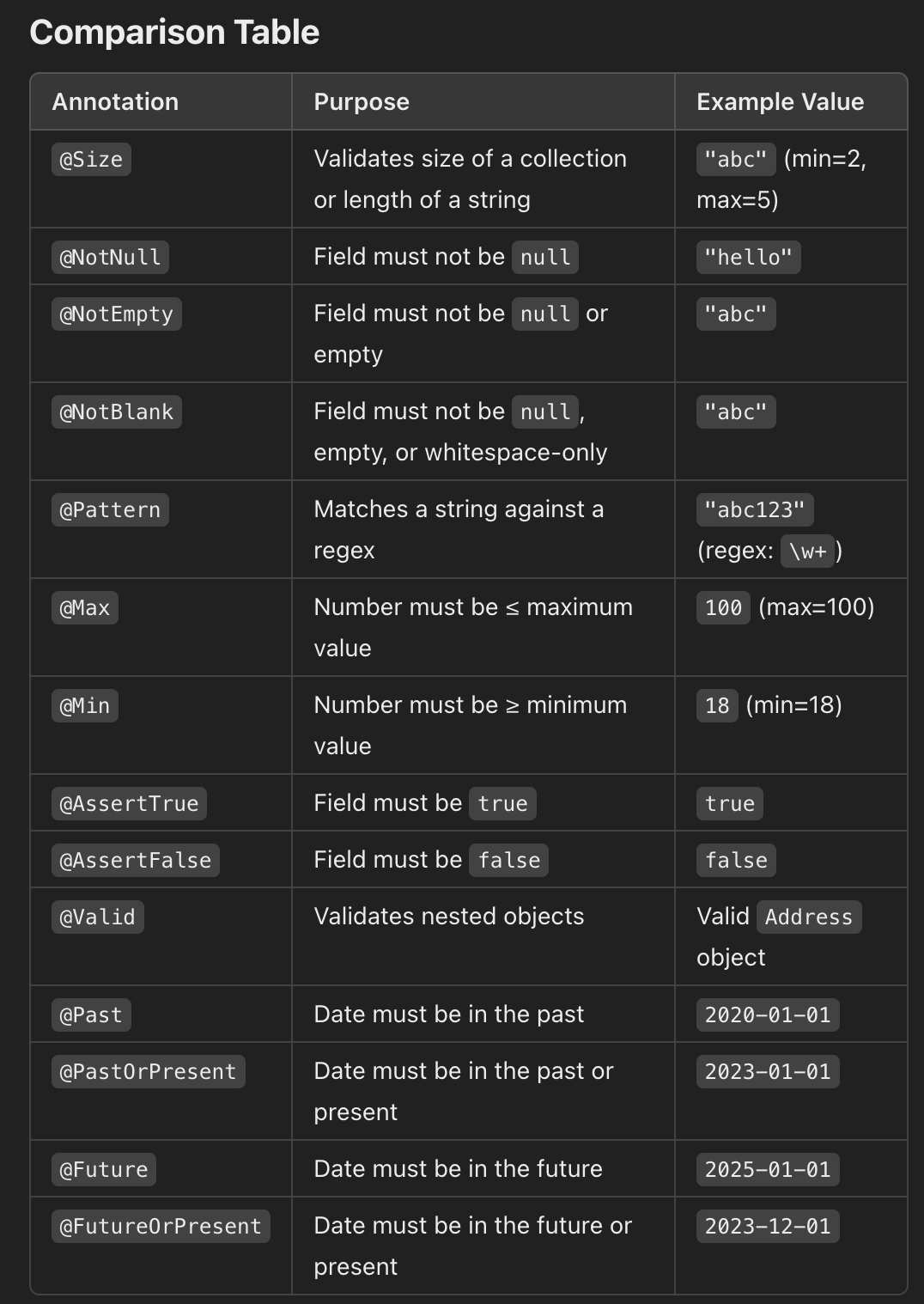
@Size
- Validates that the size of a collection, array, or string falls within a specified range:
- Attributes:
- min: Minimum size (default 0)
max: Maximum size (default Integer.MAX_VALUE
@Size(min = 2, max = 10)
private String userName;
@NotNull, @NotEmpty, @NotBlank
@NotNull ensures that a field is not null
@NotNull
private String email;
-
@NotEmpty ensures that a field is not null and is not empty (size > 0 for collections or length > 0 for strings)
-
NotBlank ensures that a string is not null, empty or only contains whitespace
@Pattern
- Validates a string against a specified regex
- Attributes:
- regexp: The regex pattern
message: Custom error message
@Pattern(regexp = "^[a-zA-Z0-9]{6,}$", message = "Password must be at least 6 characters long and alphanumeric")
private String password;
- The
password must have at least 6 alphanumeric characters.
@Max, @Min
@Max validates that a number is less than or equal to the specified maximum.
@Max(100)
private int age;
@Min validates that a number is greater than or equal to the specified minimum.
@min(18)
private int age;
@AssertTrue, @AssertFalse
@AssertTrue validates that a boolean field is true.
@AssertTrue
private boolean isActive;
AssertFalse is opposite of @AssertTrue
@Valid
- Validates nested objects or collections.
@Valid
private Address address;
@Past, @PastOrPresent, @Future, @FutureOrPresent
@Past validates that a java.util.Date or java.time object represents a date/time in the past.@PastOrPresent validates that a date/time is in the past or present.@Future validates a date/time is in the future@FutureOrPresent validates that a date/time is in the future or present.
@Past
private LocalDate birthDate;
@PastOrPresent
private LocalDate registrationDate;
@Future
private LocalDate expiryDate;
@FutureOrPresent
private LocalDate appointmentDate;
Example
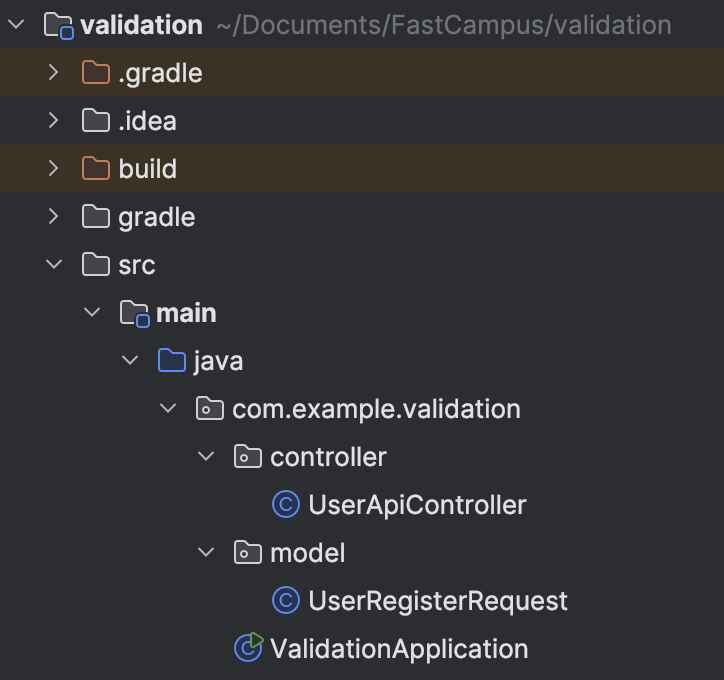
- Project Structure:
UserRegisterRequest.java:
@Data
@NoArgsConstructor
@AllArgsConstructor
@Builder
@JsonNaming(value = PropertyNamingStrategies.SnakeCaseStrategy.class)
public class UserRegisterRequest {
@NotBlank
private String name;
@NotBlank
@Size(min = 1, max = 12)
private String password;
@NotNull
@Min(1)
@Max(100)
private Integer age;
@Email
private String email;
@Pattern(regexp = "^\\d{2,3}-\\d{3,4}-\\d{4}$")
private String phoneNumber;
@FutureOrPresent
private LocalDateTime registerAt;
}
@RestController
@RequestMapping("/api/user")
@Slf4j
public class UserApiController {

    @PostMapping("")
    public UserRegisterRequest regiester(
            @Valid
            @RequestBody
            UserRegisterRequest userRegisterRequest
    ){
        log.info("init: {}", userRegisterRequest);

        return userRegisterRequest;
    }
}
- If we send a
POST request to http://localhost:8080/api/user with the following json body:
{
  "name": "",
  "password": "",
  "age": 20,
  "email": "",
  "phone_number": "",
  "register_at": "2024-11-18T13:06:00"
}
- We get the following error log:

- With a valid json body like below, we receive a status code 200.
{
  "name": "Choi Seunghwan",
  "password": "password",
  "age": 20,
  "email": "gdis@fds.com",
  "phone_number": "010-3829-3923",
  "register_at": "2024-12-18T13:06:00"
}
- Invalid Json body would be flagged by the server but the client would not know because as of the above implementation, we are not returning anything to the client to notify which field was accepted/rejected. So we create
Api.java which acts as a blueprint for all API requests.
Api.java:
@Data
@NoArgsConstructor
@AllArgsConstructor
@Builder
public class Api<T> {
    private String resultCode;
    private T data;
    private String resultMessage;
    private Error error;

    @Data
    @NoArgsConstructor
    @AllArgsConstructor
    @Builder
    public static class Error{
        private List<String> errorMessage;
    }
}
- Modified
UserApiController.java to wrap the UserRegisterRequest with Api:
@RestController
@RequestMapping("/api/user")
@Slf4j
public class UserApiController {

    @PostMapping("")
    public Api<UserRegisterRequest> regiester(
            @Valid
            @RequestBody
            Api<UserRegisterRequest> userRegisterRequest
    ){
        log.info("init: {}", userRegisterRequest);

        return userRegisterRequest;
    }
}
- Now all the requests must go through the format specified in the
Api.java:
{
  "result_code": "",
  "result_message": "",
  "data": {
    "name": "Choi Seunghwan",
    "password": "password1111111111111",
    "age": 20,
    "email": "gdis@fds.com",
    "phone_number": "010-3829-3923",
    "register_at": "2024-12-18T13:06:00"
  },
  "error": {
    "error_message": [
    ]
  }
}
- The above request gets a status 200 by the server. Notably, the password is beyond what we specified in the
UserRegisterRequest.java. This is because within the Api.java, the UserRegisterRequest is saved within private T data. If we do not annotate the private T data with @Valid, it does not run all the validations specified within the UserRegisterRequest. Once we modify the Api.java as below:
public class Api<T> {
private String resultCode;
@Valid
private T data;
private String resultMessage;
private Error error;
@Data
@NoArgsConstructor
@AllArgsConstructor
@Builder
public static class Error{
private List<String> errorMessage;
}
}
- we can see that the validations specified in the
UserRegisterRequest.java were performed, rejecting the password with length greater than 12 as specified.
[Field error in object 'api' on field 'data.password': rejected value [password1111111111111]; codes [Size.api.data.password,Size.data.password,Size.password,Size.java.lang.String,Size]; arguments [org.springframework.context.support.DefaultMessageSourceResolvable: codes [api.data.password,data.password]; arguments []; default message [data.password],12,1]; default message [크기가 1에서 12 사이여야 합니다]]
Binding Result
- How
BindingResult works:
- When a request is mapped to a controller, Spring automatically binds the incoming data to a Java object
- If the object has validation annotations (e.g.
@NotNull, @Size), Spring performs validations.
- If validation errors occur, Spring populates the
BindingResult object with those errors.
Basic Structure
@RestController
public class UserController {
@PostMapping("/register")
public String registerUser(
@Valid
@RequestBody
UserDto userDto,
BindingResult bindingResult
){
if (bindingResult.hasErrors()){
}
}
}
- Position in Method Signature:
- The BindingResult must immediately follow the @Validated or @Valid object in the method signature.
- If the
BindingResult is not placed directly after the validated object, Spring will throw an IllegalStateException.
Key Methods in BindingResult
hasErrors()
- Returns
true if there are any validation or binding errors.
if (bindingResult.hasErrors()){
}
getAllErrors()
- Returns a list of all errors (both field errors and global errors)
List<ObjectError> errors = bindingResult.getAllErrors();
getFieldErrors()
- Returns a list of errors specific to fields.
List<FieldError> fieldErrors = bindingResult.getFieldErrors();
- `getFieldError(String field)
- Gets the error for a specific field
FieldError fieldError = bindingResult.getFieldError("email");
getFieldValue(String field)
- Retrieves the rejected value for a specific field
Object rejectedValue = bindingResult.getFieldValue("username");
Implementation of BindingResult in UserApiController
@RestController
@RequestMapping("/api/user")
@Slf4j
public class UserApiController {
@PostMapping("")
public Api<? extends Object> regiester(
@Valid
@RequestBody
Api<UserRegisterRequest> userRegisterRequest,
BindingResult bindingResult
){
log.info("init: {}", userRegisterRequest);
if(bindingResult.hasErrors()){
var errorMessageList = bindingResult.getFieldErrors().stream()
.map(it -> {
var format = "%s : { %s } is %s";
var message = String.format(format, it.getField(), it.getRejectedValue());
return message;
}).collect(Collectors.toList());
var error = Api.Error
.builder()
.errorMessage(errorMessageList)
.build();
var errorResponse = Api
.builder()
.resultCode(String.valueOf(HttpStatus.BAD_REQUEST.value()))
.resultMessage(HttpStatus.BAD_REQUEST.getReasonPhrase())
.error(error)
.build();
return errorResponse;
}
Api<UserRegisterRequest> response = Api.<UserRegisterRequest>builder()
.resultCode(String.valueOf(HttpStatus.OK.value()))
.resultMessage(HttpStatus.OK.getReasonPhrase())
.data(userRegisterRequest.getData())
.build();
return response;
}
}
Api<? extends Object>: The method returns a generic Api object, where the actual type of data can vary. This supports flexible response types. - Once we send a invalid body like:
{
  "result_code": "",
  "result_message": "",
  "data": {
    "name": "",
    "password": "password",
    "age": 20,
    "email": "gdis@fds.com",
    "phone_number": "010-43829-3923",
    "register_at": "2024-12-18T13:06:00"
  },
  "error": {
    "error_message": [
    ]
  }
}
- We get the following response:
{
    "result_code": "400",
    "data": null,
    "result_message": "Bad Request",
    "error": {
        "error_message": [
            "data.name : {  } 은 공백일 수 없습니다",
            "data.phoneNumber : { 010-43829-3923 } 은 \"^\\d{2,3}-\\d{3,4}-\\d{4}$\"와 일치해야 합니다"
        ]
    }
}
Global Exception Handling
- The controller should focus on handling business logic and routing requests to the appropriate services.
- Validation error handling is not part of the core business logic and can clutter the controller code if done inline.
- Conducting this error handling in a global exception handler ensures that validation concerns are handled separately from business logic, keeping the controller clean and focused.
MethodArgumentNotValidException:
- Triggered by @Valid. If any validation fails, Spring throws a MethodArgumentNotValidException. - So we can place the entire error-handling logic into a global exception handler with a method that catches
MethodArgumentNotValidException, significantly de-cluttering our controller logic.
- Creating
ValidationExceptionHandler under package exception:
@RestControllerAdvice
@Slf4j
public class ValidationExceptionHandler {

    @ExceptionHandler(value = {MethodArgumentNotValidException.class})
    public ResponseEntity<Api> valdiationException(
            MethodArgumentNotValidException exception
    ) {
        log.error("", exception);

        var errorMessageList = exception.getFieldErrors().stream()
                .map(it -> {
                    var format = "%s : { %s } 은 %s";
                    var message = String.format(format, it.getField(), it.getRejectedValue(), it.getDefaultMessage());
                    return message;
                }).collect(Collectors.toList());

        var error = Api.Error
                .builder()
                .errorMessage(errorMessageList)
                .build();

        var errorResponse = Api
                .builder()
                .resultCode(String.valueOf(HttpStatus.BAD_REQUEST.value()))
                .resultMessage(HttpStatus.BAD_REQUEST.getReasonPhrase())
                .error(error)
                .build();

        return ResponseEntity
                .status(HttpStatus.BAD_REQUEST)
                .body(errorResponse);

    }
}
- Now with invalid body, we get the following response, which is the same as above response but generated from
ValidationExceptionHandler:
{
    "result_code": "400",
    "data": null,
    "result_message": "Bad Request",
    "error": {
        "error_message": [
            "data.name : {  } 은 공백일 수 없습니다",
            "data.phoneNumber : { 010-43829-3923 } 은 \"^\\d{2,3}-\\d{3,4}-\\d{4}$\"와 일치해야 합니다"
        ]
    }
}
Custom Validations using Assert
- Assume we have to receive either name or nickName. There is no built-in validation that involves the above checking, hence we need to perform custom validations.
- In
UserRegisterRequest.java,
public class UserRegisterRequest {
@NotBlank
private String name;
private String nickName;
@AssertTrue(message = "name or nickname must exist)
public boolean isNameCheck(){
if(Objects.nonNull(name) && !name.isBlank()){
return true;
}
if(Objects.nonNull(nickName) && !nickName.isBlank()){
return true;
}
return false;
}
}
- The above validation returns the following response if
- Both name and nickname are null.
- Both name and nickname are empty.
- One of name or nickname is null and the other is empty
{
    "result_code": "400",
    "data": null,
    "result_message": "Bad Request",
    "error": {
        "error_message": [
            "data.nameCheck : { false } 은 name or nickname must exist",
            "data.name : {  } 은 공백일 수 없습니다"
        ]
    }
}
Custom Validation using custom annotations
- A custom annotation paired with a
ConstraintValidator allows for creation of reusable, custom validation rules beyond the default annotations provided.
Defining custom annotations
@Constraint: Links the annotation to a specific validator class@Target: Specifies where the annotation can be applied (e.g. fields, methods)@Retention: Indicates how long the annotation should be retained (typically at runtime)
@Constraint(validatedBy = CustomValidator.class)
@Target({ElementType.FIELD, ElementType.METHOD})
@Retention(RetentionPolicy.RUNTIME)
public @interface CustomValidation {
String message() default "Invalid value";
Class<?> groups() default {};
Class<? extends Payload>[] payload() default {};
}
Implementing the ConstraintValidator
- The
ConstraintValidator interface contains two methods:
- initialize: Optional initialization logic
- isValid: Implements the validation logic
public class CustomValidator implements ConstraintValidator<CustomValidation, String>{
@Override
public void initialize(CustomValidation constraintAnnotation){
}
@Override
public boolean isValid(String value, ConstraintValidatorContext context){
if (value == null || value.trim().isEmpty()){
return false;
}
return value.matches("^[a-zA-Z]+$");
}
}
Example (PhoneNumber)
@Target({ElementType.FIELD})
@Retention(RetentionPolicy.RUNTIME)
@Constraint(validatedBy = {PhoneNumberValidator.class})
public @interface PhoneNumber {

    String message() default "Phone number invalid format. e.g.) 000-0000-0000";
    String regex() default "^\\d{2,3}-\\d{3,4}-\\d{4}$";

    Class<?>[] groups() default {};
    Class<? extends Payload>[] payload() default {};
}
validator/PhoneNumberValidator:
public class PhoneNumberValidator implements ConstraintValidator<PhoneNumber, String> {

    private String regexp;

    @Override
    public void initialize(PhoneNumber constraintAnnotation) {
        this.regexp = constraintAnnotation.regex();
    }

    @Override
    public boolean isValid(String s, ConstraintValidatorContext constraintValidatorContext) {
        boolean result = Pattern.matches(s, regexp);
        return result;
    }
}
- Within
UserRegisterRequest:
public class UserRegisterRequest {
@PhoneNumber
private String phoneNumber;
}
- Note that custom annotation can be annotated with built-in annotations. For example,
@Target({ElementType.FIELD})
@Retention(RetentionPolicy.RUNTIME)
@Constraint(validatedBy = {YearMonthValidator.class})
@NotBlank
public @interface YearMonth {

    String message() default "Invalid Year Month format. e.g.) 20241124";
    String pattern() default "yyyyMMdd";

    Class<?>[] groups() default {};
    Class<? extends Payload>[] payload() default {};
}