@RestController
@RequestMapping("/api/v1")
public class ResponseApiController {

    @GetMapping("")
    public UserRequest user(){

        var user = new UserRequest();
        user.setUserName("Choi Seunghwan");
        user.setUserAge(24);
        user.setEmail("choi123@naver.com");
        return user;
    }
}
- The above getter returns a user object. In this case, the client receives a json that looks identical to the user class.
If we request: http://localhost:8080/api/v1
We get:
{
    "user_name": "Choi Seunghwan",
    "user_age": 24,
    "email": "choi123@naver.com",
    "is_korean": null
}
- The returned json is in
snake_case and this is because we have JsonNaming annotation above the UserRequest class. We used this annotation to convert and map all snake_case keys in the json sent by the client to camelCase in the server. This conversion also works in reverse and the returned json is in snake_case instead of camelCase. Once we remove this JsonNaming annotation, the keys in the json to be returned will be in camelCase instead of snake_case.
@Data
@AllArgsConstructor
@NoArgsConstructor
@JsonNaming(PropertyNamingStrategies.SnakeCaseStrategy.class)
public class UserRequest {
private String userName;
private Integer userAge;
private String email;
private Boolean isKorean;
}
ResponseEntity
- ResponseEntity is a generic class provided by Spring. It allows us to specify not only the response body but also the HTTP status code and headers, providing more control over the response returned to the client.
- Customizable error handling: We can use ResponseEntity to create and return custom error messages and status codes, providing clients with clearer information when things go wrong.
@Slf4j
@RestController
@RequestMapping("/api/v1")
public class ResponseApiController {

    @GetMapping("")
    public ResponseEntity<UserRequest> user(){

        var user = new UserRequest();
        user.setUserName("Choi Seunghwan");
        user.setUserAge(24);
        user.setEmail("choi123@naver.com");

        log.info("user: {}", user);

        var response = ResponseEntity
                .status(HttpStatus.CREATED)
                .header("x-custom", "hi")
                .body(user);

        return response;
    }
}
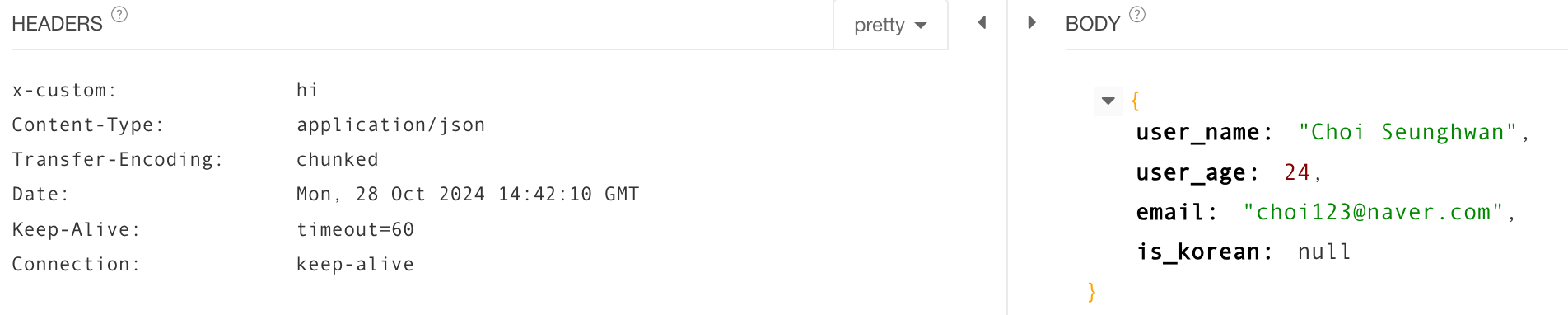
- We can modify the status code of response depending on the outcome like above.
- We can also include a header like above which will return the following: