Java Database Connectivity (JDBC)
JDBC is an API that enables applications to interact with databases in a standardized way. It provides a set of classes and interfaces to connect to a database, execute queries, and retrieve results, regardless of the underlying database management system.
Componenets of JDBC
- JDBC Driver:
- A software component that implements the JDBC API for a specific database.
- Translates Java API into database-specific calls.
- JDBC API:
- A set of classes and interfaces in the
java.sqlandjavax.sqlpacakges. - Key components include:
-DriverManager: Manages database connectionsConnection: Represents a connection to a databaseStatement/PreparedStatement: Executes SQL queriesResultSet: Retrieves results of a query
- A set of classes and interfaces in the
- Database:
- The underlying system where data is stored, such as MySQL, PostgreSQL, Oracle, or SQLite.
Example code
import java.sql.*;

public class JDBCDemo {
    public static void main(String[] args) {
        String url = "jdbc:mysql://localhost:3306/mydb";
        String user = "root";
        String password = "password";

        try {
            // Load MySQL driver (optional with JDBC 4.0+)
            Class.forName("com.mysql.cj.jdbc.Driver");

            // Establish connection
            Connection connection = DriverManager.getConnection(url, user, password);

            // Create a statement
            Statement statement = connection.createStatement();

            // Execute query
            ResultSet resultSet = statement.executeQuery("SELECT * FROM users");

            // Process results
            while (resultSet.next()) {
                System.out.println("ID: " + resultSet.getInt("id"));
                System.out.println("Name: " + resultSet.getString("name"));
            }

            // Close resources
            resultSet.close();
            statement.close();
            connection.close();
        } catch (Exception e) {
            e.printStackTrace();
        }
    }
}
Disadvantages of Using JDBC
While JDBC is a foundational API for database interaction in Java, it has several drawbacks, especially for large or complex applications:
- Boilerplate code:
- JDBC requires extensive manual coding for repetitive tasks, such as:
- Opening and closing connections.- Creating and managing statements.
- Handling result sets
- JDBC requires extensive manual coding for repetitive tasks, such as:
- Error-prone Resource Management:
- Forgetting to close database resources can lead to memory leaks or connection pool exhaustion.
- Proper exception handling and resource management are cumbersome without tools like try-with-resources
- Hardcoded SQL:
- SQL queries are often haredcoded, making the application prone to:
- SQL injection if queries are improperly parameterized.- Difficulty in maintaining or modifying SQL, especially for large projects.
- SQL queries are often haredcoded, making the application prone to:
- Poor abstraction:
- JDBC operates at a low level, requiring us to handle database-specific features manually.
- Switching between databses (e.g. MySQL to PostgreSQL) can require significant changes to the queries or drivers.
- No object Mapping:
- Data is fetched in the form of ResultSets, which require manual convresion to objects.
- Managing relationships between entities requires additional code and is prone to errors
Spring Data JPA
Spring Data JPA is a part of the Spring Framework and is built on top of Java Persistence API (JPA). It addresses many of the limitations of JDBC by providing a higher-level, ORM(Object-Relational Mapping) approach to database interaction.
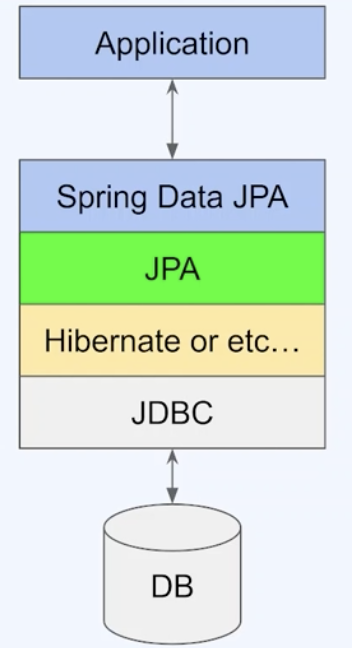
- JDBC requires manual SQL and connection handling.
- JPA is a specification (an interface) that abstracts database operations through ORM, mapping Java objects to database tables, but it needs an implementation like Hibernate to provide its functionality.
- Hibernate is a type of JPA implementation. It handles ORM tasks such as SQL generation, entity state management, caching, and lazy loading, while using JDBC for direct database communication,
- Spring Data JPA builds on JPA and Hibernate to further simplify database access by offering repository abstractions for CRUD operations and query handling, relying on Hibernate for ORM and JDBC for database connectivity.
Spring Data JPA Example
SQL Database:
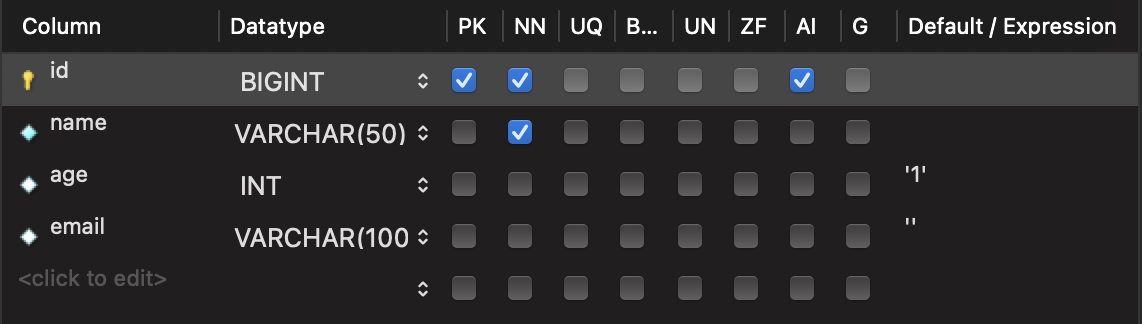
- We have a
usertable which has the following columns:id,name,age,email. idis the primary key and it is configured to be auto-incrementing.ageandemailhave respective default values of '1' and ''.- The
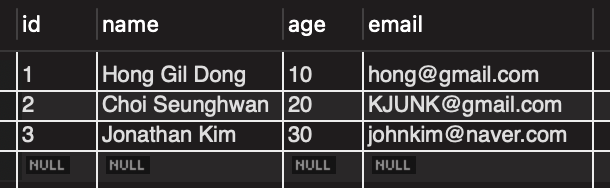
usertable is filled with rows as following:
UserEntity:
@Data
@NoArgsConstructor
@AllArgsConstructor
@Builder
@Entity(name = "user") //Indicates that UserEntity object will be mapped to "user" table
public class UserEntity {

    @Id
    @GeneratedValue(strategy = GenerationType.IDENTITY)
    private long id; //primary key

    private String name;
    private Integer age;
    private String email;
}- The
@Entity(name = "user")annotation is a JPA annotation indicating that this class is a JPA entity and will be mapped to a database table. - The
name = "user"specifies the name of the table in the database. If omitted, the default table name would be the class name (user_entityin this case, depending on naming conventions). @Idmarks the fieldidas the primary key of the entity.@GeneratedValue(strategy = GenerationType.IDENTITY):
- Specifies that the value of theidfield will be automatically generated by the database.- The
IDENTITYstrategy means that the database will handle primary key generation, typically using an auto-increment column.
- The
UserRepository:
public interface UserRepository extends JpaRepository<UserEntity, Long> {}- This is a
repository interfacethat extendsJpaRepository, provided by Spring Data JPA. JpaRepository<UserEntity, Long>defines that this repository is for managingUserEntityobjects, with the primary keyidof typeLong.- Role of Spring Data JPA:
- Spring Data JPA automatically provides implementations for CRUD operations and query methods. For example:
-findAll()retrieves all rows from theusertable and maps them toUserEntityobjects.
-save()persists a newUserEntityinto the database or updates an existing one. - Behind the scenes:
- When we call a method likefindAll(), Spring Data JPA delegates to the underlying JPA implementation.- In this case, Hibernate (the JPA implementation provider) generates and executes the SQL query (
SELECT * FROM user) via JDBC, then maps the result set toUserEntityobjects.
- In this case, Hibernate (the JPA implementation provider) generates and executes the SQL query (
UserApiController:
@RestController
@RequestMapping("/api/user")
@RequiredArgsConstructor
public class UserApiController {

    private final UserRepository userRepository;

    @GetMapping("/find-all")
    public List<UserEntity> findAll(){
        return userRepository.findAll();
    }

    @GetMapping("/name")
    public void autoSave(
            @RequestParam String name
    ){
        var user = UserEntity.builder()
                .name(name)
                .build();

        userRepository.save(user);
    }
}
Output:
- From the
GETrequest withhttp://localhost:8080/api/user/find-all, we get:
[
    {
        "id": 1,
        "name": "Hong Gil Dong",
        "age": 10,
        "email": "hong@gmail.com"
    },
    {
        "id": 2,
        "name": "Choi Seunghwan",
        "age": 20,
        "email": "KJUNK@gmail.com"
    },
    {
        "id": 3,
        "name": "Jonathan Kim",
        "age": 30,
        "email": "johnkim@naver.com"
    }
]- From the
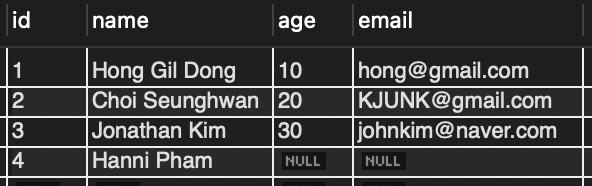
GETrequest withhttp://localhost:8080/api/user/namewith query parametername = Hanni Pham, we can see that our table was updated as following:
- And we can confirm that the SQL query was automatically generated by Hibernate as following: