1. 상황
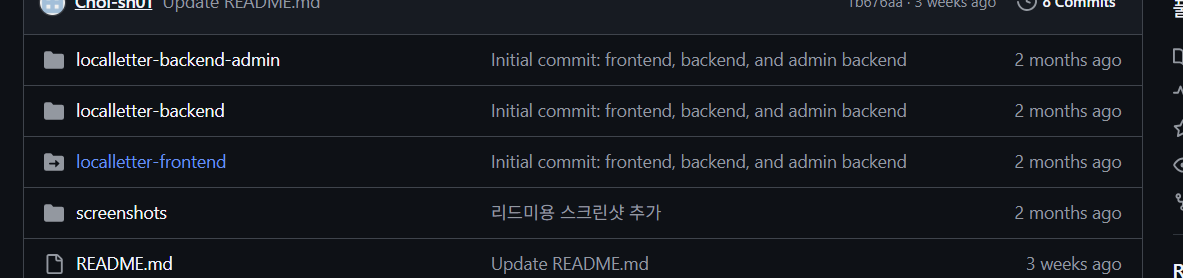
GitHub 저장소에서 localletter-frontend 폴더에 화살표 아이콘이 붙어 있었고, 클릭해도 코드가 보이지 않았다.
git ls-files -s localletter-frontend
160000 c085f971aae08fa5eeeb787ab869a473d5a30f77 0       localletter-frontend
로컬에서 확인해보니, 해당 폴더가 서브모듈로 잘못 커밋된 상태였다.
- 160000 → 서브모듈(gitlink) 모드
- .gitmodules 파일이 없어 연결이 깨진 상태
2. 원인
-
과거에 git submodule add 또는 비슷한 실수로 폴더를 서브모듈로 커밋함
-
.gitmodules 파일이 삭제되어 원격 연결 정보가 사라짐
-
깃허브에서 화살표 표시 후 다른 저장소로 연결하려 함 → 폴더 내용 확인 불가
3. 해결 과정
(1) 서브모듈 추적 제거
# 서브모듈 추적 제거 (파일은 그대로 유지)
git rm --cached localletter-frontend

# .gitmodules에서 해당 섹션 삭제 (있다면)
[ -f .gitmodules ] && git add .gitmodules

# 로컬 서브모듈 메타데이터 삭제
rm -rf .git/modules/localletter-frontend
(2) 일반 폴더로 커밋
git add localletter-frontend
git commit -m "Convert frontend from submodule to regular directory"
(3) push 시 거절 오류 발생
$ git push
To https://github.com/Choi-sh01/WebServer-Project.git
 ! [rejected]        main -> main (fetch first)
error: failed to push some refs to 'https://github.com/Choi-sh01/WebServer-Project.git'
hint: Updates were rejected because the remote contains work that you do not
hint: have locally. This is usually caused by another repository pushing to
hint: the same ref. If you want to integrate the remote changes, use
hint: 'git pull' before pushing again.
hint: See the 'Note about fast-forwards' in 'git push --help' for details.
# ! [rejected] main -> main (fetch first)
→ 원격에 내가 없는 최신 커밋이 있어서 non-fast-forward 거절
(4) 원격 변경 반영 후 푸시
# 현재 브랜치가 main인지 확인
git branch

# 원격 최신 가져오기
git fetch origin

# 원격 main 위로 내 변경을 재배치(충돌 최소화)
git pull --rebase origin main

git push
4. 배운 점
- 160000 모드는 서브모듈의 대표적인 표시
- .gitmodules가 없는데 폴더가 서브모듈로 보이면, 연결이 깨진 상태
- 깃허브에서 서브모듈 → 일반 폴더 전환은 git rm --cached로 추적만 제거 후 다시 커밋
- push 거절 시 무조건 force push가 아니라, 먼저 pull/rebase로 병합하는 습관이 안전
5. 참고 명령어
# 서브모듈 상태 확인
git submodule status
git ls-files -s <폴더명>

# 서브모듈 제거 → 일반 폴더 전환
git rm --cached <폴더명>
rm -rf .git/modules/<폴더명>
git add <폴더명>
git commit -m "Convert submodule to folder"
git push

Full-Stack Developer