Cookie
비 연결성인 웹에서 관계유지를 하기 위해 사용되는 클래스(내장객체아님)
접속자의 HDD에 file이 생성되고, 문자열로만 정보가 저장된다.
최장 1년까지 유지된다.
웹 브라우저에서 확인가능하고, 수정, 삭제도 가능.
사용법)
1. 객체화
Cookie c = new Cookie("이름","값");
- 생존시간설정
c.setMaxAge(초);
- 초*분*시*일*월*년 : 최장 1년까지 살아남는다.
- 쿠키는 생존시간을 설정하지 않으면 브라우저가 종료될 때 같이 삭제된다.
-
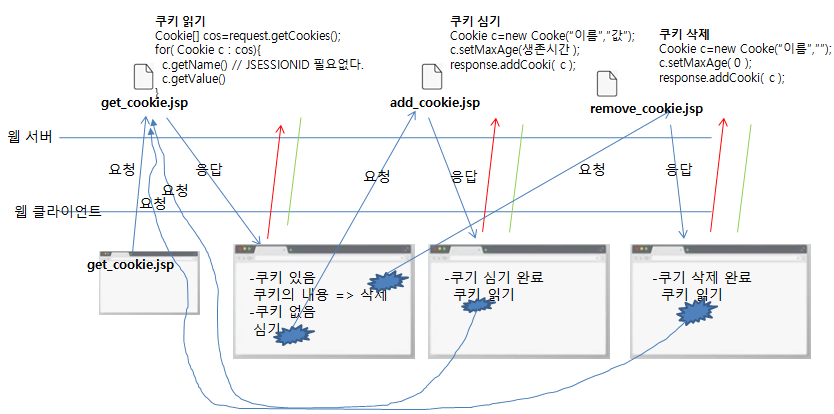
쿠키 심기.
response.addCookie(쿠키 객체); -
쿠키 읽기
Cookie[] cookies = request.getCookies();
for(Cookie tempCookie : cookies){
5. 쿠키의 이름 얻기
String name = tempCookie.getName();
6. 쿠키의 값 얻기
String value=tempCookie.getValue();
}
- 쿠키 삭제 메서드 : 없음 (비 연결성)
- 삭제할 이름의 쿠키를 생성
Cookie c = new Cookie("이름",""); - setMaxAge(0) 설정 //웹 브라우저가 열려있는 동안에만 쿠키가 유지.
- 쿠키심기
response.addCookie(쿠키객체);
action tag(표준 액션)
태그가 자체가 정해진 일을 수행하는 태그.
사용법)
<jsp:태그명 속성="값" 속성="값",,,></jsp:태그명>
- element사이에 값이 없다면 반드시 /로 끊는다.
<jsp:태그명 속성="값" 속성="값",,,/>
<jsp:useBean>, <jsp:setProperty>, <jsp:getProperty>, <jsp:include>, <jsp:forward>,<jsp:param>,,,
- <jsp:include>
다른 jsp를 함께 보여줄 때 사용.
<%@ include %>보다 속도가 느리다.
java source code는 따로 생성되고, 응답되는 HTML생성단계에서 합쳐서 응답된다.
(JSP간 변수, method가 공유되지 않는다.)
page directive에 다른 설정으로 충돌이 발생하지 않는다.
디자인을 합칠 때 사용.
사용법)
<jsp:include page="끼워넣을 JSP URI"/>
<jsp:useBean> 액션
VO class를 객체화하여 사용할 때.
객체화 + scope객체를 함께 사용.
(scope : 값을 저장하고 사용하는 범위를 제공하는 객체.)
- <jsp:setProperty>, <jsp:getProperty>와 함께 사용.
사용법)
-
객체화) default constructor만 사용가능.
<jsp:useBean id="객체명" class="패키지명.클래스명" scope="객체화 후 객체사용 범위"/>
(생략하면 page가 기본. scope객체는 page , request, session, application 4가지를 제공) -
값 할당) setter method 호출
<jsp:setProperty name="객체명" property="set을 제외한 method명 소문자" value="값"/> -
값 사용) getter method 호출 : 웹 브라우저의 출력까지 함께 수행
<jsp:getProperty name="객체명" property="get을 제외한 method명 소문자"/>
scope 속성
- page (pageContext ) : JSP를 요청할 때마다 객체가 생성되고, 생성된 객체는 해당 JSP에서만 사용.
- request : JSP를 요청할 때마다 객체가 생성되고, 생성된 객체는 forward로 이동한 페이지에서 사용가능.
- session : 웹 브라우저마다 하나의 객체가 생성되고 , 생성된 객체는 모든 JSP에서 사용된다.
- application : 최초 접속자에 의해 하나의 객체가 생성되고, 모든 접속자는 하나의 객체를 사용하며, 모든 페이지에서 사용가능 하다.
사용법
public class TestVO{
  private String name;
  private int myAge;

  public TestVO(){

  }

  public TestVO(String name, int age){

  }

  public void setName(String name){
   this.name=name;
  }

  public String getName(){
    return name;
  }

  public void setMyAge(int  myAge){
   this.myAge = myAge;
  }

  public String getMyAge(){
    return myAge;
  }
}

=============javascript===============================================
<%
  TestVO tVO=new TestVO();
  pageContext.setAttbute(“obj”, tVO );
  tVO.setName(“윤웅찬”);
  tVO.setAge(20);
%>

-객체화( TestVO() )
<jsp:useBean id=“tVO” class=“day0425.TestVO” scope=“page”/>

-setter method 호출
<jsp:setProperty name=“tVO” property=“name” value=“윤웅찬”/>
<jsp:setProperty name=“tVO” property=“myAge” value=“20”/>

-getter method 호출 : getter method의 반환값을 web browser에 출력 해준다.
(변수에 할당될 수 없다.)
<jsp:getProperty name=“tVO” property=“name”/>
<jsp:getProperty name=“tVO” property=“myAge”/>

=====================================================================