
3장 - 글꼴 및 이미지 최적화
3-1. 보조 글꼴 추가하기
// /app/ui/fonts.ts

import { Inter, Lusitana } from 'next/font/google';

export const inter = Inter({ subsets: ['latin'] });

export const lusitana = Lusitana({
  weight: ['400', '700'],
  subsets: ['latin'],
});
// /app/page.tsx
import AcmeLogo from '@/app/ui/acme-logo';
import { ArrowRightIcon } from '@heroicons/react/24/outline';
import Link from 'next/link';
import { lusitana } from '@/app/ui/fonts';
export default function Page() {
return (
// ...
<p
className={`${lusitana.className} text-xl text-gray-800 md:text-3xl md:leading-normal`}
>
<strong>Welcome to Acme.</strong> This is the example for the{' '}
<a href="https://nextjs.org/learn/" className="text-blue-500">
Next.js Learn Course
</a>
, brought to you by Vercel.
</p>
// ...
);
}3-2. 모바일 히어로 이미지 추가하기
// /app/page.tsx

import AcmeLogo from '@/app/ui/acme-logo';
import { ArrowRightIcon } from '@heroicons/react/24/outline';
import Link from 'next/link';
import { lusitana } from '@/app/ui/fonts';
import Image from 'next/image';

export default function Page() {
  return (
    // ...
    <div className="flex items-center justify-center p-6 md:w-3/5 md:px-28 md:py-12">
      {/* Add Hero Images Here */}
      <Image
        src="/hero-desktop.png"
        width={1000}
        height={760}
        className="hidden md:block"
        alt="Screenshots of the dashboard project showing desktop version"
      />
      <Image
        src="/hero-mobile.png"
        width={560}
        height={620}
        className="block md:hidden"
        alt="Screenshot of the dashboard project showing mobile version"
      />
    </div>
    //...
  );
}
4장 - 레이아웃 및 페이지 만들기
4-1. 대시보드 페이지 생성
다음과 같은 폴더 구조가 있어야 합니다.
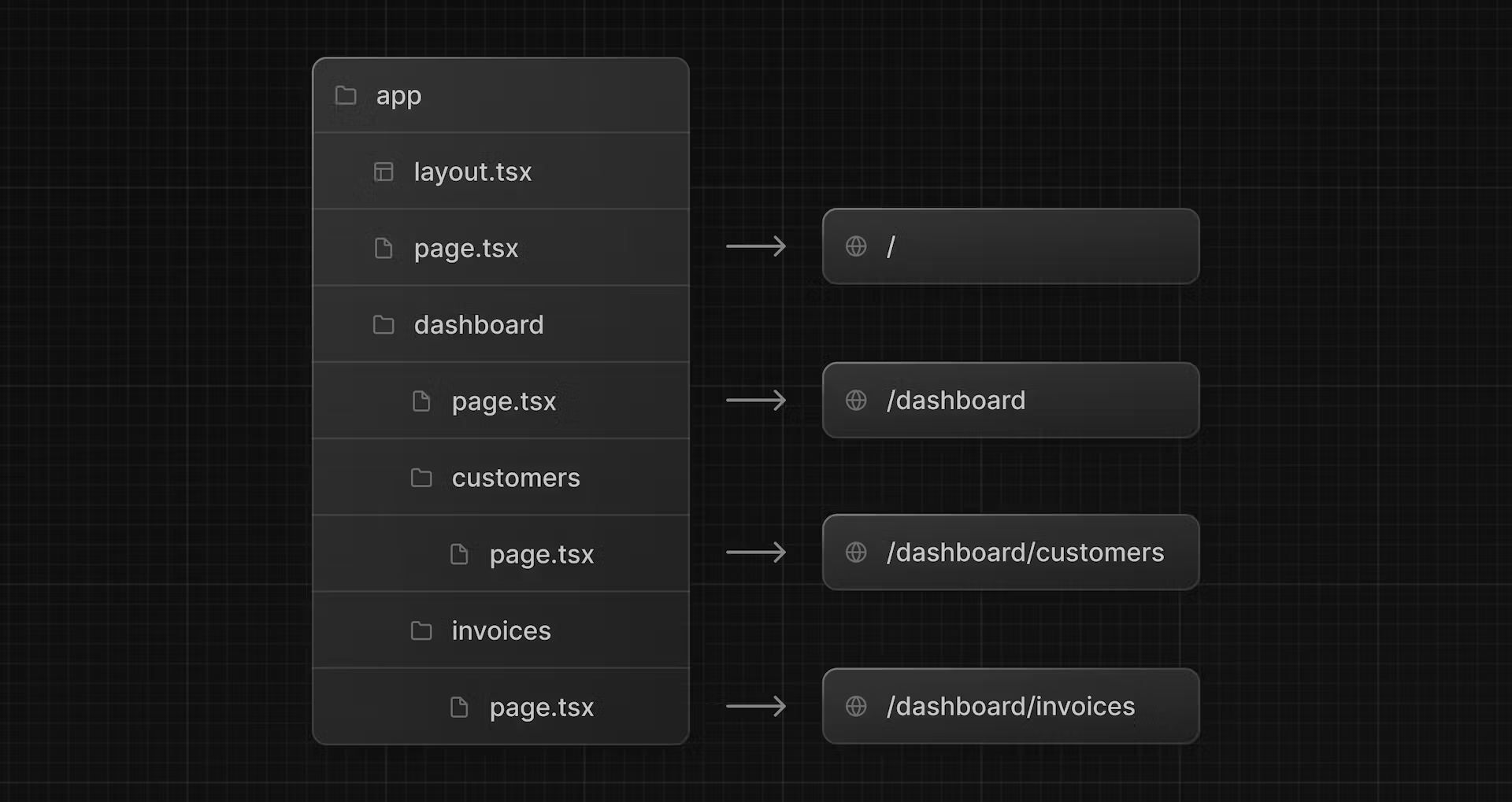
고객 페이지:
// /app/dashboard/customers/page.tsx

export default function Page() {
  return <p>Customers Page</p>;
}
송장 페이지:
// /app/dashboard/invoices/page.tsx

export default function Page() {
  return <p>Invoices Page</p>;
}
7장 - 데이터 가져오기
7-1. <Card> 구성요소에 대한 데이터 가져오기
// /app/dashboard/page.tsx

import { Card } from '@/app/ui/dashboard/cards';
import RevenueChart from '@/app/ui/dashboard/revenue-chart';
import LatestInvoices from '@/app/ui/dashboard/latest-invoices';
import { lusitana } from '@/app/ui/fonts';
import {
  fetchRevenue,
  fetchLatestInvoices,
  fetchCardData, // 여기 추가
} from '@/app/lib/data';

export default async function Page() {
  const revenue = await fetchRevenue();
  const latestInvoices = await fetchLatestInvoices();
  // 변수 선언
  const {
    numberOfInvoices,
    numberOfCustomers,
    totalPaidInvoices,
    totalPendingInvoices,
  } = await fetchCardData();

  return (
    <main>
      <h1 className={`${lusitana.className} mb-4 text-xl md:text-2xl`}>
        Dashboard
      </h1>
      <div className="grid gap-6 sm:grid-cols-2 lg:grid-cols-4">
        <Card title="Collected" value={totalPaidInvoices} type="collected" />
        <Card title="Pending" value={totalPendingInvoices} type="pending" />
        <Card title="Total Invoices" value={numberOfInvoices} type="invoices" />
        <Card
          title="Total Customers"
          value={numberOfCustomers}
          type="customers"
        />
      </div>
      <div className="mt-6 grid grid-cols-1 gap-6 md:grid-cols-4 lg:grid-cols-8">
        <RevenueChart revenue={revenue} />
        <LatestInvoices latestInvoices={latestInvoices} />
      </div>
    </main>
  );
}
9장 - 스트리밍
9-1. <LatestInvoices> 스트리밍
대시보드 페이지:
// /app/dashboard/(overview)/page.tsx

import { Card } from '@/app/ui/dashboard/cards';
import RevenueChart from '@/app/ui/dashboard/revenue-chart';
import LatestInvoices from '@/app/ui/dashboard/latest-invoices';
import { lusitana } from '@/app/ui/fonts';
import { fetchCardData } from '@/app/lib/data'; // fetchLatestInvoices 지우기
import { Suspense } from 'react';
import {
  RevenueChartSkeleton,
  LatestInvoicesSkeleton, // 폴백 불러오기
} from '@/app/ui/skeletons';

export default async function Page() {
  // `const latestInvoices = await fetchLatestInvoices()` 지우기
  const {
    numberOfInvoices,
    numberOfCustomers,
    totalPaidInvoices,
    totalPendingInvoices,
  } = await fetchCardData();

  return (
    <main>
      <h1 className={`${lusitana.className} mb-4 text-xl md:text-2xl`}>
        Dashboard
      </h1>
      <div className="grid gap-6 sm:grid-cols-2 lg:grid-cols-4">
        <Card title="Collected" value={totalPaidInvoices} type="collected" />
        <Card title="Pending" value={totalPendingInvoices} type="pending" />
        <Card title="Total Invoices" value={numberOfInvoices} type="invoices" />
        <Card
          title="Total Customers"
          value={numberOfCustomers}
          type="customers"
        />
      </div>
      <div className="mt-6 grid grid-cols-1 gap-6 md:grid-cols-4 lg:grid-cols-8">
        <Suspense fallback={<RevenueChartSkeleton />}>
          <RevenueChart />
        </Suspense>
		{/* 구성요소 래핑 */}
        <Suspense fallback={<LatestInvoicesSkeleton />}>
          <LatestInvoices />
        </Suspense>
      </div>
    </main>
  );
}
<LatestInvoices> 요소. props를 제거하는 것을 잊지 마세요.:
// /app/ui/dashboard/latest-invoices.tsx

import { ArrowPathIcon } from '@heroicons/react/24/outline';
import clsx from 'clsx';
import Image from 'next/image';
import { lusitana } from '@/app/ui/fonts';
import { fetchLatestInvoices } from '@/app/lib/data'; // fetchLatestInvoices 불러오기

export default async function LatestInvoices() { // props 지우기
  const latestInvoices = await fetchLatestInvoices();

  return (
    // ...
  );
}
14장 - 접근성 개선
14-1. aria 라벨 추가하기
누락된 필드가 있는 경우 메시지 표시:
// /app/ui/invoices/create-form.tsx

// </fieldset> 다음
<div id="error-message" aria-live="polite" aria-atomic="true">
	{state.message ? (
    	<p className="mt-2 text-sm text-red-500">
        	{state.message}
		</p>
	) : null}
</div>
송장 양식 편집:
// /app/ui/invoices/edit-form.tsx

export default function EditInvoiceForm({
  invoice,
  customers,
}: {
  invoice: InvoiceForm;
  customers: CustomerField[];
}) {
  const initialState = { message: null, errors: {} };
  const updateInvoiceWithId = updateInvoice.bind(null, invoice.id);
  const [state, dispatch] = useFormState(updateInvoiceWithId, initialState);

  return <form action={dispatch}></form>;
}
서버 작업:
// /app/lib/actions.ts

export async function updateInvoice(
  id: string,
  prevState: State,
  formData: FormData,
) {
  const validatedFields = UpdateInvoice.safeParse({
    customerId: formData.get('customerId'),
    amount: formData.get('amount'),
    status: formData.get('status'),
  });

  if (!validatedFields.success) {
    return {
      errors: validatedFields.error.flatten().fieldErrors,
      message: 'Missing Fields. Failed to Update Invoice.',
    };
  }

  const { customerId, amount, status } = validatedFields.data;
  const amountInCents = amount * 100;

  try {
    await sql`
      UPDATE invoices
      SET customer_id = ${customerId}, amount = ${amountInCents}, status = ${status}
      WHERE id = ${id}
    `;
  } catch (error) {
    return { message: 'Database Error: Failed to Update Invoice.' };
  }

  revalidatePath('/dashboard/invoices');
  redirect('/dashboard/invoices');
}
16장 - 접근성 개선
16-1. 메타데이터 추가하기
/login 페이지:
export const metadata: Metadata = {
  title: 'Login',
};
/dashboard/ 페이지:
export const metadata: Metadata = {
  title: 'Dashboard',
};
/dashboard/customers 페이지:
export const metadata: Metadata = {
  title: 'Customers',
};
/dashboard/invoices/create 페이지:
export const metadata: Metadata = {
  title: 'Create Invoice',
};
/dashboard/invoices/[id]/edit 페이지:
export const metadata: Metadata = {
  title: 'Edit Invoice',
};