https://nextjs.org/learn/dashboard-app/fetching-data
DB 생성, Seed 말고 다른 데이터 페칭 방법도 알아보자
In this chapter
데이터 페칭 방법: APIs, ORMs, SQL 등
서버 컴포넌트가 더 보안적으로 백엔드에 접근하는 방법
네트워크 waterfalls가 뭔가
JS 패턴을 통해 병행 데이터 페칭 구현 방법
Choosing how to fetch data
API layer
APIs는 앱과 DB 사이의 중간층이다.
다음의 상황에서 사용한다
- API를 제공하는 3rd 파티 서비스를 쓸 때
- 클라이언트로부터 데이터 페칭 시, DB이 비밀 정보를 클라이언트에 노출하고 싶지 않아 서버에서 API 계층을 쓸 때
Next.js에서, Route Handlers를 사용해 API endpoints를 생성할 수 있다.
Database Queries
풀 스택 앱 개발 시, DB와 상호작용하는 로직 작성 필요.
Postgres같은 관계형 DB위해, ORM 사용 가능
다음은 DB 작성이 필요한 경우이다.
- API 종단점 생성 시, DB와 상호작용하는 로직 필요
- 리액트 서버 컴포넌트(서버에서 데이터 페칭하는) 사용 시, API 계층을 건너뛰고 DB의 비밀 정보를 노출하는 것 없이 직접 DB에 쿼리할 수 있다.
Using Server Components to fetch data
Next.js는 기본값으로 리액트 서버 컴포넌트를 사용한다.
서버 컴포넌트로 데이터 페칭은 다음과 같은 장점이 있다
- 서버 컴포넌트는 데이터 페칭 같은 비동기 태스크에 대한 간단한 해답인 promise를 지원한다. useEffect, useState나 라이브러리가 필요 없이 async/await를 쓸 수 있다.
- 서버에서 동작하므로 비용이 많이 드는 데이터 페칭과 로직을 서버에서 실행하고, 결과만 클라이언트에 보내줄 수 있다.
- 서버에서 동작하므로, 추가적 API 계층 없이 DB에 직접 쿼리할 수 있다.
Using WQL
대시보드 프로젝트를 위해, Vercel Postgres SDK과 SQL을 사용해 쿼리를 작성할 수 있다.
다음은 SQL 사용 이유이다
- SQL은 관계형 DB에 쿼리하는 표준이다.
- SQL에 대한 기본적 이해는 관계형 DB의 근본 이해와, 다른 툴에 대한 지식 습득을 돕는다.
- SQL은 특정 데이터를 페치하고 조작하는 것을 돕는다
- Vercel Postgres SDK는 SQL injection 에서부터의 보호를 제공한다.
/app.lib/data.ts로 가면 @vercel/postgres에서 sql 함수를 불로오는 구문을 볼 수 있다.
import { sql } from '@vercel/postgres';
어느 서버 컴포넌트에서는 sql을 호출할 수 있지만, 네비게이트를 쉽게 하기 위해, 모든 데이터 쿼리를 data.ts에 넣고 컴포넌트에서 호출할 것이다.
Fetching data for the dashboard overview page
대시보드에 데이터를 페칭해보자.
/app/dashboard/page.tsx로 가서 다음 코드를 붙여넣는다.
import { Card } from '@/app/ui/dashboard/cards';
import RevenueChart from '@/app/ui/dashboard/revenue-chart';
import LatestInvoices from '@/app/ui/dashboard/latest-invoices';
import { lusitana } from '@/app/ui/fonts';

export default async function Page() {
  return (
    <main>
      <h1 className={`${lusitana.className} mb-4 text-xl md:text-2xl`}>
        Dashboard
      </h1>
      <div className="grid gap-6 sm:grid-cols-2 lg:grid-cols-4">
        {/* <Card title="Collected" value={totalPaidInvoices} type="collected" /> */}
        {/* <Card title="Pending" value={totalPendingInvoices} type="pending" /> */}
        {/* <Card title="Total Invoices" value={numberOfInvoices} type="invoices" /> */}
        {/* <Card
          title="Total Customers"
          value={numberOfCustomers}
          type="customers"
        /> */}
      </div>
      <div className="mt-6 grid grid-cols-1 gap-6 md:grid-cols-4 lg:grid-cols-8">
        {/* <RevenueChart revenue={revenue}  /> */}
        {/* <LatestInvoices latestInvoices={latestInvoices} /> */}
      </div>
    </main>
  );
}- 페이지는 비동기 컴포넌트이므로 이 코드는 데이터 페칭을 위한 await를 돕는다.
- 데이터를 받는 3개의 컴포넌트 : Card , RevenueChart, LatestInvoices
Fetching data for 'RevenueChart'
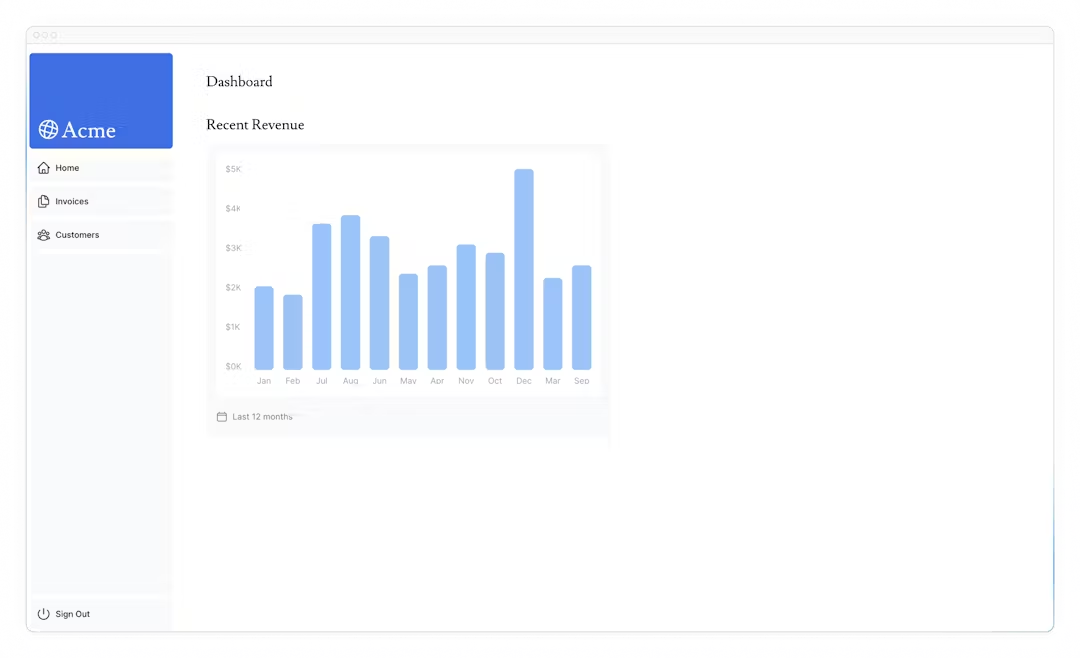
RevenueChart 컴포넌트를 위한 데이터 페칭을 위해, data.ts에서 fetchRevenue 함수를 불러온 후 호출한다.
import { fetchRevenue } from '@/app/lib/data';

  const revenue=await fetchRevenue();
그 후 /app/ui/dashboard/revenue-chart.tsx로 이동해 RevenueChart 컴포넌트를 주석 해제 한다.
다음과 같은 revenue 데이터를 볼 수 있다.
Fetching data for 'LatestInvoices'
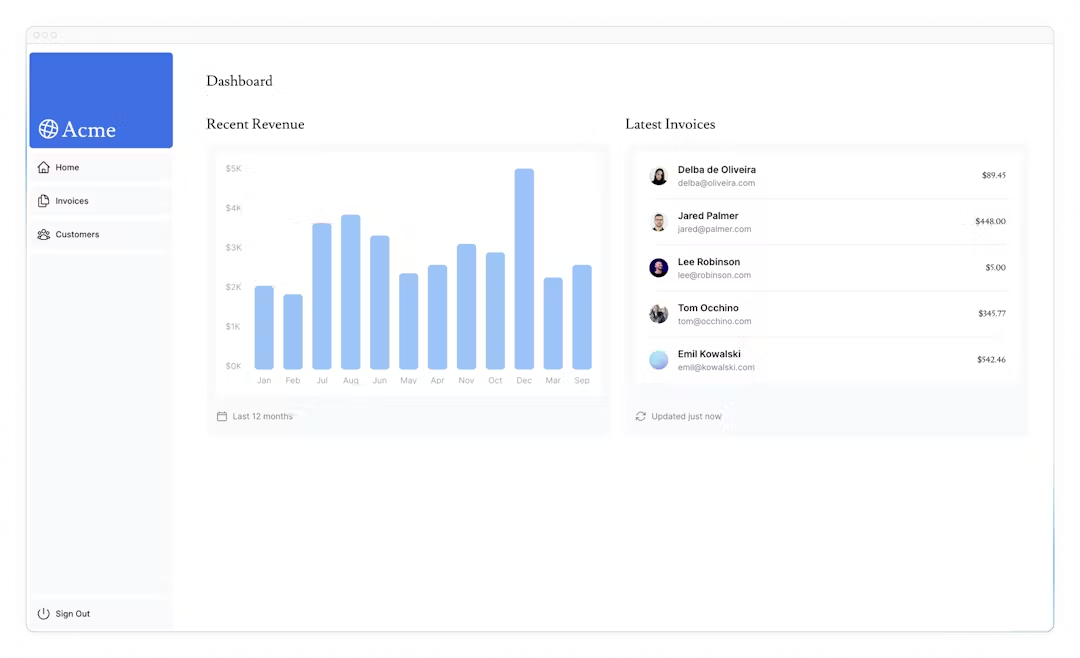
LatestInvoices 컴포넌트를 위해, 5개의 날짜별로 정렬된 최신의 인보이스가 필요하다.
JS로 모든 인보이스를 페칭하고 정렬할 수 있다.
메모리 내 인보이스를 정렬하는 것 대신, 오직 5개의 인보이스만 페치하기 위해 sql을 쓸 수 있다.
다음은 data.ts 내 예시이다.
// Fetch the last 5 invoices, sorted by date
const data = await sql<LatestInvoiceRaw>`
  SELECT invoices.amount, customers.name, customers.image_url,
  customers.email
  FROM invoices
  JOIN customers ON invoices.customer_id = customers.id
  ORDER BY invoices.date DESC
  LIMIT 5`;
페이지에서, fetchLatestInvoices 함수를 불러온다.
import { fetchRevenue, fetchLatestInvoices } from '@/app/lib/data';
const latestInvoices = await fetchLatestInvoices();
그 후 LastestInvoices 컴포넌트를 주석 해제한다.
LastestInvoice 컴포넌트에서도 역시 주석 해제 한다. (/app/ui/dashboard/latest-invoices)
페이지 방문 시, 오직 5개의 인보이스만 반환된 것을 볼 수 있다.
Practice: Fetch data for the 'Card' components
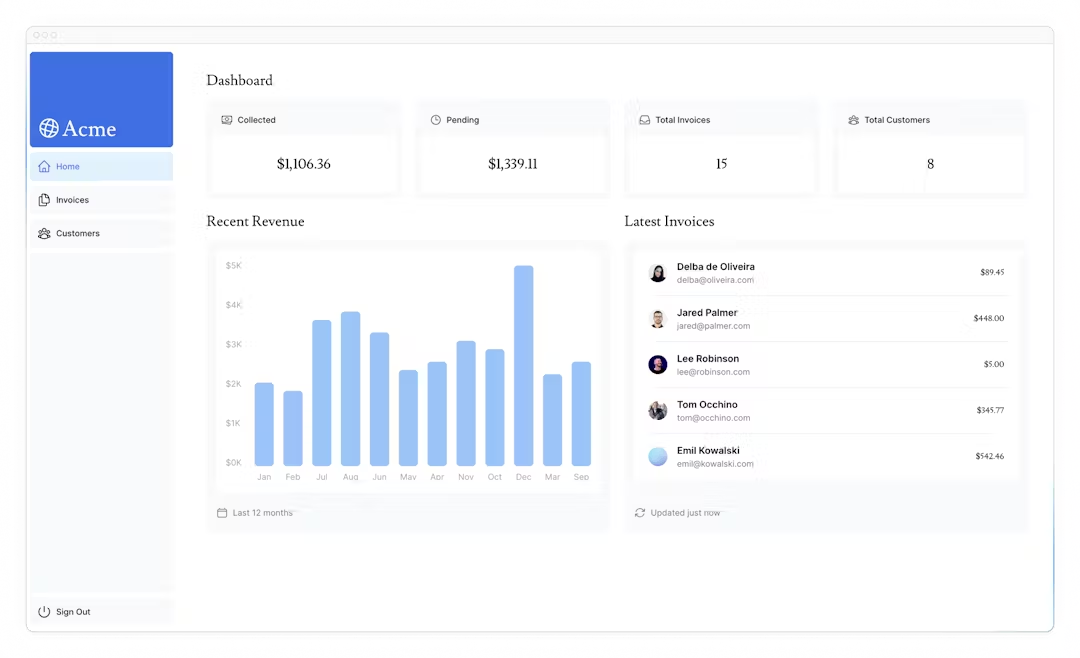
Card는 다음 데이터를 보여준다
- 인보이스가 모인 토탈 총량
- 인보이스가 펜딩한 토탈 총량
- 인보이스 수
- 고객 수
인보이스와 고객을 모두 페치하고 데이터 조작을 위해 JS를 써야 한다.
예시로, Array.length를 사용할 수 있다.
const totalInvoices = allInvoices.length;
const totalCustomers = allCustomers.length;
하지만 sql로는 필요한 데이터만 가져올 수 있다.
위 함수보다 좀 더 길 수 있지만 더 적은 데이터가 요청될 것을 의미한다.
const invoiceCountPromise = sql`SELECT COUNT(*) FROM invoices`;
const customerCountPromise = sql`SELECT COUNT(*) FROM customers`;
이 함수는 fetchCardData에서 불러와져야한다.
힌트
- 어떤 데이터가 필요한지를 보기 위해 카드 컴포넌트를 체크한다
- 어떤 함수가 반환되는지를 보기 위해 data.ts 파일을 체크한다.
/app/dashboard/page.tsx
import {
fetchRevenue,
fetchLatestInvoices,
fetchCardData,
} from '@/app/lib/data';
const {
numberOfInvoices,
numberOfCustomers,
totalPaidInvoices,
totalPendingInvoices,
} = await fetchCardData();
알고 있을 것 두가지
- 데이터 요청은 의도하지 않았더라도 서로 차단해 request waterfall을 만든다.
- 디폴트로, Next.js는 성능 향상을 위해 루트를 미리 렌더한다. 이것은 정적 렌더링이므로 데이터가 변경되어도 대시보드에 반영 안 된다.
이 챕터에선 1을, 다음 챕터에선 2를 볼 것이다.
What are request waterfalls?
이전 요청 완료에 의존하는 네트워크 요청 순서
데이터 페칭의 경우에, 각 요청은 이전 요청이 데이터를 반환했을 때만 시작된다.
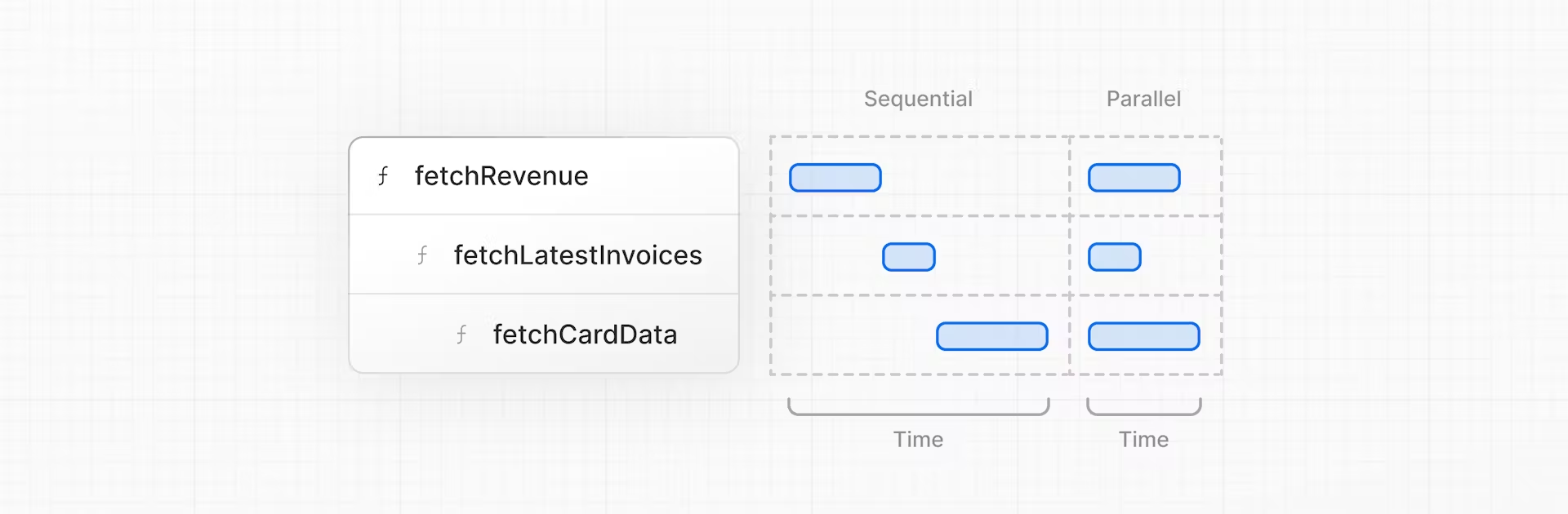
예시로, fetchLatestInvoices() 시작 전에, fetchRevenue() 실행을 기다린다.
const revenue = await fetchRevenue();
const latestInvoices = await fetchLatestInvoices(); // wait for fetchRevenue() to finish
const {
  numberOfInvoices,
  numberOfCustomers,
  totalPaidInvoices,
  totalPendingInvoices,
} = await fetchCardData(); // wait for fetchLatestInvoices() to finish
이 패턴은 항상 나쁜 건 아니다.
다음 요청 시, 이전 요청 조건의 만족을 원할 때 waterfall을 원하는 경우도 있다.
예시로, 사용자의 id,프로필 정보를 미리 페치하는 경우.
id를 페치한 후 그들의 친구 목록을 가져온다.
이 경우에, 각 요청은 이전 요청에서 반환 된 데이터에 의존적이다.
하지만, 이 행위는 의도하지 않은 영향을 끼칠 수 있다.
Parallel data fetching
waterfall을 피하는 일반적 방법은 동시에 모든 데이터 요청을 초기화 하는 것이다 - 병렬로
JS에서는 동시에 모든 프로미스 초기화를 위해 Promise.all() 혹은 Promise.allSettled()를 쓸 수 있다.
예시로, data.ts에서 fetchCardData() 내에서 Promise.all()을 쓴다.
export async function fetchCardData() {
  try {
    const data = await Promise.all([
      invoiceCountPromise,
      customerCountPromise,
      invoiceStatusPromise,
    ]);
    // ...
  }
}
이 패턴을 통해 할 수 있는 것
- 동시에 모든 데이터 페칭 실행 => 성능 향상
- JS 패턴 사용 => 어느 라이브러리| 프레임워크에 적용 가능
하지만 하나의 단점 : 만약 한 데이터 요청이 다음보다 느려진다면?
