3 Concepts of FSD
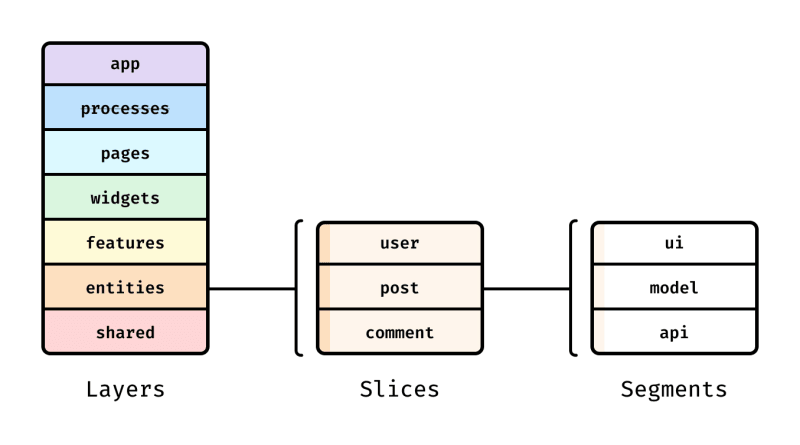
FSD는 Layers, Slices, Segments 세 파트로 나누어진다.
Layers는 엄격한 규격으로 분리된 계층,Slices는 Layers마다 가지는 서브 디렉토리로, 코드를 그것들의 가치로 묶는 것(group code by its value)을 목적으로 한다. (loose coupling high cohesion)Segments는 Slice의 코드를 분할(divide the code within a slice based on its purpose)한다.
:: Segment 하위 폴더 구조
- api - 서버 요청
- UI - Slice의 UI 컴포넌트
- model - 비즈니스 로직, 상태 관련 인터랙션 (actions and selectors)
- lib - Slice 안에서 사용되는 보조 함수
- config - Slice에 대한 설정 (그러나 흔하게 발생하지는 않음)
- consts - 필요한 상수
In mose cases, it is recommended to place api and config only in the shared layer, unless your API client is also your storage (GraphQL, TanStack Query, etc.)
Redux, Zustand 등 클라이언트에서 상태를 관리하는 경우 api, config segments를 shared 계층에만 배치하는 것이 좋습니다.
Layers
계층은 app, pages, widgets, features, entities, shared 6계층 정도로 구분한다. app과 pages 사이에 위치하는 process 계층은 공식문서에서는 deprecated되었다고 설명한다.
상위 계층은 하위 계층의 모듈을 import할 수 있지만, 하위 계층은 상위 계층의 모듈을 가져올 수 없는게 규칙이다. 따라서 자주 재사용되는 모듈은 하위 계층에 위치시키며 변경이 빈번하게 발생해서는 안된다.
1) shared
가장 최하위 계층으로, atomic pattern의 ‘atom’에 해당하는 영역으로 이해할 수 있다.
- 내용물도 children으로 받고, 최소한의 껍데기만 가지는 ‘틀’
ex. Avatar, Button, Tab …
2) entities
비즈니스 로직이 붙는, 도메인이 붙는 것들
ex. User, Video, Author, bookList, Cart
3) features
실제 '기능', '동작', '비즈니스 로직'과 관련된 것들
ex) AddCart, PlayVideo, ...
4) widgets
공식문서에서는 standalone components라는 표현을 사용한다. 즉 기능들(features)을 모아 독립적으로 사용될 수 있는 모듈을 의미한다.
ex. Navigation, Header, SideMenu
5) pages
widgets를 composition 해놓은 형태
<Root>
	<Widget1 />
	<Widget2 />
</Root>
최종적으로 위와 같은 형태로 만드는게 목표이다.
6) app
- 코드의 진입점으로 setup 코드들이 들어감
- 최상위에서 주입할 수 있는 것들을 위치시킴
ex. Provider, hoc (withAuth…), global.css, global routes, SSR Hydration Provider 등
FSD는 언제 쓰면 좋을까
FSD는 어떤 규모의 프로젝트든지 사용할 수는 있지만, 몇가지 고민해볼 사항이 있다.
- 프론트엔드 프로젝트 아키텍처에 추천한다. 백엔드 구조로는 Clean Architecture를 대신 추천한다.
- UI kits나 템플릿 용도로 쓰고자 함이 아니다. 유저에게 보여지는 서비스 화면을 구현할 때 FSD로 계층구조를 짜면 편리하다. UI 키트를 찾고 있다면 mui를 추천한다.
- 너무 간단한 프로젝트에는 굳이 추천하지 않는다.
- Google Cloud 정도의 사이즈에서는 FSD + a 커스텀 구조가 필요할 것이다.
Reference
- 예제 소스코드
Examples | Feature-Sliced Design
IT-Bookstore/src/entities/author/ui/author.tsx at main · UmttikhinaDasha/IT-Bookstore