
처음 useRef를 접했을 땐, 단순히 DOM 요소에 직접 접근할 때 사용하는 훅이라고 생각했다. ex) input 태그에 ref를 달고 focus()를 주는 식
하지만 React의 렌더링 원리를 조금 더 공부한 후, useRef는 단순한 DOM 접근용이 아닌 "렌더링 없이 값을 기억하는 저장소" 라는 걸 알게 되었다.
이번 글에선 useRef를 제대로 파헤쳐보자.
🔥 useRef란?
- 렌더링 없이도 값을 저장하고 유지할 수 있는 React의 Hook
- DOM 요소에 직접 접근하거나, 렌더링 간에도 초기화되지 않아야 할 값을 저장할 때 사용
즉, useRef는 렌더링 없이도 값이 유지되는 저장소이며, DOM에 직접 접근할 수 있는 방법이다.
사실 이렇게 글로만 설명하면 확 와닿지가 않는다. (나 한정,,)
-> useRef를 실제로 사용할 때, 어떻게 사용하는지를 알아보자.
📌 useRef 기본 사용법
const ref = useRef("hi");
console.log(ref); // { current: "hi" }

ref.current = "hello";
console.log(ref); // { current: "hello" }- useRef는 객체를 반환한다. ->
{ current: 초기값 } - ref.current 값을 수정해도 리렌더링되지 않는다.
- 컴포넌트가 언마운트되기 전까지 값은 유지된다.
📦 언제 useRef를 쓸까?
1. 렌더링을 유발하지 않는 저장 공간이 필요할 때
- 값을 useState로 관리할 경우, 값이 바뀔 때 마다 렌더링된다.
- 너무 자주 바뀌는 값이라면 성능에 부담이 될 수 있다.
✅ 이런 경우 useRef 사용하기
const renderCount = useRef(0);

useEffect(() => {
  renderCount.current += 1;
  console.log("렌더링 횟수:", renderCount.current);
});
→ 값은 잘 바뀌지만 화면엔 영향 없음!
즉 변경시, 렌더링을 발생시키지 말아야하는 값을 다룰 때 정말 편리하다.
2. DOM에 직접 접근할 때
const inputRef = useRef<HTMLInputElement>(null);

useEffect(() => {
  inputRef.current?.focus();
}, []);
→ input에 바로 focus를 줄 수 있다.
value, checked 등에도 접근 가능하다.
🔥 state와 ref의 차이
아래와 같은 코드가 있다고 치자.
import { useRef, useState } from "react";

const App = () => {
  const [count, setCount] = useState(0);
  const countRef = useRef(0);

  const increaseCountState = () => {
    setCount(count + 1);
  };

  const increaseCountRef = () => {
    countRef.current = countRef.current + 1;
  };

  return (
    <div>
      <p>{count}</p>
      <p>{countRef.current}</p>
      <button onClick={increaseCountState}>state</button>
      <button onClick={increaseCountRef}>ref</button>
    </div>
  );
};

export default App;
코드 실행시
- state 버튼을 누르면 화면에 count 값이 즉시 반영된다.
- ref 버튼을 눌러도 화면은 변하지 않는다.
왜 그럴까?
- useState는 값을 변경하면 컴포넌트를 리렌더링한다.
- useRef는 값을 변경해도 렌더링이 발생하지 않는다.
- 즉, ref.current는 내부적으로는 값이 계속 증가하고 있지만, 리렌더링되지 않으므로 화면엔 변화가 보이지 않는다.
그럼 여기서 ref의 장점이 뭘까?
- 우선, 자주 바뀌는 값을 state에 넣으면 매번 리렌더링이 발생해 성능 저하로 이어질 수 있다.
- 하지만 ref는 값을 바꿔도 리렌더링되지 않기 때문에, 불필요한 렌더링을 줄이고 성능을 개선할 수 있다.
변화는 추적하되, 리렌더링은 원하지 않을 때 ref가 유용하다.
🔥 let 변수 vs ref 의 차이
import { useRef, useState } from "react";

const App = () => {
  const [render, setRender] = useState(0);
  const countRef = useRef(0);
  let countVar = 0;

  const increaseCountRef = () => {
    countRef.current += 1;
    console.log("ref:", countRef.current);
  };

  const increaseVar = () => {
    countVar += 1;
    console.log("var:", countVar);
  };

  return (
    <div>
      <p>{countRef.current}</p>
      <p>{countVar}</p>
      <button onClick={() => setRender(render + 1)}>render</button>
      <button onClick={increaseCountRef}>ref</button>
      <button onClick={increaseVar}>var</button>
    </div>
  );
};

export default App;
코드 실행시
- ref 버튼과 var 버튼을 각각 여러 번 눌러보면, 콘솔에는 둘 다 값이 잘 증가하는 걸 볼 수 있다.
- 그런데 "렌더" 버튼을 눌러 컴포넌트를 리렌더링하면?
- countRef.current 값은 그대로 유지되어 화면에 반영된다.
- countVar는 0으로 초기화되어 화면에 다시 0이 출력된다.
왜 그럴까?
-
let countVar = 0
→ 일반 변수는 컴포넌트 함수가 다시 실행될 때마다 새로 선언되기 때문에
→ 렌더링이 되면 다시 0으로 초기화됨. -
const countRef = useRef(0)
→ ref는 React가 컴포넌트 전체 생명주기 동안 유지하는 객체에 값을 저장하므로
→ 렌더링이 몇 번 일어나든 값이 변하지 않고 유지됨.
⭐️ ref가 유용한 대표적인 상황
ex) 현재 컴포넌트가 몇 번 렌더링됐는지를 콘솔에 출력하고 싶다!
❌ 잘못된 방식 (state 사용)
import { useState, useEffect } from "react";

const App = () => {
  const [count, setCount] = useState(1);
  const [renderCount, setRenderCount] = useState(1); // 렌더링 횟수를 상태로 관리

  const increaseCountState = () => {
    setCount(count + 1);
  };

  useEffect(() => {
    setRenderCount(renderCount + 1); // 상태 업데이트 → 리렌더링 → 무한 루프!
    console.log(renderCount);
  });

  return (
    <div>
      <p>{count}</p>
      <button onClick={increaseCountState}>state</button>
    </div>
  );
};

export default App;
😱 문제 발생
- useEffect에서 setRenderCount()를 호출 2. 상태 변경
- 다시 렌더링
- useEffect 실행
- 또 setRenderCount() 호출
- 무한 반복
-> 무한 렌더링이 발생하고, 아래와 같은 에러가 뜬다.
Maximum update depth exceeded.✅ 올바른 방식 (useRef 사용)
import { useEffect, useRef, useState } from "react";

const App = () => {
  const [count, setCount] = useState(1);
  const renderCount = useRef(1); // 렌더링 횟수를 ref로 관리

  const increaseCountState = () => {
    setCount(count + 1);
  };

  useEffect(() => {
    renderCount.current += 1;
    console.log("렌더링 횟수:", renderCount.current);
  });

  return (
    <div>
      <p>{count}</p>
      <button onClick={increaseCountState}>state</button>
    </div>
  );
};

export default App;
🙌 장점
- ref는 값을 바꿔도 리렌더링을 유발하지 않는다.
- 따라서 무한 루프 없이 렌더링 횟수를 안전하게 추적할 수 있다.
🔥 ref의 Dom 요소 접근 활용법
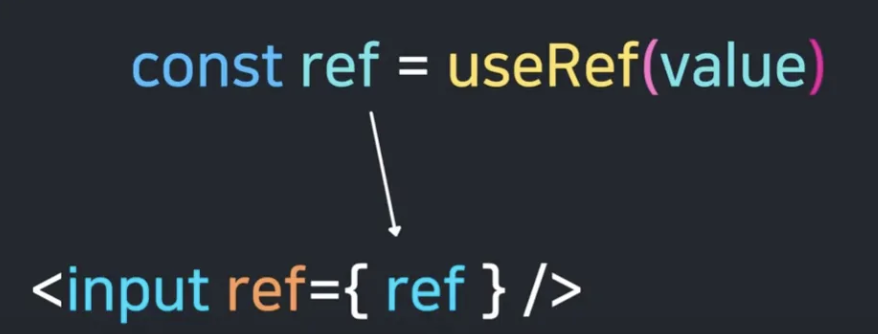
→ 이렇게 우리가 접근하고자 하는 요소 태그의 ref 속성으로 우리가 만들어준 ref를 넣어죽만 하면 된다. (정말 쉽게 해당요소에 접근할 수 있다,)
ex) input에 강제로 focus를 주고 싶다면? 렌더링과 동시에?
import { useEffect, useRef } from "react";

const App = () => {
  const inputRef = useRef<HTMLInputElement | null>(null);

  useEffect(() => {
    console.log(inputRef);
    if (inputRef.current) inputRef.current.focus();
  }, []);

  return (
    <div>
      <input type='text' ref={inputRef} />
    </div>
  );
};

export default App;
이런식으로 input 요소에 접근이 가능하다.
추가적으로 foucs 뿐만 아니라 value나 여러 input 태그의 속성에도 접근이 가능하다.
const login = () =>{
	alert(inputRef.current.value);
}
💡 마무리
useRef는
값의 변화를 추적해야 하지만, 그 변화가 리렌더링을 일으켜선 안 되는 상황에서 매우 유용하다.
React 렌더링 흐름 바깥에서 "조용히 기억"하는 저장소 역할

6개의 댓글

안녕하세요 호이초이님!🙃
매번 너무 좋은 글을 작성해주셔서 학습에 많은 도움이 되고 있습니다🙇♂️
<ex) input에 강제로 focus를 주고 싶다면? 렌더링과 동시에?> 예제 코드에 **텍스트** 가 잘못 들어간 것 같아요ㅎㅎ
추가로 alert(${inputRef.current.value}) 에서 alert(inputRef.current.value)로 바뀌어도 괜찮을 것 같다는 생각도 드는 것 같네요🤔
다음 좋은 글도 기대하고 있겠습니다👍👍👍
도대체 어디까지 뿌시나요...