
ex12
Flex
- flex : 생략되어 있다면 비율이 1의 값으로 설정되어 있다!
- flex의 경우는 비율도 중요하지만 비율보다는 해당 위젯의 크기에 영향을 받는 기능!
              SizedBox(height: 20,),
              Text('flex 사용'),
              Row(
                children: [
                  // flex : 생랻외어 있다면 비율이 1의 값으로 설정되어 있다!
                  // flex의 경우는 비율도 중요하지만 비율보다는 해당 위젯의 크기에 영향을 받는 기능!
                  Flexible(flex : 1, child: Container(width: 100, height: 50, color: Colors.red,)),
                  Flexible(flex : 1, child: Container(width: 200, height: 50,color: Colors.orange,)),
                ],
              ),
Expanded
- Expanded를 사용 할때는 먼저 alt + 엔터 해서 remove 먼저 하고, 다시 alt + 엔터 해서 Expanded 사용
- Expanded : 위젯의 크이와 상관없이 flex에 대한 비율이 가장 먼저 반영되는 기능
- flex가 생략되어 있다면 비율은 1!
              SizedBox(height: 20,),
              Text('Expanded 사용'),
              Row(
                children: [
                  // Expanded : 위젯의 크이와 상관없이 flex에 대한 비율이 가장 먼저 반영되는 기능
                  // flex가 생략되어 있다면 비율은 1!
                  Expanded(child: Flexible(child: Container(width: 150, height: 50, color: Colors.red,))),
                  Expanded(flex :2, child: Flexible(child: Container(width: 100, height: 50,color: Colors.orange,))),
                ],
              ),
실습
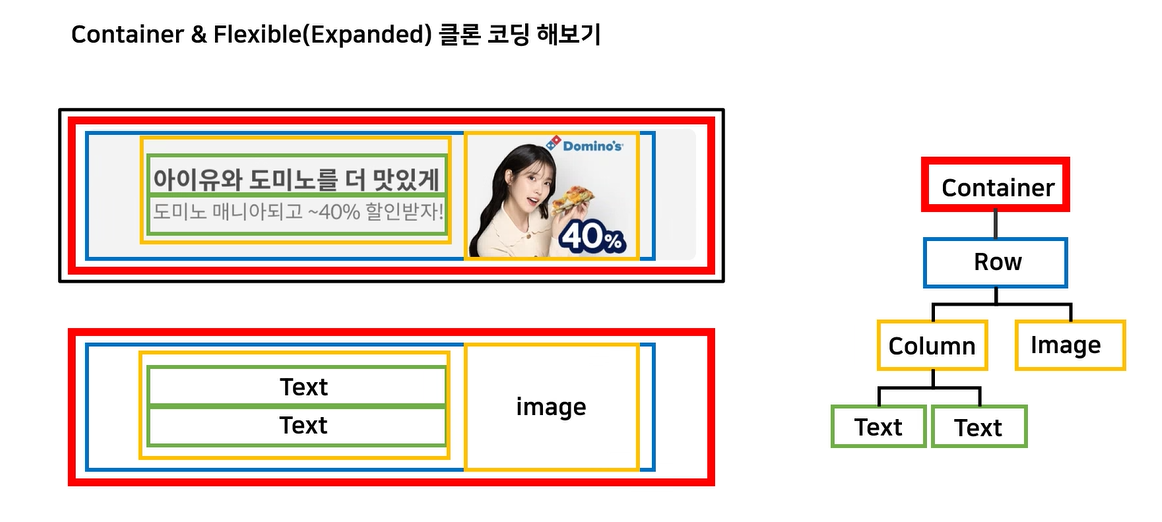
Ex13
import 'package:flutter/material.dart';
class ExDomino extends StatelessWidget {
  const ExDomino({super.key});
  @override
  Widget build(BuildContext context) {
    return Scaffold(
      body: SafeArea(
        // 1. 배경이 될 수 있는 회색 영역 -> Container
        child: Container(
          width: double.infinity,
          height: 100,
          margin: EdgeInsets.all(14),
          padding: EdgeInsets.fromLTRB(0, 0, 14, 0),
          decoration: BoxDecoration(
            color: Colors.grey[200],
            borderRadius: BorderRadius.circular(14),
          ),
          // 2. Container가 관지할 자손 만들기
          child: Row(
            // 텍스트 영역/ 이미지 영역
            children: [
              Expanded(
                flex: 2,
                child: Column(
                  mainAxisAlignment: MainAxisAlignment.center,
                  children: [
                    Text('아이유와 도미노를 더 맛있게',
                      style: TextStyle(
                        fontWeight: FontWeight.bold,
                        fontSize: 18,
                      ),
                    ),
                    Text('도미노 매니아 되고 ~40% 할인받자!',
                      style: TextStyle(
                          color: Colors.grey[500]),
                      ),
                  ],
                ),
              ),
              Expanded(
                  flex: 1,
                  child: Image.asset('images/domino.png')),
            ],
          ),
        ),
      ),
    );
  }
}
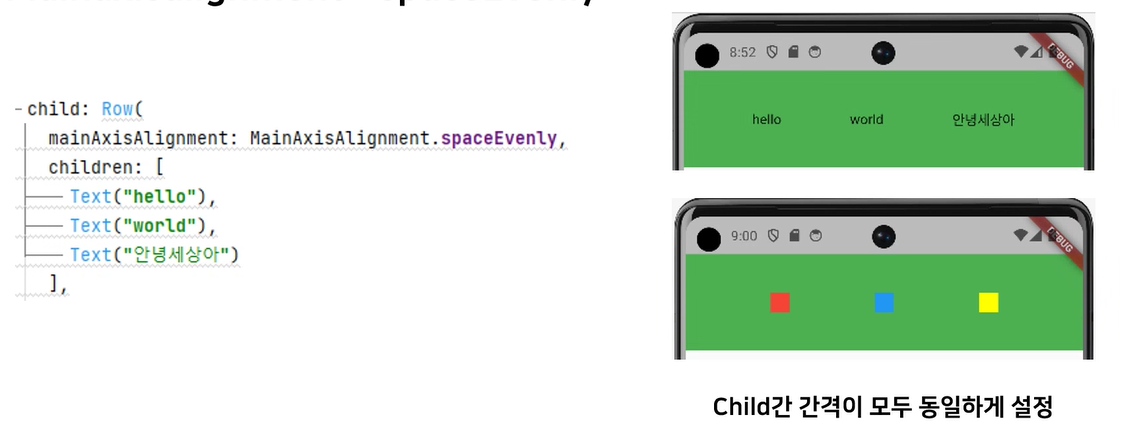
spaceEvenly
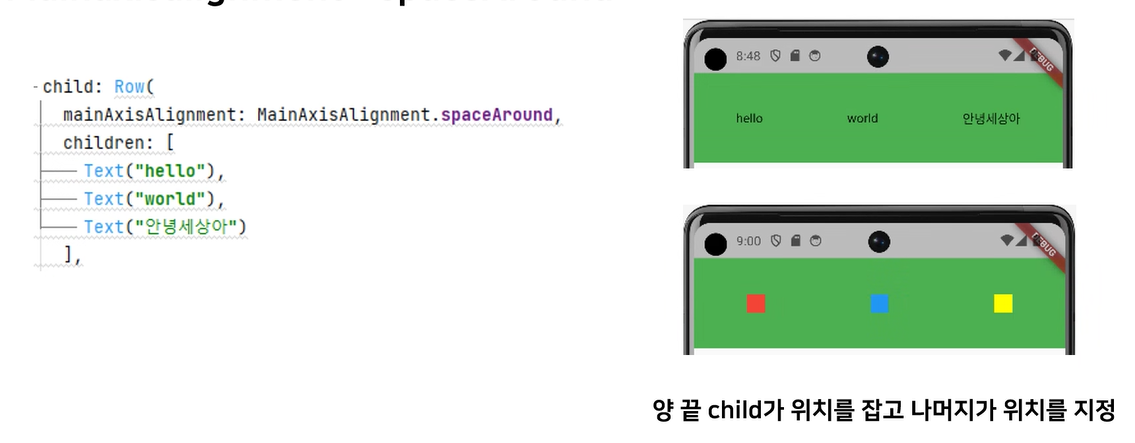
spaceAround
crossAxisAlignment
-
start
-
center
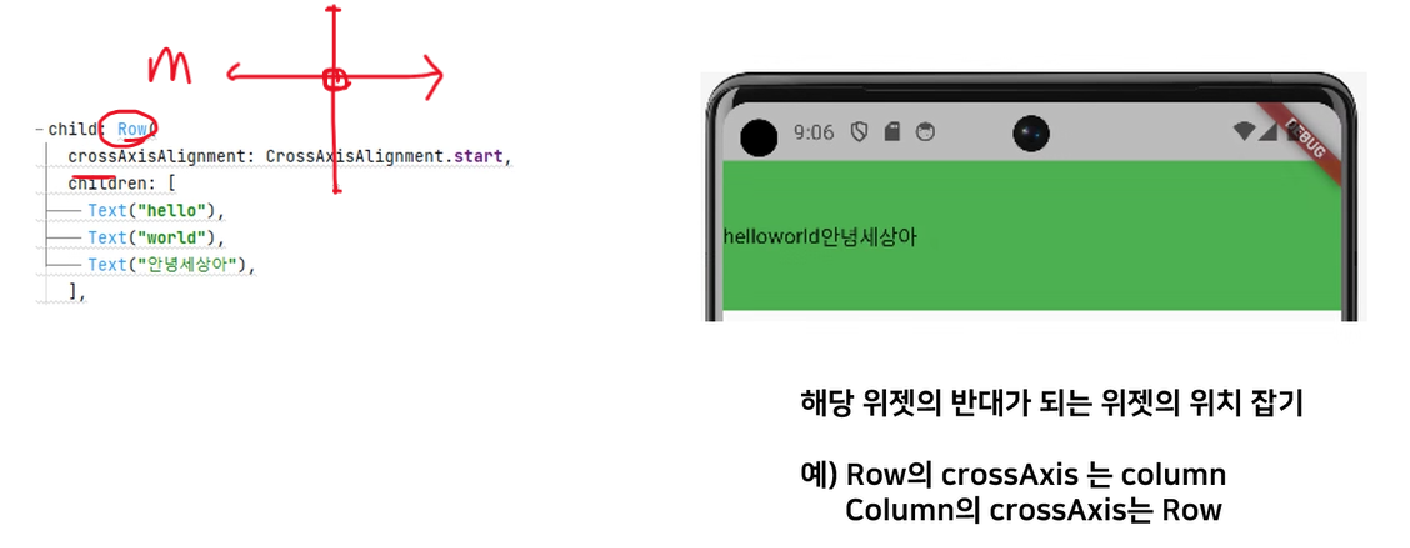
-
end
stack widget
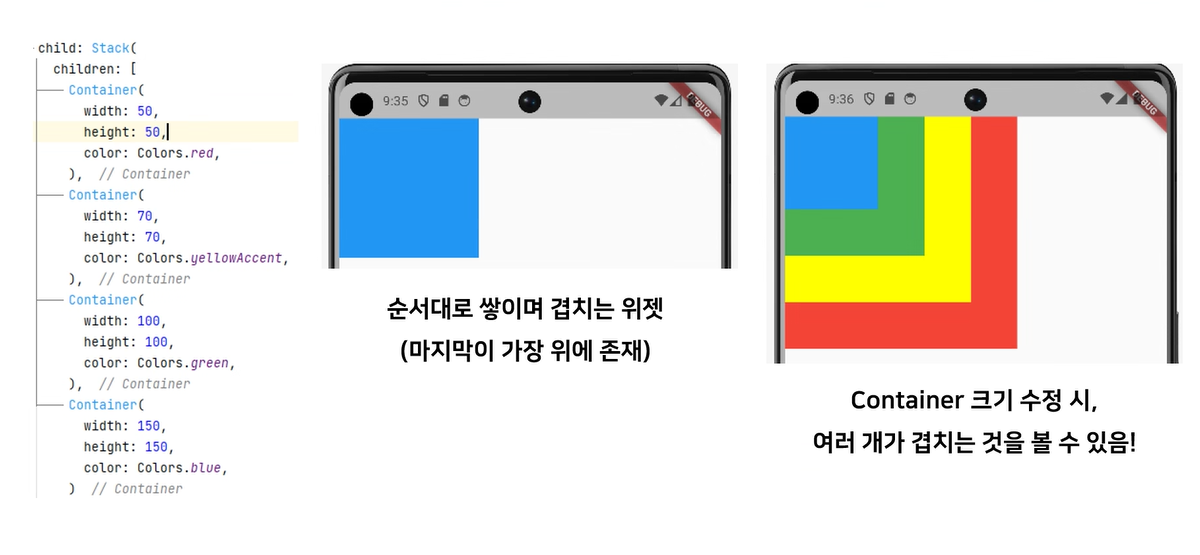
실습(Stack)
Ex15
import 'package:flutter/material.dart';
class ExStack extends StatelessWidget {
  const ExStack({super.key});
  @override
  Widget build(BuildContext context) {
    return Scaffold(
      body: SafeArea(
        child: Stack(
          alignment: Alignment.center,
          children: [
            // Positioned : 하나의 요소만 Positioned를 갖는게 아니라
            // 여러 요소가 같이 Positioned를 가져야 기능을 완벽히 수행할 수 있다!
            Positioned(
              top: 80,
              child :Container(
                width: 100,
                height: 100,
                color: Colors.green
              ),
            ),
            Positioned(
              top: 120,
              left: 20,
              right: 10,
              // bottom :50,
              child: Container(
                  width: 80,
                  height: 80,
                  color: Colors.orange),
            ),
          ],
        ),
      ),
    );
  }
}
실습2(Stack이용하여 알림뱃지 만들기)
Ex16
import 'package:flutter/material.dart';
class ExLikeicon extends StatelessWidget {
  const ExLikeicon({super.key});
  @override
  Widget build(BuildContext context) {
    return Scaffold(
      body: SafeArea(
        child: Stack(children: [
          Icon(Icons.favorite_border_sharp, size: 90),
          Positioned(
            left: 65,
            top : 5,
            child: Container(
              width: 20,
              height: 20,
              decoration: BoxDecoration(
                color: Colors.red,
                borderRadius : BorderRadius.circular(10),
              ),
            ),),
        ]),
      ),
    );
  }
}

찬과장의 Daily Reflection