목차
- 기능 설명
- 파일 구조
- 코드 설명
- 트러블 슈팅
기능설명
일정 CRUD
- 일정 생성
일정제목, 일정내용, 작성자명, 비밀번호, 작성/수정일을 저장해야 한다.
각 일정의 고유 식별자(ID)는 자동으로 생성되어야 하며, 작성/수정일은 JPA Auditing을 활용하여 적용해야한다.
또한, API응답에 비밀번호는 제외한다.
- 일정 조회
작성자명을 검색하여 일정목록을 조회할 수 있다. 만약, 작성자명이 주어지지 않았을 경우엔 전체 일정을 조회한다.
이를 사용하여 나온 결과물은 사용일을 기준으로 내림차순 정렬한다.
또한, ID를 사용하여 단건 조회할 수 있다. 이 경우 해당 일정에 작성되어있는 댓글들을 모두 불러온다.
- 일정 수정
일정 제목, 작성자명을 수정할 수 있다.
일정 수정을 요청할때 비밀번호를 같이 전달해야하며, 수정이 완료되면 수정일이 수정한 시점으로 자동 변경되게 한다.
- 일정 삭제
비밀번호를 입력받아 일치하면 삭제한다.
댓글 생성
일정에 댓글을 작성할 수 있다.
댓글 내용, 작성자명, 비밀번호, 작성/수정일, ID를 저장해야하고,
ID는 자동으로 생성 및 관리되어야 한다.
작성일, 수정일은 JPA Auditing을 활용하여 적용한다.
파일구조
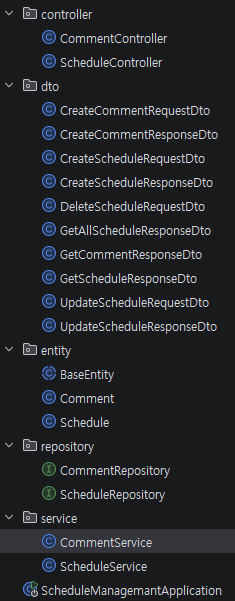
코드 설명
기능설명
컨트롤러
    @PostMapping("/comments/{schedule_id}")
    public ResponseEntity<CreateCommentResponseDto> CreateComment(
            @PathVariable Long schedule_id,
            @RequestBody CreateCommentRequestDto requestDto
            ){
        CreateCommentResponseDto result =  commentService.createComment(requestDto, schedule_id);
        return ResponseEntity.status(HttpStatus.CREATED).body(result);
} @PostMapping("/schedules")
public ResponseEntity<CreateScheduleResponseDto> CreateSchedule(@RequestBody CreateScheduleRequestDto requestDto){
CreateScheduleResponseDto result = scheduleService.createSchedule(requestDto);
return ResponseEntity.status(HttpStatus.CREATED).body(result);
}
@GetMapping("/schedules")
public ResponseEntity<List<GetAllScheduleResponseDto>> GetAllSchedule(
@RequestParam(required = false) String name
){
List<GetAllScheduleResponseDto> result = scheduleService.getSchedule(name);
return ResponseEntity.status(HttpStatus.OK).body(result);
}
@PutMapping("/schedules/{scheduleId}")
public ResponseEntity<UpdateScheduleResponseDto> update(
@PathVariable Long scheduleId,
@RequestBody UpdateScheduleRequestDto requestDto
){
UpdateScheduleResponseDto result = scheduleService.update(scheduleId, requestDto);
return ResponseEntity.status(HttpStatus.OK).body(result);
}
@DeleteMapping("/schedules/{scheduleId}")
public ResponseEntity<Void> delete(
@PathVariable Long scheduleId,
@RequestBody DeleteScheduleRequestDto requestDto
){
scheduleService.delete(scheduleId, requestDto);
return ResponseEntity.status(HttpStatus.NO_CONTENT).build();
}
}컨트롤러에서는 결과물을 ResponseEntity를 사용하여 HTTP응답을 담고 응답값을 포함하여 return할 수 있도록 작성하였다.
엔티티
@Getter
@MappedSuperclass
@EntityListeners(AuditingEntityListener.class)
public abstract class BaseEntity {

    @CreatedDate
    @Column(updatable = false)
    @Temporal(TemporalType.TIMESTAMP)
    private LocalDateTime createdAt;

    @LastModifiedDate
    @Temporal(TemporalType.TIMESTAMP)
    private LocalDateTime modifiedAt;
}작성/수정일을 자동으로 생성해주기 위하여, BaseEntity를 작성하고, Auditing 어노테이션을 통해 자동으로 생성할 수 있도록 만들었다.
@Getter
@Entity
@NoArgsConstructor(access = AccessLevel.PROTECTED)
@Table(name = "comments")
public class Comment extends BaseEntity{

    @Id
    @GeneratedValue(strategy = GenerationType.IDENTITY)
    private Long cm_id;

    @Column(length = 200, nullable = false)
    private String cm_content;
    @Column(nullable = false)
    private String cm_name;
    @Column(nullable = false)
    private String cm_password;
    @Column(nullable = false)
    private Long schedule_id;

    public Comment(String cm_content, String cm_name, String cm_password, Long schedule_id) {
        this.cm_content = cm_content;
        this.cm_name = cm_name;
        this.cm_password = cm_password;
        this.schedule_id = schedule_id;
    }
    public void cm_update(String cm_content){
        this.cm_content = cm_content;
    }
}
Comment 엔티티의 경우 일정에 대한 댓글을 작성해야 하므로 모든 요소에 nullable = false를 적용하여 필수로 입력하게 만들었다. 또한 위에서 작성한 BaseEntity를 extends하여 작성/수정일 값을 가져올 수 있게 했다.
@Getter
@Entity
@NoArgsConstructor(access = AccessLevel.PROTECTED)
@Table(name = "schedules")
public class Schedule extends BaseEntity{

    @Id
    @GeneratedValue(strategy = GenerationType.IDENTITY)
    private Long id;

    @Column(length = 30, nullable = false)
    private String title;
    @Column(length = 200, nullable = false)
    private String contents;
    @Column(nullable = false)
    private String name;
    @Column(nullable = false)
    private String password;

    public Schedule(String title, String contents, String name, String password) {
        this.title = title;
        this.contents = contents;
        this.name = name;
        this.password = password;
    }

    public void update(String title, String name){
        this.title = title;
        this.name = name;
    }
}Schedule엔티티의 경우에도 똑같이 BaseEntity를 extends하였으며, 글의 제목과 내용의 경우에 일정 글자가 넘지 않게 설정하였다.
DTO
Request의 경우에는 작성할게 많지않고, 간단하기 때문에 작성을 생략한다.
@Getter
public class CreateScheduleResponseDto {

    private final Long id;
    private final String title;
    private final String contents;
    private final String name;
    private final LocalDateTime created;
    private final LocalDateTime modified;

    public CreateScheduleResponseDto(Long id, String title, String contents, String name, LocalDateTime created, LocalDateTime modified) {
        this.id = id;
        this.title = title;
        this.contents = contents;
        this.name = name;
        this.created = created;
        this.modified = modified;
    }
}
Schedule 생성에 관한 Dto이다. 글 제목, 내용, 이름, 비밀번호를 입력하면 나머지 id와 작성/수정일은 자동으로 생성된다.
@Getter
public class GetAllScheduleResponseDto {

    private final Long id;
    private final String title;
    private final String contents;
    private final String name;
    private final LocalDateTime created;
    private final LocalDateTime modified;

    public GetAllScheduleResponseDto(Long id, String title, String contents, String name, LocalDateTime created, LocalDateTime modified) {
        this.id = id;
        this.title = title;
        this.contents = contents;
        this.name = name;
        this.created = created;
        this.modified = modified;
    }
}
@Getter
public class GetScheduleResponseDto {
private final Long id;
private final String title;
private final String contents;
private final String name;
private final List<GetCommentResponseDto> comments;
private final LocalDateTime created;
private final LocalDateTime modified;
public GetScheduleResponseDto(Long id, String title, String contents, String name, List<GetCommentResponseDto> comments, LocalDateTime created, LocalDateTime modified) {
this.id = id;
this.title = title;
this.contents = contents;
this.name = name;
this.comments = comments;
this.created = created;
this.modified = modified;
}
}일정 조회에 관련된 Dto이다. 둘다 유사하지만, 단건조회의 경우 연관되어있는 댓글을 불러와야 하기 때문에, List형태로 comments를 받고, 출력할 수 있게 reponse에 추가하였다.
@Getter
public class UpdateScheduleResponseDto {

    private final String title;
    private final String name;
    private final LocalDateTime modified;

    public UpdateScheduleResponseDto(String title, String name, LocalDateTime modified) {
        this.title = title;
        this.name = name;
        this.modified = modified;
    }
}
위는 일정수정에 대한 Dto이고, LocalDateTime을 사용하여 글을 수정했을시, 수정일이 자동으로 바뀌게 설정하였다.
@Getter
public class CreateCommentResponseDto {

    private final Long cm_id;
    private final String cm_content;
    private final String cm_name;
    private final LocalDateTime cm_created;
    private final LocalDateTime cm_modified;

    public CreateCommentResponseDto(Long cm_id, String cm_content, String cm_name, LocalDateTime cm_created, LocalDateTime cm_modified) {
        this.cm_id = cm_id;
        this.cm_content = cm_content;
        this.cm_name = cm_name;
        this.cm_created = cm_created;
        this.cm_modified = cm_modified;
    }
}
위는 Comment 생성에 대한 Dto이다. 댓글 생성시에 필요한 내용을 작성하였다.
@Getter
public class GetCommentResponseDto {
    private final Long cm_id;
    private final String cm_contents;
    private final String cm_name;
    private final LocalDateTime cm_created;
    private final LocalDateTime cm_modified;

    public GetCommentResponseDto(Long cm_id, String cm_contents, String cm_name, LocalDateTime cm_created, LocalDateTime cm_modified) {
        this.cm_id = cm_id;
        this.cm_contents = cm_contents;
        this.cm_name = cm_name;
        this.cm_created = cm_created;
        this.cm_modified = cm_modified;
    }
}
위는 Comment 조회에 대한 Dto이다. 조회시에 필요한 내용들을 작성해두었다.
Schedule서비스
 public CreateScheduleResponseDto createSchedule(CreateScheduleRequestDto requestDto){
        Schedule schedule = new Schedule(
                requestDto.getTitle(),
                requestDto.getContents(),
                requestDto.getName(),
                requestDto.getPassword()
        );
        Schedule saveSchedule = scheduleRepository.save(schedule);

        return new CreateScheduleResponseDto(
                saveSchedule.getId(),
                saveSchedule.getTitle(),
                saveSchedule.getContents(),
                saveSchedule.getName(),
                saveSchedule.getCreatedAt(),
                saveSchedule.getModifiedAt()
        );
    }

  //생성해주는 코드이다.

    @Transactional(readOnly = true)
    public GetScheduleResponseDto getOne(Long scheduleId){
        Schedule schedule = scheduleRepository.findById(scheduleId).orElseThrow(
                ()-> new IllegalStateException("없는 일정입니다")
        );
        List<GetCommentResponseDto> comments = commentRepository.findAll()
                .stream()
                .filter(c -> c.getSchedule_id().equals(scheduleId))
                .map(c -> new GetCommentResponseDto(
                        c.getCm_id(),
                        c.getCm_content(),
                        c.getCm_name(),
                        c.getCreatedAt(),
                        c.getModifiedAt()
                ))
                .toList();

        return new GetScheduleResponseDto(
                schedule.getId(),
                schedule.getTitle(),
                schedule.getContents(),
                schedule.getName(),
                comments,
                schedule.getCreatedAt(),
                schedule.getModifiedAt()
        );
    }

  //데이터 단건 조회에 대한 코드이다.
  //comments 댓글을 가져오기 위해 List로 생성하였고,
  //findAll()을 한뒤 stream을 통해 댓글의 scheduleId가 scheduleId와 같은 댓글들만 출력할 수 있게 만들었다.
  //또한, 읽기만 할것이기 때문에 `readOnly = true` 속성을 추가하였다.

    @Transactional(readOnly = true)
    public List<GetAllScheduleResponseDto> getSchedule(String name){
        List<Schedule> schedules = scheduleRepository.findAll();
        List<GetAllScheduleResponseDto> dtos = new ArrayList<>();

        if(name != null) {
            for (Schedule schedule : schedules) {
                if (name.equals(schedule.getName())) {
                    GetAllScheduleResponseDto dto = new GetAllScheduleResponseDto(
                            schedule.getId(),
                            schedule.getTitle(),
                            schedule.getContents(),
                            schedule.getName(),
                            schedule.getCreatedAt(),
                            schedule.getModifiedAt()
                    );
                    dtos.add(dto);
                }
            }
        } else{
            for (Schedule schedule : schedules) {
                GetAllScheduleResponseDto dto = new GetAllScheduleResponseDto(
                        schedule.getId(),
                        schedule.getTitle(),
                        schedule.getContents(),
                        schedule.getName(),
                        schedule.getCreatedAt(),
                        schedule.getModifiedAt()
                );
                dtos.add(dto);
            }
        }
        dtos.sort((dto1, dto2) ->
                dto2.getModified().compareTo(dto1.getModified())
        );
        return dtos;
    }

	//이는 다건조회에 관한 코드이다.
    //if문을 통해서 입력값인 name이 존재한다면(null이 아니라면) 입력한 name과 같은 name이 있는 데이터만 출력하고,
    //그렇지않다면 전부 출력한다.

    @Transactional
    public UpdateScheduleResponseDto update(Long scheduleId, UpdateScheduleRequestDto requestDto) {
        Schedule schedule = scheduleRepository.findById(scheduleId).orElseThrow(
                ()-> new IllegalStateException("없는 일정입니다")
        );
        if (!schedule.getPassword().equals(requestDto.getPassword())){
            throw new IllegalStateException("비밀번호가 일치하지 않습니다.");
        }
        schedule.update(
                requestDto.getTitle(),
                requestDto.getName()
        );

        return new UpdateScheduleResponseDto(
                schedule.getTitle(),
                schedule.getName(),
                schedule.getModifiedAt()
        );
    }

    @Transactional
    public void delete(Long scheduleId, DeleteScheduleRequestDto requestDto){
        Schedule schedule = scheduleRepository.findById(scheduleId).orElseThrow(
                ()-> new IllegalStateException("없는 일정입니다")
        );
        if (!schedule.getPassword().equals(requestDto.getPassword())){
            throw new IllegalStateException("비밀번호가 일치하지 않습니다.");
        }
        scheduleRepository.deleteById(scheduleId);
    }
  //나머지 코드는 특이한점은 없고, Delete의 경우에 password를 가져와서 비밀번호가 동일할때만 삭제가 가능하게 만들었다.
Comment 서비스
    @Transactional
    public CreateCommentResponseDto createComment(CreateCommentRequestDto requestDto, Long scheduleId){
        Schedule schedule = scheduleRepository.findById(scheduleId)
                .orElseThrow(() -> new IllegalStateException("없는 일정입니다."));

        List<Comment> commentList = commentRepository.findAll();
        if(commentList
                .stream()
                .filter(c -> c.getSchedule_id().equals(scheduleId))
                .count() >= 10){
            throw new IllegalStateException("댓글은 10개 까지 작성할 수 있습니다.");
        }

        Comment comment = new Comment(
                requestDto.getCm_content(),
                requestDto.getCm_name(),
                requestDto.getCm_password(),
                scheduleId
        );

        Comment saveComment = commentRepository.save(comment);

        return new CreateCommentResponseDto(
                saveComment.getCm_id(),
                saveComment.getCm_content(),
                saveComment.getCm_name(),
                saveComment.getCreatedAt(),
                saveComment.getModifiedAt()
        );
    }
Comment의 경우에는 작성에 관한 로직만 존재한다. stream.count를 통해 작성한 댓글이 10개가 넘으면 작성할 수 없게 예외 처리를 하였다.
트러블 슈팅
1.댓글과 일정 데이터 간 연관 관계 설계 문제
댓글 기능을 구현하면서 Comment와 Schedule간의 관계를 어떻게 매핑해야 하는지 고민이 있었다.
@OneToMany와 같은 어노테이션을 쓰고싶긴했지만, 아직 이 어노테이션에 대해선 제대로 공부해보지 않아서 모르는상태로 따라치는것보단, 일단 내가 알고있는 지식 내에서 작성하고자 하였다.
2.조건부 조회(name의 유무) 기능 구현
name값이 있으면 해당 조건을 가지고 필터링, 없다면 전체 조회하는 코드를 작성하는게 어려웠다.
특히, Controller를 구현할때 @RequestBody만 사용해왔기 때문에, @RequestParam을 사용하여 해결할 수 있다는 사실을 망각하고 있었다.
3.RequestDto와 ReponseDto의 사용 위치
service와 controller를 작성할때, 어디에 Request가 들어가고 어디에 Reponse가 들어가는지가 헷갈렸다. Reponse를 출력으로 Request를 입력으로 받아야한다 와 같은 기본적인 개념은 이해했지만, 막상 실전에서 작성하려고 하니 입력값으로 어떤 dto를 받아야하는지와 같은 사소한 부분에서 헷갈렸다.
일정관리 CRUD에 대한 실습을 진행하면서 서비스 계층을 분리하면서 MVC 패턴에 대한 중요성을 경험했다.