오류 내용
Room cannot verify the data integrity. Looks like you've changed schema but forgot to update the version number.
You can simply fix this by increasing the version number.
Room Database로 앱을 실행하는 데 오류가 발생했다. Room Entity의 정보를 변경했더니 오류가 났는데, 변경된 데이터베이스와 남아있는 이전 데이터베이스 간에 충돌이 일어나므로 버전을 업데이트해서 이전 버전을 새 버전으로 옮기라는 메시지이다. 그러나 배포 전의 앱 개발 과정에서는 데이터베이스에 큰 변화가 없다면 굳이 migrate 처리해줄 필요가 없으므로 간단한 방법을 찾게 됐다.
해결 방법
기존에 오류가 나던 앱을 삭제하고,
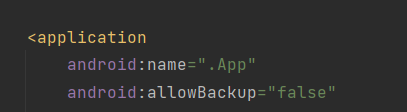
AndroidManifest.xml 에서 android:allowBackup="false"를 추가해준 후,
재설치하면 된다.
android:allowBackup="true"는 앱이 제거된 후에도 데이터가 지워지지 않도록 백업하기 때문에, 반대로 false 값을 주면 앱이 제거될 때 데이터도 같이 지워진다.

깡통 채우기
유익한 글이었습니다.