Building Android App Widgets (with. Troubleshooting)
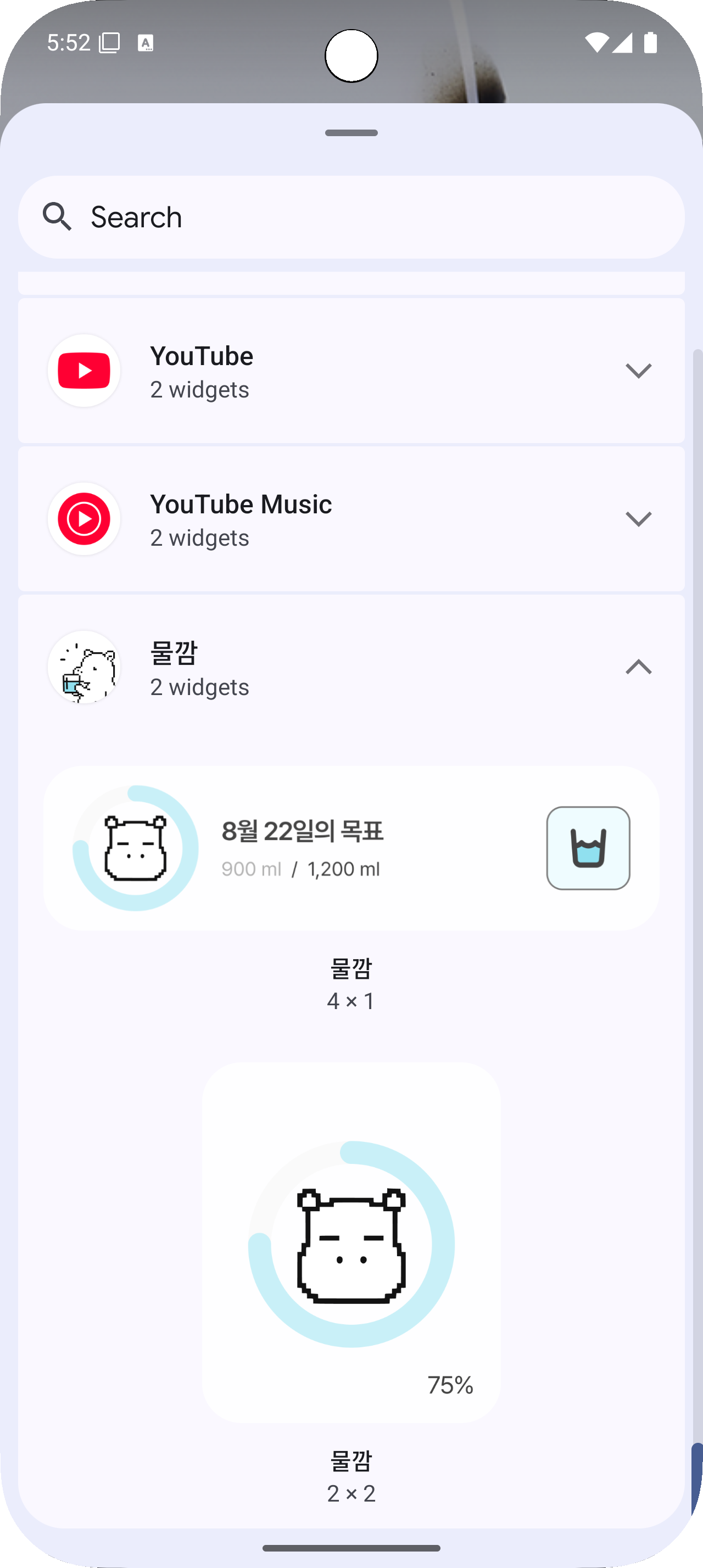
An app widget can be seen as a mini-app that users “glance at and tap on.”
However, widgets have different process lifecycles and much stricter background restrictions, so making network calls as usual is difficult. 😥
This post is a record of the trial-and-error I went through while building Mulkkam, a water intake tracking widget.
The widget is implemented with RemoteViews + AppWidgetProvider, and uses a BroadcastReceiver for events and WorkManager for actual tasks.
Along the way, I wanted to decouple the UI from WorkManager, so I introduced an abstraction layer (IntakeChecker) to keep things cleaner.
Let’s dive into the core code.
1) Building the Widget (Basic Skeleton)
1-1. Manifest Registration
<receiver
    android:name=".ui.widget.IntakeWidget"
    android:exported="false">
    <intent-filter>
        <action android:name="android.appwidget.action.APPWIDGET_UPDATE" />
    </intent-filter>

    <meta-data
        android:name="android.appwidget.provider"
        android:resource="@xml/intake_widget_info" />
</receiver>- exported=“false”: Prevents external apps from calling our BroadcastReceiver.
- @xml/intake_widget_info: Metadata declaration (layout, size, update interval).
1-2. Widget Metadata
<?xml version="1.0" encoding="utf-8"?>
<appwidget-provider xmlns:android="http://schemas.android.com/apk/res/android"
    android:initialLayout="@layout/layout_intake_widget"
    android:minWidth="276dp"
    android:minHeight="50dp"
    android:previewImage="@drawable/img_intake_widget"
    android:targetCellWidth="4"
    android:targetCellHeight="1"
    android:updatePeriodMillis="7200000"
android:widgetCategory="home_screen" />- initialLayout: RemoteViews layout, XML-based. Components are limited, so check in advance.
- updatePeriodMillis=7200000 (2 hours): Minimum system trigger interval. For real-time updates, use broadcasts.
1-3. AppWidgetProvider Skeleton
class IntakeWidget : AppWidgetProvider() {
    override fun onUpdate(context: Context, appWidgetManager: AppWidgetManager, appWidgetIds: IntArray) {
        appWidgetIds.forEach { id -> updateIntakeWidgetInfo(context, id) }
    }

    override fun onReceive(context: Context, intent: Intent) {
        super.onReceive(context, intent)
        when (IntakeWidgetAction.from(intent.action)) {
            ACTION_DRINK -> performDrink(intent, context)
            ACTION_REFRESH -> refreshWidget(context)
            null -> return
        }
    }
}- onUpdate: Called by the launcher → updates each widget instance id.
- onReceive: Custom actions when the widget is tapped.
1-4. Filling RemoteViews + Click Actions
private fun showIntakeWidgetInfo(
    context: Context,
    appWidgetManager: AppWidgetManager,
    appWidgetId: Int,
    achievementRate: Float,
    targetAmount: Int,
    totalAmount: Int,
    primaryCupAmount: Int,
) {
    val views = RemoteViews(context.packageName, R.layout.layout_intake_widget)

    val donut = GradientDonutChartView.createBitmap(
        context, width = 74.dpToPx(context), height = 74.dpToPx(context),
        stroke = 6f, progress = achievementRate
    )
    views.setImageViewBitmap(R.id.iv_donut_chart, donut)

    views.setTextViewText(
        R.id.tv_title_date,
        context.getString(R.string.intake_widget_home_target, LocalDate.now().monthValue, LocalDate.now().dayOfMonth),
    )
    views.setTextViewText(
        R.id.tv_summary,
        context.getString(R.string.home_daily_intake_summary, totalAmount, targetAmount),
    )

    // Widget click → Open app
    views.setOnClickPendingIntent(R.id.layout_intake_widget, MainActivity.newPendingIntent(context))
    // “Drink a cup” button → Trigger intake action
    views.setOnClickPendingIntent(R.id.ll_drink, newDrinkPendingIntent(context, appWidgetId, primaryCupAmount))

    appWidgetManager.updateAppWidget(appWidgetId, views)
}- RemoteViews limitation: Custom views aren’t allowed. Workaround → render GradientDonutChartView as a bitmap and setImageViewBitmap.
- MainActivity.newPendingIntent: Enter app.
- newDrinkPendingIntent: Broadcasts a custom ACTION_DRINK.
private fun newDrinkPendingIntent(context: Context, appWidgetId: Int, amount: Int): PendingIntent {
    val intent = Intent(context, IntakeWidget::class.java).apply {
        action = ACTION_DRINK.name
        putExtra(KEY_EXTRA_AMOUNT, amount)
        putExtra(KEY_EXTRA_WIDGET_ID, appWidgetId)
    }
    val requestCode = REQUEST_CODE_DRINK + appWidgetId
    return PendingIntent.getBroadcast(
        context,
        requestCode,
        intent,
        PendingIntent.FLAG_UPDATE_CURRENT or PendingIntent.FLAG_IMMUTABLE,
    )
}- Key point: mix appWidgetId into requestCode to avoid PendingIntent collisions between instances.
- FLAG_IMMUTABLE: practically mandatory on newer Android.
2) Flow: Broadcast → WorkManager → Widget Update
Since widgets are BroadcastReceiver-based, receiving a click event is easy.
But you must not run network/DB tasks directly here. (Tight background restrictions, must return within seconds, ANR risk…)
Solution: Delegate all real work to WorkManager.
- Widget click → IntakeWidget.onReceive()
- Action handling:
- ACTION_DRINK → intakeChecker.drink(amount) → enqueue
- ACTION_REFRESH → refresh current instances
- Observe WorkManager result → update UI via AppWidgetManager.updateAppWidget(…)
3) Background Work: WorkManager + Abstraction Layer
3-1. UI doesn’t know WorkManager
IntakeChecker
class IntakeCheckerImpl(private val workManager: WorkManager) : IntakeChecker {
    override fun drink(amount: Int): UUID {
        val request = OneTimeWorkRequestBuilder<DrinkByAmountWorker>()
            .setInputData(workDataOf(IntakeChecker.KEY_INTAKE_CHECKER_AMOUNT to amount))
            .build()
        workManager.enqueue(request)
        return request.id
    }

    override fun checkWidgetInfo(): UUID {
        val request = OneTimeWorkRequestBuilder<IntakeWidgetWorker>().build()
        workManager.enqueue(request)
        return request.id
    }
}- The widget (UI) doesn’t care about enqueue details → just calls intakeChecker.drink() / checkWidgetInfo().
- Returns UUID (task id) → observed later.
- Note: Observing is not abstracted away because widgets lack LifecycleOwner. Used submit/observe separation as a compromise.
3-2. Observing Results
private fun updateIntakeWidgetInfo(context: Context, appWidgetId: Int) {
    val requestId = intakeChecker.checkWidgetInfo()
    val workManager = WorkManager.getInstance(context.applicationContext)
    val live = workManager.getWorkInfoByIdLiveData(requestId)

    val observer = object : Observer<WorkInfo?> {
        override fun onChanged(value: WorkInfo?) {
            if (value?.state?.isFinished != true) return

            val rate = value.outputData.getFloat(KEY_INTAKE_CHECKER_ACHIEVEMENT_RATE, 0f)
            val target = value.outputData.getInt(KEY_INTAKE_CHECKER_TARGET_AMOUNT, 0)
            val total = value.outputData.getInt(KEY_INTAKE_CHECKER_TOTAL_AMOUNT, 0)
            val amount = value.outputData.getInt(KEY_INTAKE_CHECKER_CUP_AMOUNT, 0)

            val appWidgetManager = AppWidgetManager.getInstance(context.applicationContext)
            showIntakeWidgetInfo(context.applicationContext, appWidgetManager, appWidgetId, rate, target, total, amount)
            live.removeObserver(this) // ★ Prevent leaks
        }
    }
    live.observeForever(observer)
}- No LifecycleOwner → must use observeForever.
- Always removeObserver after finished, to prevent memory leaks.
- Use applicationContext only (avoid Activity context).
drink observing works the same way.
4) Troubleshooting 🔧
- API calls directly in widget? → Not allowed (BroadcastReceivers must return quickly).
- Multiple widgets interfering? → Fixed with unique requestCode per appWidgetId.
- observeForever leak risk? → Always removeObserver after finished.
- Outdated UI? → Added ACTION_REFRESH and manual refresh on success.
- Custom donut chart not showing? → Rendered to bitmap, setImageViewBitmap.
- Rapid taps enqueue duplicate work? → Use enqueueUniqueWork() with ExistingWorkPolicy (KEEP / REPLACE / APPEND).
5) Architecture Refinement: UI ↔ WorkManager Separation
Current:
- Submission handled by IntakeChecker
- Observation handled in widget
Future options:
- Abstraction includes observation → e.g. return LiveData.
- Asynchronous broadcast callback → Worker sends another broadcast on completion, widget updates without observing.
For now, I chose option 1 (simpler, stable), with room for refactoring later.
6) Full Flow Overview
- Launcher calls onUpdate → checkWidgetInfo() enqueued
- Worker fetches progress/target/total/cup size → outputData
- Widget observes completion → showIntakeWidgetInfo() updates RemoteViews
- User taps “Drink cup” → ACTION_DRINK broadcast
- drink(amount) enqueued → success triggers ACTION_REFRESH
Conclusion
With widgets, the rule of thumb is:
Keep the BroadcastReceiver thin, push real logic to WorkManager.
By exposing only an abstraction layer (IntakeChecker) to UI and consolidating constants, you reduce mismatches and keep contracts consistent.
Still room for architectural polish, but this structure is already robust. 🥲
Hope this saves someone else a few headaches when building their first widget. 🎉