스프링 시큐리티 핵심 개념
| 구분 | 설명 |
|---|---|
| 인증 (Authentication) | 사용자가 누구인지 확인 (ex. 로그인) |
| 인가 (Authorization) | 인증된 사용자가 무엇을 할 수 있는지 확인 (ex. 권한 확인) |
| 필터 (Filter) | 요청이 들어올 때 시큐리티 로직을 거쳐서 통과 여부 결정 |
| 시큐리티 컨텍스트(SecurityContext) | 인증된 사용자 정보를 저장하는 공간 |
| UserDetailsService | 사용자 정보(아이디, 비번, 권한 등)를 불러오는 인터페이스 |
| PasswordEncoder | 비밀번호 암호화 (ex. BCryptPasswordEncoder 사용) |
예제
pom.xml
		<dependency>
			<groupId>org.springframework.security</groupId>
			<artifactId>spring-security-web</artifactId>
			<version>${org.springframework-version}</version>
		</dependency>
		<dependency>
			<groupId>org.springframework.security</groupId>
			<artifactId>spring-security-config</artifactId>
			<version>${org.springframework-version}</version>
		</dependency>
		<dependency>
			<groupId>org.springframework.security</groupId>
			<artifactId>spring-security-core</artifactId>
			<version>${org.springframework-version}</version>
		</dependency>
		<!-- https://mvnrepository.com/artifact/org.springframework.security/spring-security-taglibs -->
		<dependency>
			<groupId>org.springframework.security</groupId>
			<artifactId>spring-security-taglibs</artifactId>
			<version>${org.springframework-version}</version>
		</dependency>
web.xml
	<!-- The definition of the Root Spring Container shared by all Servlets
		and Filters -->
	<context-param>
		<param-name>contextConfigLocation</param-name>
		<param-value>
			/WEB-INF/spring/root-context.xml
			/WEB-INF/spring/security-context.xml
			</param-value>
	</context-param>
	...
	<filter>
		<filter-name>springSecurityFilterChain</filter-name>
		<filter-class>org.springframework.web.filter.DelegatingFilterProxy
		</filter-class>
	</filter>
	<filter-mapping>
		<filter-name>springSecurityFilterChain</filter-name>
		<url-pattern>/*</url-pattern>
	</filter-mapping>
Controller.java
package org.zerock.controller;

import org.springframework.stereotype.Controller;
import org.springframework.web.bind.annotation.GetMapping;
import org.springframework.web.bind.annotation.RequestMapping;

import lombok.extern.log4j.Log4j;

@Controller
@Log4j
@RequestMapping("/sample3/*")
public class SampleController3 {
	@GetMapping("/all")
	public void doAll() {
		log.info("all access...............................");
	}

	@GetMapping("/member")
	public void Member() {
		log.info("member...................................");
	}

	@GetMapping("/admin")
	public void doAdmin() {
		log.info("admin.....................................");
	}
}
CommonController.java
...
@Controller
@Log4j
public class CommonController {

	@GetMapping("/accessError")
	public void accessDenied(Authentication auth, Model model) {
		log.info("access Denied: " + auth);
		model.addAttribute("msg", "Access Denied");
	}
}
📌 설명: 사용자가 권한이 없어 접근이 거부되었을 때 /accessError 페이지로 이동하며, 에러 메시지를 모델에 담아 뷰로 전달함.
🌟 security-context.xml
security 관련 설정 모두 담당!
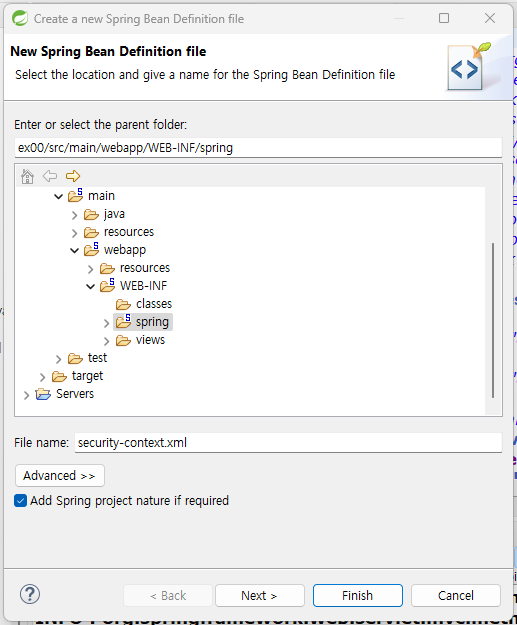
<?xml version="1.0" encoding="UTF-8"?>
<beans xmlns="http://www.springframework.org/schema/beans"
	xmlns:xsi="http://www.w3.org/2001/XMLSchema-instance"
	xmlns:security="http://www.springframework.org/schema/security"
	xsi:schemaLocation="http://www.springframework.org/schema/security http://www.springframework.org/schema/security/spring-security.xsd http://www.springframework.org/schema/beans http://www.springframework.org/schema/beans/spring-beans.xsd">

	<security:http>

		<security:intercept-url pattern="/sample3/all" access="permitAll"/>
		<security:intercept-url pattern="/sample3/member"
											access="hasRole('ROLE_MEMBER')"/>
		<security:intercept-url pattern="/sample3/admin"
											access="hasRole('ROLE_ADMIN')"/>

		<security:form-login/>

		<security:access-denied-handler error-page="/accessError"/>
	</security:http>


 	<security:authentication-manager>
		<security:authentication-provider>
			<security:user-service>

				<security:user name="member" password="{noop}member" authorities="ROLE_MEMBER"/>
				<security:user name="admin" password="{noop}admin"
											authorities="ROLE_MEMBER, ROLE_ADMIN"/>

			</security:user-service>
		</security:authentication-provider>
	</security:authentication-manager>

</beans>
(( 인메모리 유저 설정은 {noop}으로 비밀번호 인코딩 없이 테스트 용도로 사용. ))
스프링 시큐리티 요약
🔐 핵심 개념
| 개념 | 설명 |
|---|---|
| 인증 (Authentication) | 사용자가 누구인지 확인 (예: 로그인) |
| 인가 (Authorization) | 인증된 사용자가 무엇을 할 수 있는지 확인 (권한 검사) |
| 접근 거부 처리 | 인가 실패 시 사용자에게 보여줄 에러 페이지 설정 (/accessError) |
| Security Filter Chain | 요청에 대해 시큐리티 필터 체인이 작동하여 인증/인가 처리 |
📦 주요 설정 파일 요약
1. pom.xml – 의존성 설정
스프링 시큐리티 관련 핵심 라이브러리 추가:
spring-security-webspring-security-configspring-security-corespring-security-taglibs
2. web.xml – 필터 설정
스프링 시큐리티 필터 체인 등록:
springSecurityFilterChain을DelegatingFilterProxy로 등록하여 모든 요청(/*)에 대해 시큐리티 필터 적용
3. Controller.java – 접근 제어 예시
URL 패턴별 접근 로그 출력:
/sample3/all: 모든 사용자 접근 허용/sample3/member: 인증된 회원만 접근 가능/sample3/admin: 관리자 권한 사용자만 접근 가능
4. security-context.xml – 보안 설정
접근 제어 및 사용자 인증 설정:
/sample3/all: 모든 사용자 접근 허용 (permitAll)/sample3/member:ROLE_MEMBER권한 필요/sample3/admin:ROLE_ADMIN권한 필요- 폼 기반 로그인 활성화 (
<security:form-login/>) - 인메모리 사용자 설정:
member/member→ROLE_MEMBERadmin/admin→ROLE_MEMBER,ROLE_ADMIN
🧠 요약 포인트
- 스프링 시큐리티의 핵심은 인증과 인가를 통해 애플리케이션의 보안을 강화하는 것입니다.
security-context.xml에서 URL별 접근 권한을 설정하고, 인메모리 사용자 정보를 통해 간단한 인증을 구현할 수 있습니다.web.xml에서 필터를 설정하여 모든 요청에 대해 시큐리티 로직이 적용되도록 구성합니다.