Bootstrap 실습4
Bootstrap 홈페이지 예시의 Checkout form 만들어보기
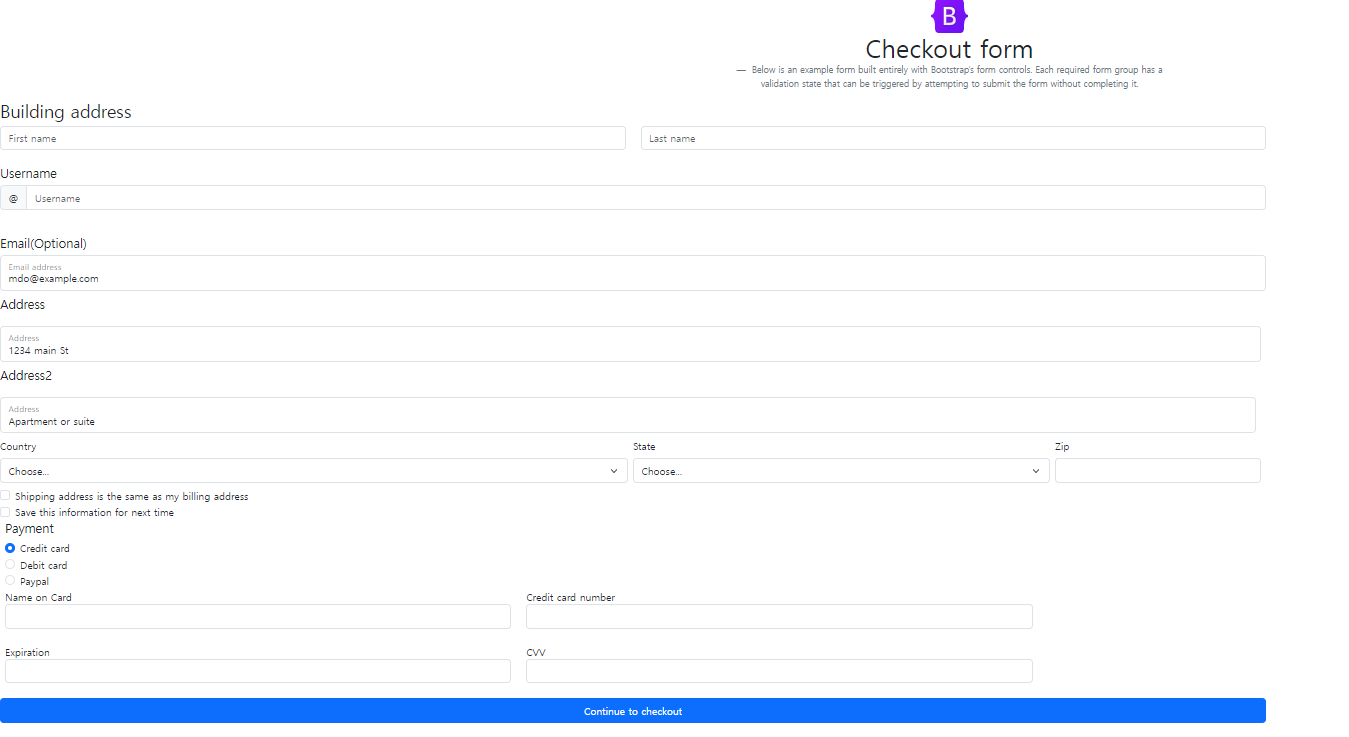
소스코드
<!DOCTYPE html>
<html lang="en">
<head>
<meta charset="UTF-8">
<meta http-equiv="X-UA-Compatible" content="IE=edge">
<meta name="viewport" content="width=device-width, initial-scale=1.0">
<title>Document</title>
<link href="https://cdn.jsdelivr.net/npm/bootstrap@5.3.0-alpha3/dist/css/bootstrap.min.css" rel="stylesheet"
integrity="sha384-KK94CHFLLe+nY2dmCWGMq91rCGa5gtU4mk92HdvYe+M/SXH301p5ILy+dN9+nJOZ" crossorigin="anonymous">
</head>
<style>
.container1 {
/**/
}
.container2 {
/**/
}
</style>
<body>
<!-- JavaScript Bundle with Popper -->
<script src="https://cdn.jsdelivr.net/npm/bootstrap@5.2.3/dist/js/bootstrap.bundle.min.js"
integrity="sha384-kenU1KFdBIe4zVF0s0G1M5b4hcpxyD9F7jL+jjXkk+Q2h455rYXK/7HAuoJl+0I4"
crossorigin="anonymous"></script>
<div class="container1">
<div class="row">
<main>
<!-- checkout form-->
<div class="py5 text-center">
<figure class="text-center">
<blockquote class="blockquote">
<img src="https://getbootstrap.kr/docs/5.2/assets/brand/bootstrap-logo.svg" alt="Logo"
width="60" height="55" class="d-inline-block align-text-top">
<br>
<h1>Checkout form</h1>
</blockquote>
<figcaption class="blockquote-footer">
Below is an example form built entirely with Bootstrap’s form controls. Each required form
group
has a <br>
validation state that can be triggered by attempting to submit the form without completing
it.
</figcaption>
</figure>
</div>
<div class="row g-5">
<div class="A">
<div class="col-md -7 col-lg-8">
<!--Building address-->
<h3>Building address</h3>
<div class="row">
<div class="col">
<input type="text" class="form-control" placeholder="First name"
aria-label="First name">
</div>
<div class="col">
<input type="text" class="form-control" placeholder="Last name"
aria-label="Last name">
</div>
</div>
<br>
<!--Username-->
<h5>Username</h5>
<div class="input-group mb-3">
<span class="input-group-text" id="basic-addon1">@</span>
<input type="text" class="form-control" placeholder="Username" aria-label="Username"
aria-describedby="basic-addon1">
</div>
<br>
<!--Email(Optional)-->
<h5>Email(Optional)</h5>
<div class="row g-2">
<div class="col-md">
<div class="form-floating">
<input type="email" class="form-control" id="floatingInputGrid"
placeholder="name@example.com" value="mdo@example.com">
<label for="floatingInputGrid">Email address</label>
</div>
</div>
<br>
<!--Address-->
<h5>Address</h5>
<div class="row g-2">
<div class="col-md">
<div class="form-floating">
<input type="email" class="form-control" id="floatingInputGrid"
placeholder="1234 main St" value="1234 main St">
<label for="floatingInputGrid">Address</label>
</div>
</div>
<!--Address2-->
<h5>Address2</h5>
<div class="row g-2">
<div class="col-md">
<div class="form-floating">
<input type="email" class="form-control" id="floatingInputGrid"
placeholder="1234 main St" value="Apartment or suite">
<label for="floatingInputGrid">Address</label>
</div>
</div>
</div>
<br>
<div class="col-md-6">
<label for="inputState" class="form-label">Country</label>
<select id="inputState" class="form-select">
<option selected>Choose...</option>
<option>...</option>
</select>
</div>
<div class="col-md-4">
<label for="inputState" class="form-label">State</label>
<select id="inputState" class="form-select">
<option selected>Choose...</option>
<option>...</option>
</select>
</div>
<div class="col-md-2">
<label for="inputZip" class="form-label">Zip</label>
<input type="text" class="form-control" id="inputZip">
</div>
<!--체크박스-->
<div class="col-12">
<div class="form-check">
<input class="form-check-input" type="checkbox" id="gridCheck">
<label class="form-check-label" for="gridCheck">
Shipping address is the same as my billing address
</label>
</div>
<div class="form-check">
<input class="form-check-input" type="checkbox" id="gridCheck">
<label class="form-check-label" for="gridCheck">
Save this information for next time
</label>
</div>
</div>
<br>
<!--Payment-->
<fieldset class="row mb-3">
<h5>Payment</h5>
<div class="col-sm-10">
<div class="form-check">
<input class="form-check-input" type="radio" name="gridRadios"
id="gridRadios1" value="option1" checked>
<label class="form-check-label" for="gridRadios1">
Credit card
</label>
</div>
<div class="form-check">
<input class="form-check-input" type="radio" name="gridRadios"
id="gridRadios2" value="option2">
<label class="form-check-label" for="gridRadios2">
Debit card
</label>
</div>
<div class="form-check disabled">
<input class="form-check-input" type="radio" name="gridRadios"
id="gridRadios3" value="option3">
<label class="form-check-label" for="gridRadios3">
Paypal
</label>
</div>
<div class="row">
<div class="col">
Name on Card
<input type="text" class="form-control" placeholder=""
aria-label="First name">
</div>
<div class="col">
Credit card number
<input type="text" class="form-control" placeholder=""
aria-label="Last name">
</div>
<br>
</div>
<br>
<div class="row">
<div class="col">
Expiration
<input type="text" class="form-control" placeholder=""
aria-label="First name">
</div>
<div class="col">
CVV
<input type="text" class="form-control" placeholder=""
aria-label="Last name">
</div>
</div>
</div>
</div>
<br>
<div class="d-grid gap-2">
<button class="btn btn-primary" type="button">Continue to checkout</button>
</div>
</fieldset>
</div>
</div>
</div>
<div class="container2">
<!--Bclass-->
<div class="col-md-5 col-lg-4 order-md-last">
<div class="B">
<h4 class="d-flex justify-content-between align-items-center mb-3">
<span class="text-primary">Your cart</span>
<span class="badge bg-primary rounded-pill">3</span>
</h4>
<ul class="list-group list-group">
<li class="list-group-item d-flex justify-content-between align-items-start">
<div class="ms-2 me-auto">
<div class="fw-bold">Product name</div>
Breif description
</div>
<span class="text-muted">$12</span>
</li>
<li class="list-group-item d-flex justify-content-between align-items-start">
<div class="ms-2 me-auto">
<div class="fw-bold">Second product</div>
Breif description
</div>
<span class="text-muted">$8</span>
</li>
<li class="list-group-item d-flex justify-content-between align-items-start">
<div class="ms-2 me-auto">
<div class="fw-bold">Third item</div>
Breif description
</div>
<span class="text-muted">$5</span>
</li>
<li class="list-group-item d-flex justify-content-between bg-light">
<div class="text-success">
<div class="fw-bold">Promo code</div>
EXAMPLECODE
</div>
<span class="text-muted">$-5</span>
</li>
</ul>
<div class="input-group mb-3">
<input type="text" class="form-control" placeholder="Promo code"
aria-label="Recipient's username" aria-describedby="button-addon2">
<button class="btn btn-outline-secondary" type="button"
id="button-addon2">Redeem</button>
</div>
</div>
</div>
<!--Bclass-->>
</div>
</main>
</div>
</body>
</html>