JDBC로 CRUD 구현하기
MySQL과 JDBC를 이용하여 편의점 재고관리 프로그램을 만들어보자.
해당 프로그램에서는 상품 목록을 조회(READ), 등록(CREATE), 수정(UPDATE), 삭제(DELETE) 하는 기능을 가지고 있다.
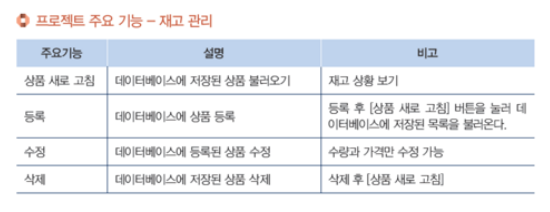
프로젝트 주요 기능은 아래 이미지와 같다.
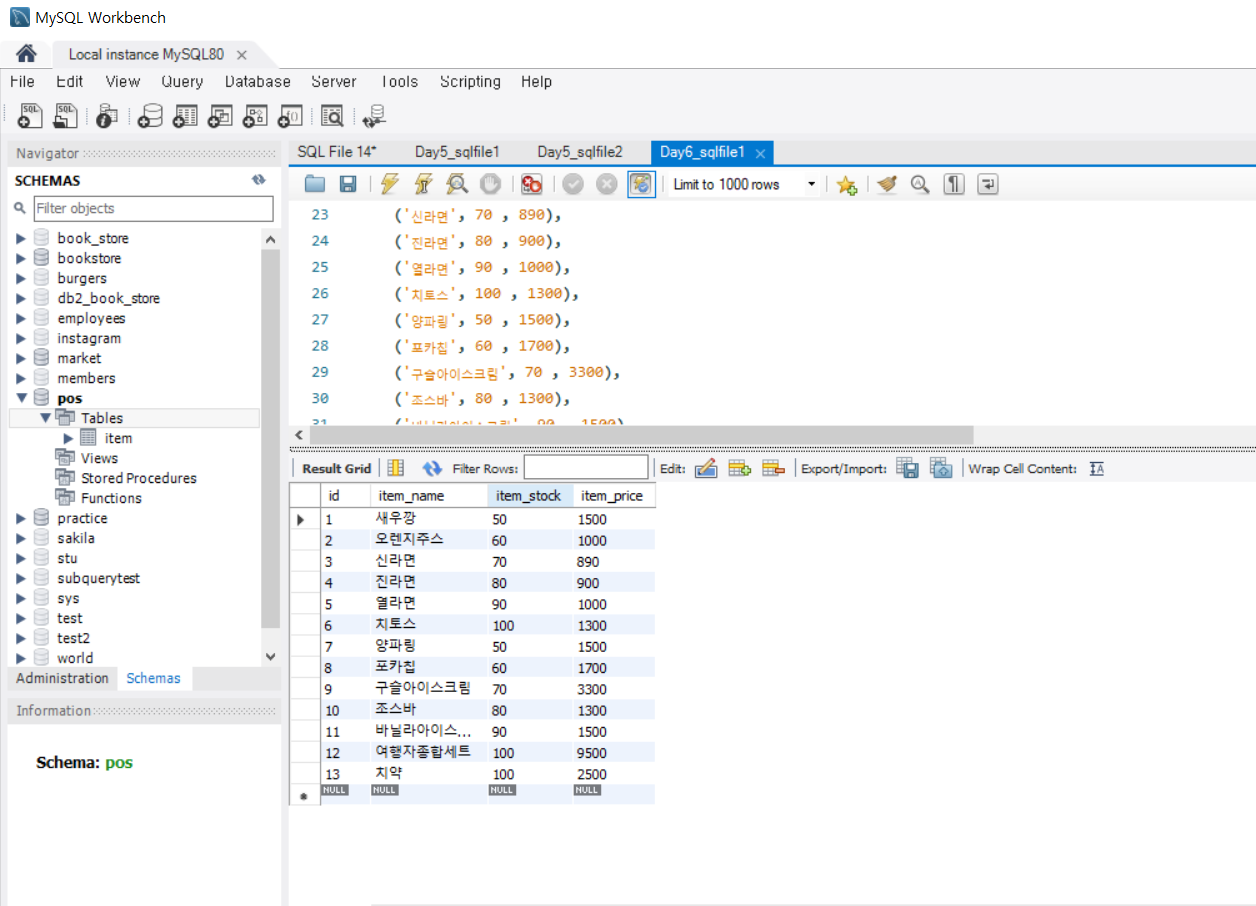
MySQL에서 데이터베이스 생성 및 테이블에 레코드 추가
CREATE DATABASE POS;
USE POS;


CREATE TABLE Item(
	id int NOT NULL auto_increment PRIMARY KEY,
    item_name VARCHAR(45),
    item_stock int,
    item_price int,
	UNIQUE (item_name)

);


INSERT INTO
  Item(item_name, item_stock, item_price)
VALUES
   ('새우깡', 50, 1500),
   ('오렌지주스', 60 , 1000),
  ('신라면', 70 , 890),
  ('진라면', 80 , 900),
  ('열라면', 90 , 1000),
  ('치토스', 100 , 1300),
  ('양파링', 50 , 1500),
  ('포카칩', 60 , 1700),
  ('구슬아이스크림', 70 , 3300),
  ('조스바', 80 , 1300),
  ('바닐라아이스크림', 90 , 1500),
  ('여행자종합세트',100,9500),
  ('치약',100,2500)
;
JDBC를 통해 이클립스(Eclipse)와 MySQL 연동
- Class.forName() 메서드를 이용해서 JDBC 드라이버를 로딩
Class.forName("com.mysql.cj.jdbc.Driver");- 데이터 베이스 연결
String url = "jdbc:mysql://localhost:3306/pos?serverTimezone=UTC"; //DB연결 (로컬호스트 뒤에 연결 할 DB명)
			String user = "아이디"; //mysql 워크벤치 아이디
String pass = "비밀번호"; //mysql 워크벤치 비밀번호- Connection 객체 생성으로 계정 연결
Connection con = DriverManager.getConnection(url, user, pass);메뉴 선택 구현
- Scanner를 이용해 번호를 입력받고 switch-case문에서 해당되는 번호의 메서드를 호출
	Scanner scanner = new Scanner(System.in);

				while (true) {
					// 메뉴 출력
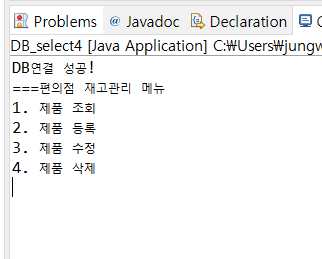
					System.out.println("===편의점 재고관리 메뉴");
					System.out.println("1. 제품 조회");
					System.out.println("2. 제품 등록");
					System.out.println("3. 제품 수정");
					System.out.println("4. 제품 삭제");

					int choice = scanner.nextInt();
					scanner.nextLine(); // 개행 문자 제거

					switch (choice) {
					case 1:
						readItem(con);
						break;
					case 2:
						createItem(con, scanner);
						break;
					case 3:
						updateItem(con, scanner);
						break;
					case 4:
						deleteItem(con, scanner);
						break;
					case 5:
						// 프로그램 종료
						con.close();
						scanner.close();
						return;
					default:
						System.out.println("잘못된 메뉴 선택입니다.");
					}

					System.out.println();
				}
READ 구현
private static void readItem(Connection con) throws SQLException {
		// TODO Auto-generated method stub
		System.out.println("read, 제품을 조회합니다.");

		String selectQuery = "SELECT * FROM ITEM";
		Statement stmt = con.createStatement();
		ResultSet result = stmt.executeQuery(selectQuery);

		while (result.next()) {

			// 컬럼 이름을 이용해서 데이터를 뽑는게 더 안전하다.
			// getString("컬럼이름")
			int id = Integer.parseInt(result.getString("id"));
			String item_name = result.getString("item_name");
			int item_stock = Integer.parseInt(result.getString("item_stock"));
			int item_price = Integer.parseInt(result.getString("item_price"));

			System.out.println("id:" + id);
			System.out.println("item_name:" + item_name);
			System.out.println("item_stock:" + item_stock);
			System.out.println("item_price :" + item_price);
			System.out.println();

		}
	}
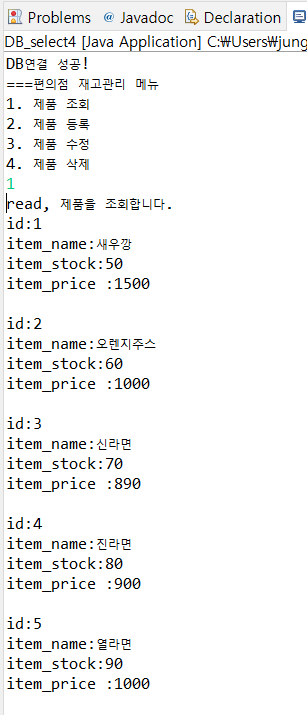
MySQL의 Item 테이블을 정상적으로 READ한 것을 확인할 수 있다.
CREATE 구현
private static void createItem(Connection con, Scanner scanner) throws SQLException {
		// TODO Auto-generated method stub
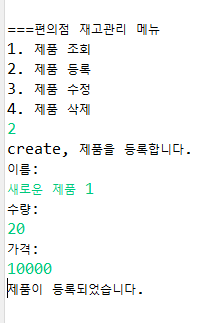
		System.out.println("create, 제품을 등록합니다.");

		System.out.println("이름:");
		String item_name = scanner.nextLine();

		System.out.println("수량:");
		int item_stock = scanner.nextInt();

		System.out.println("가격:");
		int item_price = scanner.nextInt();

		String insertQuery = "INSERT INTO item (item_name, item_stock, item_price) VALUES (?, ?, ?)";
		PreparedStatement preparedStatement = con.prepareStatement(insertQuery);

		// 매개변수 설정
		preparedStatement.setString(1, item_name);
		preparedStatement.setInt(2, item_stock);
		preparedStatement.setInt(3, item_price);

		// 실행
		preparedStatement.executeUpdate();
		System.out.println("제품이 등록되었습니다.");
	}
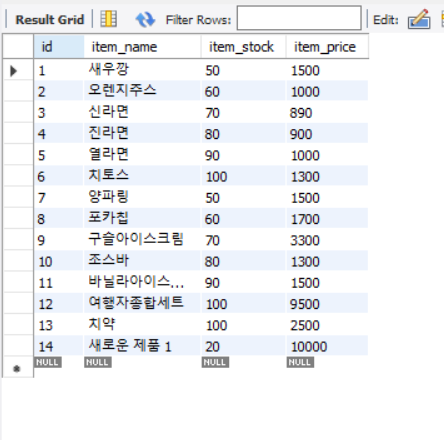
Item 테이블에 새로운 제품1을 CREATE
MySQL에서 테이블 조회 시 정상적으로 제품이 CREATE된 것을 확인할 수 있다.
UPDATE 구현
	private static void updateItem(Connection con, Scanner scanner) throws SQLException {
		// TODO Auto-generated method stub
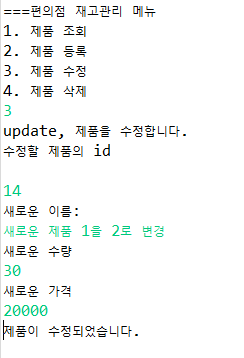
		System.out.println("update, 제품을 수정합니다.");

		System.out.println("수정할 제품의 id");
		int id = scanner.nextInt();
		scanner.nextLine(); // 개행 문자 제거

		System.out.println("새로운 이름:");
		String item_name = scanner.nextLine();

		System.out.println("새로운 수량");
		int item_stock = scanner.nextInt();

		System.out.println("새로운 가격");
		int item_price = scanner.nextInt();
		scanner.nextLine(); // 개행 문자 제거

		String updateQuery = "UPDATE ITEM SET item_name = ?, item_stock = ?, item_price = ? WHERE id = ?";
		PreparedStatement preparedStatement = con.prepareStatement(updateQuery);

		// 매개변수 설정
		preparedStatement.setString(1, item_name);
		preparedStatement.setInt(2, item_stock);
		preparedStatement.setInt(3, item_price);
		preparedStatement.setInt(4, id);

		// 실행
		preparedStatement.executeUpdate();
		System.out.println("제품이 수정되었습니다.");
	}
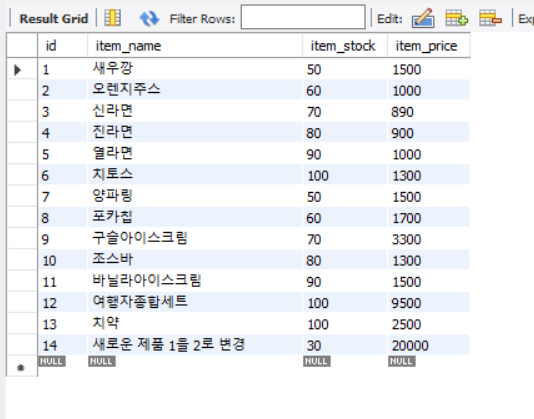
CREATE로 추가한 새로운 제품 1을 UPDATE
MySQL에서 테이블 조회 시 정상적으로 제품이 UPDATE된 것을 확인할 수 있다.
DELETE 구현
private static void deleteItem(Connection con, Scanner scanner) throws SQLException {
		// TODO Auto-generated method stub
		System.out.println("delete, 제품을 삭제합니다.");

		System.out.println("삭제할 제품의 id");
		int id = scanner.nextInt();
		scanner.nextLine(); // 개행 문자 제거

		String deleteQuery = "DELETE FROM ITEM WHERE id = ?";
		PreparedStatement preparedStatement = con.prepareStatement(deleteQuery);

		// 매개변수 설정
		preparedStatement.setInt(1, id);

		// 실행
		preparedStatement.executeUpdate();
		System.out.println("제품이 삭제되었습니다.");
	}
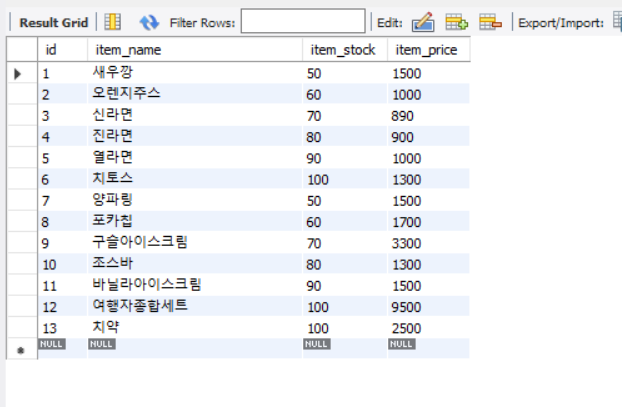
CREATE로 추가한 새로운 제품 1을 UPDATE 후 DELETE로 삭제
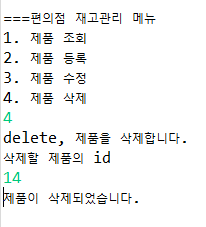
MySQL에서 테이블 조회 시 정상적으로 제품이 DELETE된 것을 확인할 수 있다.
JDBC 연결 과정에서 필요했던 객체들을 close
	// 데이터베이스 작업에 사용한 객체를 닫는 메서드
	public static void close(Connection conn) {
		if (conn != null) {
			try {
				conn.close();
			} catch (SQLException e) {
				// TODO Auto-generated catch block
				e.printStackTrace();
			}
		}

	}

	public static void close(Statement conn) {
		if (conn != null) {
			try {
				conn.close();
			} catch (SQLException e) {
				// TODO Auto-generated catch block
				e.printStackTrace();
			}
		}

	}

	public static void close(PreparedStatement conn) {
		if (conn != null) {
			try {
				conn.close();
			} catch (SQLException e) {
				// TODO Auto-generated catch block
				e.printStackTrace();
			}
		}

	}

	public static void close(ResultSet rs) {
		if (rs != null) {
			try {
				rs.close();
			} catch (SQLException e) {
				e.printStackTrace();
			}
		}
	}
전체 코드
// JDBC 편의점 예제 (재고관리 CRUD 구현 )


import java.sql.Connection;
import java.sql.DriverManager;
import java.sql.PreparedStatement;
import java.sql.ResultSet;
import java.sql.SQLException;
import java.sql.Statement;
import java.util.Scanner;

// MySQL과 기본 연결
public class DB_select4 {

	public static void main(String[] args) {

		// 8.x
		try {
			Class.forName("com.mysql.cj.jdbc.Driver"); // Class.forName() 메서드를 이용해서 JDBC 드라이버를 로딩
			String url = "jdbc:mysql://localhost:3306/pos?serverTimezone=UTC"; // DB연결 (로컬호스트 뒤에 DB명)
			String user = "아이디"; // mysql 워크벤치 아이디
			String pass = "비밀번호"; // mysql 워크벤치 비밀번호

			// 데이터베이스 실제 연결을 도와주는 클래스
//			Connection con = DriverManager.getConnection(url, user, pass);
			try {
				Connection con = DriverManager.getConnection(url, user, pass);

				if (con != null) {
					System.out.println("DB연결 성공!");
				}

				Scanner scanner = new Scanner(System.in);

				while (true) {
					// 메뉴 출력
					System.out.println("===편의점 재고관리 메뉴");
					System.out.println("1. 제품 조회");
					System.out.println("2. 제품 등록");
					System.out.println("3. 제품 수정");
					System.out.println("4. 제품 삭제");

					int choice = scanner.nextInt();
					scanner.nextLine(); // 개행 문자 제거

					switch (choice) {
					case 1:
						readItem(con);
						break;
					case 2:
						createItem(con, scanner);
						break;
					case 3:
						updateItem(con, scanner);
						break;
					case 4:
						deleteItem(con, scanner);
						break;
					case 5:
						// 프로그램 종료
						con.close();
						scanner.close();
						return;
					default:
						System.out.println("잘못된 메뉴 선택입니다.");
					}

					System.out.println();
				}

			} catch (SQLException e) {
				// TODO Auto-generated catch block
				e.printStackTrace();
				System.out.println("연결 에러");
			}

		} catch (ClassNotFoundException e) {
			// TODO Auto-generated catch block
			System.out.println("드라이버 로딩 에러");
			e.printStackTrace();
		}

	}

	private static void readItem(Connection con) throws SQLException {
		// TODO Auto-generated method stub
		System.out.println("read, 제품을 조회합니다.");

		String selectQuery = "SELECT * FROM ITEM";
		Statement stmt = con.createStatement();
		ResultSet result = stmt.executeQuery(selectQuery);

		while (result.next()) {


			int id = Integer.parseInt(result.getString("id"));
			String item_name = result.getString("item_name");
			int item_stock = Integer.parseInt(result.getString("item_stock"));
			int item_price = Integer.parseInt(result.getString("item_price"));

			System.out.println("id:" + id);
			System.out.println("item_name:" + item_name);
			System.out.println("item_stock:" + item_stock);
			System.out.println("item_price :" + item_price);
			System.out.println();

		}
	}

	private static void createItem(Connection con, Scanner scanner) throws SQLException {
		// TODO Auto-generated method stub
		System.out.println("create, 제품을 등록합니다.");

		System.out.println("이름:");
		String item_name = scanner.nextLine();

		System.out.println("수량:");
		int item_stock = scanner.nextInt();

		System.out.println("가격:");
		int item_price = scanner.nextInt();

		String insertQuery = "INSERT INTO item (item_name, item_stock, item_price) VALUES (?, ?, ?)";
		PreparedStatement preparedStatement = con.prepareStatement(insertQuery);

		// 매개변수 설정
		preparedStatement.setString(1, item_name);
		preparedStatement.setInt(2, item_stock);
		preparedStatement.setInt(3, item_price);

		// 실행
		preparedStatement.executeUpdate();
		System.out.println("제품이 등록되었습니다.");
	}

	private static void updateItem(Connection con, Scanner scanner) throws SQLException {
		// TODO Auto-generated method stub
		System.out.println("update, 제품을 수정합니다.");

		System.out.println("수정할 제품의 id");
		int id = scanner.nextInt();
		scanner.nextLine(); // 개행 문자 제거

		System.out.println("새로운 이름:");
		String item_name = scanner.nextLine();

		System.out.println("새로운 수량");
		int item_stock = scanner.nextInt();

		System.out.println("새로운 가격");
		int item_price = scanner.nextInt();
		scanner.nextLine(); // 개행 문자 제거

		String updateQuery = "UPDATE ITEM SET item_name = ?, item_stock = ?, item_price = ? WHERE id = ?";
		PreparedStatement preparedStatement = con.prepareStatement(updateQuery);

		// 매개변수 설정
		preparedStatement.setString(1, item_name);
		preparedStatement.setInt(2, item_stock);
		preparedStatement.setInt(3, item_price);
		preparedStatement.setInt(4, id);

		// 실행
		preparedStatement.executeUpdate();
		System.out.println("제품이 수정되었습니다.");
	}

	private static void deleteItem(Connection con, Scanner scanner) throws SQLException {
		// TODO Auto-generated method stub
		System.out.println("delete, 제품을 삭제합니다.");

		System.out.println("삭제할 제품의 id");
		int id = scanner.nextInt();
		scanner.nextLine(); // 개행 문자 제거

		String deleteQuery = "DELETE FROM ITEM WHERE id = ?";
		PreparedStatement preparedStatement = con.prepareStatement(deleteQuery);

		// 매개변수 설정
		preparedStatement.setInt(1, id);

		// 실행
		preparedStatement.executeUpdate();
		System.out.println("제품이 삭제되었습니다.");
	}

	// 데이터베이스 작업에 사용한 객체를 닫는 메서드
	public static void close(Connection conn) {
		if (conn != null) {
			try {
				conn.close();
			} catch (SQLException e) {
				// TODO Auto-generated catch block
				e.printStackTrace();
			}
		}

	}

	public static void close(Statement conn) {
		if (conn != null) {
			try {
				conn.close();
			} catch (SQLException e) {
				// TODO Auto-generated catch block
				e.printStackTrace();
			}
		}

	}

	public static void close(PreparedStatement conn) {
		if (conn != null) {
			try {
				conn.close();
			} catch (SQLException e) {
				// TODO Auto-generated catch block
				e.printStackTrace();
			}
		}

	}

	public static void close(ResultSet rs) {
		if (rs != null) {
			try {
				rs.close();
			} catch (SQLException e) {
				e.printStackTrace();
			}
		}
	}

}
