
✅ IAM
우선 s3에 업로드 하기 위해서는 권한을 가진 유저를 만들어줘야 한다.
IAM > 사용자 > 사용자 추가에 들어간다.- 사용자 이름을 정하고, 권한 옵션에 직접 정책 연결을 선택해준다.
- S3를 검색하고, S3FullAccess를 선택해준다.
- 액세스 키를 만들고, csv 파일로 저장해준다.
✅ 코드 작성하기
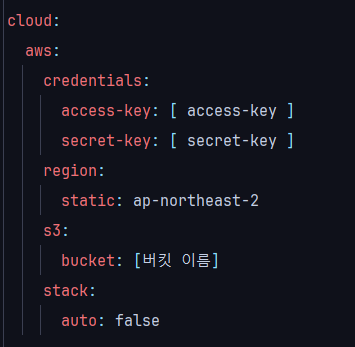
- application.yaml
여기서 accessKey와 secretKey는 위에서 저장한 csv 파일에서 확인가능하다.
- build.gradle
implementation 'io.awspring.cloud:spring-cloud-starter-aws:2.4.4'- S3config
package org.delivery.storeadmin.config;

import com.amazonaws.auth.AWSCredentials;
import com.amazonaws.auth.AWSStaticCredentialsProvider;
import com.amazonaws.auth.BasicAWSCredentials;
import com.amazonaws.services.s3.AmazonS3;
import com.amazonaws.services.s3.AmazonS3ClientBuilder;
import org.springframework.beans.factory.annotation.Value;
import org.springframework.context.annotation.Bean;
import org.springframework.context.annotation.Configuration;

@Configuration
public class S3Config {

    @Value("${cloud.aws.credentials.access-key}")
    private String accessKey;

    @Value("${cloud.aws.credentials.secret-key}")
    private String secretKey;

    @Value("${cloud.aws.region.static}")
    private String region;

    @Bean
    public AmazonS3 s3Client() {
        AWSCredentials credentials = new BasicAWSCredentials(accessKey, secretKey);
        return AmazonS3ClientBuilder.standard()
                .withCredentials(new AWSStaticCredentialsProvider(credentials))
                .withRegion(region).build();
    }
}
- S3Service
    private String uploadImage(MultipartFile image, String folderName) {
    // folderName : s3 버킷 안에 폴더를 지정할 때 사용함
        this.validateImageFileExtention(image.getOriginalFilename());
        try {
            return this.uploadImageToS3(image, folderName);
        } catch (IOException e) {
            throw new IllegalArgumentException("파일 없음");
        }
    }

    private void validateImageFileExtention(String filename) {
        int lastDotIndex = filename.lastIndexOf(".");
        if (lastDotIndex == -1) {
            throw new IllegalArgumentException("확장자 없음");
        }

        String extention = filename.substring(lastDotIndex + 1).toLowerCase();
        List<String> allowedExtentionList = Arrays.asList("jpg", "jpeg", "png");

        if (!allowedExtentionList.contains(extention)) {
            throw new IllegalArgumentException("지원하지 않는 확장자");
        }
    }

    private String uploadImageToS3(MultipartFile image, String folderName) throws IOException {
        String originalFilename = image.getOriginalFilename(); //원본 파일 명
        String extention = originalFilename.substring(originalFilename.lastIndexOf(".")); //확장자 명

        String s3FileName = folderName+"/"+UUID.randomUUID().toString().substring(0, 10) + originalFilename; //변경된 파일 명

        InputStream is = image.getInputStream();
        byte[] bytes = IOUtils.toByteArray(is);

        ObjectMetadata metadata = new ObjectMetadata();
        metadata.setContentType("image/jpeg");
        metadata.setContentLength(bytes.length);
        ByteArrayInputStream byteArrayInputStream = new ByteArrayInputStream(bytes);

        try{
            PutObjectRequest putObjectRequest =
                    new PutObjectRequest(bucketName, s3FileName, byteArrayInputStream, metadata)
                            .withCannedAcl(CannedAccessControlList.PublicRead);
            amazonS3Client.putObject(putObjectRequest);
        }catch (Exception e){
            log.error("s3 error {}",e.getMessage());
            throw new IllegalArgumentException("s3  업로드 오류");
        }finally {
            byteArrayInputStream.close();
            is.close();
        }

        return amazonS3Client.getUrl(bucketName, s3FileName).toString();
    }
🔺 check
html 파일에서 아래와 같이 표현하면 이미지를 확인할 수 있다.
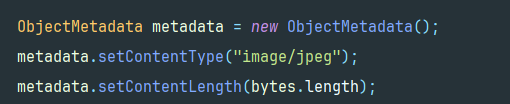
<a href="https://{bucket-name}.s3.{region-name}.amazonaws.com/{파일명}">사진보기</a>단 이 경우 S3에 올라간 파일의 Content-Type 이 "image/jpeg" 여야한다. "image/*" 인 경우 다운로드 받아버린다.

하루하루 차근차근🌱