프로젝트 시작
- https://start.spring.io/
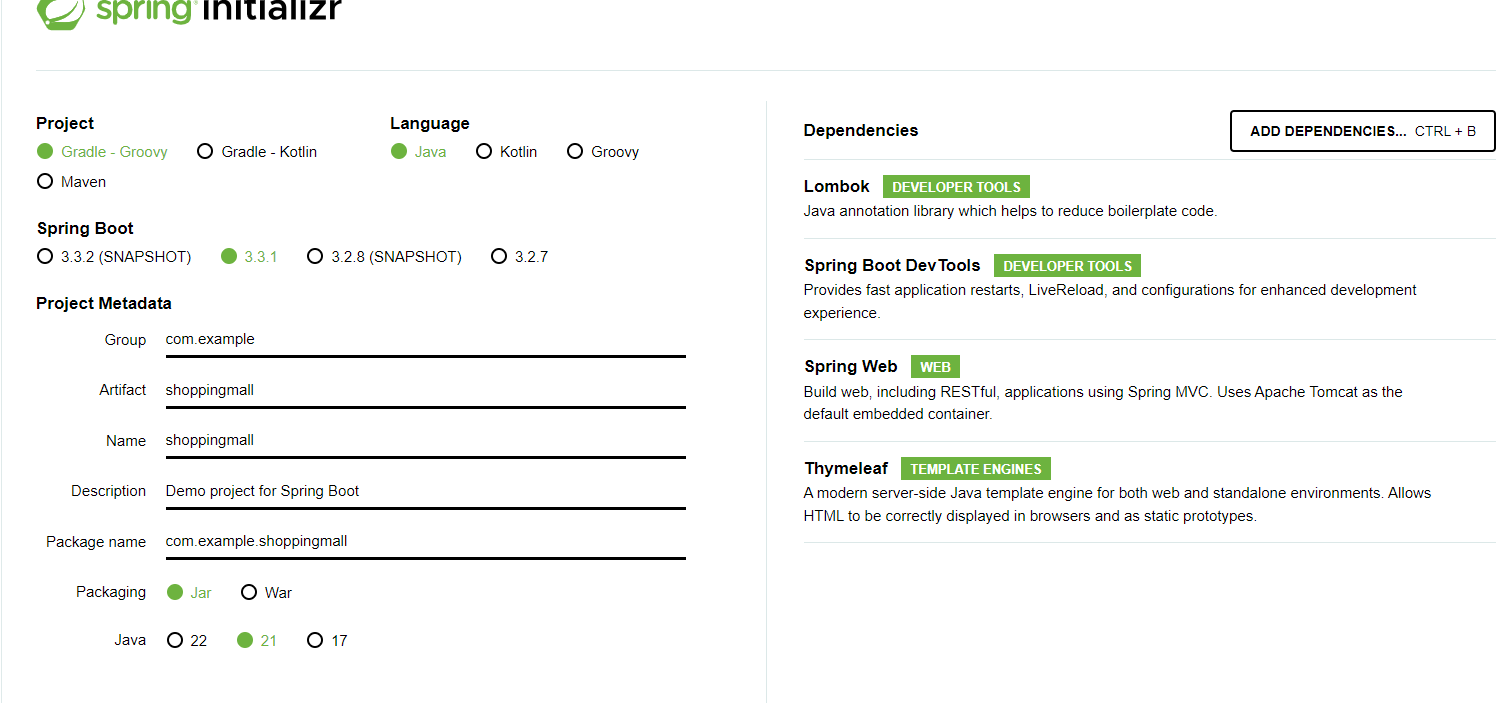
- mysql xampp 다운로드
들어가기전 알아야할것
-
url -> controller ->template ->controller ->template 반복으로 진행된다
- 컨트롤러와 템플릿의 주고 받고 하는식이다.
-
template 에서는 th:, ${} ->변수대입 등을 이용한다.
-
template 에서 controller 보낼때는 a 태그 href 를 이용해서 보낸다.
-
template 에서 controller 에 보낼때 form 테그도 가능하다.
-
href 값 만들때는 controller 에서 model 로 넘어간 값 $ {}로 사용가능.
ex) < a th:href="@{|/category/${category.id}|}"> -
category/1 -> @pathVariable (url 에서 넘어옴)
category?id=1 -> @requestParam (html name="" 으로 넘어옴)
form => @requestParam -
gpt 질문법
-
A를 하고 싶다
A 어떻게 해? (x)
B를 쓰고 있는데 C를 이용한 A를 만드는 중이야
어떻게 해야돼?(0)스프링부트로 JPA와 타임리프를 사용해서 카테고리를 만들고 있어
쉬운 예제코드 보여줘. 그리고 각 코드에 주석으로 의미 설명해줘문제 찾을땐 문제만
여기서 더안되면 구글
-
properties
-
server.port=8080 추가.
-
my sql 연결
spring.datasource.url:jdbc:mysql://localhost:3306/project?useUnicode=true&characterEncoding=utf8&autoReconnect=true&serverTimezone=Asia/Seoul
spring.datasource.driverClassName:com.mysql.cj.jdbc.Driver
spring.datasource.username:root
spring.datasource.password:
spring.jpa.database-platform=org.hibernate.dialect.MySQL8Dialect
spring.jpa.properties.hibernate.dialect=org.hibernate.dialect.MySQLDialect
spring.jpa.hibernate.ddl-auto=update
spring.thymeleaf.prefix=classpath:/templates/
spring.thymeleaf.suffix=.html
spring.thymeleaf.mode=HTML5
spring.thymeleaf.cache=false
build graddle
- implementation 'mysql:mysql-connector-java:8.0.28' 추가
상품만들기
@Entity
@Getter
@Setter
public class Product {

    @Id
    @GeneratedValue(strategy = GenerationType.IDENTITY)
    private Long id;

    private String name;

    private double price; //상품 가격  - 소수도 표현 위해 double 변수 타입 설정.

    private String description; //상품 설명

}
@Service
@RequiredArgsConstructor
public class ProductService {

    private final ProductRepository productRepository;


    //상품리스트 보여주기
    public List<Product> getProductList() {
        return productRepository.findAll();
    }

    //상품 아이디로 찾아 상세보기하기
    public Product showProductById(@PathVariable("id") Long id) {
        return productRepository.findById(id).orElseThrow();
    }

    //상품 생성하기
    public Product createProduct(@RequestParam String name, @RequestParam String description, @RequestParam double price) {
        Product product = new Product();
        product.setName(name);
        product.setDescription(description);
        product.setPrice(price);
        return productRepository.save(product);

    }
    // 상품 삭제하기
    public void deleteProduct(@PathVariable("id") Long id){
        productRepository.deleteById(id);
    }


}
public interface ProductRepository extends JpaRepository<Product ,Long> {
}
@Controller
@RequiredArgsConstructor
@RequestMapping("/product")
public class ProductController {

    private final ProductService productService;


    //상품 리스트 보여 주기!
    @GetMapping("/list")
    public String getProductList(Model model) {
        List<Product> productList = productService.getProductList();
        model.addAttribute("productList", productList);
        return "product_list";
    }

    //상품 id 로 상세 보기!
    @GetMapping("/{id}")
    public String getProductById(@PathVariable("id") Long id, Model model) {
        Product productById = productService.showProductById(id);
        model.addAttribute("productById", productById);
        return "product_detail";
    }

    //상품 생성 폼 보여주기

    @GetMapping("/create")
    public String createProduct(){
        return "product_form";
    }

    //상품 생성 하기!
    @PostMapping("/create")
    public String createProduct(@RequestParam String name, @RequestParam String description,
                                @RequestParam Double price) {
        productService.createProduct(name, description, price);
        return "redirect:/product/list";
    }

    //상품 삭제 폼 보여주기
    @GetMapping("/delete")
    public String deleteProduct(){
        return "product_delete";
    }


    //상품 삭제 하기
    @PostMapping("/delete")
    public String deleteProduct(@RequestParam("productId") Long productId ){
        productService.deleteProduct(productId);
        return "redirect:/product/list";
    }


}
<!DOCTYPE html>
<html lang="en">
<head>
    <meta charset="UTF-8">
    <title>상품 리스트</title><!-- 위에 페이지 이름 지정해줌 -->

</head>
<body>
<h2>상품 리스트</h2>

<ul>
    <li th:each="product : ${productList}">
        <a th:href="@{|/product/${product.id}|}"> <!--  경로에 변수 넣을때는 @{||}-->
        <span th:text="${product.name}"></span>
        <span th:text="${product.price}"></span>
        </a>
    </li>
</ul>
<div><a th:href="@{/product/create}">상품 생성</a></div>
<div><a th:href="@{/product/delete}">상품 삭제</a></div>


</body>
</html>
<!DOCTYPE html>
<html lang="en">
<head>
    <meta charset="UTF-8">
    <title>상품 상세보기</title>
</head>
<body>
<h2>상품 상세보기</h2>
<ul>
    <li th:each="product : ${productById}">
        <span th:text="${product.description}"></span>
    </li>
</ul>

<a th:href="@{/product/list}">목록으로 돌아가기</a>
</body>
</html><!DOCTYPE html>
<html lang="en">
<head>
<meta charset="UTF-8">
<title>상품 생성하기</title>
</head>
<body>
<h2>상품 생성하기</h2>
<form th:action="@{/product/create}" method="post">
<label for="name">상품 이름:</label><br>
<input type="text" id="name" name="name" placeholder="상품 이름을 입력하세요"><br>
<label for="price">상품 가격:</label><br>
<input type="text" id="price" name="price" placeholder="상품 가격을 입력하세요"><br>
<label for="description">상품 설명:</label><br>
<textarea name="description" id="description" cols="30" rows="10" placeholder="상품 설명을 입력하세요"></textarea><br>
<input type="submit" value="상품 생성">
</form>
</body>
</html>
<!DOCTYPE html>
<html lang="en">
<head>
    <meta charset="UTF-8">
    <title>상품 삭제하기</title>
</head>
<body>
<h2>상품 삭제하기</h2>
<form th:action="@{/product/delete}" method="post">
    <label for="productId">삭제할 상품 id:</label><br>
    <input type="text" id="productId" name="productId" required><br><br>
    <input type="submit" value="상품 삭제">
</form>


</body>
</html>