2-05 리포지터리로 데이터베이스 관리하기
- (sql 테이블 매핑되는 )엔티티만으로 테이블의 데이터를 저장, 조회, 수정, 삭제 등 불가능
- 그러므로 데이터 관리를 위하여 DB와 연동하는 JPA 리포지터리 필요
cf), JPA 리포지터리는 엔티티와 데이터베이스 간의 상호작용을 추상화하고 단순화하는 인터페이스입니다.
1) 리포지터리 생성하기
- 리포지터리 : DB 테이블의 데이터들을 저장, 조회, 수정, 삭제 등을 할 수 있도록 도와주는 인터페이스
- 테이블에 접근하고, 데이터를 관리하는 메서드 제공 (EX. findAll, save 등)
QuestionRepository 생성
package com.example.sbb;

import org.springframework.data.jpa.repository.JpaRepository;

public interface QuestionRepository extends JpaRepository<Question,Integer> {
}JpaRepository: JPA 가 제공하는 인터페이스 중 하나로 CRUD 작업을 처리하는 메서드들을 이미 내장하고 있어 데이터 관리 작업을 좀 더 편리하게 처리 가능- 리포지터리로 만들기 위해 상속해야 하는 것
JpaRepository<Question,Integer>: Question 엔티티로 리포지터리 생성, Question 엔티티의 기본키가 Integer- CRUD : Create, Read, Update, Delete 의 앞 글자를 따 만든 단어로, 데이터 처리의 기본 기능
AnswerRepository 생성
package com.example.sbb;

import org.springframework.data.jpa.repository.JpaRepository;

public interface AnswerRepository extends JpaRepository<Answer,Integer> {
}
2) JUnit 설치하기
- Junit : 테스트 코드를 작성하고, 작성한 테스트 코드를 실행할 때 사용하는 자바의 테스트 프레임워크
- 소프트웨어 개발 시 테스트 수행할 때 많이 사용
build.gradle 에 내용 추가
testImplementation 'org.junit.jupiter:junit-jupiter-api:5.10.2'
testRuntimeOnly 'org.junit.platform:junit-platform-launcher'testRuntimeOnly: 해당 라이브러리가 테스트 실행 시에만 사용
3) 질문 데이터 저장
package com.example.sbb;

import org.junit.jupiter.api.Test;
import org.springframework.beans.factory.annotation.Autowired;
import org.springframework.boot.test.context.SpringBootTest;

import java.time.LocalDateTime;

@SpringBootTest
class SbbApplicationTests {

   @Autowired
   private QuestionRepository questionRepository;

   @Test
   void testJpa() {
    // q1, q2라는 질문 엔티티의 객체를 생성하고 QuestionRepository를 이용하여 그 값을 DB 에 저장
      Question q1 = new Question();
      q1.setSubject("sbb가 무엇인가요?");
      q1.setContent("sbb에 대해서 알고 싶습니다.");
      q1.setCreateDate((LocalDateTime.now()));
      this.questionRepository.save(q1);

      Question q2 = new Question();
      q2.setSubject("스프링부트 모델 질문입니다.");
      q2.setContent("id는 자동으로 생성되나요?");
      q2.setCreateDate(LocalDateTime.now());
      this.questionRepository.save(q2);
   }

}@SpringBootTest: SbbApplicationTests 클래스가 스프링부트의 테스트 클래스라는 것을 알려주는 것@Autowired: 의존성 주입 기능 ( QuestionRepository 객체 주입)- 의존성 주입 : 스프링이 객체를 대신 생성하여 주입하는 기법
@Test: test.Jpa 메서드가 테스트 메서드임을 선언
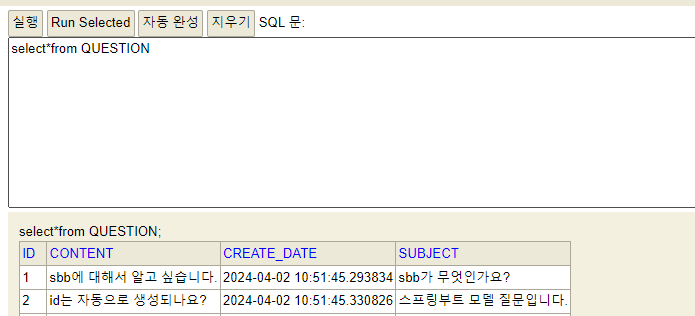
4) 질문 데이터 조회
findAll 메서드 : SELECT * FROM QUESTION 과 같은 결과를 얻게 한다
    @Test
    void testJpa() {
        List<Question> all = this.questionRepository.findAll();
        assertEquals(2, all.size());

        Question q = all.get(0);
        assertEquals("sbb가 무엇인가요?", q.getSubject());
}assertEquals(기댓값,실젯값): 기댓값과 실제값이 동일한지 확인- 만약 동일하지 않다면 테스트 실패, 동일하다면 성공
findById 메서드 : 기본키인 id의 값을 활용해 데이터 조회
  @Test
    void testJpa() {
    // questionRepository 를 사용하여 DB에서 id가 1인 질문을 조회
    //리턴 타입은 Optional : findById로 호출한 값이 존재할 수도 있고 없을 수도 있기 때문에 사용
        Optional<Question> oq = this.questionRepository.findById(1);
    //만약 값이 존재한다고 확인하면, get()을 통해 Question 객체의 값을 얻는다
        if(oq.isPresent()) {
            Question q = oq.get();
            assertEquals("sbb가 무엇인가요?", q.getSubject());
        }
}- Optional : 그 값을 처리하기 위한 클래스
- isPresent() 메서드 : 값이 존재하는지 확인 가능
- ID가 1인 질문을 검색하고, 이에 해당하는 질문의 제목이 sbb가 무엇인가요? 인 경우에 테스트 통과
findBySubject 메서드 : subject의 값을 활용해 데이터 조회
- 리포지터리는 findBySubject 메서드를 기본적으로 제공하지 않는다. 즉, QuestionRepository 인터페이스 변경 필요
- QuesitonRepository 인터페이스 수정
package com.example.sbb;

import org.springframework.data.jpa.repository.JpaRepository;

public interface QuestionRepository extends JpaRepository<Question,Integer> {
    Question findBySubject(String subject);
}
@Test
void testJpa() {
Question q = this.questionRepository.findBySubject("sbb가 무엇인가요?");
assertEquals(1, q.getId());
}findBy+엔티티의 속성명: 입력한 속성의 값으로 데이터 조회 가능
findBySubjectAndContent 메서드 : subject와 content 값을 함께 조회
- QuesitonRepository 에 findBySubjectAndContent 메서드를 추가
- QuesitonRepository 인터페이스 수정
package com.example.sbb;

import org.springframework.data.jpa.repository.JpaRepository;

public interface QuestionRepository extends JpaRepository<Question,Integer> {
    Question findBySubject(String subject);
    Question findBySubjectAndContent(String subject, String content);
}
@Test
void testJpa() {
Question q = this.questionRepository.findBySubjectAndContent(
"sbb가 무엇인가요?", "sbb에 대해서 알고 싶습니다.");
assertEquals(1, q.getId());
}findBySubjectLike 메서드 : subject 열 값들 중에 특정 문자열을 포함하는 데이터 조회
package com.example.sbb;

import org.springframework.data.jpa.repository.JpaRepository;

import java.util.List;

public interface QuestionRepository extends JpaRepository<Question,Integer> {
    Question findBySubject(String subject);
    Question findBySubjectAndContent(String subject, String content);
    List<Question> findBySubjectLike(String subject);

}
@Test
void testJpa() {
List<Question> qList = this.questionRepository.findBySubjectLike("sbb%");
Question q = qList.get(0);
assertEquals("sbb가 무엇인가요?", q.getSubject());
}sbb%: sbb로 시작하는 것들이 찾아진다
5) 질문 데이터 수정
@Test
    void testJpa() {
        Optional<Question> oq = this.questionRepository.findById(1);
        assertTrue(oq.isPresent());
        Question q = oq.get();
        // 질문 데이터 엔티티 데이터 조회 후, subject 속성을 '수정된 제목' 으로 수정
        q.setSubject("수정된 제목");
        // 변경된 질문을 db에 저장
        this.questionRepository.save(q);
}-assertTrue() :괄호 안의 값이 true 인지 테스트
oq.isPresent(): false 리턴하면 오류 발생, 테스트 종료
6) 질문 데이터 삭제
  @Test
    void testJpa() {
        assertEquals(2, this.questionRepository.count());
        Optional<Question> oq = this.questionRepository.findById(1);
        assertTrue(oq.isPresent());
        Question q = oq.get();
        this.questionRepository.delete(q);
        assertEquals(1, this.questionRepository.count());
}- count : 테이블 행의 개수를 리턴한다
7) 답변 데이터 저장하기
- 답변 데이터 저장하기 위해 AnswerRepository 추가
@SpringBootTest
class SbbApplicationTests {

    @Autowired
    private QuestionRepository questionRepository;

    @Autowired
    private AnswerRepository answerRepository;

    @Test
    void testJpa() {
    // ID 가 2인 질문 데이터를 가져와 답변의 question 속성에 대입해 답변 데이터 생성
        Optional<Question> oq = this.questionRepository.findById(2);
        assertTrue(oq.isPresent());
        Question q = oq.get();

        Answer a = new Answer();
        a.setContent("네 자동으로 생성됩니다.");
        a.setQuestion(q);  // 어떤 질문의 답변인지 알기위해서 Question 객체가 필요하다.
        a.setCreateDate(LocalDateTime.now());
        this.answerRepository.save(a);
}- 답변을 생성하려면 질문이 필요함 > 질문 조회 필요
8) 답변 데이터 조회하기
   @Test
    void testJpa() {
        Optional<Answer> oa = this.answerRepository.findById(1);
        assertTrue(oa.isPresent());
        Answer a = oa.get();
        assertEquals(2, a.getQuestion().getId());
}- 답변 데이터 통해 질문 데이터 찾기
a.getQuestion(): a 는 답변 객체, a.getQuestion() 은 답변에 연결된 질문 객체- 답변에 연결된 질문 데이터 찾기는 Answer에 question 속성이 이미 정의 되어있어 쉬움
- 질문 데이터 통해 답변 데이터 찾기
- QustionRepository가 findById 메서드를 통해 Question 객체를 조회하면 DB 세션이 끊어져 오류가 뜸
- 해결 방법 : @Transactional 사용
@Transactional: 메서드 종료시까지 DB 세션이 유지
2-06 도메인별로 분류하기
-
비슷한 기능이나 관련된 개념을 함께 묶어 코드를 구조화하여 정리 → 코드를 쓰거나 읽을 때 혹은 유지 보수 할 때 편리
-
1) 패키지 생성
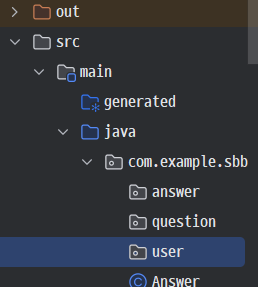
-
2) 생성된 패키지에 정리
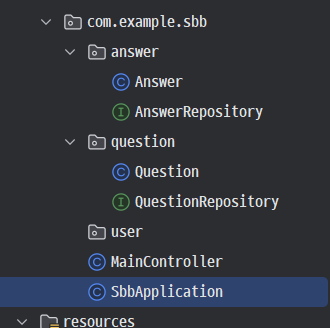
2-07 질문 목록 만들기
1) 질문 목록 URL 매핑하기
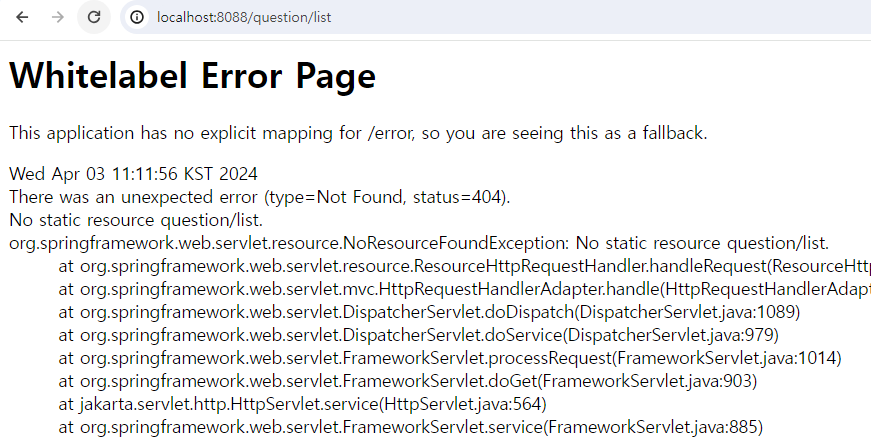
- 매핑이 되지 않은 상태라면 상단과 같이 오류가 뜬다 이를 해결하려면 URL을 매핑을 해야한다
- 매핑을 하려면 컨트롤러가 필요하다
QuestionController 파일 생성
package com.example.sbb.question;

import lombok.Getter;
import org.springframework.stereotype.Controller;
import org.springframework.web.bind.annotation.GetMapping;
import org.springframework.web.bind.annotation.ResponseBody;

@Controller
public class QuestionController {
    @GetMapping("/question/list")
    @ResponseBody
    public String list(){
        return "quetion list";
    }

}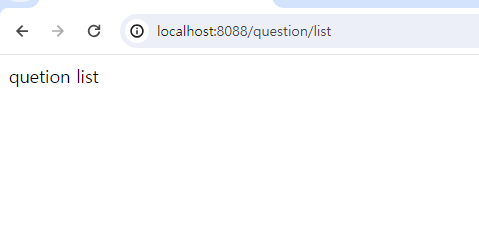
- /question/list URL에 매핑이 성공적으로 완료된 것을 알 수 있다.
2) 템플릿 설정하기
- 템플릿 : 자바 코드를 삽입할 수 있는 HTML 형식의 파일
- 보통 브라우저에 응답하는 문자열은 자바 코드에서 직접 만들지 않고 템플릿 방식을 사용한다
타임리프 설치
- 의존성 추가
   implementation 'org.springframework.boot:spring-boot-starter-thymeleaf'
   implementation 'nz.net.ultraq.thymeleaf:thymeleaf-layout-dialect'
3) 템플릿 사용하기
1) 템플릿에 html(question_list) 파일 생성
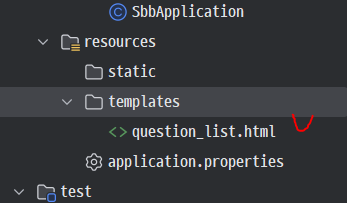
2) html 파일 작성
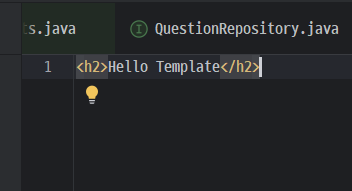
3) 컨트롤러 수정
package com.example.sbb.question;

import lombok.Getter;
import org.springframework.stereotype.Controller;
import org.springframework.web.bind.annotation.GetMapping;
import org.springframework.web.bind.annotation.ResponseBody;

@Controller
public class QuestionController {
    @GetMapping("/question/list")
// 템플릿을 받을 것이기 때문에 ResponseBody는 삭제해준다
//    @ResponseBody
    public String list(){
        return "question_list";
    }

}
4) 브라우저 재실행
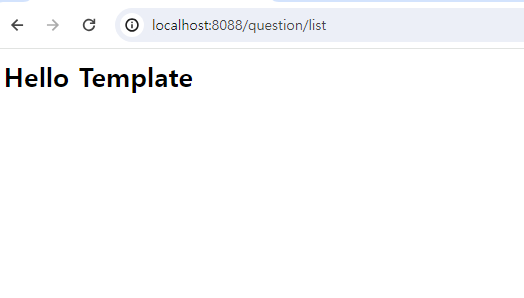
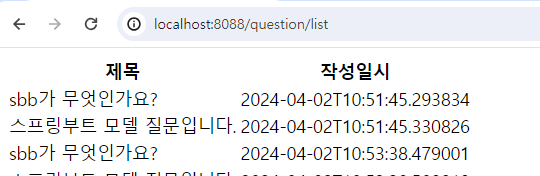
- 템플릿에서 작성한 내용이 브라우저에 출력 되는 것을 확인 가능하다
4) 데이터를 템플릿에 전달하기
- 질문 목록이 담긴 데이터를 조회 → 템플릿에 전달 → 화면에 전달
- 질문 목록과 관련된 데이터 조회
package com.example.sbb.question;

import lombok.Getter;
import lombok.RequiredArgsConstructor;
import org.springframework.stereotype.Controller;
import org.springframework.ui.Model;
import org.springframework.web.bind.annotation.GetMapping;
import org.springframework.web.bind.annotation.ResponseBody;

import java.util.List;

@RequiredArgsConstructor
@Controller
public class QuestionController {

   // @RequiredArgsConstructor 를 사용하여 QuestionController를 생성할 때
   // 롬복으로 만들어진 생성자에 의해 questionRepository 객체가 자동으로 주입
    private final QuestionRepository questionRepository;


    @GetMapping("/question/list")
    public String list(Model model){

       //findAll() 에 의해 질문 목록 db인 questionList 생성 Model 객체에 'questionList' 라는 이름으로 저장
        List<Question> questionList=this.questionRepository.findAll();
        model.addAttribute("questionList",questionList);
        return "question_list";
    }

}-@RequiredArgsConstructor : final이 붙은 속성을 포함하는 생성자를 자동으로 만들어주는 역할
Model: 자바 클래스와 템플릿 간의 연결 고리 역할- 값을 담아 두면 템플릿에서 그 값을 사용할 수 있다
- 객체 생성 따로 할 필요 없고, 컨트롤러의 메서드에 매개변수로 지정하면 스프링부트가 자동으로 객체 생성
5) 데이터를 화면에 출력하기
<table>
    <thead>
    <tr>
        <th>제목</th>
        <th>작성일시</th>
    </tr>
    </thead>
    <tbody>
    <tr th:each="question : ${questionList}">
        <td th:text="${question.subject}"></td>
        <td th:text="${question.createDate}"></td>
    </tr>
    </tbody>
</table>
th:each="question : ${questionList}"th:: 타임리프에서 사용하는 속성임을 알려준다, 자바 코드와 연결${questionList}: Model 객체에 저장한 questionList를 읽을 수 있음
- questionList 에 저장된 데이터를 하나씩 꺼내 qustion 변수에 대입한 후 questionList의 개수만큼 반복하여 문장을 출력한다
참고) 자주 사용하는 타임리프 3가지 속성
1. 조건문 속성
th:if="${question != null}"- question 객체가 null이 아닌 경우 이 속성을 포함한 요소 표시
2. 반복문 속성
-th:each : 반복문
1) th:each="question:${questionList}"
2) th:each="qeustion,loop:${questionList}"- 1),2) 같은 표현이다
- 루프 사용 법
loop.index: 루프의 순서(루프의 반복 순서, 0부터 1씩 증가)
loop.count: 루프의 순서(루프의 반복 순서, 1부터 1씩 증가)
loop.size: 반복 객체의 요소 개수(예를 들어 questionList의 요소 개수)
loop.first: 루프의 첫 번째 순서인 경우 true
loop.last: 루프의 마지막 순서인 경우 true
loop.odd: 루프의 홀수 번째 순서인 경우 true
loop.even: 루프의 짝수 번째 순서인 경우 true
loop.current: 현재 대입된 객체(여기서는 question과 동일)
3. 텍스트 속성
-th:text : 텍스트값 출력
th:text=${question.subject}"- 대괄호를 사용하여 값을 직접 출력 가능
<tr th:each="question : ${questionList}">
    <td>[[${question.subject}]]</td>
    <td>[[${question.createDate}]]</td>
</tr>
2-08 루트 URL 사용하기
- 루트 URL : 서버의 URL을 요청할 때 도메인명 뒤에 아무런 주소도 덧붙이지 않는 URL
- 메인 페이지 : 루트 URL 을 요청했을 때 보여지는 페이지
질문 목록을 메인 페이지로 정하고, 루트 URL 요청시 질문 목록 화면으로 이동되게 만들기
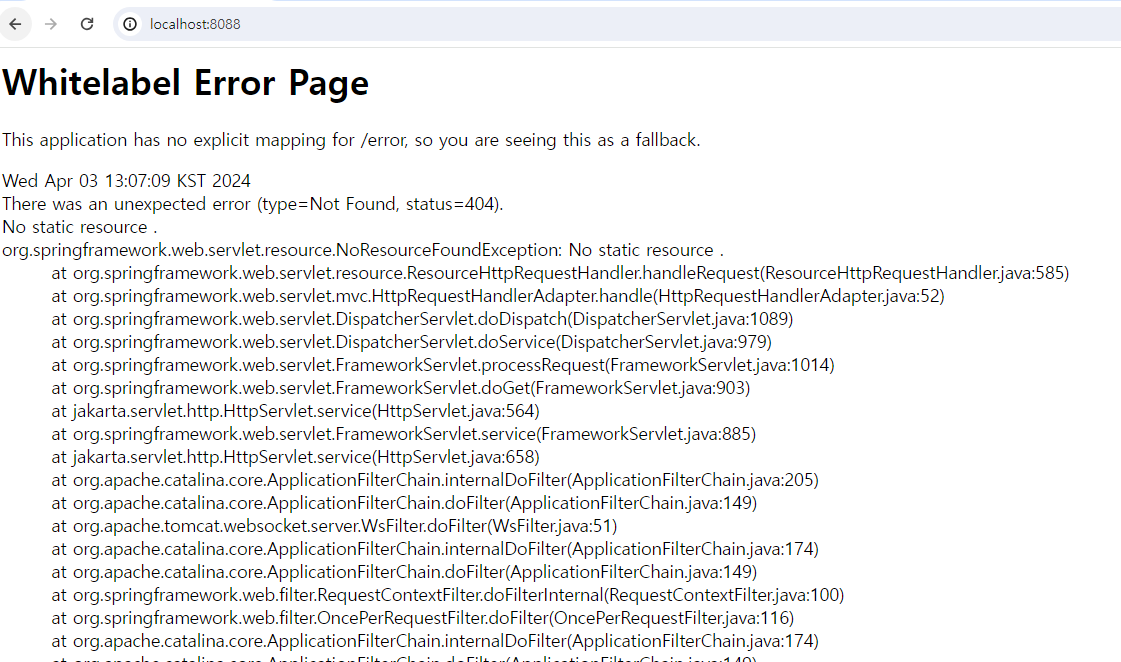
- 현재 오류가 뜸(URL 매핑이 되지 않았기 때문)
- MainController 수정
package com.example.sbb;

import org.springframework.stereotype.Controller;
import org.springframework.web.bind.annotation.GetMapping;
import org.springframework.web.bind.annotation.ResponseBody;


@Controller
public class MainController {

    @GetMapping("/sbb")
    @ResponseBody
    public String index() {
        return "안녕하세요 sbb에 오신것을 환영합니다.";
    }

    // root 메서드 추가하고 / URL 매핑
    @GetMapping("/")
    public String root(){
        return "redirect:/question/list";
    }
}redirect:/question/list: /question/list URL로 페이지를 리다이렉트하라는 명령어- 리다이렉트 : 클라이언트가 요청하면 새로운 URL로 전송
- http://localhost:8088 접속시 자동으로 localhost:8088/question/list 로 주소가 바뀌고 웹 페이지로 연결
2-09 서비스 활용하기
- 서비스 : 스프링에서 데이터 처리를 위해 작성하는 클래스
- 역할 : 컨트롤러와 리포지터리의 중간에서 엔티티 객체와 DTO 객체를 서로 변환하여 양방향에 전달
- 필요성
- 복잡한 코드르 모듈화 할 수 있다
- 여러 컨트롤러 사이의 중복된 코드를 줄이며 리포지터리 메서드를 호출할 수 있다
- 앤티티 객체를 DTO(Data Transfer Object) 객체로 변환할 수 있다
- 엔티티(Question, Answer 클래스 등) 객체에는 민감한 데이터가 포함 될 수 있고, 유출 위험이 있으므로 컨트롤러에서 직접 사용하지 않는 것이 좋다
- 상단과 같은 이유로 DTO 클래스가 필요하다
- 복잡한 코드르 모듈화 할 수 있다
01) 서비스 만들기
- QuestionService 생성
package com.example.sbb.question;


import lombok.RequiredArgsConstructor;
import org.springframework.stereotype.Service;

import java.util.List;

@RequiredArgsConstructor
@Service
public class QuestionService {
    private final QuestionRepository questionRepository;

    //컨트롤러에서 리포지터리를 사용했던 부분을 그대로 옮김
    public List<Question> getList(){
        return this.questionRepository.findAll();
    }
}@Service: 생성한 클래스를 서비스로 만들어주는 역할
02) 컨트롤러에서 서비스 사용하기
package com.example.sbb.question;

import lombok.Getter;
import lombok.RequiredArgsConstructor;
import org.springframework.stereotype.Controller;
import org.springframework.ui.Model;
import org.springframework.web.bind.annotation.GetMapping;
import org.springframework.web.bind.annotation.ResponseBody;

import java.util.List;

@RequiredArgsConstructor
@Controller
public class QuestionController {

   //레파지토리 > 서비스를 사용하도록 변경해준다
    private final QuestionService questionService;

    @GetMapping("/question/list")
    public String list(Model model){
        List<Question> questionList=this.questionService.getList();
        model.addAttribute("questionList",questionList);
        return "question_list";
    }

}- 레파지토리에서 서비스로 연결해준다
- 서비스랑 연결하고 서비스 메소드인 getList를 사용한다
- 기존 부분을 getList 메소드에 넣었기 때문에 크게 웹브라우저에서 달라진 부분은 없다
2-10 상세 페이지 만들기
01) 질문 목록에 링크 추가하기
 <table>
    <thead>
    <tr>
        <th>제목</th>
        <th>작성일시</th>
    </tr>
    </thead>
    <tbody>
    <tr th:each="question : ${questionList}">
        <td>
            <a th:href="@{|/question/detail/${question.id}|}" th:text="${question.subject}"></a>
        </td>
        <td th:text="${question.createDate}"></td>
    </tr>
    </tbody>
</table><td>: 질문 목록의 제목을 텍스트로 출력하던 것에서 질문의 상세 내용이 담긴 웹 페이지로 이동할 수 있는 링크로 변경
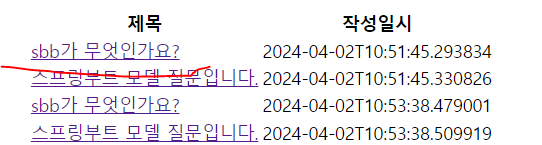
<a th:href="@{|/question/detail/${question.id}|}" th:text="${question.subject}">th:href: URL 연결@{}: 반드시 사이에 URL 넣어줘야 한다/question/detail/${question.id}: question/detail 주소 후에 id는 변경되기 때문에 변수로 넣어준다||: /question/detail/ 문자열과 ${question.id} 객체 값을 더해줄 때 반드시 좌우로 감싸줘야 한다th:text="${question.subject}": 보여질 출력 값
02) 상세 페이지 컨트롤러 만들기
package com.example.sbb.question;

import lombok.Getter;
import lombok.RequiredArgsConstructor;
import lombok.Value;
import org.springframework.stereotype.Controller;
import org.springframework.ui.Model;
import org.springframework.web.bind.annotation.GetMapping;
import org.springframework.web.bind.annotation.PathVariable;
import org.springframework.web.bind.annotation.ResponseBody;

import java.util.List;

@RequiredArgsConstructor
@Controller
public class QuestionController {

    private final QuestionService questionService;
    @GetMapping("/question/list")
    public String list(Model model){
        List<Question> questionList=this.questionService.getList();
        model.addAttribute("questionList",questionList);
        return "question_list";
    }

    @GetMapping(value = "/question/detail/{id}")
    public String detail(Model model, @PathVariable("id") Integer id) {
        return "question_detail";
    }

}
@PathVariable: 변하는 값을 얻을 때 사용- GetMapping 할 때 사용한 변수명과 PathVariable에서 사용한 매개변수 이름이 동일해야 한다 (ex.id)
- 리턴할 question_detail 템플릿 만들어주기
<h1>제목</h1>
<div>내용</div>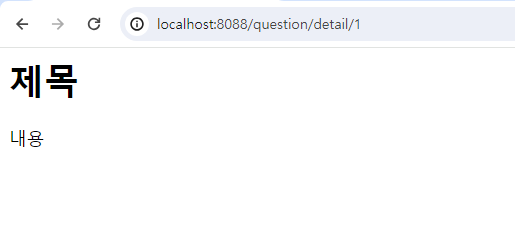
03) 상세 페이지 서비스 사용하기
getQuestion 메서드 추가
package com.example.sbb.question;


import com.example.sbb.DataNotFoundException;
import lombok.RequiredArgsConstructor;
import org.springframework.stereotype.Service;

import java.util.List;
import java.util.Optional;

@RequiredArgsConstructor
@Service
public class QuestionService {
    private final QuestionRepository questionRepository;

    public List<Question> getList(){
        return this.questionRepository.findAll();
    }

    public Question getQuestion(Integer id){
        Optional<Question> question = this.questionRepository.findById(id);
        // isPresent로 id 값이 존재하는지 검사하는 과정
        // 만약 id 값이 없다면 예외 클래스가 실행된다
        if(question.isPresent()){
            return question.get();
        } else{
            throw new DataNotFoundException("question not found");
        }
    }
}
- getQuestion 메서드 : id 값으로 질문 데이터를 조회
예외처리 클래스 생성
// 예외처리 클래스를 만들어준다
package com.example.sbb;

import org.springframework.http.HttpStatus;
import org.springframework.web.bind.annotation.ResponseStatus;

@ResponseStatus(value= HttpStatus.NOT_FOUND,reason = "entity not found")
public class DataNotFoundException extends RuntimeException{
    private static final long serialVersionUID = 1L;
    public DataNotFoundException(String message){
        super(message);
    }
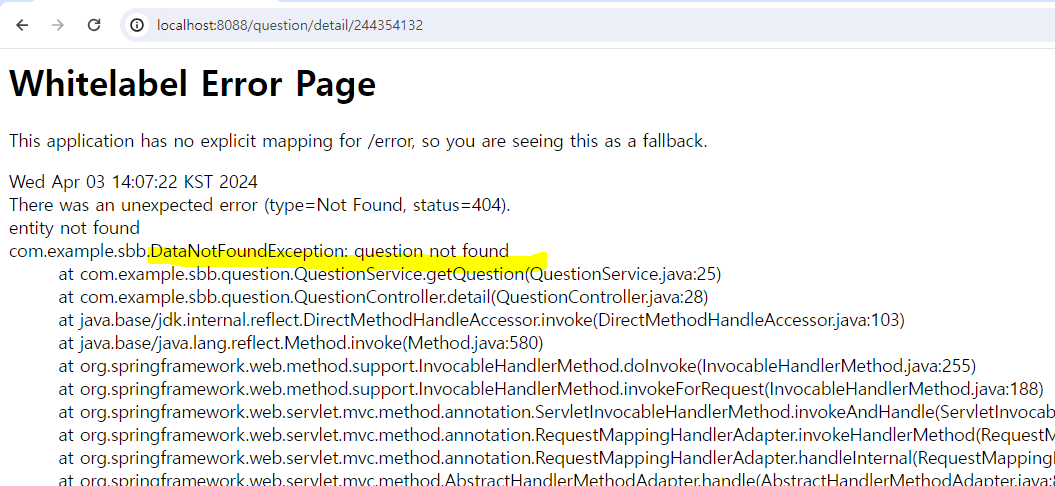
}- db에서 특정 엔티티 또는 데이터를 찾을 수 없을 때 발생시키는 예외 클래스
getQuestion 메서드 호출
package com.example.sbb.question;

import lombok.Getter;
import lombok.RequiredArgsConstructor;
import lombok.Value;
import org.springframework.stereotype.Controller;
import org.springframework.ui.Model;
import org.springframework.web.bind.annotation.GetMapping;
import org.springframework.web.bind.annotation.PathVariable;
import org.springframework.web.bind.annotation.ResponseBody;

import java.util.List;

@RequiredArgsConstructor
@Controller
public class QuestionController {

    private final QuestionService questionService;
    @GetMapping("/question/list")
    public String list(Model model){
        List<Question> questionList=this.questionService.getList();
        model.addAttribute("questionList",questionList);
        return "question_list";
    }

    @GetMapping(value = "/question/detail/{id}")
    public String detail(Model model, @PathVariable("id") Integer id) {
        Question question = this.questionService.getQuestion(id);
        model.addAttribute("question",question);
        return "question_detail";
    }

}- Question 객체를 템플릿에 전달 할 수 있게 만들어준다
04) 상세 페이지 출력하기
detail 화면 편집하기
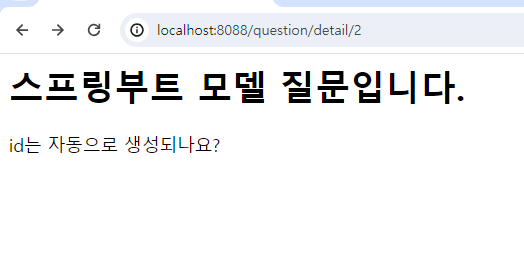
<h1 th:text="${question.subject}"></h1>
<div th:text="${question.content}"></div>-
Model 객체에서 question 이름으로 객체를 저장했으므로 사용 가능
-
없는 데이터를 조회할 경우 예외 클래스가 실행되어 오류 발생
2-11 URL 프리픽스 알아 두기
- 프리픽스(prefix) : URL의 접두사 또는 시작 부분을 가리키는 말
ex) QuestionController에 속하는 URL 매핑은 항상 /question 프리픽스로 시작하도록 설정 가능
컨트롤러에서 프리픽스 설정하기
package com.example.sbb.question;

import lombok.Getter;
import lombok.RequiredArgsConstructor;
import lombok.Value;
import org.springframework.stereotype.Controller;
import org.springframework.ui.Model;
import org.springframework.web.bind.annotation.*;

import java.util.List;

// URL 매핑은 항상 /question 프리픽스로 시작하도록 설정
@RequestMapping("/question")
@RequiredArgsConstructor
@Controller
public class QuestionController {

    private final QuestionService questionService;

    ///question 부분 삭제
    @GetMapping("/list")
    public String list(Model model){
        List<Question> questionList=this.questionService.getList();
        model.addAttribute("questionList",questionList);
        return "question_list";
    }

   ///question 부분 삭제
    @GetMapping(value = "/detail/{id}")
    public String detail(Model model, @PathVariable("id") Integer id) {
        Question question = this.questionService.getQuestion(id);
        model.addAttribute("question",question);
        return "question_detail";
    }

}- /list = /question + /list가 되어 최종 URL 매핑은 /question/list
- QuestionController.java에서 URL을 매핑할 때 반드시 /question으로 시작한다는 것을 기억 필수