
Mapper 인터페이스, xml 생성
- 인터페이스와 xml의 경로와 이름이 서로 갖아야 한다
- xml을 원하는 위치에 두고 싶은 경우
application.properties설정mybatis.mapper-locations=classpath:mapper/**/*.xmlresources/mapper를 포함한 그 하위 폴더에 있는 XML을 XML 매핑 파일로 인식한다- 파일 이름도 자유롭게 설정 가능함
- xml을 원하는 위치에 두고 싶은 경우
- src/main/resources/hello/itemservice/repository/mybatis/ItemMapper.java
@Mapper애노테이션을 사용@Param애노테이션을 이용하여 파라미터를 넣을 수 있음
@Mapper
public interface ItemMapper {

    void save(Item item);

    void update(@Param("id") Long id, @Param("updateParam") ItemUpdateDto updateParam);

    Optional<Item> findById(Long id);

    List<Item> findAll(ItemSearchCond itemSearch);
}- src/main/resources/hello/itemservice/repository/mybatis/ItemMapper.xml
- 인터페이스의 메소드를 xml에 같은 이름으로 만들어야한다
- namespace에 mapper를 입력해줘야 한다
- 파라미터는
#{}문법을 사용하여 매퍼에서 넘긴 객체의 프로퍼티 이름을 적어주면 된다 - 특수문자의 경우
<![CDATA[ ... ]]>안에 넣어도 되고 < 같은 표현을 써도됨
<?xml version="1.0" encoding="UTF-8"?>
<!DOCTYPE mapper PUBLIC "-//mybatis.org//DTD Mapper 3.0//EN"
"http://mybatis.org/dtd/mybatis-3-mapper.dtd">
<mapper namespace="hello.itemservice.repository.mybatis.ItemMapper">
<insert id="save" useGeneratedKeys="true" keyProperty="id">
insert into item (item_name, price, quantity)
values (#{itemName}, #{price}, #{quantity})
</insert>
<update id="update">
update item
set item_name=#{updateParam.itemName},
price=#{updateParam.price},
quantity=#{updateParam.quantity}
where id = #{id}
</update>
<select id="findById" resultType="Item">
select id, item_name, price, quantity
from item
where id = #{id}
</select>
<select id="findAll" resultType="Item">
select id, item_name, price, quantity
from item
<where>
<if test="itemName != null and itemName != ''">
and item_name like concat('%', #{itemName}, '%')
</if>
<if test="maxPrice != null">
and price <= #{maxPrice}
</if>
</where>
</select>
</mapper>리포지토리 생성
@Slf4j
@Repository
@RequiredArgsConstructor
public class MyBatisItemRepository implements ItemRepository {

    private final ItemMapper itemMapper;

    @Override
    public Item save(Item item) {
        log.info("itemMapper class={}", itemMapper.getClass());
        itemMapper.save(item);
        return item;
    }

    @Override
    public void update(Long itemId, ItemUpdateDto updateParam) {
        itemMapper.update(itemId, updateParam);
    }

    @Override
    public Optional<Item> findById(Long id) {
        return itemMapper.findById(id);
    }

    @Override
    public List<Item> findAll(ItemSearchCond cond) {
        return itemMapper.findAll(cond);
    }
}
동작 방식
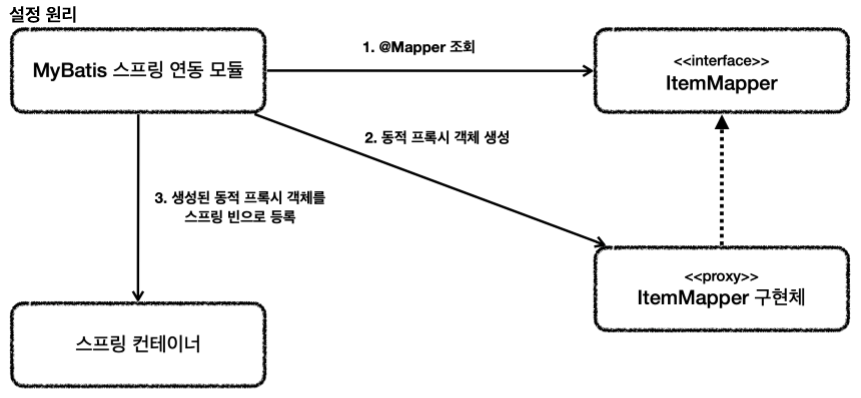
1. 애플리케이션 로딩 시점에 MyBatis 스프링 연동 모듈은 @Mapper 가 붙어있는 인터페이스를 조사한다.
2. 해당 인터페이스가 발견되면 동적 프록시 기술을 사용해서 ItemMapper 인터페이스의 구현체를 만든다.
3. 생성된 구현체를 스프링 빈으로 등록한다.(클래스를 확인해보면 JDK 동적 프록시 적용 확인 가능)

진짜 개발자가 되어보자