이 글은 『자바스크립트 딥 다이브』를 공부하며 정리한 내용입니다.
fetch란?
fetch 함수는 XMLHttpRequest 객체와 마찬가지로 HTTP 요청 전송 기능을 제공하는 클라이언트 사이드 Web API다.
하지만 fetch는 XMLHttpRequest보다 사용법이 간단하고, Promise를 지원하기 때문에 콜백 패턴의 단점에서 자유롭다.
fetch("https://jsonplaceholder.typicode.com/todos/1")
  .then(res => console.log(res));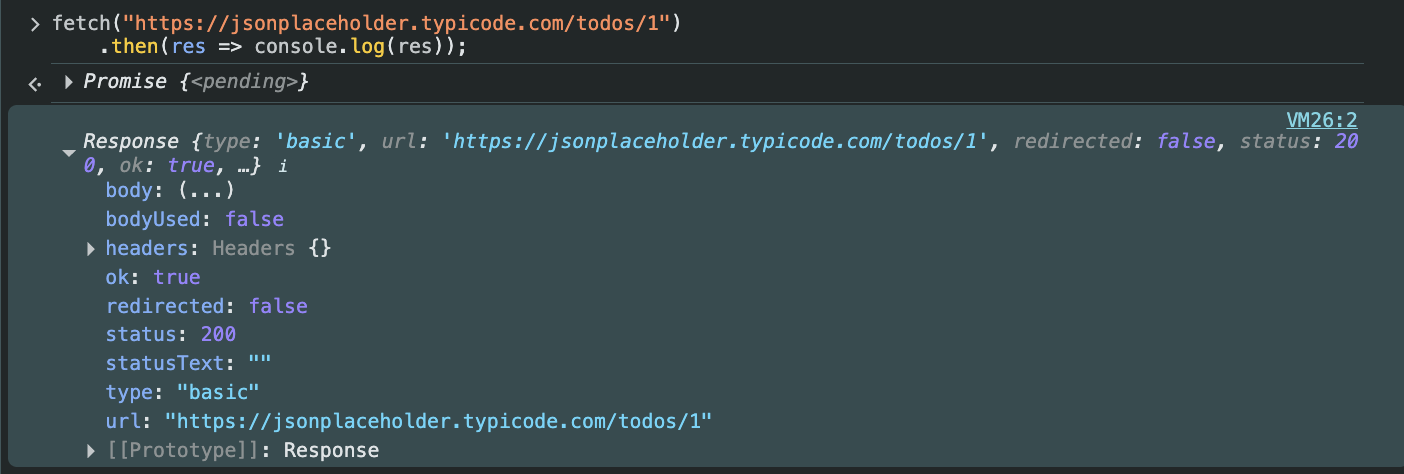
fetch 함수는 HTTP 응답을 나타내는 Response 객체를 래핑한 Promise 객체를 반환한다.
따라서 then 메서드를 사용하면 비동기적으로 Response 객체에 접근할 수 있다.
Response 객체와 응답 몸체 역직렬화
Response 객체는 HTTP 응답에 대한 다양한 정보를 담고 있으며,
응답 본문(body)을 쉽게 다루기 위한 여러 메서드를 제공한다.
대표적으로 json(), text(), blob(), formData() 등이 있다.
fetch("https://jsonplaceholder.typicode.com/todos/1")
  .then(res => res.json()) // JSON 데이터 역직렬화
  .then(json => console.log(json));
// json은 역직렬화된 HTTP 응답 몸체다.
fetch의 에러 처리
fetch 함수 사용 시 가장 주의해야 할 점은,
HTTP 상태 코드가 404나 500이라도 Promise가 reject되지 않는다는 점이다.
이 경우, 반환된 Response 객체의 ok 프로퍼티가 false로 설정된다.
즉, fetch는 네트워크 장애(오프라인, CORS 오류 등) 같은
요청 자체가 실패했을 때만 Promise를 reject한다.
따라서 다음과 같이 ok 상태를 직접 확인해 명시적으로 에러를 처리해야 한다.
fetch("https://jsonplaceholder.typicode.com/XXX/1")
  .then(res => {
    if (!res.ok) throw new Error(res.statusText);
    return res.json();
  })
  .then(todo => console.log(todo))
  .catch(err => console.error(err));
fetch와 axios의 차이점
| 구분 | fetch | axios |
|---|---|---|
| Promise reject 조건 | 네트워크 오류(CORS, 연결 실패 등) | HTTP 에러(4xx, 5xx) 포함 |
| 에러 처리 방식 | ok 속성 확인 필요 | 모든 에러를 catch에서 처리 가능 |
| 기능 | 브라우저 내장 API (가벼움) | 인터셉터, 요청 취소, 기본 헤더 등 추가 기능 |
| 사용 편의성 | 기본적 | 고수준 추상화로 편리 |
즉, fetch는 기본 기능에 충실하고 가볍지만,
axios는 추가적인 편의 기능을 제공한다.
fetch로 HTTP 요청 실습
요청 메서드별로 request 객체를 구성해보자.
const request = {
  get(url) {
    return fetch(url);
  },
  post(url, payload) {
    return fetch(url, {
      method: "POST",
      headers: { "Content-Type": "application/json" },
      body: JSON.stringify(payload)
    });
  },
  patch(url, payload) {
    return fetch(url, {
      method: "PATCH",
      headers: { "Content-Type": "application/json" },
      body: JSON.stringify(payload)
    });
  },
  delete(url) {
    return fetch(url, {
      method: "DELETE",
    });
  },
};
1️⃣ GET 요청
request.get("https://jsonplaceholder.typicode.com/todos/1")
  .then(res => {
    if (!res.ok) throw new Error(res.statusText);
    return res.json();
  })
  .then(todo => console.log(todo))
  .catch(err => console.error(err));
// { userId: 1, id: 1, title: "delectus aut autem", completed: false }
2️⃣ POST 요청
request.post("https://jsonplaceholder.typicode.com/todos", {
  userId: 1,
  title: "JavaScript",
  completed: false
})
  .then(res => {
    if (!res.ok) throw new Error(res.statusText);
    return res.json();
  })
  .then(todo => console.log(todo))
  .catch(err => console.error(err));
// { userId: 1, title: "JavaScript", completed: false, id: 201 }
3️⃣ PATCH 요청
request.patch("https://jsonplaceholder.typicode.com/todos/1", {
  completed: true
})
  .then(res => {
    if (!res.ok) throw new Error(res.statusText);
    return res.json();
  })
  .then(todo => console.log(todo))
  .catch(err => console.error(err));
// { userId: 1, id: 1, title: "delectus aut autem", completed: true }
4️⃣ DELETE 요청
request.delete("https://jsonplaceholder.typicode.com/todos/1")
  .then(res => {
    if (!res.ok) throw new Error(res.statusText);
    return res.json();
  })
  .then(todo => console.log(todo))
  .catch(err => console.error(err));
// {}
✨ 정리
- fetch는 XMLHttpRequest보다 간결하고 Promise를 지원한다.
- 기본적으로 HTTP 에러(404, 500)는 reject되지 않으며, res.ok로 처리해야 한다.
- axios는 모든 에러를 catch에서 처리할 수 있어 편리하지만, 별도 설치가 필요하다.
- fetch는 가볍고 표준적, axios는 기능적이고 실무에 편리하다.

퍼블리셔에서 프론트앤드로 전향하기