Gitlog & Branch
리펙토링 한 기록은 아래 링크 Branch에서 확인할 수 있다.
- feature/리펙토링 Branch
지난 포스팅에서 나는 기존 코드의 문제점(God Object, 안티 패턴 등)을 분석했다. 이번 글에서는 그 첫 번째 실천으로 신규 유저 추가(UsersNewForm) 컴포넌트를 리팩토링한 과정을 기록한다.
목표는 단순했다.
1. 상태 위치시키기 : 폼 입력 상태를 전역 Provider에서 제거하고 로컬로 내린다.
2. 로직 분리 : UI 상태 제어(열림/닫힘/로딩)를 useReducer로 분리한다.
3. Standard HTML Form : useEffect로 억지스럽게 폼을 제출하던 방식을 버리고, 표준 Web API를 활용한다.
1. useReducer로 UI 상태 로직 분리하기
기존에는 새로운 유저 추가 에디터의 Show/Hide, 제출 시 Loading & Error 상태를 모두 useState로 각각 관리하고 있었다.
때문에 업데이트 된 각 상태로 로직을 구현하기 위해서는 useEffect로 ref에 업데이트 하는 방법을 사용했었다.
이를 useReducer를 도입하여 하나의 묶음으로 관리하고 필요없는 로직은 모두 제거할 예정이다.
Before : UsersProvider.tsx
// UI의 각 상태 state
const [isShowNewUserForm, setIsShowNewUserForm] = useState<boolean>(false) // UsersNewForm 마운트 여부
const [newUserValue, setNewUserValue] = useState<PayloadNewUser>(INIT_NEW_USER_VALUE) // UsersNewForm 컴포넌트 내부 input들의 value
const newUserValueRef = useRef<PayloadNewUser>(newUserValue) // newUserValue ref
const [isCreatingUser, setIsCreatingUser] = useState<boolean>(false) // 새로운 유저 데이터 생성 중 여부
const isCreatingUserRef = useRef<boolean>(isCreatingUser) // isCreatingUser ref

// newUserValueRef 업데이트
useEffect(() => {
	newUserValueRef.current = newUserValue
}, [newUserValue])

// isCreatingUserRef 업데이트
useEffect(() => {
	isCreatingUserRef.current = isCreatingUser
}, [isCreatingUser])
After : usersReducer.ts
이제 리듀서는 오직 UI의 상태 변화만 관리한다.
// src/reducers/usersReducer.ts
import { INIT_NEW_USER_VALUE } from '@/constants/users'
import type { PayloadNewUser } from '@/types/users'

export type NewUserState = {
  isShowEditor: boolean
  isCreating: boolean
  error: string | null
  data: PayloadNewUser
}

export type NewUserAction =
  | { type: 'SHOW_EDITOR' }
  | { type: 'HIDE_EDITOR' }
  | { type: 'SUBMIT_START' }
  | { type: 'SUBMIT_SUCCESS'; payload: PayloadNewUser }
  | { type: 'SUBMIT_ERROR'; payload: string }
  | { type: 'RESET' }

export const INIT_NEW_USER_STATE: NewUserState = {
  isShowEditor: false,
  isCreating: false,
  error: null,
  data: INIT_NEW_USER_VALUE,
}

export function newUserReducer(state: NewUserState, action: NewUserAction) {
  switch (action.type) {
    case 'SHOW_EDITOR':
      return {
        ...state,
        isShowEditor: true,
      }
    case 'HIDE_EDITOR':
      return {
        ...state,
        isShowEditor: false,
      }
    case 'SUBMIT_START':
      return { ...state, isCreating: true }
    case 'SUBMIT_SUCCESS':
      return { ...state, isCreating: false, isShowEditor: false, data: action.payload }
    case 'SUBMIT_ERROR':
      return { ...state, isCreating: false, error: action.payload }
    case 'RESET':
      return INIT_NEW_USER_STATE
    default:
      return state
  }
}
이제 Provider나 컴포넌트에서 새로운 유저 추가하기 관련된 UI의 state(setIsShowNewUserForm(true), setIsCreatingUser(true)) 등을 나열할 필요 없이, 내가 설정 한 newUserReducer의 action들로 각 케이스 별 UI의 상태 변화를 설정할 수 있다.
2. 제출 로직 개선
기존 제출 로직 패턴은 UsersProvider의 onNewUserForm 이벤트를 UsersNewForm 컴포넌트의 형제인 '추가하기 버튼에게 onClick 연결 -> 버튼을 누르면 -> 매개변수 isPost가 true일 때 제출'하는 방식이었다.
Before : UsersProvider.tsx
// src/features/users/context/UsersProvider.tsx
const onNewUserForm = useCallback(
    async ({ isShowEditor, isPost = false }: OnNewUserForm) => {
      // 추가완료(POST) : isPost
      if (isPost) {
        if (isCreatingUserRef.current) return

        const hasEmpty = hasEmptyRequiredField(newUserValueRef.current)

        if (hasEmpty) {
          alert('이메일, 이름, 성을 모두 입력해주세요.')
          return
        }

        const confirmMsg = `${newUserValueRef.current[`first_name`]} ${newUserValueRef.current[`last_name`]}님의 데이터를 추가하시겠습니까?`
        if (!confirm(confirmMsg)) return

        try {
          setIsCreatingUser(true)
          await onCreate(newUserValueRef.current)
          alert('추가를 완료하였습니다.')
        } catch (error) {
          console.error(error)
          alert('유저 생성에 실패했습니다. 다시 시도해주세요.')
        } finally {
          setIsCreatingUser(false)
        }
      }

      if (isShowEditor) {
        setDisplayItemEditor([])
        resetAllUsersData()
      } else {
        setNewUserValue(INIT_NEW_USER_VALUE)
      }

      // toggle
      setIsShowNewUserForm(isShowEditor)
    },
    [onCreate, resetAllUsersData],
  )
기존 제출 로직은 에디터를 열기와 제출하기의 함수를 onNewUserForm 함수 하나로 사용하였고 매개 변수 isPost여부로 제출 여부를 결정했다.
하나의 함수에 두개 이상의 기능이 있어 코드가 복잡해질 수 밖에 없었다.
After (Standard HTML Form & Ref Forwarding)
리액트도 결국 웹 위에서 돌아간다. HTML5 표준인 form 속성을 활용하면 별도의 분기처리나 함수 실행 없이 코드가 훨씬 깔끔하게 처리할 수 있다.
UsersNewForm.tsx 컴포넌트를 form 태그로 감싼 후 onSubmit 이벤트 핸들러 안에서 모든 비즈니스 로직(검증, API 호출, Dispatch)을 처리한다.
이렇게 하면 해당 로직이 UsersNewForm의 것임을 분명히 할 수 있어 유지보수 측면에서도 좋을 것 같다.
// src/features/users/components/UsersNewForm.tsx
type UsersNewFormProps = {
  onCreate: (payload: PayloadNewUser) => Promise<void>;
};

export default function UsersNewForm({ onCreate }: UsersNewFormProps) {
  // Input State는 이제 컴포넌트 내부에 격리됨 (상태 위치시키기 : State Colocation)
  const [newUserValue, setNewUserValue] = useState<PayloadNewUser>(INIT_NEW_USER_VALUE);
  const { newUserState } = useUsersState();
  const { newUserDispatch } = useUsersActions();

  const handleSubmit = async (e: FormEvent) => {
    e.preventDefault(); // 새로고침 방지
    if (newUserState.isCreating) return;

    // 1. 유효성 검사
    if (hasEmptyRequiredField(newUserValue)) {
      alert('필수 값을 입력해주세요.');
      return;
    }

    // 2. 비즈니스 로직 실행
    newUserDispatch({ type: 'RESET' })

    try {
      newUserDispatch({ type: 'SUBMIT_START' }); // UI: 로딩 시작
      await onCreate(newUserValue); // API 호출

      alert('추가되었습니다.');
      newUserDispatch({ type: 'SUBMIT_SUCCESS', payload: newUserValue }) // UI: 성공 (창 닫기)

      // 폼 초기화
      setNewUserValue(INIT_NEW_USER_VALUE);
    } catch (err) {
      console.error(err);
      // UI: 에러 (창 유지)
      newUserDispatch({
        type: 'SUBMIT_ERROR',
        payload: '유저 생성에 실패했습니다. 다시 시도해주세요.',
      })
      alert('유저 생성에 실패했습니다. 다시 시도해주세요.')
    }
  };

  return (
    // id를 부여하여 부모 버튼과 연결
    <form id="usersNewForm" onSubmit={handleSubmit}>
       {/* inputs... */}
    </form>
  );
}
Users.tsx 컴포넌트에 있는 제출하기 버튼은 ref나 복잡한 핸들러를 내려줄 필요 없이, 단순히 버튼의 속성만 지정해주면 된다.
UsersNewForm 컴포넌트와 떨어져 있어도 HTML5 표준인 form 속성을 활용하여 onSubmit 이벤트를 발생시킬 수 있다.
기존에 isPost 매개변수로 제출하느냐 마느냐 했던 분기를 제거하고 <button type="submit">과 form의 onSubit 이벤트로 대체한 것이다.
// 부모 컴포넌트의 버튼
<button
  type="submit"
  form="usersNewForm" // 자식 컴포넌트의 form ID와 매핑
  disabled={newUserState.isCreating}
>
  {newUserState.isCreating ? '추가중...' : '추가완료'}
</button>
3. 리팩토링 성과
이번 리팩토링을 통해 얻은 이점은 명확하다.
- 성능 최적화
- 기존:
input에 글자 하나 칠 때마다UsersProvider전체가 리렌더링됨.
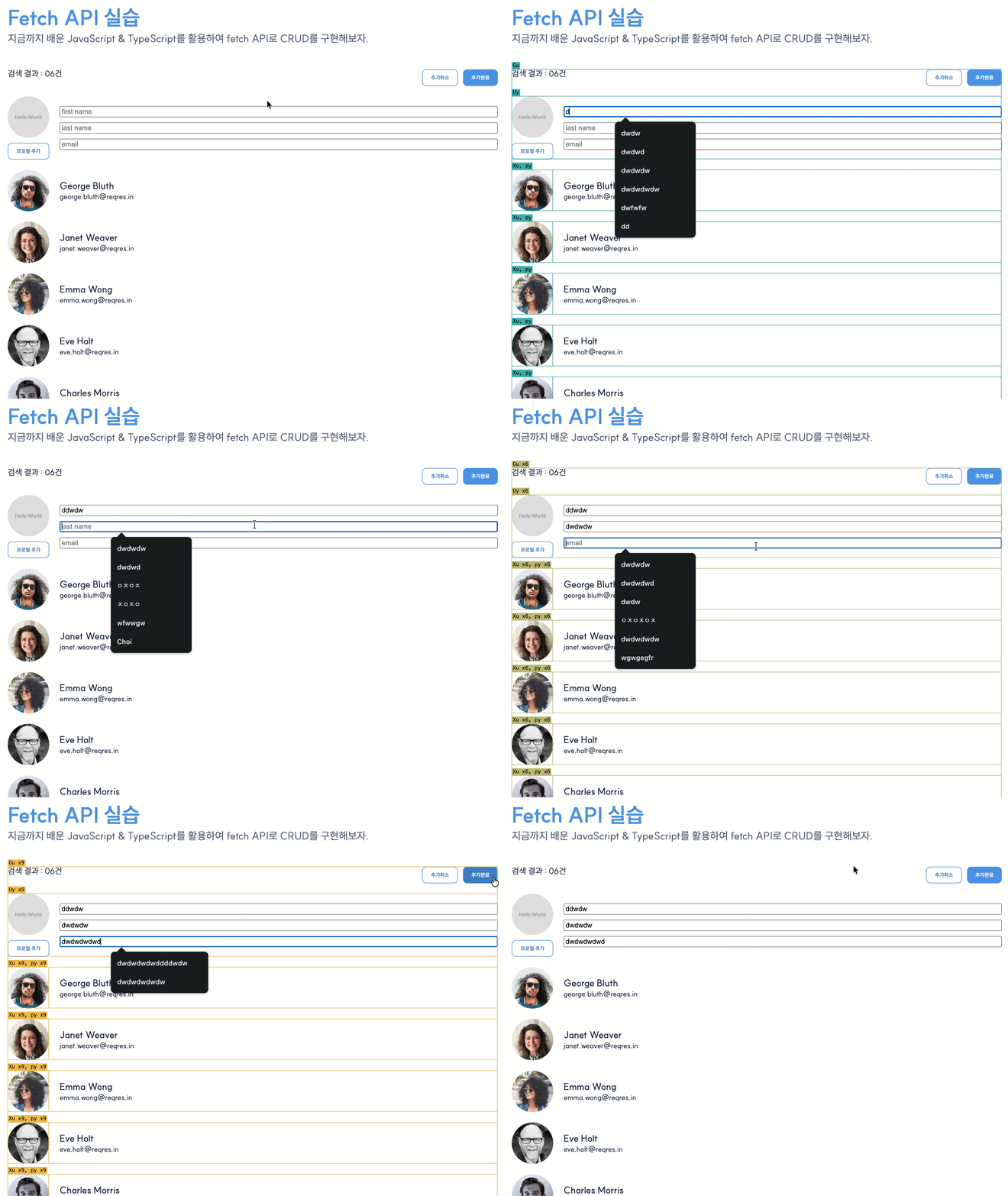
- 변경:
UsersNewForm내부에서만useState가 돌기 때문에, 타이핑 시 해당 컴포넌트만 리렌더링됨.
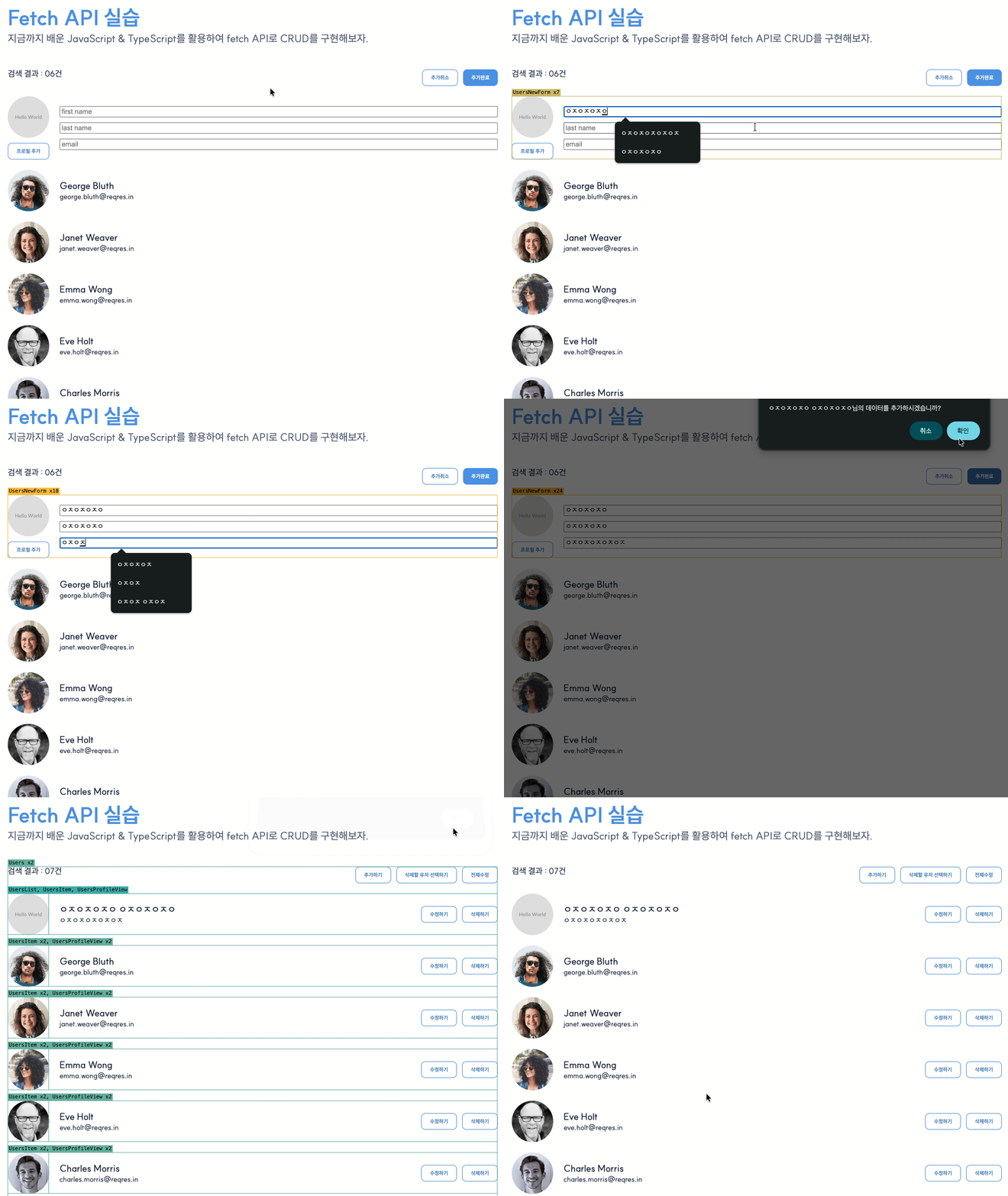
- 코드 가독성
- 신규 유저 생성과 관련된 수십 줄의 코드가
UsersProvider에서UsersNewForm으로 이동되어UsersProvider의 역할은 축소되었다. UsersNewForm에 신규 유저 생성 관련 있는 로직을 하나로 묶을 수 있어 유지보수 측면에서도 개선되었다.- 상태 변화 로직이
reducer한곳으로 모여 유지보수가 쉬워졌다.
앞으로의 계획
다음 포스팅에서는 이 시리즈의 하이라이트인 "전체 유저 수정"와 "개별 유저 수정" 기능을 리팩토링한다. 수백 명의 유저 데이터를 효율적으로 관리할 수 있는 방향으로 리펙토링할 예정이다.