
useRef
useRef는 렌더링에 필요하지 않은 값을 참조할 수 있게 해주는 React Hook입니다.
const ref = useRef(initialValue)Reference
ref 를 선언하려면 컴포넌트의 최상위 수준에서 useRef를 호출하세요.
import { useRef } from 'react';

function MyComponent() {
  const intervalRef = useRef(0);
  const inputRef = useRef(null);
  // ...
Parameters
initialValue: ref 객체의current속성을 초기에 지정하려는 값입니다. 모든 타입의 값이 될 수 있습니다. 이 argument는 초기 렌더링 후에는 무시됩니다.
Returns
useRef는 단일 속성을 가진 객체를 반환합니다.
current: 처음에는 전달한initialValue값으로 설정됩니다. 나중에 다른 것으로 설정할 수 있습니다. ref 객체를 JSX 노드의ref속성으로 React에 전달하면 React는 current 속성을 설정합니다.
다음 렌더링에서는 useRef가 동일한 객체를 반환합니다.
Caveats
ref.current속성을 변경할 수 있습니다. 상태와 달리 mutable 합니다. 그러나 렌더링에 사용되는 객체(예: 상태의 일부)를 보유하는 경우 해당 객체를 변경하면 안 됩니다.ref.current속성을 변경하면 React는 컴포넌트를 리-렌더링하지 않습니다. ref는 일반 JavaScript 객체이기 때문에 React는 언제 변경되는지 인식하지 못합니다.- 초기화를 제외하고 렌더링 중에
ref.current를 쓰거나 읽지 마십시오. 이로 인해 구성 요소의 동작을 예측할 수 없게 됩니다. - Strict Mode 에서 React는 우발적인 불순물을 찾는 데 도움을 주기 위해 컴포넌트 함수를 두 번 호출합니다. 이는 개발 전용 동작이며 프로덕션에는 영향을 주지 않습니다. 각 참조 객체는 두 번 생성되지만 버전 중 하나는 삭제됩니다. 컴포넌트 기능이 순수하다면(되어야 하는 대로) 동작에 영향을 주어서는 안 됩니다.
Usage
Referencing a value with a ref
하나 이상의 ref를 선언하려면 컴포넌트의 최상위 수준에서 useRef를 호출하세요.
import { useRef } from 'react';

function Stopwatch() {
  const intervalRef = useRef(0);
  // ...
useRef는 처음에 사용자가 제공한 초기 값으로 설정된 단일 current 속성을 사용하여 ref 객체를 반환합니다.
다음 렌더링에서는 useRef가 동일한 객체를 반환합니다. current 속성을 변경하여 정보를 저장하고 나중에 읽을 수 있습니다. 이는 state 를 생각나게 할 수 있지만 중요한 차이점이 있습니다.
ref를 변경해도 다시 렌더링이 실행되지 않습니다. 이는 refs가 컴포넌트의 시각적 출력에 영향을 주지 않는 정보를 저장하는 데 적합하다는 것을 의미합니다. 예를 들어 interval ID를 저장하고 나중에 검색해야 하는 경우 이를 참조에 넣을 수 있습니다. ref 내부의 값을 업데이트하려면 current 속성을 수동으로 변경해야 합니다.
function handleStartClick() {
  const intervalId = setInterval(() => {
    // ...
  }, 1000);

  intervalRef.current = intervalId;
}
나중에 해당 interval 지우기를 호출할 수 있도록 ref에서 해당 interval ID를 읽을 수 있습니다.
function handleStopClick() {
  const intervalId = intervalRef.current;
  clearInterval(intervalId);
}
ref를 사용하면 다음을 보장할 수 있습니다.
- 렌더링할 때마다 재설정되는 일반 변수와는 달리 re-renders 할 때마다 정보를 저장할 수 있습니다.
- 이를 변경해도 다시 렌더링이 트리거되지 않습니다 (다시 렌더링을 트리거하는 상태 변수와는 달리).
- 정보는 공유되는 외부 변수와 달리 컴포넌트의 각 복사본에 대해 로컬입니다.
refs를 변경해도 다시 렌더링이 실행되지 않으므로 refs는 화면에 표시하려는 정보를 저장하는 데 적합하지 않습니다. 대신에 state를 사용하세요. useRef와 useState 중에서 선택하는 방법에 대해 자세히 알아보세요.
아래 예에서는 state와 refs의 조합을 사용합니다. startTime과 now는 모두 렌더링에 사용되므로 상태 변수입니다. 그러나 버튼을 누를 때 간격을 중지할 수 있도록 interval ID도 보유해야 합니다. interval ID는 렌더링에 사용되지 않으므로 ref에 보관하고 수동으로 업데이트하는 것이 적절합니다.
import { useState, useRef } from 'react';

export default function Stopwatch() {
  const [startTime, setStartTime] = useState(null);
  const [now, setNow] = useState(null);
  const intervalRef = useRef(null);

  function handleStart() {
    setStartTime(Date.now());
    setNow(Date.now());

    clearInterval(intervalRef.current);
    intervalRef.current = setInterval(() => {
      setNow(Date.now());
    }, 10);
  }

  function handleStop() {
    clearInterval(intervalRef.current);
  }

  let secondsPassed = 0;
  if (startTime != null && now != null) {
    secondsPassed = (now - startTime) / 1000;
  }

  return (
    <>
      <h1>Time passed: {secondsPassed.toFixed(3)}</h1>
      <button onClick={handleStart}>
        Start
      </button>
      <button onClick={handleStop}>
        Stop
      </button>
    </>
  );
}

❗️ 렌더링 중에는 ref.current를 쓰거나 읽지 마십시오.
React는 컴포넌트의 본문이 순수한 함수처럼 동작할 것으로 기대합니다.
- 입력(props, state 및 context)이 동일한 경우 정확히 동일한 JSX를 반환해야 합니다.
- 다른 순서나 다른 인수로 호출해도 다른 호출의 결과에 영향을 주어서는 안 됩니다.
렌더링 중에 ref를 읽거나 쓰면 이러한 기대가 깨집니다.
function MyComponent() {
  // ...
  // 🚩 Don't write a ref during rendering
  myRef.current = 123;
  // ...
  // 🚩 Don't read a ref during rendering
  return <h1>{myOtherRef.current}</h1>;
}
대신 이벤트 핸들러나 effects에서 refs를 읽거나 쓸 수 있습니다.
function MyComponent() {
  // ...
  useEffect(() => {
    // ✅ You can read or write refs in effects
    myRef.current = 123;
  });
  // ...
  function handleClick() {
    // ✅ You can read or write refs in event handlers
    doSomething(myOtherRef.current);
  }
  // ...
}
렌더링 중에 무언가를 읽거나 써야 한다면 대신 상태를 사용하세요.
이러한 규칙을 어기면 컴포넌트가 계속 작동할 수 있지만 React에 추가하는 대부분의 최신 기능은 이러한 기대에 의존합니다. 컴포넌트를 순수하게 유지하는 방법에 대해 자세히 알아보세요.
Manipulating the DOM with a ref
DOM을 조작하기 위해 ref를 사용하는 것이 특히 일반적입니다. React에는 이를 위한 기본 지원이 있습니다.
먼저 초기 값이 null인 ref 객체를 선언합니다.
import { useRef } from 'react';

function MyComponent() {
  const inputRef = useRef(null);
  // ...
그런 다음 ref 객체를 조작하려는 DOM 노드의 JSX에 ref 속성으로 전달합니다.
  // ...
  return <input ref={inputRef} />;
React가 DOM 노드를 생성하여 화면에 표시한 후, React는 ref 객체의 current 속성을 해당 DOM 노드로 설정합니다. 이제 <input>의 DOM 노드에 액세스하고 focus()와 같은 메서드를 호출할 수 있습니다.
  function handleClick() {
    inputRef.current.focus();
  }
React는 노드가 화면에서 제거되면 현재 속성을 다시 null로 설정합니다. refs을 사용하여 DOM을 조작하는 방법에 대해 자세히 알아보세요.
첫번째 예시. Focusing a text input
'Focus the input' 버튼을 클릭하면 input이 focus 되는 간단한 예시네요.
import { useRef } from 'react';

export default function Form() {
  const inputRef = useRef(null);

  function handleClick() {
    inputRef.current.focus();
  }

  return (
    <>
      <input ref={inputRef} />
      <button onClick={handleClick}>
        Focus the input
      </button>
    </>
  );
}

두번째 예시. Scrolling an image into view
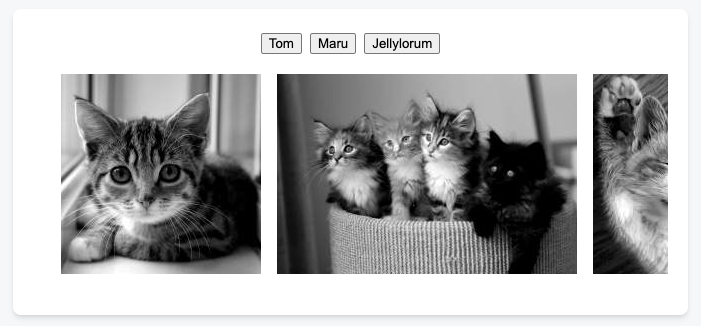
이 예에서는 버튼을 클릭하면 이미지가 스크롤되어 표시됩니다. list DOM 노드에 대한 ref를 사용한 다음 DOM querySelectorAll API를 호출하여 스크롤하려는 이미지를 찾습니다.
import { useRef } from 'react';

export default function CatFriends() {
  const listRef = useRef(null);

  function scrollToIndex(index) {
    const listNode = listRef.current;
    // This line assumes a particular DOM structure:
    const imgNode = listNode.querySelectorAll('li > img')[index];
    imgNode.scrollIntoView({
      behavior: 'smooth',
      block: 'nearest',
      inline: 'center'
    });
  }

  return (
    <>
      <nav>
        <button onClick={() => scrollToIndex(0)}>
          Tom
        </button>
        <button onClick={() => scrollToIndex(1)}>
          Maru
        </button>
        <button onClick={() => scrollToIndex(2)}>
          Jellylorum
        </button>
      </nav>
      <div>
        <ul ref={listRef}>
          <li>
            <img
              src="https://placekitten.com/g/200/200"
              alt="Tom"
            />
          </li>
          <li>
            <img
              src="https://placekitten.com/g/300/200"
              alt="Maru"
            />
          </li>
          <li>
            <img
              src="https://placekitten.com/g/250/200"
              alt="Jellylorum"
            />
          </li>
        </ul>
      </div>
    </>
  );
}
세번째 예시. Playing and pausing a video
이 예제에서는 ref를 사용하여 <video> DOM 노드에서 play() 및 Pause()를 호출합니다.
import { useState, useRef } from 'react';

export default function VideoPlayer() {
  const [isPlaying, setIsPlaying] = useState(false);
  const ref = useRef(null);

  function handleClick() {
    const nextIsPlaying = !isPlaying;
    setIsPlaying(nextIsPlaying);

    if (nextIsPlaying) {
      ref.current.play();
    } else {
      ref.current.pause();
    }
  }

  return (
    <>
      <button onClick={handleClick}>
        {isPlaying ? 'Pause' : 'Play'}
      </button>
      <video
        width="250"
        ref={ref}
        onPlay={() => setIsPlaying(true)}
        onPause={() => setIsPlaying(false)}
      >
        <source
          src="https://interactive-examples.mdn.mozilla.net/media/cc0-videos/flower.mp4"
          type="video/mp4"
        />
      </video>
    </>
  );
}
네번째 예시. Exposing a ref to your own component
때로는 상위 구성 요소가 구성 요소 내부의 DOM을 조작하도록 할 수도 있습니다. 예를 들어 MyInput 구성 요소를 작성 중이지만 부모가 input(부모가 액세스할 수 없음)에 집중할 수 있기를 원할 수 있습니다. useRef의 조합을 사용하여 input을 보관하고 forwardRef을 사용해 상위 구성 요소에 노출할 수 있습니다. 여기에서 자세한 연습을 읽어보세요.
import { forwardRef, useRef } from 'react';

const MyInput = forwardRef((props, ref) => {
  return <input {...props} ref={ref} />;
});

export default function Form() {
  const inputRef = useRef(null);

  function handleClick() {
    inputRef.current.focus();
  }

  return (
    <>
      <MyInput ref={inputRef} />
      <button onClick={handleClick}>
        Focus the input
      </button>
    </>
  );
}
Avoiding recreating the ref contents
React는 초기 참조 값을 한 번 저장하고 다음 렌더링에서는 이를 무시합니다.
function Video() {
  const playerRef = useRef(new VideoPlayer());
  // ...
new VideoPlayer()의 결과는 초기 렌더링에만 사용되지만 여전히 모든 렌더링에서 이 함수를 호출합니다. 값비싼 객체를 생성한다면 이는 낭비일 수 있습니다.
이 문제를 해결하려면 대신 다음과 같이 ref를 초기화할 수 있습니다. (오홋...)
function Video() {
  const playerRef = useRef(null);
  if (playerRef.current === null) {
    playerRef.current = new VideoPlayer();
  }
  // ..
일반적으로 렌더링 중에는 ref.current를 쓰거나 읽는 것이 허용되지 않습니다. 하지만 이 경우에는 결과가 항상 동일하고 조건이 초기화 중에만 실행되므로 완전히 예측 가능하기 때문에 괜찮습니다.
Troubleshooting
I can’t get a ref to a custom component
다음과 같이 자신의 컴포넌트에 ref를 전달하려고 하면:
const inputRef = useRef(null);

return <MyInput ref={inputRef} />;
이러한 에러를 볼 수 있을 겁니다.

기본적으로 자신의 구성 요소는 내부 DOM 노드에 refs를 노출하지 않습니다. 이 문제를 해결하려면 ref를 가져오려는 구성요소를 찾으세요.
export default function MyInput({ value, onChange }) {
  return (
    <input
      value={value}
      onChange={onChange}
    />
  );
}
그리고 나서 이 컴포넌트를 forwardRef로 감싸세요.
import { forwardRef } from 'react';

const MyInput = forwardRef(({ value, onChange }, ref) => {
  return (
    <input
      value={value}
      onChange={onChange}
      ref={ref}
    />
  );
});

export default MyInput;
그런 다음 상위 구성 요소는 해당 구성 요소에 대한 참조를 얻을 수 있습니다. 다른 구성 요소의 DOM 노드에 액세스하는 방법에 대해 자세히 알아보세요.
마치면서
useRef에 대해 한번 리마인딩하는 시간이 되었네요. "useRef는 렌더링에 필요하지 않은 값을 참조할 수 있게 해주는 React Hook입니다." 그리고 그 쓰임새에 따라 두가지 경우가 있죠.
- interval ID와 같이 시각적 출력에 영향을 주지 않는 정보를 저장하는 경우
- (일반적으로) DOM을 조작하기 위해 ref를 사용하는 것
사용시 주의할 점으로는 forwardRef 를 사용하는 경우가 있겠네요.