
✅ 중첩 라우팅
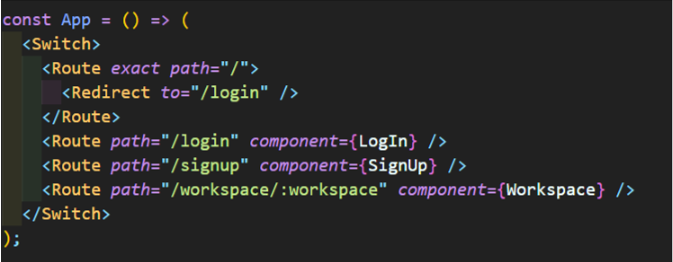
App/index.tsx
Workspace/index.tsx

Switch, Route안에 또다시 Switch, Route를 적용하여 중첩라우팅을 할 수 있으며, 이때 두 구조가 동일해야한다.
즉, App/index.tsx에서
/workspace에 의해Workspace/index.tsx가 걸리게 되며,
이때Workspace.index.tsx안에서도 마찬가지로 Switch, Route를 사용할 때 시작주소를 App/index.tsx와 동일하게/workspace로 시작하여야 한다.
✅ createBrowserRouter를 통한 중첩 라우팅
아래는 createBrowserRouter를 통한 중첩 라우팅 방법이다.
const router = createBrowserRouter([
  {
    path: "/",
    element: <App />,
    children: [
      { index: true, element: <Main /> },
      { path: "workspace", element: <Workspace />,
       children: [
       {
	       path:"channel", element: <Channel />
       },
       {
         path: "dm/:id", element: <DirectMessage />
       }
    ],
  },
]);

const root = ReactDOM.createRoot(document.getElementById("root"));
root.render(
  <React.StrictMode>
    <RouterProvider router={router} />
  </React.StrictMode>
);createBrowserRouter의 children속성 값 을 통해, children의 경로인 path를 설정하고, element에 컴포넌트를 적어 원하는 주소에 따라 매핑할 수 있으며, 이때 부모 컴포넌트에서는 <Outlet />을 통해 자식 컴포넌트의 위치를 조절할 수 있다.
✅ StopPropagation
<CreateModal onClick={onCloseModal}>
<div onClick={stopPropagation}>
<CloseModalButton onClick={onCloseModal}>×</CloseModalButton>
{children}
</div>
</CreateModal>자식의 모달창을 클릭하였을 때, 이벤트 버블링에 의해서 자식뿐만 아니라 부모에게도 이벤트가 적용되는데 이를 방지하고자, 자식 컴포넌트 클릭시
stopPropagation을 통해 부모로의 이벤트 적용을 방지한다.
✅ trim()을 통한 공백 제거
     if (!newWorkspace || !newWorkspace.trim()) {
       return;
     }
     if (!newUrl || !newUrl.trim()) {
       return;
     }
공백만 입력하고 엔터치는 경우를 방지하기 위해서, string.trim()을 통해 문자열 내의 공백을 제거해야 한다.

프론트엔드 개발을 하고 있는 김태윤입니다.
https://www.cllaude99.com 에서 글을 작성하고 있습니다.