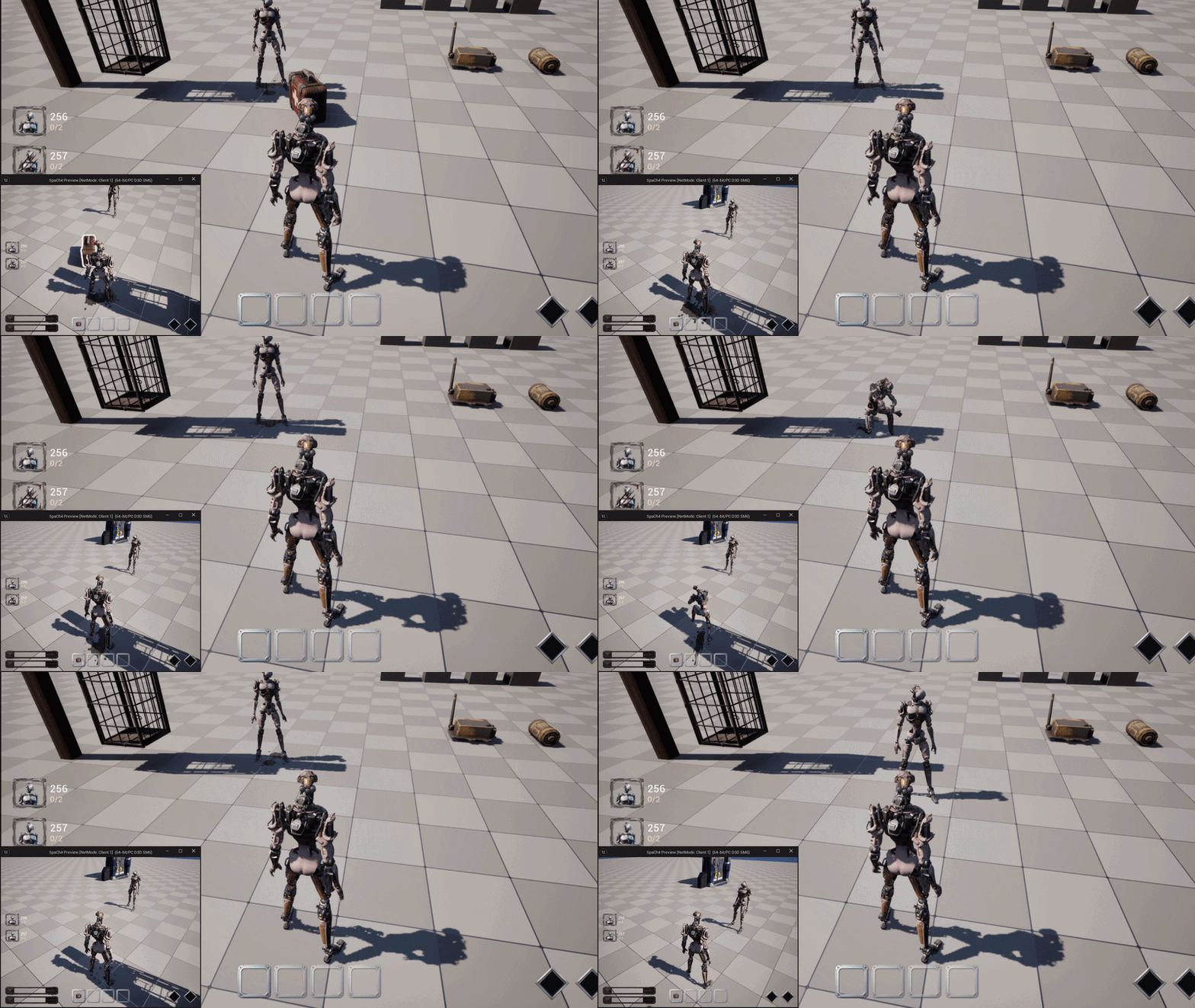
상호작용 가능한 소모품과 인벤토리
이번엔 기존에 치료 기능으로만 존재하던 Medkit을 월드 아이템으로 변경하고, 새로운 소모품인 Speed Potion을 추가했다.
정리하면 이번 목표는 이렇다.
- Medkit과 Speed Potion을 맵에 배치하고 직접 줍거나 버릴 수 있게 한다
- 기존 수집품과 소모품이 같은 4칸 인벤토리를 사용하게 한다
- 동일한 소모품을 주우면 다른 슬롯에 복제하지 않고 같은 슬롯의 수량만 증가시킨다
- 상호작용 키를 유지하는 동안에만 채널링이 진행되게 한다
- 수동 버리기는 상호작용 키와 분리된
IA_Drop으로 처리한다 - 이동을 막는 대신 이동 입력이 들어오면 진행 중인 상호작용만 취소한다
공통 아이템 클래스
기존에는 ASPCollectibleItem만 상호작용 가능한 월드 아이템이었다.
하지만 Medkit과 Speed Potion도 똑같이 줍고 버려야 하므로, 공통 부모인 ASPPickupItem을 만들고 두 종류의 아이템이 이를 상속하게 했다.
UCLASS(Abstract, Blueprintable)
class SPACH4_API ASPPickupItem : public AActor, public ISPInteractable
{
	GENERATED_BODY()

public:
	virtual void Interact_Implementation(AActor* Interactor) override;
	virtual void SetHighlight_Implementation(bool bEnabled) override;
	virtual bool IsInteractable_Implementation() const override;

	bool TryReserve(ASurvivorCharacter* Survivor);
	void ReleaseReservation(ASurvivorCharacter* Survivor);
	void SetStored(bool bNewStored, const FVector& WorldLocation);

protected:
	UPROPERTY(VisibleAnywhere, BlueprintReadOnly, Category = "SP|Item")
	TObjectPtr<UStaticMeshComponent> Mesh;

	UPROPERTY(EditAnywhere, BlueprintReadOnly, Category = "SP|Item")
	TSoftObjectPtr<UTexture2D> Icon;
};
상호작용되면 아이템이 인벤토리를 직접 수정하지 않고, 생존자의 기존 줍기 흐름으로 진입한다.
void ASPPickupItem::Interact_Implementation(AActor* Interactor)
{
	if (ASurvivorCharacter* Survivor = Cast<ASurvivorCharacter>(Interactor))
	{
		Survivor->BeginPickup(this);
	}
}
4칸 인벤토리 통합
수집품과 소모품은 별도의 인벤토리를 만들지 않고 같은 4칸을 사용하도록 했다.
슬롯은 자신이 어떤 종류의 아이템을 가지고 있는지와 수량을 함께 저장한다.
UENUM(BlueprintType)
enum class EInventorySlotContentType : uint8
{
	Empty,
	Collectible,
	Consumable
};

USTRUCT(BlueprintType)
struct FInventorySlotEntry
{
	GENERATED_BODY()

	UPROPERTY(BlueprintReadOnly)
	EInventorySlotContentType ContentType = EInventorySlotContentType::Empty;

	UPROPERTY(BlueprintReadOnly)
	EConsumableItemType ConsumableType = EConsumableItemType::None;

	UPROPERTY(BlueprintReadOnly)
	int32 Quantity = 0;

	UPROPERTY(BlueprintReadOnly)
	TSoftObjectPtr<UTexture2D> Icon;

	UPROPERTY()
	TObjectPtr<ASPPickupItem> SourceItem;
};
여기서 한 슬롯은 하나의 아이템 종류를 표현한다.
동일한 소모품을 여러 개 가지고 있으면 새로운 슬롯을 차지하는 것이 아니라 해당 슬롯의 Quantity만 증가한다.
예를 들어 Medkit을 하나 가진 상태에서 Medkit 두 개를 더 주우면 다음과 같이 된다.
1번 슬롯: Medkit ×3
2번 슬롯: Empty
3번 슬롯: Empty
4번 슬롯: Empty
동일 소모품 중첩
처음 문제가 되었던 부분은 같은 소모품을 주웠을 때 2번, 3번 슬롯에도 같은 아이콘이 복제되는 것이었다.
원하는 동작은 같은 종류가 이미 존재하면 그 슬롯의 숫자만 증가하는 것이다.
그래서 아이템을 저장하기 전에 같은 타입의 소모품 슬롯을 먼저 찾도록 했다.
if (const ASPConsumableItem* Consumable = Cast<ASPConsumableItem>(Item))
{
	const EConsumableItemType ItemType = Consumable->GetConsumableType();
	const int32 ExistingIndex = FindConsumableSlotIndex(ItemType);

	if (ExistingIndex != INDEX_NONE)
	{
		FInventorySlotEntry& ExistingSlot = InventorySlots[ExistingIndex];

		++ExistingSlot.Quantity;
		Item->Destroy();
		BroadcastInventoryChanged();
		return true;
	}
}
첫 번째 아이템의 월드 액터는 SourceItem으로 보관하고, 이후 같은 종류의 아이템은 수량에 흡수한 뒤 제거한다.
새로운 종류의 아이템일 때만 빈 슬롯을 찾는다.
const int32 EmptyIndex = FindFirstEmptySlotIndex();
if (EmptyIndex == INDEX_NONE)
	return false;

FInventorySlotEntry& Slot = InventorySlots[EmptyIndex];

Slot.SourceItem = Item;
Slot.Icon = Item->GetIcon();
Slot.Quantity = 1;
Slot.ContentType = EInventorySlotContentType::Consumable;
Slot.ConsumableType = Consumable->GetConsumableType();
따라서 Medkit과 Speed Potion은 서로 다른 슬롯을 사용하지만, 같은 종류끼리는 각각 하나의 슬롯 안에서 수량으로 중첩된다.
HUD 수량 처리
HUD도 전체 보유량을 모든 슬롯에 전달하면 안 되고, 반드시 각 슬롯이 가진 수량을 그대로 사용해야 한다.
case EInventorySlotContentType::Consumable:
	HUDSlot.ItemName =
		SPInventoryText::GetConsumableDisplayName(Slot.ConsumableType);

	HUDSlot.Quantity = Slot.Quantity;
	break;
HUD에서는 수량이 1일 때 숫자를 숨기고, 2개 이상일 때만 표시하도록 했다.
const int32 Quantity =
	bValidData ? InventoryData[Index].Quantity : 0;

CountText->SetText(
	Quantity > 1
		? FText::AsNumber(Quantity)
		: FText::GetEmpty());

CountText->SetVisibility(
	Quantity > 1
		? ESlateVisibility::HitTestInvisible
		: ESlateVisibility::Collapsed);
이제 같은 소모품을 주우면 다른 슬롯의 아이콘이 복제되지 않고, 기존 슬롯의 숫자만 2, 3처럼 증가한다.
줍기 예약 처리
멀티플레이에서 두 생존자가 같은 아이템을 동시에 주우려고 할 수 있다.
이를 막기 위해 채널링을 시작할 때 아이템을 예약하고, 예약된 아이템은 다른 생존자가 상호작용할 수 없게 했다.
bool ASPPickupItem::TryReserve(ASurvivorCharacter* Survivor)
{
	if (!HasAuthority() || !IsValid(Survivor)
		|| bStored || IsValid(ReservedBy))
	{
		return false;
	}

	ReservedBy = Survivor;
	ForceNetUpdate();
	return true;
}
줍기가 취소되면 예약을 해제한다.
if (ASPPickupItem* PickupItem = CurrentPickupItem.Get())
{
	PickupItem->ReleaseReservation(Survivor);
}
줍기가 완료되면 서버에서 인벤토리에 저장하고, 월드 액터는 숨김 및 충돌 비활성화 상태가 된다.
void ASPPickupItem::ApplyStoredState()
{
	SetActorHiddenInGame(bStored);
	SetActorEnableCollision(!bStored);

	if (bStored && Mesh)
	{
		Mesh->SetRenderCustomDepth(false);
	}
}
상호작용과 아이템 사용
상호작용 키는 월드 상호작용과 소모품 사용을 함께 처리한다.
먼저 전방에 상호작용 가능한 대상이 있는지 확인하고, 대상이 없다면 현재 선택한 슬롯의 소모품을 사용한다.
if (TraceInteractable(Hit)
	&& Hit.GetActor()
	&& Hit.GetActor()->Implements<USPInteractable>()
	&& ISPInteractable::Execute_IsInteractable(Hit.GetActor()))
{
	ISPInteractable::Execute_Interact(Hit.GetActor(), Survivor);
	return;
}

TryUseSelectedConsumable();
소모품 사용은 슬롯에 저장된 타입으로 분기한다.
bool USPInteractionComponent::TryUseSelectedConsumable()
{
	ASurvivorCharacter* Survivor = GetSurvivor();
	USPInventoryComponent* Inventory =
		Survivor ? Survivor->GetInventoryComponent() : nullptr;

	if (!Survivor || !Inventory)
		return false;

	const int32 SlotIndex = Survivor->GetSelectedSlotIndex();

	switch (Inventory->GetConsumableTypeAtSlot(SlotIndex))
	{
	case EConsumableItemType::Medkit:
		return TryBeginSelfHeal();

	case EConsumableItemType::SpeedPotion:
		return TryBeginSpeedPotionUse();

	default:
		return false;
	}
}
버리기 입력 분리
처음에는 상호작용 키 하나로 사용과 버리기를 구분하려고 했지만, 입력 시간이 복잡해지고 의도가 불명확해지는 문제가 있었다.
그래서 버리기는 별도의 IA_Drop으로 분리했다.
UPROPERTY(EditDefaultsOnly, BlueprintReadOnly, Category = "Input|Action")
TObjectPtr<UInputAction> InteractAction;

UPROPERTY(EditDefaultsOnly, BlueprintReadOnly, Category = "Input|Action")
TObjectPtr<UInputAction> DropAction;
생존자는 DA_InputConfig에 지정된 액션만 가져와 바인딩한다.
if (UInputAction* DropAction = InputConfig->DropAction.Get())
{
	EnhancedInput->BindAction(
		DropAction,
		ETriggerEvent::Started,
		this,
		&ASurvivorCharacter::DropSelectedItem);
}
키 자체는 C++에서 지정하지 않고 Input Mapping Context에서 설정하도록 했다.
중첩 아이템 버리기
중첩된 소모품을 버릴 때는 슬롯 전체를 비우지 않고 수량 하나만 감소시킨다.
if (Slot.ContentType == EInventorySlotContentType::Consumable
	&& Slot.Quantity > 1)
{
	OutSourceItem = SpawnStackedItem(Slot);

	if (!OutSourceItem)
		return false;

	--Slot.Quantity;
	BroadcastInventoryChanged();
	return true;
}
새로 생성되는 월드 아이템도 특정 C++ 클래스로 고정하지 않는다.
슬롯이 보관 중인 원본 아이템의 런타임 클래스를 사용하므로, 블루프린트에 설정한 Mesh와 Icon이 그대로 유지된다.
return GetWorld()->SpawnActor<ASPPickupItem>(
	Slot.SourceItem->GetClass(),
	GetOwner()->GetActorTransform(),
	SpawnParameters);
수량이 하나만 남았다면 보관 중이던 SourceItem을 그대로 월드에 돌려놓고 슬롯을 비운다.
OutSourceItem = Slot.SourceItem;
Slot.Clear();
BroadcastInventoryChanged();
다운 시 모든 아이템 드롭
생존자가 다운되면 기존 수집품뿐 아니라 소모품도 모두 떨어뜨려야 한다.
상태가 Downed로 변경될 때 인벤토리 전체 드롭을 호출한다.
if (NewState == ESurvivorState::Downed)
{
	InteractionComponent->DropAllItems();
}
중첩된 소모품도 수량이 없어질 때까지 반복해서 하나씩 월드에 생성한다.
for (int32 SlotIndex = 0;
	SlotIndex < USPInventoryComponent::InventorySlotCount;
	++SlotIndex)
{
	while (Inventory->IsSlotOccupied(SlotIndex))
	{
		ASPPickupItem* Item = nullptr;

		if (!Inventory->DropSlot(SlotIndex, Item) || !Item)
			break;

		Item->SetStored(false, DropLocation);
	}
}
드롭 간격은 별도의 배율 값으로 고정하지 않고, 각 아이템의 실제 Bounds를 읽어 옆으로 배치했다.
덕분에 Mesh 크기가 다른 아이템이 추가되더라도 서로 완전히 겹치는 현상을 줄일 수 있다.
Medkit 채널링
Medkit은 부상 상태인 생존자가 자신을 치료할 때 사용한다.
기존 치료 동작은 유지하되, 이제 인벤토리의 실제 Medkit 슬롯을 확인하고 채널링이 완료됐을 때만 하나를 소비한다.
bool USPInteractionComponent::TryBeginSelfHeal()
{
	ASurvivorCharacter* Survivor = GetSurvivor();
	const USurvivorData* Data = GetSurvivorData();

	if (!Survivor || !Survivor->HasAuthority()
		|| bIsInteract || !Data)
	{
		return false;
	}

	if (Survivor->GetSurvivorState() != ESurvivorState::Injured	|| !IsSelectedSlotMedkit())
	{
		return false;
	}

	bIsSelfHealing = true;
	bIsInteract = true;
	ActiveConsumableSlotIndex =	Survivor->GetSelectedSlotIndex();

	GetWorld()->GetTimerManager().SetTimer(
		HealTimer, this, &USPInteractionComponent::CompleteHeal,
		Data->MedkitDuration, false);

	return true;
}
완료 시점에도 시작할 때 저장한 슬롯에 Medkit이 남아 있는지 다시 확인한다.
const bool bConsumed =
	Inventory->ConsumeConsumableAtSlot(ActiveConsumableSlotIndex,
		EConsumableItemType::Medkit);

if (bConsumed)
{
	Survivor->RecoverOneStep();
}
아이템의 표기는 Medikit이 아니라 올바른 철자인 Medkit으로 통일했다.
Speed Potion 채널링
Speed Potion도 즉시 사용되지 않고 Medkit처럼 채널링하도록 만들었다.
다만 기본 사용 시간은 Medkit 3초의 절반인 1.5초로 설정했다.
UPROPERTY(EditAnywhere, BlueprintReadOnly, Category = "Items")
float MedkitDuration = 3.00;

UPROPERTY(EditAnywhere, BlueprintReadOnly, Category = "Items")
float SpeedPotionUseDuration = 1.50;
이 값은 DA_SurvivorData에서 수정할 수 있으므로 기획 변경이 생겨도 C++을 다시 수정할 필요가 없다.
채널링을 시작할 때는 다음 조건을 검사한다.
- 서버에서 실행 중인가
- 다른 상호작용을 진행 중이지 않은가
- 선택한 슬롯이 Speed Potion인가
- 현재 생존자 상태가
Healthy또는Injured인가 - 기존 Speed Potion 효과가 진행 중이지 않은가
bool USPInteractionComponent::TryBeginSpeedPotionUse()
{
	ASurvivorCharacter* Survivor = GetSurvivor();
	USPInventoryComponent* Inventory = Survivor ? Survivor->GetInventoryComponent() : nullptr;
	USPMovementComponent* Movement = Survivor ? Survivor->GetSPMovementComponent() : nullptr;
	const USurvivorData* Data = GetSurvivorData();

	const int32 SlotIndex = Survivor ? Survivor->GetSelectedSlotIndex() : INDEX_NONE;

	if (!Survivor || !Survivor->HasAuthority() || bIsInteract || !Inventory	|| !Movement
		|| !Data || !Movement->CanActivateSpeedPotion() ||
        !Inventory->IsSlotConsumable(SlotIndex, EConsumableItemType::SpeedPotion))
	{
		return false;
	}

	bIsUsingSpeedPotion = true;
	bIsInteract = true;
	ActiveConsumableSlotIndex = SlotIndex;

	PlayInteractMontage(SpeedPotionUseMontage.LoadSynchronous());

	GetWorld()->GetTimerManager().SetTimer(
		SpeedPotionUseTimer, this, &USPInteractionComponent::CompleteSpeedPotionUse,
		Data->SpeedPotionUseDuration, false);

	return true;
}
아이템 소비와 효과 적용은 채널링 완료 시점에만 처리한다.
if (Inventory->ConsumeConsumableAtSlot(ActiveConsumableSlotIndex,
		EConsumableItemType::SpeedPotion))
{
	const bool bSkipFatigue = Inventory->HasPerk(EPerkType::LightWheels);

	Movement->TryActivateSpeedPotion(bSkipFatigue);
}
채널링이 취소되면 타이머와 상태만 초기화한다.
void USPInteractionComponent::CancelSpeedPotionChannel()
{
	GetWorld()->GetTimerManager().ClearTimer(SpeedPotionUseTimer);

	bIsUsingSpeedPotion = false;
	ActiveConsumableSlotIndex = INDEX_NONE;
}
따라서 채널링 도중 R을 놓거나 움직여도 Speed Potion은 사라지지 않는다.
Speed Potion 효과 상태
Speed Potion의 인벤토리 수량은 중첩할 수 있지만, 이동속도 효과는 중첩하지 않는다.
효과 상태를 별도 enum으로 관리했다.
UENUM(BlueprintType)
enum class ESpeedPotionPhase : uint8
{
	None,
	Boost,
	Fatigue
};
현재 상태가 None일 때만 새로운 Speed Potion 효과를 시작할 수 있다.
bool USPMovementComponent::CanActivateSpeedPotion() const
{
	const ASurvivorCharacter* Survivor = GetSurvivor();
	const USurvivorData* Data = GetSurvivorData();

	if (!Survivor || !Data || SpeedPotionPhase != ESpeedPotionPhase::None)
	{
		return false;
	}

	const ESurvivorState State = Survivor->GetSurvivorState();

	return State == ESurvivorState::Healthy || State == ESurvivorState::Injured;
}
이동속도 계산에서는 기존 속도에 Speed Potion 배율을 곱한다.
float USPMovementComponent::ComputeTargetMoveSpeed() const
{
	const float BaseSpeed =	bHitEscapeSprintActive ? HitEscapeSprintSpeed
			: GetBaseWalkSpeed();

	return BaseSpeed * GetCarryMoveSpeedMultiplier() * GetSpeedPotionMultiplier();
}
다음과 같이 소모품이 잘 중첩되고 사용되는 것을 확인할 수 있다.