attachToParent
우리는 Fragment의 onCreateView 또는 RecyclerView의 onCreateViewHolder에서 xml를 view 객체로 바꾸기 위해 inflate 메소드를 사용합니다. 이 때 마지막 parameter에는 항상 false 값을 전달하는데 이렇게 설정하는 이유는 무엇일까요?
// Fragment

override fun onCreateView(
	inflater: LayoutInflater,
	container: ViewGroup?,
	savedInstanceState: Bundle?
): View? {
	_binding = DataBindingUtil.inflate(inflater, layoutId, container, false) // false
	binding.lifecycleOwner = viewLifecycleOwner
	return binding.root
}

// ListAdapter

override fun onCreateViewHolder(parent: ViewGroup, viewType: Int): OptionItemViewHolder {
	val bind = ItemOptionBinding.inflate(LayoutInflater.from(context), parent, false) // false
	return OptionItemViewHolder(bind)
}
inflate 내부 코드 살펴보기
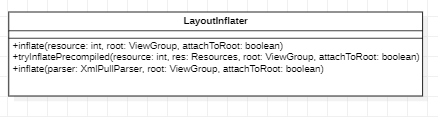
이유를 찾기 위해 inflate 메소드를 확인해보겠습니다.
inflate 는 추상 클래스인 LayoutInflater 가 구현하고 있는걸 알 수 있습니다.
저희가 사용하는 inflate 메소드는 reousce를 인자로 받는 가장 위에 존재하는 메소드입니다.
public View inflate(@LayoutRes int resource, @Nullable ViewGroup root, boolean attachToRoot) {
	final Resources res = getContext().getResources();
    if (DEBUG) {
		Log.d(TAG, "INFLATING from resource: \"" + res.getResourceName(resource) + "\" ("
                  + Integer.toHexString(resource) + ")");
	}

    View view = tryInflatePrecompiled(resource, res, root, attachToRoot);
	if (view != null) {
        return view;
	}
    XmlResourceParser parser = res.getLayout(resource);
	try {
        return inflate(parser, root, attachToRoot);
	} finally {
        parser.close();
	}
}
이 때 inflate 의 return 은 tryInflatePrecompiled() 메소드의 결과에 따라 나뉘게 됩니다.
null 이 아니라면 그 결과인 view를 반환하고 null일 경우에는 아래 inflate 메소드의 결과를 반환하는 것을 알 수 있습니다.
tryInflatePrecompiled
private @Nullable
    View tryInflatePrecompiled(@LayoutRes int resource, Resources res, @Nullable ViewGroup root,
        boolean attachToRoot) {
        if (!mUseCompiledView) {
            return null;
        }

        Trace.traceBegin(Trace.TRACE_TAG_VIEW, "inflate (precompiled)");

        // Try to inflate using a precompiled layout.
        String pkg = res.getResourcePackageName(resource);
        String layout = res.getResourceEntryName(resource);

        try {
            Class clazz = Class.forName("" + pkg + ".CompiledView", false, mPrecompiledClassLoader);
            Method inflater = clazz.getMethod(layout, Context.class, int.class);
            View view = (View) inflater.invoke(null, mContext, resource);

            if (view != null && root != null) {
                // We were able to use the precompiled inflater, but now we need to do some work to
                // attach the view to the root correctly.
                XmlResourceParser parser = res.getLayout(resource);
                try {
                    AttributeSet attrs = Xml.asAttributeSet(parser);
                    advanceToRootNode(parser);
                    ViewGroup.LayoutParams params = root.generateLayoutParams(attrs);

                    if (attachToRoot) {
                        root.addView(view, params);
                    } else {
                        view.setLayoutParams(params);
                    }
                } finally {
                    parser.close();
                }
            }

            return view;
        } catch (Throwable e) {
            if (DEBUG) {
                Log.e(TAG, "Failed to use precompiled view", e);
            }
        } finally {
            Trace.traceEnd(Trace.TRACE_TAG_VIEW);
        }
        return null;
    }
이 메소드는 mUseCompiledView 변수가 null 이 아니거나 exception error 발생 시 null 을 반환합니다.
이와 같은 경우가 아니라면 attachToRoot 분기문을 보시면 됩니다.
view 와 root(ViewGrouo) 가 null 이 아닐 때 attachToRoot가 true일 경우 root에 addView 를 해주고 있는 것을 볼 수 있습니다.
inflate(XmlPullParser parser ...)
null 일 경우에는 parser를 매개변수로 한 inflate 메소드를 살펴봐야 합니다.
public View inflate(XmlPullParser parser, @Nullable ViewGroup root, boolean attachToRoot) {
        synchronized (mConstructorArgs) {
        //...

        if (root != null && attachToRoot) {
            root.addView(temp, params);
        }
        //...
자세한 코드는 직접 확인하시면됩니다. 저희가 살펴볼 부분만 보자면 attachToRoot가 true일 경우 root에 addView를 해주고 있음을 확인할 수 있습니다.
내부 코드를 확인한 결과 inflate 메소드는 attachToRoot가 true일 경우 항상 부모 view에 addView를 해주고 있음을 확인할 수 있었습니다.
정리
그렇다면 attachToParent 의 값이 true 면 어떻게 될까요?
보시다시피 true일 경우 바로 부모 view에 addView를 하게 됩니다.
저희가 Fragment를 사용할 때는 Activity에서 FragmentManager를 호출하여 add 해주었습니다. 이러면 attachToParent에 의해 이미 추가된 view를 중복 추가하기 때문에 예외가 발생합니다.
따라서 Fragment 에서 inflate시 attachToParent 를 flase 값으로 설정하는 겁니다.!!