
1. INTRO
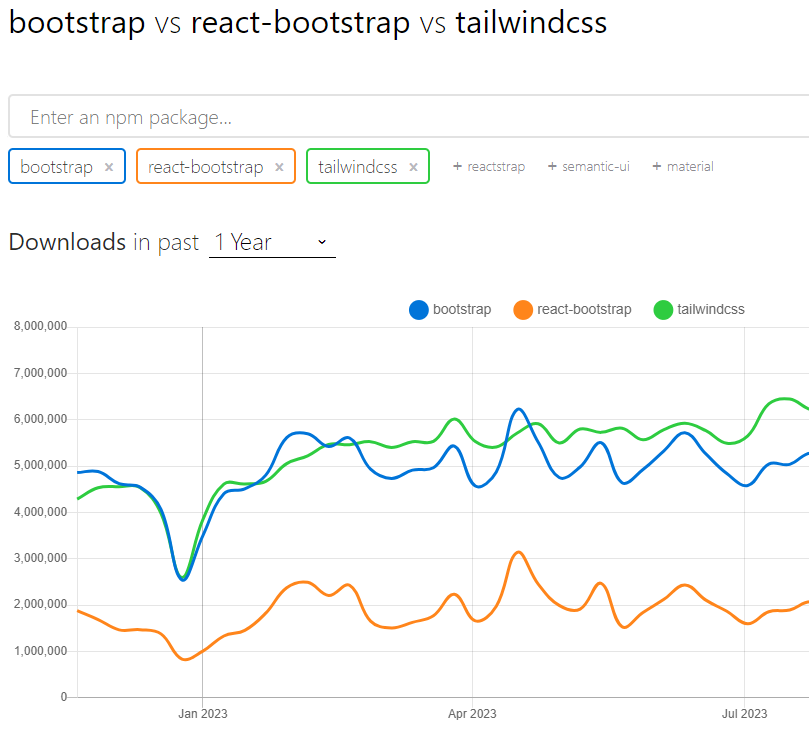
Tailwind CSS는 오픈 소스 CSS 인기 프레임워크이다.
2. Install
yarn add --dev tailwindcss postcss autoprefixer postcss-loader sass sass-loader @tailwindcss/postcss
tailwindcss : 오픈 소스 CSS 프레임워크이다. 인기짱
postcss : JavaScript 플러그인을 사용하여 CSS를 변환
postcss-loader : Webpack 내부에서 PostCSS로 CSS를 처리.
autoprefixer : css 구문 분석후 all, break, custom, media query range와 같은 속성들을 최대한 많은 브라우저가 지원할 수 있게끔 자동으로 폴리필 해주는 라이브러리다. Google에서 권장하며 Twitter 및 Alibaba에서 사용됩니다.
3. Setting
create file
touch ./tailwind.config.js && touch ./postcss.config.cjs
✅ SCSS + Tailwind 설정 정리 (Webpack 기반 프로젝트)
1. 📁 파일 구조
config/
	webbpack.common.js
src/
  styles/
    tailwind.css       ✅ Tailwind 전용 (PostCSS 처리 대상)
    custom.scss        ✅ 사용자 SCSS (Sass 처리 대상)

  index.tsx            ✅ tailwind + scss import
tailwind.config.js
postcss.config.cjs- ⚙️ Webpack 설정 (webpack.common.js)
rules: [
        { test: /\.md$/, loader: "ignore-loader" },
        {
          test: /\.(js|ts|tsx)?$/,
          use: ["ts-loader"],
          exclude: /node_modules/
        },
        {
          test: /\.css$/i,
          use: ["style-loader", "css-loader", "postcss-loader"]
        },
        {
          test: /\.scss$/i,
          use: ["style-loader", "css-loader", "sass-loader"]
        }
      ]
📌 .css와 .scss는 서로 별도로 처리되며, Tailwind는 반드시 .css에만 작성
- 🧠 PostCSS 설정 (postcss.config.cjs)
module.exports = {
  plugins: {
    "@tailwindcss/postcss": {},
    autoprefixer: {}
  }
};
📌 최신 Tailwind에서는 @tailwindcss/postcss 필요 없음
- 🎨 Tailwind 설정 (tailwind.config.js)
// tailwind.config.js
module.exports = {
  darkMode: "class", // or "media"
  content: [
    "./src/**/*.{js,ts,jsx,tsx}", // 👈 필수
    "./public/index.html"
  ],
  theme: {
    extend: {}
  },
  plugins: []
};
📌 content 필드는 Tailwind 클래스 사용 위치 추적에 반드시 필요
- 💅 스타일 파일들
✅ src/styles/tailwind.css
@import "tailwindcss";

@custom-variant dark (&:where(.dark, .dark *));
✅ src/styles/index.scss
#root {
  .comp-div {
    color: blue;
  }
}- 🧩 index.tsx에서 import 순서 (※ 순서 중요!)
import "@/styles/tailwind.css"; // 반드시 먼저

import "@/styles/index.scss"; // 사용자 스타일 나중에
...
📌 Tailwind가 reset을 포함하고 있어 사용자 SCSS가 덮어써야 하므로 순서 중요
- 🧪 적용 테스트
<div className="bg-red-500 text-white p-4 comp-div">
  Tailwind + SCSS 적용 테스트
</div>
4. Styling
@/App.tsx
import React from "react";
import ExplictComponent from "@/components/ExplictComponent";
import ImplictComponent from "@/components/ImplictComponent";

const App = () => {
  return (
    <React.Fragment>
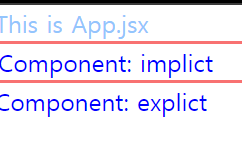
      <div className="text-blue-300">This is App.jsx</div>
      <ImplictComponent text="implict" />
      <ExplictComponent />
    </React.Fragment>
  );
};

export default App;
@/components/ImplictComponent
import React from "react";

type TProps = {
  text: string;
};
const ImplictComponent = ({ text }: TProps) => {
  return <div className="comp-div border-2 border-red-400">Component: {text}</div>;
};

export default ImplictComponent;- className 을 통해 css를 정의 할수 있다.
5. execution
yarn dev

ENFJ