<!DOCTYPE html>
<html lang="en">
<head>
  <meta charset="UTF-8">
  <meta name="viewport" content="width=device-width, initial-scale=1.0">
  <title>Document</title>
</head>
<body>
  <div id="container">

    <form id="registerForm" action="">
      <label for="userName">이름</label><br>
      <input id="userName" type="text"/><br>
      <label for="userEmail">e-mail</label><br>
      <input id="userEmail" type="email"/><br>

      <input id="male" type="radio" name="gender" value="M"><label for="male">남</label>
      <input id="female" type="radio" name="gender" value="F" checked><label for="female">여</label><br>

      <input id="movie" type="checkbox" name="hobby" value="movie">
      <label for="movie">영화</label>
      <input id="sport" type="checkbox" name="hobby" value="sport" checked>
      <label for="sport">스포츠</label>
      <input id="mung" type="checkbox" name="hobby" value="mung">
      <label for="mung">멍때리기</label>
      <br>
      <label for="major">전공</label>
      <select name="major" id="major" multiple> <!-- multiple -->
          <option value="CS">Computer Science</option>
          <option value="HI" selected>History</option>
          <option value="KL">Korean Language</option>
      </select>
      <br>
      <label for="desc">기타</label><br>
      <textarea name="desc" id="desc" cols="30" rows="10"></textarea>
    </form>
    <br>
    <label for="userData">사용자 정보</label><br>
    <input id="userData" type="text"/><br>
    <button id="setName">이름</button> <button id="setEmail">e-mail</button> <button id="setDesc">기타</button>
    <br>
    <button id="setMale">남</button> <button id="setFemale">여</button>
    <br>
    <button id="setMovieOn">영화 On</button> <button id="setMovieOff">영화 Off</button>
    <button id="setSportOn">스포츠 On</button> <button id="setSportOff">스포츠 Off</button>
    <button id="setMungOn">멍 On</button> <button id="setMungOff">멍 Off</button>
    <button id="setHobbyAllOn">취미 전체 On</button> <button id="setHobbyAllOff">취미 전체 Off</button>
    <br>
    <button id="setCSOn">Computer Science On</button> <button id="setCSOff">Computer Science Off</button>
    <button id="setHIOn">History On</button> <button id="setHIOff">History Off</button>
    <button id="setKLOn">한국어 On</button> <button id="setKLOff">한국어 Off</button>
    <button id="setMajorAllOn">전공 전체 On</button> <button id="setMajorAllOff">전공 전체 Off</button>
  </div>
  <script>
    window.onload = function() {
      // 개별 버튼의 click 이벤트 핸들러 등록
      document.querySelector("#setName").onclick = function() {
        document.querySelector("#userName").value = document.querySelector("#userData").value;
      };
      document.querySelector("#setEmail").onclick = function() {
        document.querySelector("#userEmail").value = document.querySelector("#userData").value;
      };
      document.querySelector("#setDesc").onclick = function() {
        document.querySelector("#desc").value = document.querySelector("#userData").value;
      };
      // radio
      document.querySelector("#setMale").onclick = function() {
        document.querySelector("#male").checked = true;
      };
      document.querySelector("#setFemale").onclick = function() {
        document.querySelector("#female").checked = true;
      };
      // checkbox
      document.querySelector("#setMovieOn").onclick = function() {
        document.querySelector("#movie").checked = true;
      };
      document.querySelector("#setMovieOff").onclick = function() {
        document.querySelector("#movie").checked = false;
      };
      document.querySelector("#setSportOn").onclick = function() {
        document.querySelector("#sport").checked = true;
      };
      document.querySelector("#setSportOff").onclick = function() {
        document.querySelector("#sport").checked = false;
      };
      document.querySelector("#setMungOn").onclick = function() {
        document.querySelector("#mung").checked = true;
      };
      document.querySelector("#setMungOff").onclick = function() {
        document.querySelector("#mung").checked = false;
      };
      document.querySelector("#setHobbyAllOn").onclick = function() {
        document.querySelectorAll('input[name="hobby"]').forEach( el => el.checked = true );
      };
      document.querySelector("#setHobbyAllOff").onclick = function() {
        const hobbies = document.getElementsByName("hobby");
        hobbies.forEach(function(hobby) {
          hobby.checked = false;
        });
      };

      document.querySelector("#setCSOn").onclick = function() {
        document.querySelector('#major option[value="CS"]').selected = true;
      };
      document.querySelector("#setCSOff").onclick = function() {
        document.querySelector('#major option[value="CS"]').selected = false;
      };
      document.querySelector("#setHIOn").onclick = function() {
        document.querySelector('#major option[value="HI"]').selected = true;
      };
      document.querySelector("#setHIOff").onclick = function() {
        document.querySelector('#major option[value="HI"]').selected = false;
      };
      document.querySelector("#setKLOn").onclick = function() {
        document.querySelector('#major option[value="KL"]').selected = true;
      };
      document.querySelector("#setKLOff").onclick = function() {
        document.querySelector('#major option[value="KL"]').selected = false;
      };
      document.querySelector("#setMajorAllOn").onclick = function() {
        document.querySelectorAll('#major option').forEach( el => el.selected = true );
      };
      document.querySelector("#setMajorAllOff").onclick = function() {
        document.querySelectorAll('#major option').forEach( el => el.selected = false );
      };
    }
  </script>
</body>
</html>
eventListener
<!DOCTYPE html>
<html lang="en">

<head>
    <meta charset="utf-8">
    <meta name="viewport" content="width=device-width, initial-scale=1">
    <title>Document</title>
</head>
<body>
    <div id="container">
        <h4 id="title">title</h4>
        <p id="content">content</p>
        <hr>
        <button onclick="fun_1();">change title</button>
        <button id="btn_2">change content</button>
        <button id="btn_3">change border</button>

        <script>
            function fun_1() {
                document.getElementById("title").innerText = "Title has changed";
            }

            document.querySelector('#btn_2').addEventListener('click', function(){
                document.querySelector('#content').innerText = "Content has changed"
            })
            document.querySelector('#btn_3').onmouseover = function(){
                document.querySelector('#container').style.border = "3px solid red"
            }
        </script>
    </div>
</body>
</html>
attribute
<!DOCTYPE html>
<html lang="en">
<head>
  <meta charset="UTF-8">
  <meta name="viewport" content="width=device-width, initial-scale=1.0">
  <style>
    #shape {
      width: 400px;
      height: 400px;
      border: 1px solid lightcoral;
    }

    .circle {
      border-radius: 50%;
    }

    .rect{
      border-radius: 0;
    }

    .round-rect {
      border-radius: 15%;
    }
  </style>
  <title>Document</title>
</head>
<body>
  <div id="shape"></div>
  <hr>
  <button id="btnCircle" data-click-count="0">circle</button>
  <button id="btnRect" data-click-count="0">rect</button>
  <button id="btnRoundRect" data-click-count="0">round-rect</button>

  <script>

    // 스타일을 자바스크립트로 변경할 때, 직접 변경하지 말고, style 을 가진 class 를 추가/제거 하는 방식을 권장
    const shape = document.querySelector("#shape");

    document.querySelector("#btnCircle").onclick = function(e) {
      shape.classList.remove("rect", "round-rect");
      shape.classList.add("circle");
      e.target.setAttribute("data-click-count", parseInt(e.target.getAttribute("data-click-count")) + 1);
    };

    document.querySelector("#btnRect").onclick = function(e) {
      shape.classList.remove("circle", "round-rect");
      shape.classList.add("rect");
      e.target.setAttribute("data-click-count", parseInt(e.target.getAttribute("data-click-count")) + 1);
    };

    document.querySelector("#btnRoundRect").onclick = function(e) {
      shape.classList.remove("circle", "rect");
      shape.classList.add("round-rect");
      e.target.setAttribute("data-click-count", parseInt(e.target.getAttribute("data-click-count")) + 1);
    };
  </script>
</body>
</html>
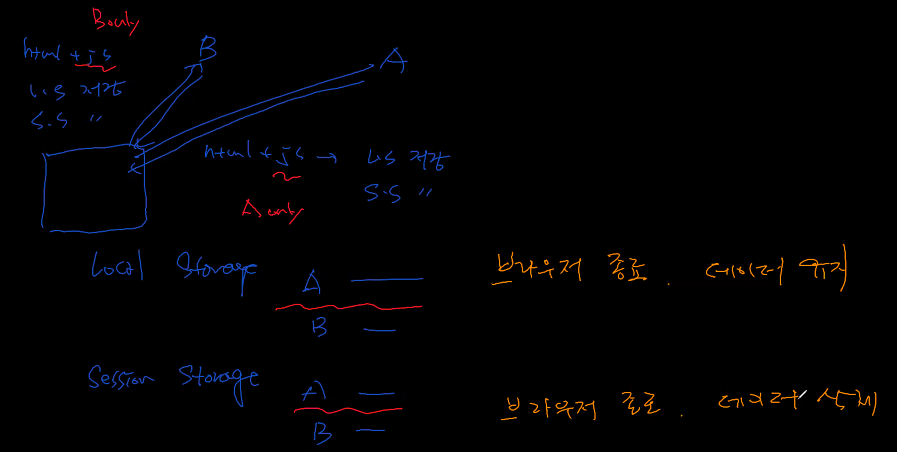
local vs session
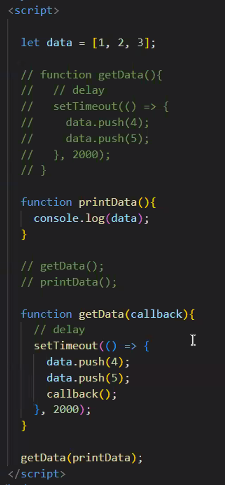
callback
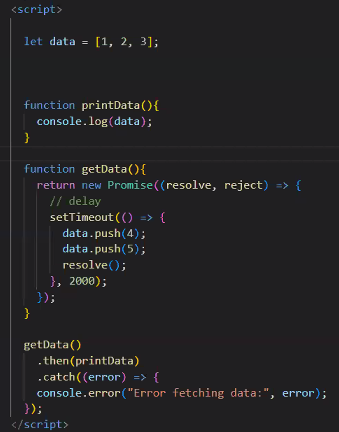
promise
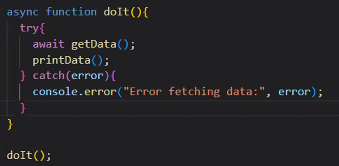
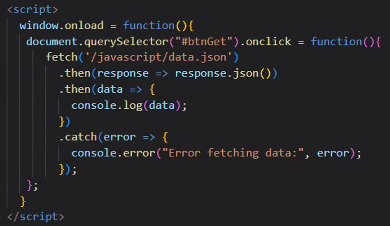
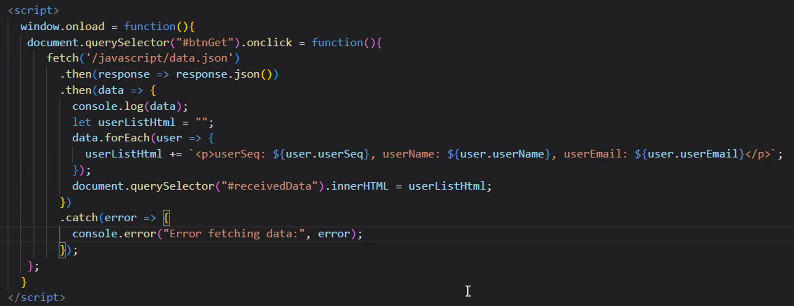
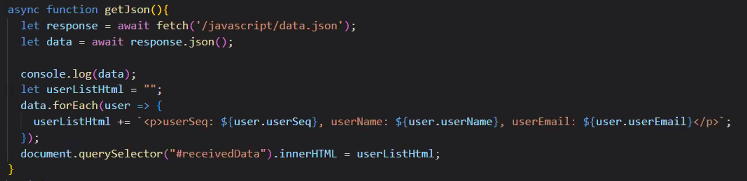
fetch
bootstrap
https://getbootstrap.com/docs/5.2/getting-started/introduction/
공동 작업 기본 개념
Singlepage application - index.html ex. facebook -> 페이지 요청은 안하고 데이터 요청만 함 => 사용자 데이터 수집 용이, 복잡도가 높음
=> 단체 개발이 힘들기에 대안으로 리액트나 vue 사용 -> 각자 개발하고 합침 -> index.html
Client Side Rendering