복습
데이터가 적거나 분포도가 20%이상인 데이터를 봐야 하면, 인덱스를 사용안하는 게 나음. ex. 성별
오라클은 알아서 판단해서 인덱스 안사용하는 것이 빠르면 선택안한다고 함. ex. age = 25은 인덱스가 좋지만, age>10는 안 좋음
함수
now() --17:39:40
sysdate() --17:39:40

sleep(2)

now() --17:39:40
sysdate() --17:39:42
exists, not exists
fk - 타입 일치 시켜야 함, 자동인 경우도 있고 아닌 경우도 존재
자식 insert/update, 부모 delete/update에 제약이 생김 - cascade 사용은 신중하게 해야함
트리거도 상황에 맞게 활용. 무조건 사용하는 거는 좋지 않음. 부모가 사라진다고 자식도 사라지게 하면 문제가 발생하는 경우도 생기기 때문이라고 함
다양한 에러(1451, 1215, 1061)
인덱스 - b tree 구조
db 통신 방식
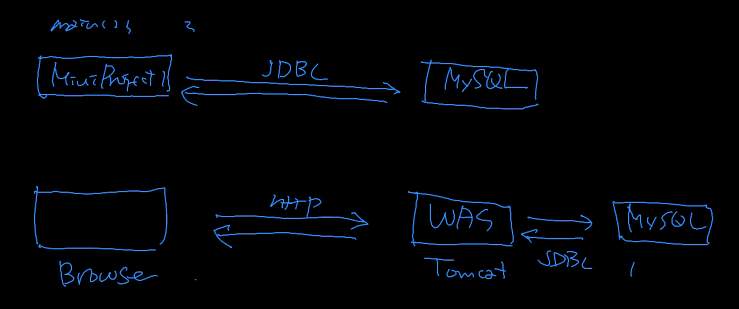
jdbc와 연결하여 주로 사용할 내용

jar 추가하는 법
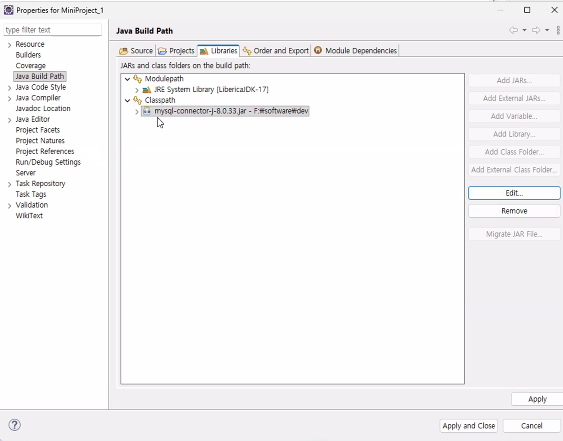
이클립스 버전
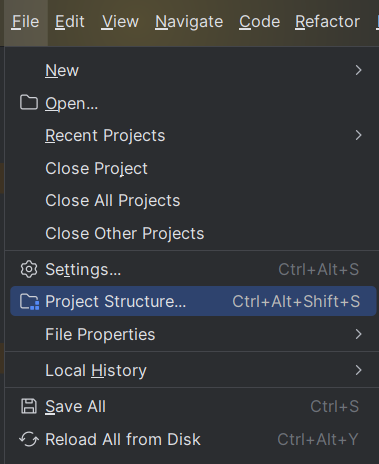
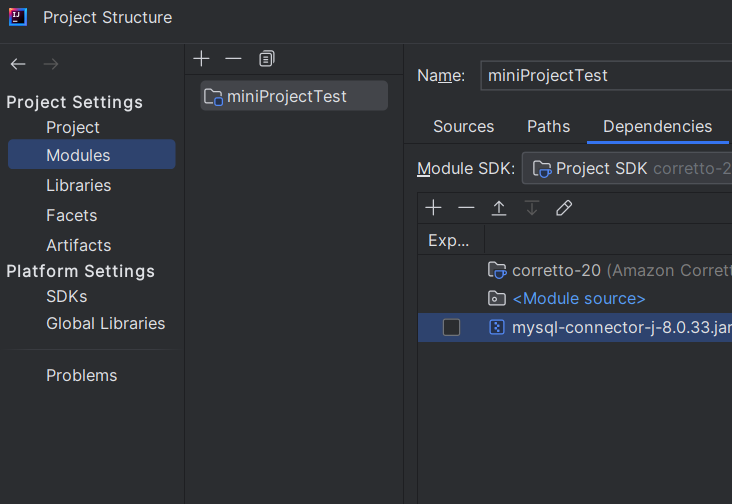
인텔리제이 버전
file -> Project structure -> modules -> dependencies 에서 + 눌러서 JAR 추가
sql 연결 및 crud
test
// test1.java
package jdbc;

import java.sql.*;
import java.util.ArrayList;
import java.util.List;

// madang schema
public class test1 {
    static String url = "jdbc:mysql://127.0.0.1:3306/madang";
    static String user = "본인 sql 사용자 이름";
    static String pw = "본인 sql 비번";
    public static void main(String[] args) {
        int ret = -1;
//        ret = insertCustomer(6, "손흥민","LAFC","010-1111-1111");
//        ret = updateCustomer(6, "손흥민","LAFC","010-2222-2222");
//        ret = deleteCustomer(6);
//        System.out.println(ret);

//        CustomerDto dto = detailCustomer(1);
//        System.out.println(dto);

        List<CustomerDto> list = listCustomer();
        for(CustomerDto dto:list)
            System.out.println(dto);
    }
    // insert customer
    static int insertCustomer(int custId, String name, String address, String phone){
        Connection con = null; // 연결
        PreparedStatement pstmt = null; // 쿼리 전달

        String insertSql = "insert into customer values (?, ?, ?, ?);";
        int ret = -1;

        try{
            con = DriverManager.getConnection(url, user, pw); // db 연결
            pstmt = con.prepareStatement(insertSql); // sql 전달 객체 생성
            pstmt.setInt(1, custId); // 인덱스 번호(1부터 시작), 넣을 값
            pstmt.setString(2, name);
            pstmt.setString(3, address);
            pstmt.setString(4, phone);

            ret = pstmt.executeUpdate(); // insert, delete, update
        } catch(SQLException e){
            e.printStackTrace();
        } finally {
            // 리소스 정리 작업
            try{
                pstmt.close();
                con.close();
            } catch(SQLException e){
                e.printStackTrace();
            }
        }

        return ret;
    }

    // update
    static int updateCustomer(int custId, String name, String address, String phone){
        Connection con = null; // 연결
        PreparedStatement pstmt = null; // 쿼리 전달

        String insertSql = "update customer set name =?, address = ?, phone = ? where custid = ?;";
        int ret = -1;

        try{
            con = DriverManager.getConnection(url, user, pw); // db 연결
            pstmt = con.prepareStatement(insertSql); // sql 전달 객체 생성

            pstmt.setString(1, name);
            pstmt.setString(2, address);
            pstmt.setString(3, phone);
            pstmt.setInt(4, custId);

            ret = pstmt.executeUpdate(); // insert, delete, update
        } catch(SQLException e){
            e.printStackTrace();
        } finally {
            // 리소스 정리 작업
            try{
                pstmt.close();
                con.close();
            } catch(SQLException e){
                e.printStackTrace();
            }
        }

        return ret;
    }
    // delete
    static int deleteCustomer(int custId){
        Connection con = null; // 연결
        PreparedStatement pstmt = null; // 쿼리 전달

        String insertSql = "delete from customer where custid = ?;";
        int ret = -1;

        try{
            con = DriverManager.getConnection(url, user, pw); // db 연결
            pstmt = con.prepareStatement(insertSql); // sql 전달 객체 생성

            pstmt.setInt(1, custId);

            ret = pstmt.executeUpdate(); // insert, delete, update
        } catch(SQLException e){
            e.printStackTrace();
        } finally {
            // 리소스 정리 작업
            try{
                pstmt.close();
                con.close();
            } catch(SQLException e){
                e.printStackTrace();
            }
        }

        return ret;
    }

    // 1건 조회
    static CustomerDto detailCustomer(int custId){
        Connection con = null;
        PreparedStatement pstmt = null;
        ResultSet rs = null;

        String detailSql = "select * from customer where custid = ?;";
        CustomerDto dto = null;

        try{
            con = DriverManager.getConnection(url, user, pw);
            pstmt = con.prepareStatement(detailSql);

            pstmt.setInt(1, custId);

            rs = pstmt.executeQuery(); // select, 0부터 시작

            if(rs.next()){ // select by pk여서 if 사용
                dto = new CustomerDto();
                dto.setCustid(rs.getInt("custid"));
                dto.setName(rs.getString("name"));
                dto.setAddress(rs.getString("address"));
                dto.setPhone(rs.getString("phone"));
            }
        } catch(SQLException e){
            e.printStackTrace();
        } finally {
            // 리소스 정리 작업
            try{
                rs.close();
                pstmt.close();
                con.close();
            } catch(SQLException e){
                e.printStackTrace();
            }
        }

        return dto;
    }

    // 전체 조회
    static List<CustomerDto> listCustomer(){
        Connection con = null;
        PreparedStatement pstmt = null;
        ResultSet rs = null;

        String listSql = "select * from customer;";
        List<CustomerDto> list = new ArrayList<>(); // empty

        try{
            con = DriverManager.getConnection(url, user, pw);
            pstmt = con.prepareStatement(listSql);

            rs = pstmt.executeQuery(); // select

            while(rs.next()){ // select 여러 건
                CustomerDto dto = new CustomerDto();
                // alias를 주면 그에 맞춰 작성해야 함. ex. phone ph이면 ph로 줘야 함
                dto.setCustid(rs.getInt("custid"));
                dto.setName(rs.getString("name"));
                dto.setAddress(rs.getString("address"));
                dto.setPhone(rs.getString("phone"));

                list.add(dto);
            }
        } catch(SQLException e){
            e.printStackTrace();
        } finally {
            // 리소스 정리 작업
            try{
                rs.close();
                pstmt.close();
                con.close();
            } catch(SQLException e){
                e.printStackTrace();
            }
        }

        return list;
    }
}
CustomerDto
// CustomerDto.java
package jdbc;

public class CustomerDto {
    private int custId;
    private String name;
    private String address;
    private String phone;

    public CustomerDto() {}
    public CustomerDto(int custId, String name, String address, String phone){
        super();
        this.custId = custId;
        this.name = name;
        this.address = address;
        this.phone = phone;
    }
    public int getCustid(){
        return custId;
    }
    public void setCustid(int custId){
        this.custId = custId;
    }
    public String getName(){
        return name;
    }
    public void setName(String name){
        this.name = name;
    }
    public String getAddress(){
        return address;
    }
    public void setAddress(String address){
        this.address = address;
    }
    public String getPhone(){
        return phone;
    }
    public void setPhone(String phone){
        this.phone = phone;
    }

    @Override
    public String toString() {
        return "CustomerDto [custId="+custId+", name="+name+", address="+address+", phone="+phone;
    }
}
auto close
/* auto close */
// try with resources 블럭에서 선언, 생성된 AutoClosable 객체는 자동으로 close()
try(
    Connection con = DriverManager.getConnection(url, user, pw);
    PreparedStatement pstmt = con.prepareStatement(query);
    ) {
    pstmt.setInt(1, custid);

    ret = pstmt.executeUpdate();
} catch (SQLException e){
    e.printStackTrace();
}
DB Manager
/* DB Manager*/
package jdbc;

import java.sql.*;

// db 연결
// resource release
public class DBManager {
    static String url = "jdbc:mysql://127.0.0.1:3306/madang";
    static String user = "본인 sql 사용자 이름";
    static String pw = "본인 sql 비번";

    public static Connection getConnection(){
        Connection con = null;
        try{
            con = DriverManager.getConnection(url, user, pw);
        } catch (SQLException e){
            e.printStackTrace();
        }

        return con;
    }
    public static void releaseConnection (PreparedStatement pstmt, Connection con){
        try{
            pstmt.close();
            con.close();
        } catch (SQLException e){
            e.printStackTrace();
        }
    }
    public static void releaseConnection (ResultSet rs, PreparedStatement pstmt, Connection con){
        try{
            rs.close();
            pstmt.close();
            con.close();
        } catch (SQLException e){
            e.printStackTrace();
        }
    }
}