Section 1. 예외 처리
1. 컴파일 오류와 실행 오류
-
컴파일(Compile) 오류
- 프로그램 코드 작성 중 발생하는 문법적 오류
-
실행(Runtime) 오류
- 실행 중인 프로그램이 의도 하지 않은 동작(bug)을 하거나 프로그램이 중지 되는 오류
2. 오류와 예외 클래스
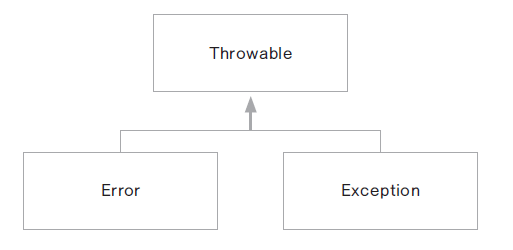
- 시스템 오류(error) - 가상 머신에서 발생, 프로그래머가 처리 할 수 없는 오류
(동적 메모리가 없는 경우, 스택 메모리 오버플로우 등)
- 예외(Exception) - 프로그램에서 제어 할 수 있는 오류
(불러오는 파일이 존재하지 않거나, 네트워크나 DB연결이 안되는 경우 등)
3. 예외 (Exception) 클래스
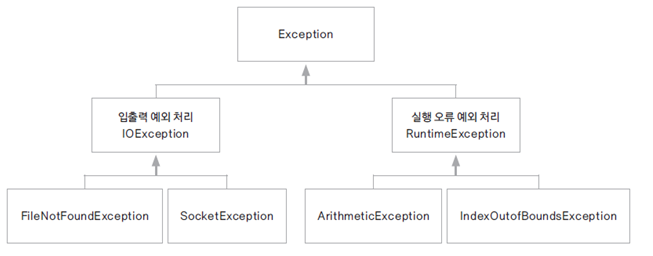
- 모든 예외 클래스의 최상위 클래스는 Exception 클래스
- RuntimeException 예외는 컴파일러 단계에서 확인되지 않음
Section 2. try-catch 문
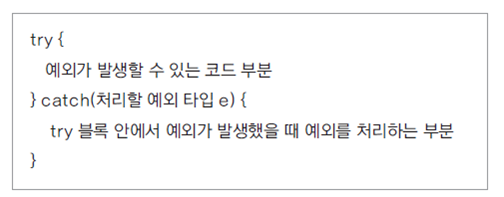
1. try-catch 문
- 보통 catch 문에 log 생성하는 코드를 구현
- main 에서 throw 로 넘기게 되면 JVM 으로 넘어가서 프로그램이 종료될 수 있음
2. 배열 인덱스 예외
- 존재하지 않는 인덱스에 접근하는 예외
public class ArrayExceptionHandling {

	public static void main(String[] args) {
		int[] arr = {1,2,3,4,5};
		try{
			for(int i=0; i<=5; i++){
				System.out.println(arr[i]);
			}
		}catch(ArrayIndexOutOfBoundsException e){
			System.out.println(e);
		}
		System.out.println("비정상 종료되지 않았습니다.");
	}
}
2. try-catch-finally 문
- finally 문 - 예외 발생 여부에 상관없이 항상 수행되는 부분
- 보통 finally 블럭에서 파일를 닫거나 네트웍을 닫는 등의 리소스 해제 구현을 함
- 리소스를 불러올 때 해제할 때 둘 다 예외 처리 필요
public class FileExceptionHandling {

	public static void main(String[] args) {

		FileInputStream fis = null;

		try {
			fis = new FileInputStream("a.txt");
		} catch (FileNotFoundException e) {
			System.out.println(e);
			//return;		# return이 수행되도 finally는 수행됨
		}finally{
			if(fis != null){
				try {
					fis.close();

				} catch (IOException e) {

					e.printStackTrace();
				}
			}
			System.out.println("항상 수행 됩니다.");
		}
		System.out.println("여기도 수행됩니다.");
	}
}
3. try-catch-resources 문
- 리소스를 사용하는 경우 close() 하지 않아도 자동으로 해제 되도록 함
- 리소스를 try() 내부에서 선언 (java7) / 외부에서 선언 후 변수만 지정 (java9)
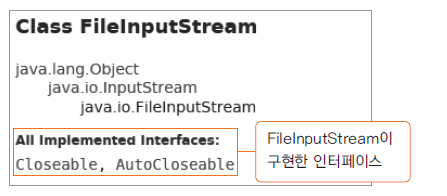
- 해당 리소스 클래스가 AutoCloseable 인터페이스를 구현 해야 함
- 사용자 정의 리소스
public class AutoCloseObj implements AutoCloseable{

	@Override
	public void close() throws Exception {			# try 문에 Exception 발생 시킴 (JVM으로 넘기지 않음)
		System.out.println("리소스가 close() 되었습니다");	# 실제로는 여기서 리소스를 반환하는 작업 필요
	}
}
public class AutoCloseTest {
public static void main(String[] args) {
AutoCloseObj obj = new AutoCloseObj();
try (obj){
//throw new Exception(); # try 블록이 끝나면 close 수행됨
}catch(Exception e) {
System.out.println("예외 부분 입니다"); # exception 블록이 끝나면 close 수행됨
}
}
}Section 3. 예외 처리 throw
1. 예외 처리 미루기 (넘기기)
- 예외가 발생하는 문장에서 try-catch 블록으로 처리하는 방법
- 해당 객체를 사용하는 부분으로 예외 처리를 넘겨서 처리하는 방법 두 가지가 있음
2. 예외 처리 throw
public class ThrowsException {

	public Class loadClass(String fileName, String className) throws FileNotFoundException, ClassNotFoundException{
		FileInputStream fis = new FileInputStream(fileName);
		Class c = Class.forName(className);
		return c;
	}

	public static void main(String[] args) {

		ThrowsException test = new ThrowsException();	# 예외가 발생할 수 있는 코드를 담은 객체를 생성

		try {
			test.loadClass("a.txt", "java.lang.String");

		}catch (FileNotFoundException e) {
			e.printStackTrace();
		} catch (ClassNotFoundException e) {
			e.printStackTrace();
		}catch (Exception e) {
			e.printStackTrace();
		}catch (Exception e) {			# default 예외처리는 맨 마지막
			e.printStackTrace();
		}


	}
}- 하나 이상의 예외 처리가 예상되는 경우에 예외를 한번에 묶어서 처리
try {
	test.loadClass("a.txt", "java.lang.String");
	} catch (FileNotFoundException | ClassNotFoundException e) {
		e.printStackTrace();
	}
