
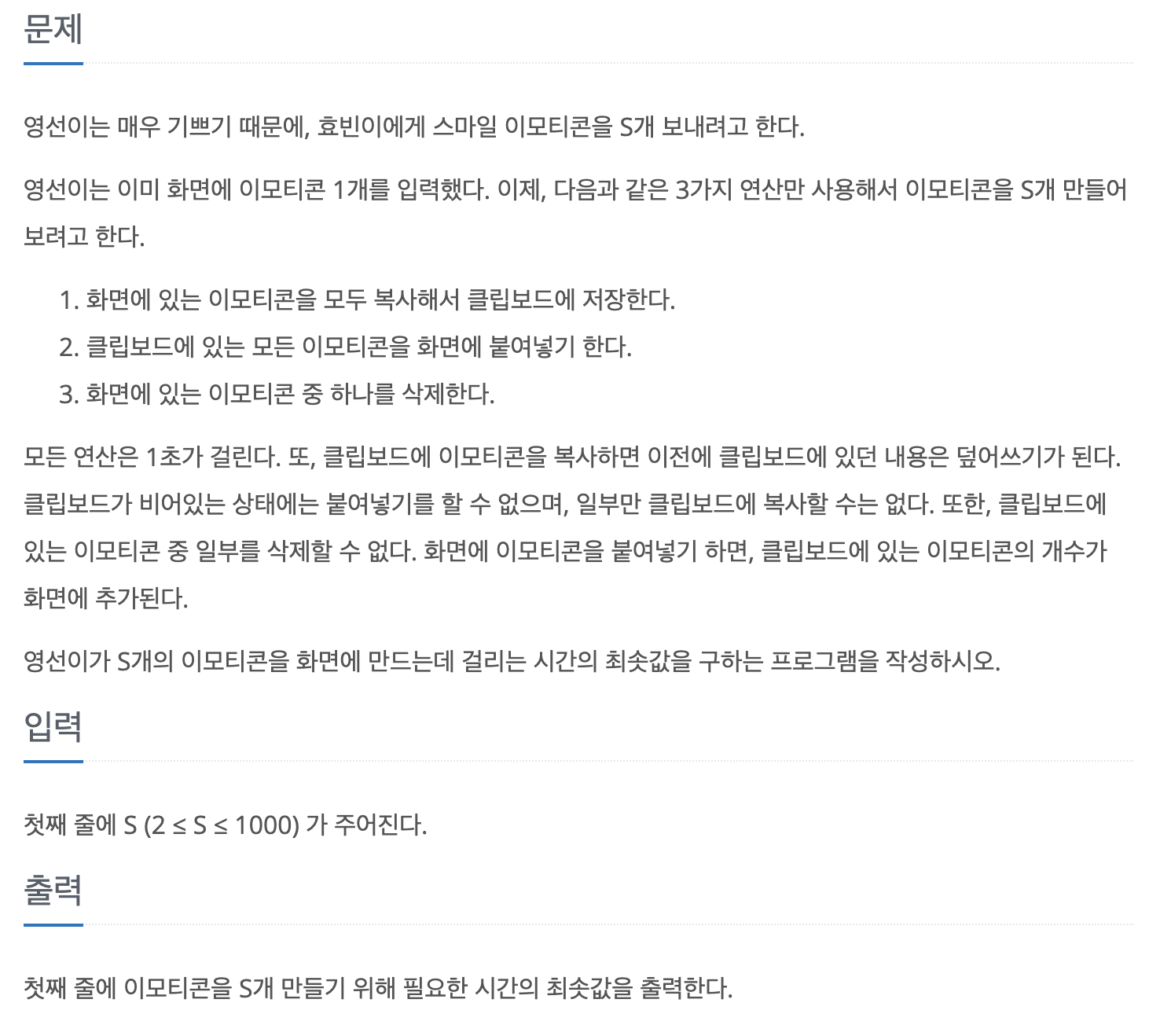
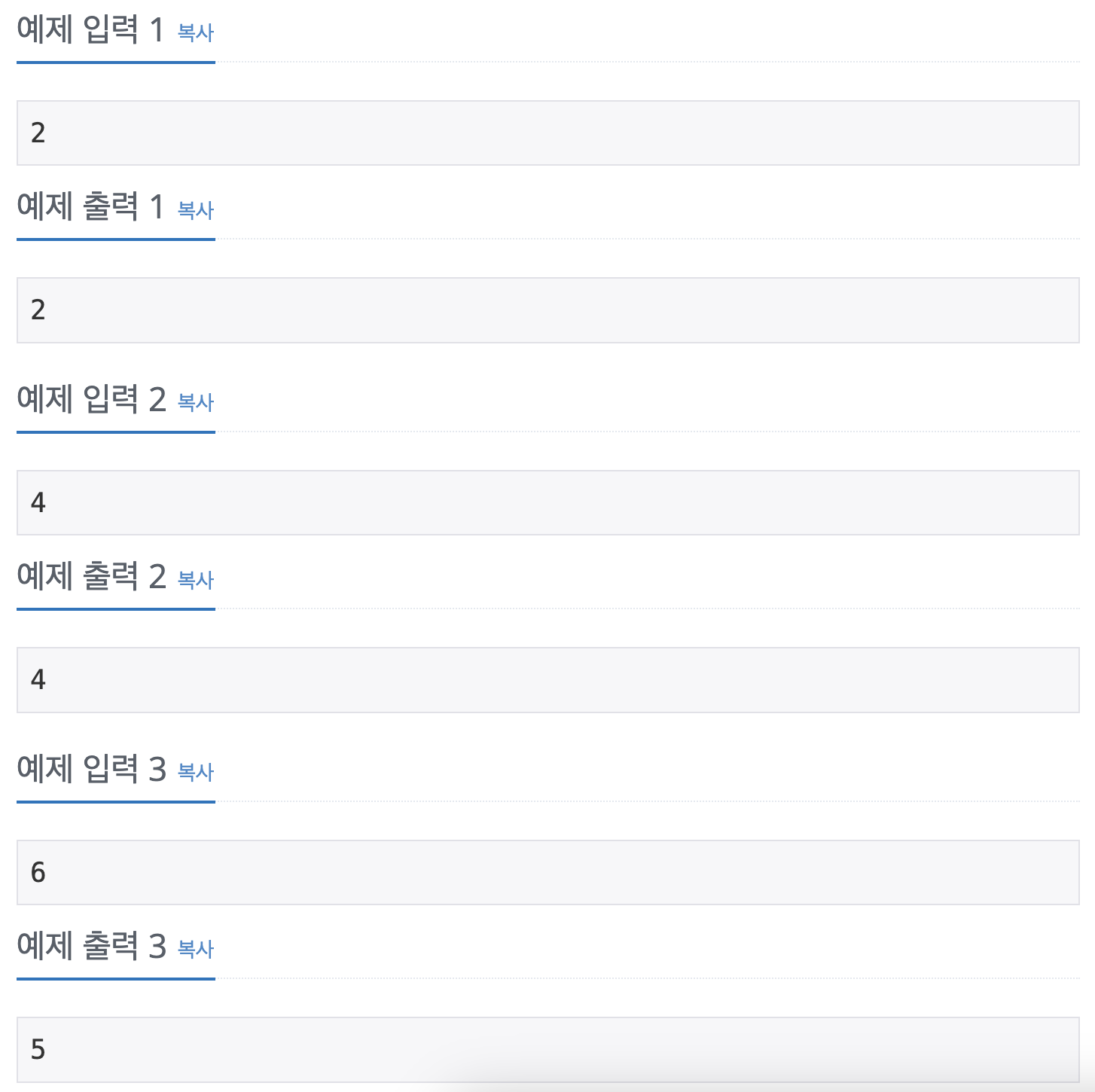
 https://www.acmicpc.net/problem/14226
해결 과정
구현
- 화면에 있는 이모티콘 수, 클립보드에 있는 이모티콘 수, 현재 시간을 한번에 관리할 수 있게
State구조체를 만든다.
typedef struct state {
    int screenCount;
    int boardCount;
    int time;
} State;- 이미 처리되었는지를 체크하기 위해
visited[MAX][MAX]배열을 선언한다. 이 배열이 2차원인 이유는 화면에 있는 이모티콘 수, 클립보드에 있는 이모티콘 수에 따른 모든 경우에 대해 이미 처리된 경우인지를 체크해야 되기 때문이다. 첫 번째 차원이 화면에 있는 이모티콘 수를 나타내며, 두 번째 차원이 클립보드에 있는 이모티콘 수를 나타낸다.
BFS
head = 0,tail = 0으로 선언한 후 큐에 초기 상태를 추가한다.
State current = queue[head++];초기 상태에서는 화면에 이모티콘이 1개 있으며, 클립보드에는 0개 있고 걸리는 시간이 0이다.
BFS에서는 큐를 사용하는데, 이 문제에서 사용되는 큐는 State 타입의 큐이다. 즉, 큐의 한 요소 안에 State의 멤버인 screenCount, boardCount, time이 모두 들어가 있는 것이다!
- 현재 상태를 처리하기 위해 문제에서 주어진 3가지 동작을 모두 시도해본다. 이때 문제에서 주어진 복사, 붙여넣기, 삭제를 하기 위한 조건에 유의하며 if문을 구성한다.
// 1. 클립보드로 복사
        // 화면의 이모티콘 수 = 클립보드의 이모티콘 수 인 상태가 처리되지 않은 경우에만 실행
        if (!visited[current.screenCount][current.screenCount]) {
            // 이모티콘을 클립보드에 복사한 상태를 방문함으로 표시
            visited[current.screenCount][current.screenCount] = 1;
            // 큐에 현재 화면 수, 클립보드 수, 시간을 새 상태로 추가함
            queue[tail++] = (State){current.screenCount, current.screenCount, current.time + 1};
        }
        // 2. 화면에 붙여넣기
        // 붙여넣기는 화면에 임티 있어야지만 가능
        // 화면에 있는 이모티콘 + 클립보드의 이모티콘 총합이 MAX보다 적어야지만 가능
        // 해당 상태가 방문되지 않은 경우
        if (current.boardCount > 0 && (current.screenCount + current.boardCount < MAX) && !visited[current.screenCount + current.boardCount][current.boardCount]) {
            visited[current.screenCount + current.boardCount][current.boardCount] = 1;
            queue[tail++] = (State){current.screenCount + current.boardCount, current.boardCount, current.time + 1};
        }
        // 3. 이모티콘 하나 삭제
        if (current.screenCount > 0 && !visited[current.screenCount - 1][current.boardCount]) {
            visited[current.screenCount - 1][current.boardCount] = 1;
            queue[tail++] = (State){current.screenCount - 1, current.boardCount, current.time + 1};
        }
1. 클립보드로 복사하는 경우
현재 화면에 있는 이모티콘 수를 그대로 클립보드에 복사하기 때문에 visited[current.screen][current.screen] 에 방문 표시를 한다.
2. 화면으로 붙여넣기 하는 경우
화면의 이모티콘 수 + 클립보드의 이모티콘 수를 더한 값이 화면의 이모티콘 수가 된다. 클립보드에 있는 이모티콘 수는 그대로다.
3. 화면에서 하나를 삭제하는 경우
하나를 삭제하기 때문에 화면의 이모티콘 수가 -1 된다. 클립보드의 이모티콘 수는 변경되지 않는다.
while (head < tail)을 도는 동안 각 상태에서 화면의 이모티콘 수 == s 인지를 검사하고, true라면 그때의 시간time을 반환해 출력한다.
if (current.screen == s)
	return current.time;
전체 코드
#include <stdio.h>
#include <stdlib.h>
#include <string.h>

#define MAX 1002

typedef struct state {
    int screenCount;
    int boardCount;
    int time;
} State;

int visited[MAX][MAX];

int bfs(int s) {
    State queue[MAX * MAX];
    int head = 0;
    int tail = 0;

    queue[tail++] = (State){1, 0, 0};
    visited[1][0] = 1;

    while (head < tail) {
        State current = queue[head++];

        if (current.screen == s)
            return current.time;

        if (!visited[current.screenCount][current.screenCount]) {
            visited[current.screenCount][current.screenCount] = 1;
            queue[tail++] = (State){current.screenCount, current.screenCount, current.time + 1};
        }

        if (current.boardCount > 0 && (current.screenCount + current.boardCount < MAX) && !visited[current.screenCount + current.boardCount][current.boardCount]) {
            visited[current.screenCount + current.boardCount][current.boardCount] = 1;
            queue[tail++] = (State){current.screenCount + current.boardCount, current.boardCount, current.time + 1};
        }

        if (current.screenCount > 0 && !visited[current.screenCount - 1][current.boardCount]) {
            visited[current.screenCount - 1][current.boardCount] = 1;
            queue[tail++] = (State){current.screenCount - 1, current.boardCount, current.time + 1};
        }
    }
    return -1;
}

int main() {
    int s;
    scanf("%d", &s);

    memset(visited, 0, sizeof(visited));

    printf("%d\n", bfs(s));
    return 0;
}
답을 참고해도 참 어려운 문제.....

초보입니다. 피드백 환영합니다 😗