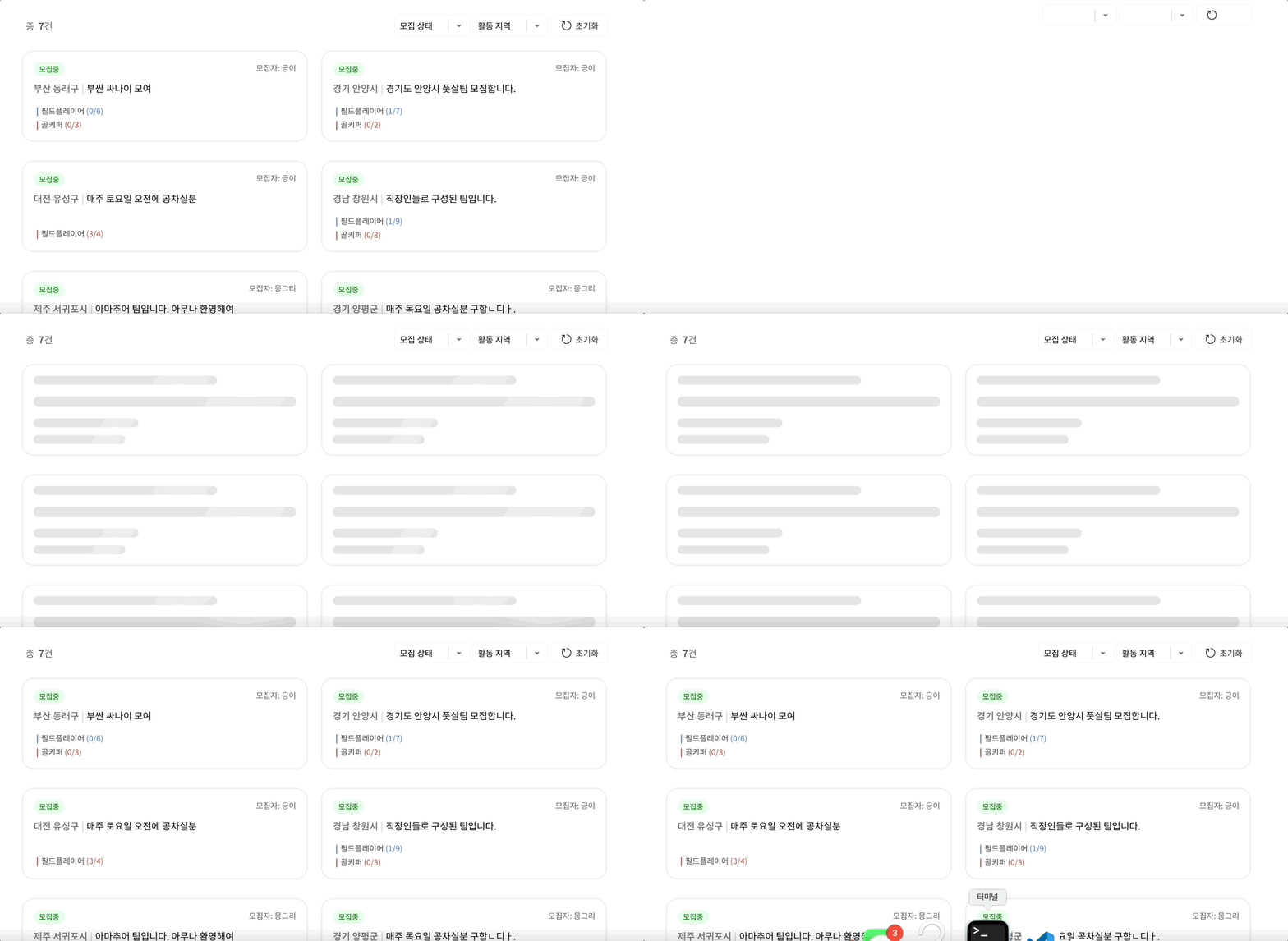
Skeleton UI를 왜 적용해야할까?
데이터가 로딩 중에 있을 때 UI의 흐름이 끊긴다면 사용자는 웹애플리케이션과 상호작용이 안된다는 느낌을 받을 것입니다. 또한 기다림과 지루함으로 인해 페이지 이탈을 할 수도 있겠죠. 즉 사용성이 떨어지는 것인데요. 근본적인 해결방법은 그러한 로딩 시간 자체를 단축하는 것이지만 많은 양의 리소스를 요청하거나 인터넷 환경 자체가 좋지 못할 때와 같이 불가피한 상황이 발생하기 마련입니다.
스켈레톤 UI는 데이터가 준비되고 있다는 것을 사용자에게 알리고, 애니메이션을 통해 로딩이 실제로 진행 중이라는 인식을 줍니다. 이를 통해 사용자는 로딩되는 페이지를 자연스럽게 받아들일 수 있게 됩니다.
오늘은 React에서 스켈레톤 UI를 적용한 후기를 전해드리려합니다.
공용 Skeleton 컴포넌트
스켈레톤 UI는 서버로 API를 요청하는 페이지라면 어디에서나 사용할 수 있습니다. 그렇기 때문에 스켈레톤 UI용 공용 컴포넌트를 미리 만들어 두었습니다.
또한 CSS 수정이 필요할 수 있는 스타일 속성들은 optional props로 받도록 하였습니다.
interface SkeletonPropsType {
  width?: string;
  height?: string;
  margin?: string;
  borderRadius?: string;
}

function Skeleton({ width, height, margin, borderRadius }: SkeletonPropsType) {

  return (
    <SkeletonLine
      style={{ width, height, margin, borderRadius }}
    ></SkeletonLine>
  );
}

export default Skeleton;

const loadingAnimation = keyframes`
    100% {
        background-position: -100% 0;
    }
`;

export const Shining = styled.span`
  background: linear-gradient(
    120deg,
    #e5e5e5 30%,
    #f0f0f0 38%,
    #f0f0f0 40%,
    #e5e5e5 48%
  );
  background-size: 200% 100%;
  background-position: 100% 0;
  animation: ${loadingAnimation} 1s infinite;
`;

const SkeletonLine = styled(Shining)<{ visible: boolean }>`
  height: 1.5rem;
  border-radius: 1rem;
  display: inline-block;
  background: ${({ visible }) => !visible && 'white'};
`;
공용 컴포넌트 사용
만들어놓은 Skeleton 공용 컴포넌트를 import하여 사용합니다.
커스텀이 필요한 스타일 속성들은 props로 넘겨 적용합니다.
import Skeleton from '../../common/Skeleton';

export function PostCardSkeleton() {

  return (
    <SkeletonList>
      <Skeleton width="70%" height="1.7rem" />
      <Skeleton width="100%" height="2rem" margin="0.7rem 0" />
      <Skeleton width="40%" height="1.7rem" />
      <Skeleton width="35%" height="1.7rem" />
    </SkeletonList>
  );
}

export default PostCard;

const SkeletonList = styled.div>`
  display: flex;
  flex-direction: column;
  box-sizing: border-box;
  padding: 2rem;
  margin: 0.5rem;
  justify-content: space-between;
  background: white;
  height: 17rem;
  filter: drop-shadow(rgb(211, 211, 211) 0px 0px 0.3rem);
  border-radius: 2rem;
`;
실제 코드 예시
로딩 중인 경우 스켈레톤 UI를 보여줍니다.
제 코드의 경우 무한 스크롤을 사용하여 8개씩 데이터를 요청하기 때문에 Array.from({ length: 8 }) 길이가 8인 배열을 만들어 map을 돌리는 방식으로 구현했습니다. 즉 기존 데이터들은 그대로 보여주고 새로 로딩 중인 부분에 추가적으로 스켈레톤을 보여줄 수 있지요.
function PostList({
  postData,
  isLoading,
  isFetchingEnded,
}: PostListPropsType) {

  // 로딩이 완료되었으나 게시글이 없는 경우
  if (postData.length === 0 && !isLoading && isFetchingEnded)
    return <Wrapper>게시글이 없습니다.</Wrapper>;

  return (
    <TeamPageBody>
      <TeamRecruitContainer>
        {postData.map((post: PostDataType, index: number) => (
            <PostCard post={post} index={index} key={post.group_id} />
          ))}
        //로딩 중인 경우
        {isLoading &&
          Array.from({ length: 8 }).map((_, index) => (
            <PostCardSkeleton key={키값} />
          ))}
      </TeamRecruitContainer>
    </TeamPageBody>
  );
}

export default TeamList;
⬇️ 싸커퀵 바로가기 ⬇️
https://soccerquick.kr/