
기본 인증(Basic Auth)은 요청할 때마다 username/password가 함께 전송되는 구조라서 보안적으로 불리하고, 프론트(React)에서 “로그인 → 토큰 저장 → 이후 요청에 토큰 첨부” 같은 흐름을 만들기에도 적합하지 않다. 그래서 REST API에서 가장 보편적인 방식인 JWT 기반 인증으로 전환한다.
1. JWT 개념 정리: Authentication vs Authorization
- Authentication(인증): “로그인 성공했는가?” (사용자 본인 확인)
- Authorization(인가): “이 사용자가 이 요청을 할 권한이 있는가?” (ROLE 기반 접근 제어)
즉 로그인(인증)이 됐더라도, 관리자만 가능한 API(예: 회원 삭제)는 ROLE_ADMIN이 있어야 통과된다.
2. JWT 구조
JWT는 점(.)을 기준으로 3부분으로 나뉜다.

- header: 토큰 타입과 서명 알고리즘
- payload: 사용자 정보(예: username, role)와 만료시간 같은 Claim
- signature: 토큰 위변조 검증용 서명
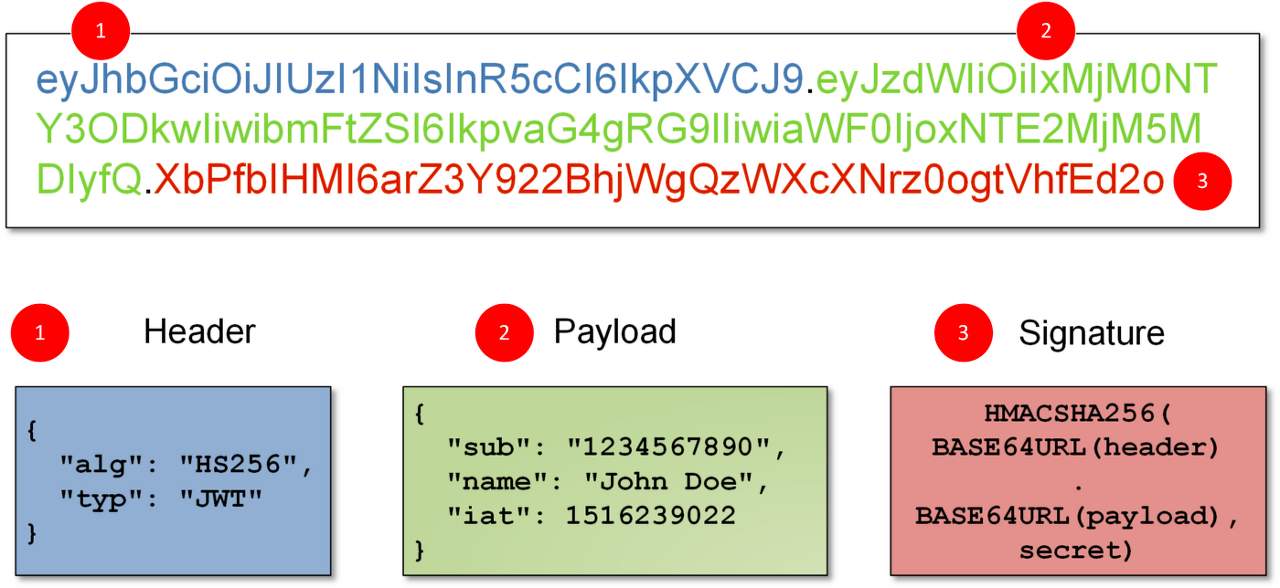
클라이언트는 로그인 성공 시 JWT를 받고, 이후 모든 요청의 헤더에 다음 형태로 붙여서 보낸다.
Authorization: Bearer <token>3. 의존성 추가 (Backend build 설정)
implementation 'io.jsonwebtoken:jjwt-api:0.13.0'
runtimeOnly 'io.jsonwebtoken:jjwt-impl:0.13.0'
runtimeOnly 'io.jsonwebtoken:jjwt-jackson:0.13.0'
4. JwtService 만들기 (Backend Service Layer: token 생성/검증)
JwtService는 2가지를 책임진다.
- 로그인 성공 시 토큰 발급
- 요청이 들어올 때 헤더에서 토큰을 읽어 username 추출(검증 포함)
package com.korit12.cardatabase.service;

import io.jsonwebtoken.Jwts;
import io.jsonwebtoken.SignatureAlgorithm;
import io.jsonwebtoken.security.Keys;
import jakarta.servlet.http.HttpServletRequest;
import org.springframework.http.HttpHeaders;
import org.springframework.stereotype.Service;

import javax.crypto.SecretKey;
import java.util.Date;

@Service
public class JwtService {

    static final long EXPIRATIONTIME = 86400000; // 1 day
    static final String PREFIX = "Bearer ";

    static final SecretKey KEY = Keys.secretKeyFor(SignatureAlgorithm.HS256);

    public String getToken(String username) {
        return Jwts.builder()
                .subject(username)
                .expiration(new Date(System.currentTimeMillis() + EXPIRATIONTIME))
                .signWith(KEY)
                .compact();
    }

    public String getAuthUser(HttpServletRequest request) {
        String token = request.getHeader(HttpHeaders.AUTHORIZATION);

        if (token != null && token.startsWith(PREFIX)) {
            String authToken = token.substring(PREFIX.length()).trim();

            String user = Jwts.parser()
                    .verifyWith(KEY)
                    .build()
                    .parseSignedClaims(authToken)
                    .getPayload()
                    .getSubject();

            return user;
        }
        return null;
    }
}
5. 로그인 요청 DTO: record(AccountCredentials) (Domain DTO Layer)
로그인은 username/password만 필요하니 “데이터만 담는 클래스”가 적합하다. Record는 Java 14부터 지원하며, DTO 보일러플레이트를 줄이는 데 유리하다.
package com.korit12.cardatabase.domain;

public record AccountCredentials(String username, String password) {
}
6. LoginController 구현 (Backend Controller Layer: 토큰 발급 엔드포인트)
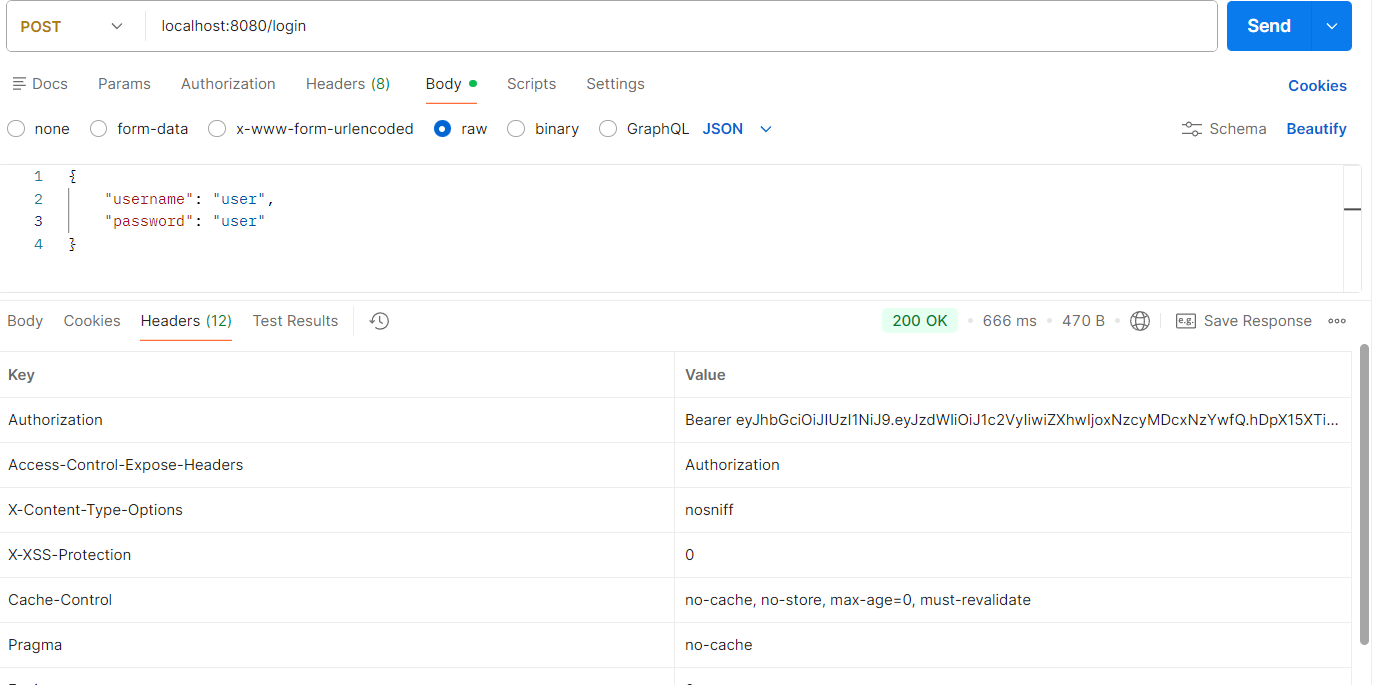
Controller는 프론트가 요청하는 “API의 입구”다. 로그인 성공 시 Body가 아니라 Authorization 헤더로 JWT를 내려주면, 프론트(React)가 헤더 값을 저장했다가 이후 요청에 재첨부할 수 있다.
package com.korit12.cardatabase.web;

import com.korit12.cardatabase.domain.AccountCredentials;
import com.korit12.cardatabase.service.JwtService;
import lombok.AllArgsConstructor;
import org.springframework.http.HttpHeaders;
import org.springframework.http.ResponseEntity;
import org.springframework.security.authentication.AuthenticationManager;
import org.springframework.security.authentication.UsernamePasswordAuthenticationToken;
import org.springframework.security.core.Authentication;
import org.springframework.web.bind.annotation.PostMapping;
import org.springframework.web.bind.annotation.RequestBody;
import org.springframework.web.bind.annotation.RestController;

@RestController
@AllArgsConstructor
public class LoginController {

    private JwtService jwtService;
    private AuthenticationManager authenticationManager;

    @PostMapping("/login")
    public ResponseEntity<?> getToken(@RequestBody AccountCredentials credentials) {

        Authentication auth = new UsernamePasswordAuthenticationToken(
                credentials.username(),
                credentials.password()
        );

        authenticationManager.authenticate(auth);

        String token = jwtService.getToken(credentials.username());

        return ResponseEntity.ok()
                .header(HttpHeaders.AUTHORIZATION, "Bearer " + token)
                .build();
    }
}
7. SecurityConfig: /login만 열고 나머지는 JWT 필요 (Backend Security Layer)
JWT 인증의 핵심은 “세션을 안 쓴다”는 점이다. 그래서 STATELESS로 간다. 그리고 POST /login만 토큰 없이 열어두고, 나머지는 인증을 요구한다.
package com.korit12.cardatabase.config;

import com.korit12.cardatabase.service.UserDetailsServiceImpl;
import lombok.AllArgsConstructor;
import org.springframework.context.annotation.Bean;
import org.springframework.context.annotation.Configuration;
import org.springframework.http.HttpMethod;
import org.springframework.security.authentication.AuthenticationManager;
import org.springframework.security.config.annotation.authentication.builders.AuthenticationManagerBuilder;
import org.springframework.security.config.annotation.authentication.configuration.AuthenticationConfiguration;
import org.springframework.security.config.annotation.web.builders.HttpSecurity;
import org.springframework.security.config.annotation.web.configuration.EnableWebSecurity;
import org.springframework.security.config.http.SessionCreationPolicy;
import org.springframework.security.crypto.bcrypt.BCryptPasswordEncoder;
import org.springframework.security.crypto.password.PasswordEncoder;
import org.springframework.security.web.SecurityFilterChain;

@Configuration
@EnableWebSecurity
@AllArgsConstructor
public class SecurityConfig {

    private UserDetailsServiceImpl userDetailsService;

    public void configureGlobal(AuthenticationManagerBuilder auth) throws Exception {
        auth.userDetailsService(userDetailsService);
    }

    @Bean
    public PasswordEncoder passwordEncoder() {
        return new BCryptPasswordEncoder();
    }

    @Bean
    public AuthenticationManager authenticationManager(AuthenticationConfiguration authConfig) throws Exception {
        return authConfig.getAuthenticationManager();
    }

    @Bean
    public SecurityFilterChain filterChain(HttpSecurity http) throws Exception {
        http
                .csrf(csrf -> csrf.disable())
                .sessionManagement(sm -> sm.sessionCreationPolicy(SessionCreationPolicy.STATELESS))
                .authorizeHttpRequests(auth -> auth
                        .requestMatchers(HttpMethod.POST, "/login").permitAll()
                        .anyRequest().authenticated()
                );
        return http.build();
    }
}
8. AuthenticationFilter: 매 요청마다 JWT 검사 (Backend Security Filter Layer)
JWT는 “매 요청마다” 들어오므로, 요청을 가로채서 헤더를 확인해야 한다. OncePerRequestFilter를 쓰면 요청 1번당 필터가 1번 실행된다.
package com.korit12.cardatabase;

import com.korit12.cardatabase.service.JwtService;
import jakarta.servlet.FilterChain;
import jakarta.servlet.ServletException;
import jakarta.servlet.http.HttpServletRequest;
import jakarta.servlet.http.HttpServletResponse;
import lombok.AllArgsConstructor;
import org.springframework.http.HttpHeaders;
import org.springframework.security.authentication.UsernamePasswordAuthenticationToken;
import org.springframework.security.core.Authentication;
import org.springframework.security.core.context.SecurityContextHolder;
import org.springframework.stereotype.Component;
import org.springframework.web.filter.OncePerRequestFilter;

import java.io.IOException;
import java.util.Collections;

@Component
@AllArgsConstructor
public class AuthenticationFilter extends OncePerRequestFilter {

    private JwtService jwtService;

    @Override
    protected void doFilterInternal(HttpServletRequest request, HttpServletResponse response, FilterChain filterChain)
            throws ServletException, IOException {

        String jws = request.getHeader(HttpHeaders.AUTHORIZATION);

        if (jws != null) {
            String user = jwtService.getAuthUser(request);

            Authentication authentication =
                    new UsernamePasswordAuthenticationToken(user, null, Collections.emptyList());

            SecurityContextHolder.getContext().setAuthentication(authentication);
        }

        filterChain.doFilter(request, response);
    }
}
9. 필터를 SecurityConfig에 연결 (addFilterBefore)
Filter는 만들어도 체인에 연결하지 않으면 동작하지 않는다. 그래서 UsernamePasswordAuthenticationFilter 전에 우리 필터를 끼워 넣는다.
package com.korit12.cardatabase.config;

import com.korit12.cardatabase.AuthenticationFilter;
import com.korit12.cardatabase.service.UserDetailsServiceImpl;
import lombok.AllArgsConstructor;
import org.springframework.context.annotation.Bean;
import org.springframework.context.annotation.Configuration;
import org.springframework.http.HttpMethod;
import org.springframework.security.authentication.AuthenticationManager;
import org.springframework.security.config.annotation.authentication.builders.AuthenticationManagerBuilder;
import org.springframework.security.config.annotation.authentication.configuration.AuthenticationConfiguration;
import org.springframework.security.config.annotation.web.builders.HttpSecurity;
import org.springframework.security.config.annotation.web.configuration.EnableWebSecurity;
import org.springframework.security.config.http.SessionCreationPolicy;
import org.springframework.security.crypto.bcrypt.BCryptPasswordEncoder;
import org.springframework.security.crypto.password.PasswordEncoder;
import org.springframework.security.web.SecurityFilterChain;
import org.springframework.security.web.authentication.UsernamePasswordAuthenticationFilter;

@Configuration
@EnableWebSecurity
@AllArgsConstructor
public class SecurityConfig {

    private UserDetailsServiceImpl userDetailsService;
    private AuthenticationFilter authenticationFilter;

    public void configureGlobal(AuthenticationManagerBuilder auth) throws Exception {
        auth.userDetailsService(userDetailsService);
    }

    @Bean
    public PasswordEncoder passwordEncoder() {
        return new BCryptPasswordEncoder();
    }

    @Bean
    public AuthenticationManager authenticationManager(AuthenticationConfiguration authConfig) throws Exception {
        return authConfig.getAuthenticationManager();
    }

    @Bean
    public SecurityFilterChain filterChain(HttpSecurity http) throws Exception {
        http
                .csrf(csrf -> csrf.disable())
                .sessionManagement(sm -> sm.sessionCreationPolicy(SessionCreationPolicy.STATELESS))
                .authorizeHttpRequests(auth -> auth
                        .requestMatchers(HttpMethod.POST, "/login").permitAll()
                        .anyRequest().authenticated()
                )
                .addFilterBefore(authenticationFilter, UsernamePasswordAuthenticationFilter.class);

        return http.build();
    }
}
10. 로그인 실패(잘못된 비밀번호) 예외를 401로 만들기
현재는 로그인 실패 시 403처럼 보일 수 있는데, 협업/디버깅을 위해 “인증 실패는 401”로 통일하는 게 실무적으로 깔끔하다. 이때 AuthenticationEntryPoint를 커스터마이징한다.
package com.korit12.cardatabase;

import jakarta.servlet.http.HttpServletRequest;
import jakarta.servlet.http.HttpServletResponse;
import org.springframework.security.core.AuthenticationException;
import org.springframework.security.web.AuthenticationEntryPoint;
import org.springframework.stereotype.Component;

import java.io.IOException;

@Component
public class AuthEntryPoint implements AuthenticationEntryPoint {

    @Override
    public void commence(HttpServletRequest request, HttpServletResponse response,
                         AuthenticationException authException) throws IOException {

        response.setStatus(HttpServletResponse.SC_UNAUTHORIZED);
        response.setContentType("application/json;charset=UTF-8");
        response.getWriter().println("{\"error\":\"" + authException.getMessage() + "\"}");
    }
}
11. React 연동을 위한 CORS 설정 추가
Frontend(5173) ↔ Backend(8080)는 origin이 다르기 때문에 CORS 설정이 없으면 차단된다. 이건 “Frontend가 Backend API를 호출하기 위한 필수 통로”다.
package com.korit12.cardatabase.config;

import com.korit12.cardatabase.AuthEntryPoint;
import com.korit12.cardatabase.AuthenticationFilter;
import com.korit12.cardatabase.service.UserDetailsServiceImpl;
import lombok.AllArgsConstructor;
import org.jspecify.annotations.NonNull;
import org.springframework.context.annotation.Bean;
import org.springframework.context.annotation.Configuration;
import org.springframework.http.HttpMethod;
import org.springframework.security.authentication.AuthenticationManager;
import org.springframework.security.config.annotation.authentication.builders.AuthenticationManagerBuilder;
import org.springframework.security.config.annotation.authentication.configuration.AuthenticationConfiguration;
import org.springframework.security.config.annotation.web.builders.HttpSecurity;
import org.springframework.security.config.annotation.web.configuration.EnableWebSecurity;
import org.springframework.security.config.http.SessionCreationPolicy;
import org.springframework.security.crypto.bcrypt.BCryptPasswordEncoder;
import org.springframework.security.crypto.password.PasswordEncoder;
import org.springframework.security.web.SecurityFilterChain;
import org.springframework.security.web.authentication.UsernamePasswordAuthenticationFilter;
import org.springframework.web.cors.CorsConfiguration;
import org.springframework.web.cors.CorsConfigurationSource;
import org.springframework.web.cors.UrlBasedCorsConfigurationSource;

import java.util.Arrays;

import static org.springframework.security.config.Customizer.withDefaults;

@Configuration
@EnableWebSecurity
@AllArgsConstructor
public class SecurityConfig {

    private UserDetailsServiceImpl userDetailsService;
    private AuthenticationFilter authenticationFilter;
    private AuthEntryPoint exceptionHandler;

    public void configureGlobal(@NonNull AuthenticationManagerBuilder auth) throws Exception {
        auth.userDetailsService(userDetailsService);
    }

    @Bean
    public PasswordEncoder passwordEncoder() {
        return new BCryptPasswordEncoder();
    }

    @Bean
    public AuthenticationManager authenticationManager(AuthenticationConfiguration authConfig) throws Exception {
        return authConfig.getAuthenticationManager();
    }

    @Bean
    public SecurityFilterChain filterChain(HttpSecurity http) throws Exception {
        http
                .csrf(csrf -> csrf.disable())
                .cors(withDefaults())
                .sessionManagement(sm -> sm.sessionCreationPolicy(SessionCreationPolicy.STATELESS))
                .authorizeHttpRequests(auth -> auth
                        .requestMatchers(HttpMethod.POST, "/login").permitAll()
                        .anyRequest().authenticated()
                )
                .addFilterBefore(authenticationFilter, UsernamePasswordAuthenticationFilter.class)
                .exceptionHandling(e -> e.authenticationEntryPoint(exceptionHandler));

        return http.build();
    }

    @Bean
    public CorsConfigurationSource corsConfigurationSource() {
        UrlBasedCorsConfigurationSource source = new UrlBasedCorsConfigurationSource();
        CorsConfiguration config = new CorsConfiguration();

        config.setAllowedOrigins(Arrays.asList("http://localhost:5173"));
        config.setAllowedMethods(Arrays.asList("*"));
        config.setAllowedHeaders(Arrays.asList("*"));
        config.setAllowCredentials(false);

        source.registerCorsConfiguration("/**", config);
        return source;
    }
}
12. Role-based Security (권한 기반 접근 제어)
JWT 인증이 끝나면 다음 단계는 “역할에 따라 API 제한”이다. 예를 들어 관리자만 접근 가능한 API는 hasRole("ADMIN")로 막는다.
@Bean
public SecurityFilterChain filterChain(HttpSecurity http) throws Exception {
    http
      .csrf(csrf -> csrf.disable())
      .cors(withDefaults())
      .sessionManagement(sm -> sm.sessionCreationPolicy(SessionCreationPolicy.STATELESS))
      .authorizeHttpRequests(auth -> auth
              .requestMatchers("/admin/**").hasRole("ADMIN")
              .requestMatchers("/user/**").hasRole("USER")
              .anyRequest().authenticated()
      )
      .addFilterBefore(authenticationFilter, UsernamePasswordAuthenticationFilter.class)
      .exceptionHandling(e -> e.authenticationEntryPoint(exceptionHandler));

    return http.build();
}
13. 프론트-백 통신 흐름 (React 기준)
- React가
POST /login으로 username/password 전송 - 백엔드는 로그인 성공 시
Authorization헤더로 JWT 내려줌 - React는 토큰을 저장(localStorage 등)하고
- 이후 모든 API 요청 헤더에
Authorization: Bearer <token>붙여서 호출 - 백엔드 필터(AuthenticationFilter)가 토큰을 검증하고 SecurityContext에 인증 정보 세팅
- SecurityFilterChain이 인증 여부/권한 여부에 따라 요청을 통과/차단
14. 핵심 요약
- JWT는 “로그인 1번 → 토큰 발급 → 이후 요청은 토큰으로 인증” 구조
- 토큰 검증은 Filter에서 매 요청마다 수행
- 세션을 쓰지 않으므로
STATELESS가 기본 - React 연동 시 CORS 설정이 필수
- JWT 이후에는 Role-based로 권한 제어를 세분화한다